Introduzzjoni
Thank you for choosing the AFEXOA Luminous Alarm Clock. This device is designed to provide a pleasant wake-up experience with its customizable alarms, soothing sleep sounds, and vibrant color lights. It also functions as a night light and features a convenient USB charging port. Please read this manual carefully to ensure proper use and maintenance of your alarm clock.

Figure 1: AFEXOA Luminous Alarm Clock, showcasing its digital display and colorful ambient lighting.
Setup
1. Tneħħija tal-kaxxa u l-komponenti
Malli tiftaħ il-pakkett, kun żgur li l-komponenti kollha huma preżenti:
- AFEXOA Luminous Alarm Clock (1 unit)
- USB-C Power Cord (1 unit)
- Wall Adapter (1 unit)
- Manwal għall-Utent (dan id-dokument)

Figure 2: Included components: Wall adapter, USB-C power cord, the alarm clock, and the user manual.
2. Konnessjoni tal-Enerġija
- Connect the USB-C end of the power cord to the USB-C port on the back of the alarm clock.
- Plug the USB-A end of the power cord into the provided wall adapter.
- Insert the wall adapter into a standard electrical outlet.
- Id-displej se jixgħel, u jindika li l-apparat huwa mixgħul.
Istruzzjonijiet Operattivi
1. L-issettjar tal-Ħin u d-Data
Refer to the specific buttons on your device (usually labeled 'SET' or 'TIME') to enter time setting mode. Use the '+' and '-' buttons to adjust hours, minutes, and date. Confirm each setting by pressing the 'SET' button again.
The clock supports both 12-hour and 24-hour formats. This setting can typically be toggled within the time setting menu.
2. Settings tal-allarm
The AFEXOA Luminous Alarm Clock features dual alarms, allowing you to set two separate wake-up times.
- Issettjar ta' Allarmi: Press the 'ALARM 1' or 'ALARM 2' button to select an alarm. Use '+' and '-' to set the desired wake-up time.
- Modi tax-Xogħol: Each alarm can be configured for three working modes:
- Kuljum: Alarm sounds daily.
- Ġranet tal-ġimgħa: L-allarm idoqq mit-Tnejn sal-Ġimgħa.
- Weekends: L-allarm idoqq is-Sibt u l-Ħadd.
- Ħsejjes ta' Allarm: Choose from 7 unique alarm sounds to wake up naturally and pleasantly.
- Aġġustament tal-Volum: The alarm volume can be adjusted across 16 levels. The alarm starts softly and gradually increases to the set volume.
- Funzjoni Snooze: When the alarm sounds, press the snooze button (often a large button on top) to get an extra 9 minutes of sleep. This can be repeated.

Figure 3: Illustration of the dual alarm feature with options for Everyday, Weekdays, and Weekends.

Figure 4: Demonstrates the 7 alarm sounds and the snooze function, along with the 16-level volume adjustment.
3. Night Light and Color Settings
The alarm clock features a vibrant light display with various customization options.
- Modi tal-Kulur: Choose from 5 solid colors, 1 rainbow color, and 2 dynamic light modes.
- Kontroll tal-luminożità: Adjust the display and light brightness from 0% to 100% using the dimmer wheel located on the side of the device. There are 10 brightness levels available.
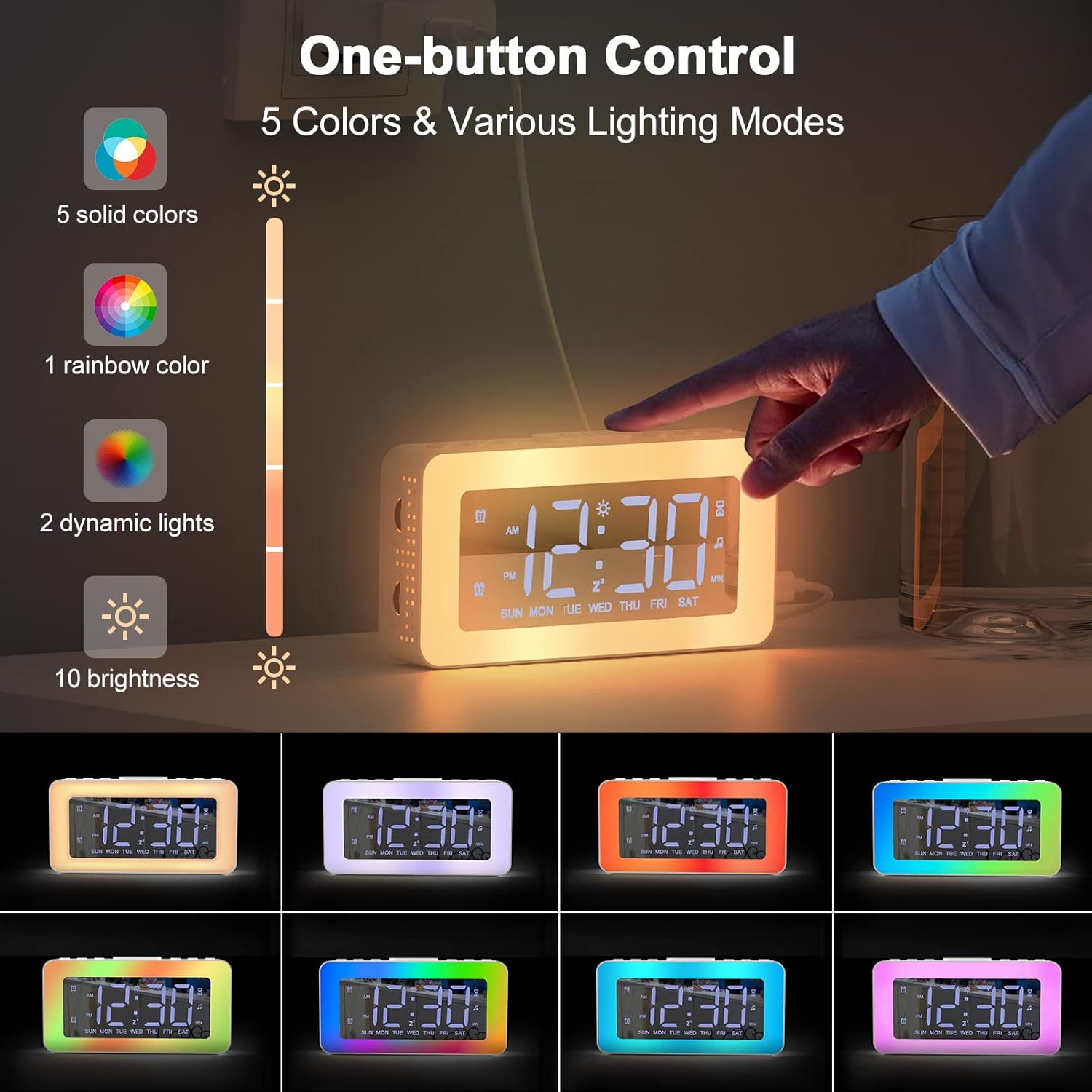
Figure 5: One-button control for selecting from 5 solid colors, 1 rainbow color, 2 dynamic lights, and 10 brightness levels.

Figure 6: Demonstrates the 0-100% adjustable dimmer function for comfortable brightness.
4. Soothing Sounds and Sleep Timer
The alarm clock includes features to aid in relaxation and sleep.
- Ħsejjes serħan il-moħħ: Access 8 different soothing sounds designed to help you fall asleep.
- Timer ta 'l-Irqad: Set a timer for the soothing sounds to play for 10 to 120 minutes (in 10-minute increments).

Figure 7: The 8 soothing sounds available for sleep, with a timer function from 10 to 120 minutes.
5. Port tal-Iċċarġjar tal-USB
The alarm clock is equipped with a USB charging port, allowing you to conveniently charge your smartphone or other small electronic devices directly from the clock.
Figure 8: The alarm clock's USB charging port in use, charging a smartphone.
6. Funzjoni tal-Mera
The display surface of the alarm clock can also function as a mirror, providing added utility in your daily life.

Figure 9: The alarm clock's display surface acting as a mirror.
Manutenzjoni
Tindif
To clean your AFEXOA Luminous Alarm Clock:
- Kun żgur li l-apparat huwa skonnettjat mis-sors tal-enerġija qabel ma tnaddaf.
- Use a soft, dry, lint-free cloth to wipe the display and exterior surfaces.
- Għal marki iebsa, d ftitampen the cloth with water. Avoid using abrasive cleaners, solvents, or aerosol sprays, as these can damage the surface.
- Tgħaddix l-apparat fl-ilma jew f'xi likwidu ieħor.
Ħażna
When not in use for extended periods, store the alarm clock in a cool, dry place, away from direct sunlight and extreme temperatures.
Issolvi l-problemi
| Problema | Kawża Possibbli | Soluzzjoni |
|---|---|---|
| Id-displej huwa mitfi jew mudlam. | Not powered on; brightness set too low. | Ensure power cord is securely connected. Adjust brightness using the dimmer wheel. |
| L-allarm ma jdoqqx. | Alarm not activated; volume too low; incorrect alarm mode. | Verify alarm is set and enabled. Increase alarm volume. Check if the alarm mode (Everyday, Weekdays, Weekends) matches the current day. |
| Il-ħin mhux korrett. | Il-ħin mhux issettjat sew; interruzzjoni tad-dawl. | Erġa' ssettja l-ħin billi ssegwi l-istruzzjonijiet tal-"Issettjar tal-Ħin u d-Data". |
| Soothing sounds not playing. | Sound function not activated; timer expired. | Ensure soothing sound mode is active. Check the sleep timer setting. |
Speċifikazzjonijiet
| Karatteristika | Dettall |
|---|---|
| Brand | AFEXOA |
| Numru tal-Mudell | CH-06 |
| Kulur | Abjad |
| Dimensjonijiet (L x W x H) | 16 x 3.81 x 3.8 ċm (6.3 x 1.5 x 1.5 pulzieri) |
| Piż | 20 g (0.04 lbs) |
| Materjal | Plastik |
| Tip ta 'Wiri | Diġitali |
| Sors tal-Enerġija | Corded Elettriku |
| Karatteristiċi Speċjali | Alarm, Loud Alarm, Large Display, Timer, Charging Port, Mirror Display, Color Lights, Brightness Control, 12/24 Hour Format, Snooze, Dual Alarm, 7 Alarm Sounds, 8 Sleeping Sounds |
| Batterija | 1 CR2032 (included) - likely for memory backup |
Garanzija u Appoġġ
For warranty information or technical support, please refer to the contact details provided on the product packaging or the official AFEXOA websit. Żomm l-irċevuta tax-xiri tiegħek bħala prova tax-xiri.
If you encounter any issues not covered in this manual, please contact AFEXOA customer service for assistance.


