1. Introduzzjoni
This user manual provides comprehensive instructions for the installation, operation, and maintenance of your Cecotec QLED 70" Smart TV V1Z+ Series. Please read this manual thoroughly before using the television and retain it for future reference. This television combines advanced display technology with smart features to deliver an immersive viewing esperjenza.
2. Informazzjoni dwar is-Sigurtà
Dejjem segwi l-prekawzjonijiet ta’ sigurtà li ġejjin biex tevita xokk elettriku, nar, jew ħsara lit-televiżjoni.
- Provvista tal-Enerġija: Tiżgura l-provvista tal-enerġija voltage matches the rating label on the TV. Do not overload power outlets.
- Ventilazzjoni: Timblokkax il-fetħiet tal-ventilazzjoni. Ħalli biżżejjed spazju madwar it-TV għal fluss tal-arja xieraq.
- Likwidu u Umdità: Keep the TV away from water, rain, or excessive moisture. Do not place objects filled with liquids on the TV.
- Tindif: Skonnettja t-TV qabel ma tnaddaf. Uża drapp artab u niexef. Evita prodotti tat-tindif likwidi jew aerosol.
- Pjazzament: Place the TV on a stable, level surface. If wall-mounting, ensure the wall mount is suitable for the TV's weight and installed by qualified personnel.
- Tfal: Tħallix lit-tfal jitilgħu fuq it-TV jew l-istand.
- Sajjetti: Skonnettja t-TV waqt maltempati bis-sajjetti jew meta ma tużahx għal perjodi twal.
3. Kontenut tal-Pakkett
Ivverifika li l-oġġetti kollha huma preżenti fil-pakkett:
- 1 x Cecotec QLED 70" Smart TV
- 1 x Kontroll mill-bogħod
- 1 x Batteriji AAA (għall-kontroll remot)
- 1 x Manwal tal-Utent (dan id-dokument)
- 1 x Kejbil tal-Enerġija
- 1 x Central Stand (if "Con Peana" model)
4. Prodott Aktarview
Familiarize yourself with the main components and features of your television.

Figura 4.1: Quddiem view of the Cecotec QLED 70" Smart TV with included remote controls.

Figura 4.2: Quddiem dettaljat view of the Cecotec QLED 70" Smart TV, highlighting its slim bezels.

Figure 4.3: Illustration of the TV's frameless design, enhancing the viewing experience by minimizing borders.

Figure 4.4: Depiction of Chromecast built-in functionality, allowing easy content streaming from mobile devices to the TV.
5. Setup
5.1 Disimballaġġ
Carefully remove the television from its packaging. It is recommended to keep the original packaging for future transportation or servicing.
5.2 Installazzjoni ta' Stand
If you intend to use the included central stand, follow these steps:
- Poġġi l-iskrin tat-TV 'l isfel fuq wiċċ artab u ċatt biex tevita l-grif.
- Allinja l-istand mat-toqob tal-immuntar fil-qiegħ tat-TV.
- Żgura l-istand billi tuża l-viti pprovduti.
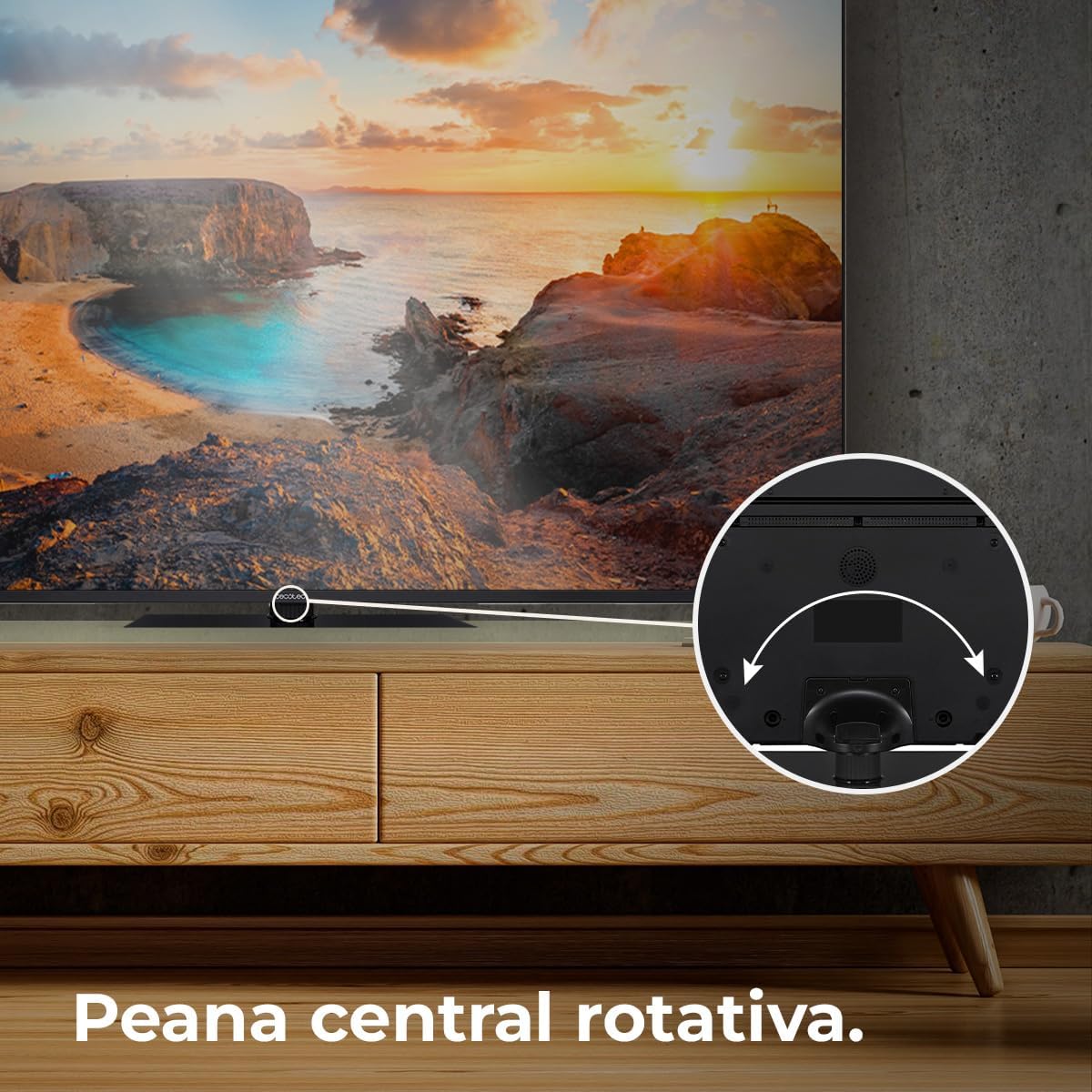
Figure 5.1: The rotative central stand allows for flexible viewangoli.
5.3 Immuntar mal-Ħajt (Mhux obbligatorju)
For wall mounting, use a VESA-compatible wall mount kit (not included). Consult a professional for installation to ensure safety and proper mounting.
5.4 Konnessjonijiet
Connect your devices to the TV using the appropriate ports:
- HDMI: For high-definition devices like Blu-ray players, game consoles, and set-top boxes. This TV supports HDMI 2.1 for high frequencies and resolutions.
- USB: Għall-konnessjoni ta' apparati tal-ħażna USB biex tilgħab il-midja files.
- Ethernet: Għal konnessjoni tal-internet bil-fili.
- Qawwa: Qabbad il-kejbil tal-enerġija mat-TV u mbagħad ma' sokit tal-ħajt.
6. Joperaw
6.1 Setup Inizjali
Upon first power-on, the TV will guide you through the initial setup process, including language selection, network connection, and Google account sign-in for Android TV 11 features.

Figure 6.1: The Android TV 11 interface provides access to a wide collection of applications for an optimal user experience.
6.2 Funzjonijiet Bażiċi
- Power On/Off: Agħfas il-buttuna tal-qawwa fuq il-kontroll remot jew it-TV.
- Għażla tal-Input: Use the "Input" button on the remote to switch between HDMI, TV, and other sources.
- Kontroll tal-Volum: Uża l-buttuni tal-Volum 'il fuq/'l isfel.
- Navigazzjoni: Uża l-buttuna direzzjonali u l-buttuna OK biex tinnaviga l-menus.
6.3 Karatteristiċi tat-TV Intelliġenti
Your Cecotec Smart TV runs on Android TV 11, offering a rich smart experience:
- Google Assistent: Uża kmandi tal-vuċi permezz tal-kontroll remot biex tfittex kontenut, tikkontrolla apparati tad-dar intelliġenti, u tikseb informazzjoni.
- Chromecast inkorporat: Easily cast content from your smartphone, tablet, or computer directly to the TV.
- Google Play Store: Download and install a wide variety of apps, games, and streaming services.
6.4 Settings tal-Istampa
Ottimizza tiegħek viewing experience with these advanced picture technologies:
- Riżoluzzjoni 4K UHD: Enjoy ultra-sharp images with high definition, revealing even the smallest details.
- Teknoloġija QLED: Delivers vibrant and realistic colors with exceptional contrast.
- HDR10+: Processes images for greater color depth and dynamic range.
- Dolby Vision: Optimizes each frame for purer and more realistic images.
- MEMC (Stima tal-Mozzjoni, Kumpens tal-Mozzjoni): Adds compensation frames to generate smoother and sharper images, especially beneficial for fast-moving scenes.
- 10-Bit Display: Reproduces over 1 billion colors for a richer and more nuanced picture.

Figure 6.2: Experience ultra-high definition images with 4K UHD and QLED technology.

Figure 6.3: MEMC technology ensures fluid movements and more defined details in fast-paced scenes.

Figure 6.4: HDR 10 provides greater color depth in every image, enhancing realism.

Figure 6.5: The 10-bit display reproduces over 1 billion colors for superior image quality.
6.5 Settings tal-awdjo
Enhance your audio experience:
- Dolby Atmos: Provides immersive 360° multi-dimensional surround sound.
- Subwoofers: Integrated subwoofer system improves bass and creates a superior audio experience.

Figure 6.6: Dolby Vision and Dolby Atmos combine for purer images and multi-dimensional surround sound.

Figure 6.7: The integrated subwoofer enhances bass for a superior audio experience.
6.6 Karatteristiċi tal-Logħob
- Low Latency for Gaming (ALLM): Automatically configures latency to improve your console gaming experience.

Figure 6.8: HDMI 2.1 with Auto Low Latency Mode (ALLM) improves your console gaming experience.
7. Manutenzjoni
- Tindif tal-iskrin: Imsaħ l-iskrin bil-mod b'ċarruta ratba u mingħajr suf. Għal marki persistenti, nixxef ftit.ampen the cloth with water or a screen-specific cleaner. Do not spray liquid directly onto the screen.
- Tindif tal-Kabinett: Uża drapp artab u niexef biex tnaddaf il-kabinett tat-TV.
- It-tfarfir: Naddaf it-trab mill-fetħiet tal-ventilazzjoni regolarment biex tevita li jisħnu żżejjed.
8 Issolvi l-problemi
Jekk tiltaqa' ma' problemi bit-televiżjoni tiegħek, irreferi għall-problemi u s-soluzzjonijiet komuni li ġejjin:
| Problema | Kawża Possibbli | Soluzzjoni |
|---|---|---|
| Ebda Qawwa | Kejbil tal-enerġija skonnettjat; Problema fil-bokka tal-enerġija. | Check power cable connection. Try a different outlet. |
| L-ebda Stampa, iżda l-Ħoss huwa Preżenti | Sors ta' input mhux korrett; Kejbil HDMI/AV maħlul. | Select correct input source. Reconnect cables securely. |
| L-ebda ħoss, iżda l-istampa hija preżenti | Volume muted or too low; Audio settings incorrect. | Unmute volume or increase level. Check audio output settings. |
| Il-Kontroll Remot Mhux Jaħdem | Batteriji mejta; Ostruzzjoni bejn ir-remote u t-TV. | Replace batteries. Remove any obstructions. |
| Kwistjonijiet ta' Konnessjoni Wi-Fi | Password mhux korretta; Problemi bir-router; It-TV wisq 'il bogħod mir-router. | Verify password. Restart router. Move TV closer or use Ethernet. |
Jekk il-problema tippersisti wara li tipprova dawn is-soluzzjonijiet, jekk jogħġbok ikkuntattja l-appoġġ għall-klijenti ta' Cecotec.
9. Speċifikazzjonijiet
| Karatteristika | Dettall |
|---|---|
| Numru tal-Mudell | VQU11070Z+S (03632) |
| Daqs tal-Iskrin | 70 pulzieri / 178 ċm |
| Teknoloġija tal-Wiri | QLED |
| Riżoluzzjoni | 4K UHD (3840 x 2160 pixel) |
| Sistema Operattiva | Android TV 11 |
| Riffriskar Rata | 50 Hz |
| Karatteristiċi Speċjali | Chromecast Built-in, HDR10+, Dolby Vision, Dolby Atmos, Subwoofers, Google Voice Assistant, MEMC, 10-Bit Display, Low Latency for Gaming (HDMI 2.1 ALLM), Rotative Central Stand, Eye Safe (minimizes blue light emission) |
| Konnettività | Ethernet, Wi-Fi (implied by Android TV), HDMI 2.1 |
| Proporzjon ta' l-aspett | 16:9 |
| Dimensjonijiet tal-Prodott (bl-istand) | 27.9 cm (depth) x 157.5 cm (width) x 92.4 cm (height) |
| Piż tal-Prodott | 27.58 kg |
| Klassi tal-Effiċjenza tal-Enerġija | F (based on 114 kWh/1000h) |
| Oriġini | Spanja |

Figure 9.1: Energy efficiency label for the Cecotec QLED 70" Smart TV. For more details, scan the QR code or visit eprel.ec.europa.eu/qr/1677956.
10. Garanzija u Appoġġ
Your Cecotec QLED 70" Smart TV is covered by a manufacturer's warranty. Please refer to the warranty card included in your package for specific terms and conditions. For technical support, service, or inquiries, please visit the official Cecotec webis-sit jew ikkuntattja lid-dipartiment tas-servizz tal-konsumatur tagħhom. Żomm l-irċevuta tax-xiri tiegħek bħala prova tax-xiri għal talbiet ta’ garanzija.
For more information, visit the official Cecotec store: Ħanut Cecotec


