1. Introduzzjoni
Grazzi tax-xiriasing the Deeyaple LED Digital Alarm Clock. This manual provides detailed instructions for setting up, operating, and maintaining your new alarm clock. Please read this manual thoroughly before use to ensure proper functionality and to maximize your user experience. This clock features adjustable brightness, dual alarms, a snooze function, and a clear LED display showing both time and day.
2. Informazzjoni dwar is-Sigurtà
- Tesponix l-apparat għal temperaturi estremi, dawl tax-xemx dirett, jew umdità għolja.
- Żomm l-apparat 'il bogħod mill-ilma u likwidi oħra.
- Use only the provided USB cable for power. An AC adapter is not included.
- Tippruvax tiżżarma jew issewwi l-apparat int stess. Ikkuntattja l-appoġġ għall-klijenti jekk jinqalgħu xi problemi.
- Żomm fejn ma jintlaħaqx mit-tfal.
3. Kontenut tal-Pakkett
- Deeyaple LED Digital Alarm Clock (Model: F-8816)
- Kejbil tal-Enerġija USB (Nota: L-adapter tal-enerġija mhux inkluż)
- Manwal għall-Utent (Dan id-dokument)

Figure 3.1: Back panel and side view of the alarm clock, showing control buttons and USB port.
4. Prodott Aktarview
4.1 Wiri ta 'quddiem
The front of the clock features a large LED display that shows the time, day of the week, and indicators for Alarm 1 and Alarm 2. The display uses vibrant, multi-colored digits for enhanced readability.

Figura 4.1: Quddiem view of the alarm clock with time and day displayed.
4.2 Top Buttons
- Buttuna SNOOZE/DAWL: Located on the top. Press to activate snooze during an alarm or to adjust display brightness.
4.3 Back Controls
- Buttuna SET TAL-ĦIN: Użat biex tidħol fil-modalità tal-issettjar tal-ħin.
- Buttuna SSET TA’ ALLARMI: Użat biex tidħol fil-modalità tal-issettjar tal-allarm.
- UP (+) Button: Increases values during setting or toggles functions.
- DOWN (-) Button: Decreases values during setting or toggles functions.
- Port DC 5V: USB power input.
- Buttuna RESET: Small button to reset the clock to factory settings.

Figura 4.2: Wara view of the alarm clock, highlighting the USB power input and control buttons.
5. Setup
5.1 It-Tħaddim tal-Apparat
- Connect the provided USB power cable to the DC 5V port on the back of the alarm clock.
- Plug the other end of the USB cable into a standard USB power adapter (not included) or a powered USB port (e.g., computer, power bank).
- Id-displej se jixgħel, u jindika li l-arloġġ huwa mixgħul.

Figure 5.1: The alarm clock is powered via a USB cable, ensuring continuous display.
6. Istruzzjonijiet Operattivi
6.1 Issettjar tal-Ħin
- Agħfas il- IL-ĦIN IPPOST button on the back of the clock. The hour digits will start flashing.
- Uża l- UP (+) or 'L isfel (-) buttuni biex taġġusta s-siegħa.
- Agħfas IL-ĦIN IPPOST Agħfas mill-ġdid biex tikkonferma s-siegħa u tmur għall-issettjar tal-minuti. Iċ-ċifri tal-minuti se jteptpu.
- Uża l- UP (+) or 'L isfel (-) buttuni biex jaġġustaw il-minuti.
- Agħfas IL-ĦIN IPPOST a third time to confirm the minutes and move to 12/24H format selection.
- Uża l- UP (+) or 'L isfel (-) buttons to select between 12-hour (with AM/PM indicator) or 24-hour format.
- Agħfas IL-ĦIN IPPOST one last time to save the settings and exit time setting mode.
6.2 Issettjar tal-Allarmi (Allarmi Doppji)
L-arloġġ jappoġġja żewġ allarmi indipendenti (Allarm 1 u Allarm 2).
- Agħfas il- SET TA 'ALLARM button. The Alarm 1 hour digits will start flashing, and the Alarm 1 icon will appear.
- Uża l- UP (+) or 'L isfel (-) buttons to adjust the Alarm 1 hour.
- Agħfas SET TA 'ALLARM again to confirm the hour and move to Alarm 1 minute setting. The minute digits will flash.
- Uża l- UP (+) or 'L isfel (-) buttons to adjust the Alarm 1 minutes.
- Agħfas SET TA 'ALLARM a third time to confirm minutes and move to Alarm 1 day setting.
- Uża l- UP (+) or 'L isfel (-) buttons to select the alarm days:
- 1-1: Allarm ta 'ġurnata waħda
- 1-5: Mit-Tnejn sal-Ġimgħa
- 1-6: Mit-Tnejn sas-Sibt
- 1-7: Monday to Sunday (Every day)
- 6-7: Saturday to Sunday (Weekend)
- Agħfas SET TA 'ALLARM again to confirm Alarm 1 settings and proceed to Alarm 2 setting. Repeat steps 2-6 for Alarm 2.
- Wara li tissettja l-Allarm 2, agħfas SET TA 'ALLARM one last time to save all alarm settings and exit.

Figure 6.1: Alarm days setting options for customized wake-up schedules.
6.3 Funzjoni Snooze
Meta tinstema' allarm, agħfas il-buttuna l-kbira SNOOZE / DAWL button on the top of the clock. The alarm will pause for 5 minutes and then sound again. You can repeat the snooze cycle multiple times.

Figure 6.2: Activating the snooze function by touching the top button for an additional 5 minutes of rest.
6.4 Aġġustament tal-Luminożità tad-Displej
The clock has 3 levels of brightness (Bright, Medium, Low) and an option to turn off the display.
- Agħfas il- SNOOZE / DAWL button on the top of the clock (when no alarm is sounding) to cycle through the brightness levels: Bright > Medium > Low > Off > Bright.
- Select the brightness level that best suits your environment and preference.
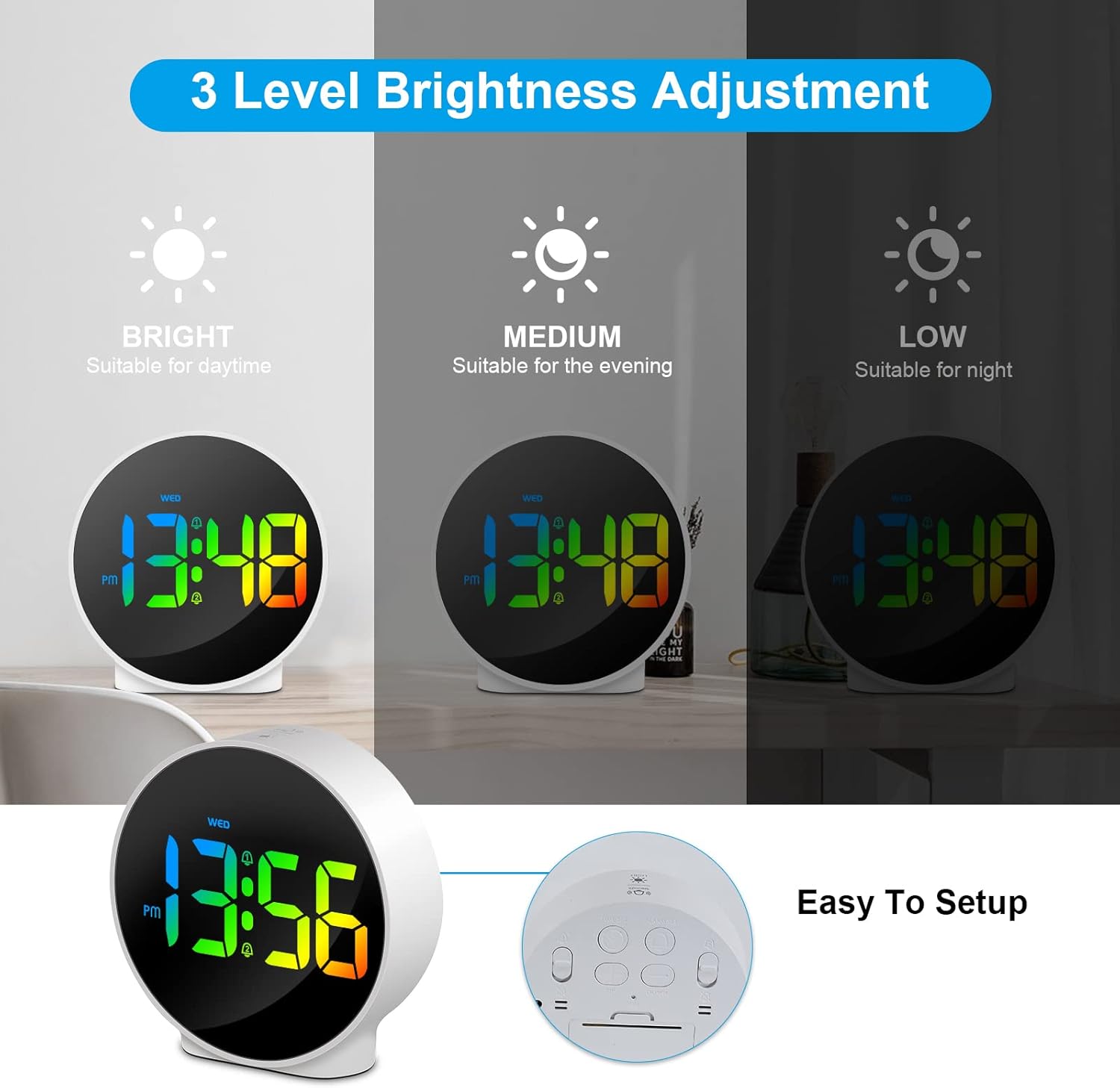
Figure 6.3: Three adjustable brightness levels for optimal viewf’kundizzjonijiet ta ’dawl differenti.
6.5 Week and Time Display
The clock simultaneously displays the current time and the day of the week on the same screen, eliminating the need to switch displays.

Figure 6.4: The clock displays both the time and the day of the week on a single screen for convenience.
7. Manutenzjoni
- Tindif: Uża drapp artab u niexef biex tnaddaf il-wiċċ tal-arloġġ. Tużax prodotti tat-tindif jew solventi li joborxu.
- Ħażna: If storing the clock for an extended period, disconnect it from power and store it in a cool, dry place.
8 Issolvi l-problemi
| Problema | Kawża Possibbli | Soluzzjoni |
|---|---|---|
| Id-displej huwa mitfi jew mudlam. | Not powered, brightness set to off/low. | Ensure USB cable is securely connected to a power source. Press SNOOZE/LIGHT button to adjust brightness. |
| L-allarm ma jdoqqx. | Alarm not set, alarm volume too low (not applicable for this model), incorrect alarm days. | Verify alarm time and ensure the alarm icon is displayed. Check alarm day settings. |
| Il-ħin mhux korrett. | Il-ħin mhux issettjat sew, qtugħ tad-dawl. | Re-set the time following Section 6.1. Ensure continuous power supply. |
| Il-buttuni ma jirrispondux. | Problema temporanju tas-softwer. | Unplug the USB cable, wait 10 seconds, then plug it back in. If issue persists, use the RESET button on the back (requires a thin object like a paperclip). |
9. Speċifikazzjonijiet
- Ditta: Deeyaple
- Numru tal-Mudell: F-8816
- Kulur: White shell with multi-color display
- Dimensjonijiet (L x W x H): 10 x 3.81 x 10 ċm (3.94 x 1.5 x 3.94 pulzieri)
- Piż: 180 gramma (0.4 lbs)
- Karatteristiċi: Dual Alarm, Snooze, Adjustable Brightness (3 levels + off), 12/24H Display, Week Display, Corded Electric
- Sors tal-Enerġija: USB Cable (DC 5V)
- Tip ta' wiri: LED diġitali
- Materjal: Acrylonitrile Butadiene Styrene (ABS)

Figure 9.1: Dimensions of the Deeyaple LED Digital Alarm Clock.
10. Garanzija u Appoġġ
Deeyaple products are designed for quality and reliability. For any questions, technical support, or warranty claims, please contact the seller or manufacturer directly through your purchase platform. Please retain your proof of purchase for warranty purposes.


