1. Introduzzjoni
The Concept OV2012 is a versatile appliance designed to improve indoor air quality by combining dehumidification with air purification. This device effectively reduces excess humidity, which can contribute to mold growth and discomfort, while simultaneously filtering airborne pollutants. It features a triple filtration system, intuitive touch controls, and smart app connectivity for convenient operation.

Figura 1: Quddiem view of the Concept OV2012 Dehumidifier.
2. Informazzjoni dwar is-Sigurtà
Jekk jogħġbok aqra l-istruzzjonijiet kollha tas-sigurtà bir-reqqa qabel ma tuża l-apparat. Jekk ma ssegwix dawn l-istruzzjonijiet, dan jista' jirriżulta f'xokk elettriku, nar, jew korriment serju.
- Tiżgura l-provvista tal-enerġija voltage jaqbel mat-tikketta tal-klassifikazzjoni fuq l-apparat.
- Tħaddimx l-unità b'korda jew plagg bil-ħsara.
- Keep the appliance away from water and other liquids. Do not immerse it.
- Timblokkax id-daħliet jew il-ħruġ tal-arja. Kun żgur li jkun hemm biżżejjed spazju madwar l-unità għal fluss tal-arja xieraq.
- Unplug the unit before cleaning, maintenance, or when not in use for extended periods.
- This appliance is not intended for use by persons (including children) with reduced physical, sensory, or mental capabilities, or lack of experience and knowledge, unless they have been given supervision or instruction.
- Tużax l-apparat f'żoni fejn ikun hemm gassijiet jew fwar fjammabbli.
3. Komponenti tal-Prodott
Familiarize yourself with the main parts of your Concept OV2012 dehumidifier.
- Panel tal-Kontroll: Touch-sensitive interface for setting modes and functions.
- Żbokk tal-Arja: Where processed air is released.
- Qoxra tad-daħla tal-arja/filtru: Located at the rear, provides access to the air filters.
- Tank tal-Ilma: Jiġbor l-ilma kkondensat.
- Ħruġ tad-Drenaġġ Kontinwu: Port for attaching a hose for continuous water drainage.
- 360° Rolling Wheels: Għal moviment faċli tal-unità.

Figura 2: Wara view of the dehumidifier, showing air intake and water tank.
4. Control Panel u Display
The OV2012 features an intuitive touch control panel with a digital display and LED indicators.
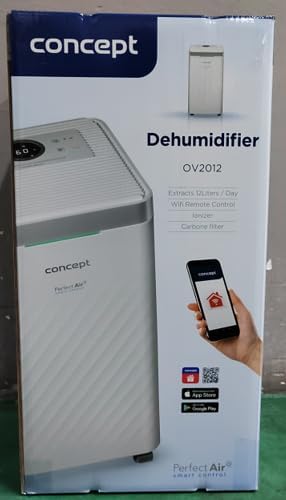
Figura 3: Dettaljat view tal-pannell tal-kontroll tat-touch.
- Buttuna tal-Qawwa: Ixgħel jew jitfi l-unità.
- Għażla tal-Modalità: Cycles through operating modes (Automatic, Continuous, Laundry Drying, Fan).
- Humidity Slider/Buttons: Jaġġusta l-livell ta' umdità mixtieq.
- Buttuna tat-Tajmer: Sets the delayed on/off time (up to 24 hours).
- Veloċità tal-fann: Adjusts fan speed (usually two levels).
- Buttuna tal-Ionizzatur: Jattiva jew jiddiżattiva l-funzjoni tal-jonizzatur.
- LED Humidity Indicator: Changes color based on current room humidity:
- Aħmar: High humidity (RH > 70%)
- Aħdar: Satisfactory humidity (70% ≥ RH ≥ 50%)
- Blu: Low humidity (RH < 50%)
5. Setup Inizjali
- Spakkjar: Neħħi d-deumidifikatur mill-imballaġġ tiegħu bir-reqqa. Żomm l-imballaġġ għal ħażna jew trasport fil-futur.
- Pjazzament: Place the unit on a firm, level surface. Ensure there is at least 20 cm of clear space around all sides for optimal airflow. The 360° rolling wheels allow for easy positioning.
- Konnessjoni tal-Enerġija: Ipplaggja l-korda tad-dawl fi żbokk elettriku ertjat.
- Tank tal-Ilma: Kun żgur li t-tank tal-ilma jkun imdaħħal sew fl-unità.
6. Modi Operattivi
The OV2012 offers four distinct operating modes to suit various needs:
- Modalità Awtomatika: The dehumidifier automatically maintains the humidity level you select. The unit will cycle on and off to achieve and sustain the target humidity.
- Operazzjoni Kontinwa: Ideal for long-term drying of very wet areas. In this mode, the unit runs continuously regardless of the ambient humidity. It is recommended to use the continuous drainage hose in this mode.
- Modalità Tnixxif tal-Ħasil: Accelerates the drying of laundry and helps prevent moisture buildup in the room, reducing the risk of mold.
- Fan Mode (Air Purification without Dehumidification): In this mode, the compressor is off, and only the fan and filtration system operate to purify the air without removing moisture.
Using the Concept Home Mobile Application
The OV2012 can be controlled remotely via the Concept Home mobile application, available for iOS and Android devices. This app allows you to:
- Ixgħel jew itfi l-unità.
- Select desired operating modes.
- Check the current air status in the room.
- Create a precise operating schedule for the dehumidifier.

Figure 4: The Concept Home mobile application for remote control.
7. Drenaġġ tal-Ilma
Drenaġġ tat-Tank tal-Ilma
When the 2.2-liter water tank is full, the unit will automatically shut off, and an indicator light will illuminate. Carefully remove the water tank, empty it, and reinsert it securely to resume operation.
Drenaġġ Kontinwu
For continuous operation without needing to empty the water tank, attach the included hose to the continuous drainage outlet. Direct the hose to a suitable drain, ensuring it is sloped downwards for proper water flow. This allows the unit to operate uninterrupted.
8. Manutenzjoni u Tindif
Manutenzjoni regolari tiżgura prestazzjoni ottimali u lonġevità tad-deumidifikatur tiegħek.
Sistema tal-Iffiltra
The OV2012 features a triple filter system:
- Filtru tat-Trab: Captures coarse impurities like dust particles, hair, fur, and pollen. This filter should be cleaned regularly.
- Filtru tal-Karbonju Attivat: Absorbs toxic, suffocating, and foul-smelling gases and vapors, such as formaldehyde, benzene, and cigarette smoke. This filter requires periodic replacement (Optional accessory: Carbon filter - 42394390).
- Ijonizzatur: Refreshes and purifies the air by increasing negatively charged ions, neutralizing odors and absorbing positively charged particles, viruses, and bacteria.
To clean the dust filter, remove the rear filter cover, gently remove the filter, and clean it with a vacuum cleaner or rinse it with water. Ensure it is completely dry before reinserting. Replace the activated carbon filter as recommended by the manufacturer or when you notice a decrease in odor removal effectiveness.

Figure 5: Illustration of the triple filtration system.
Tindif tat-Tank tal-Ilma
Periodically clean the water tank with mild detergent and warm water to prevent mold and bacterial growth. Rinse thoroughly and dry before reinserting.
Tindif ta' barra
Imsaħ il-barra tal-unità b'artab, damp drapp. Tużax tindif jew solventi li joborxu.
9. Gwida għas-soluzzjoni tal-problemi
Jekk tiltaqa' ma' problemi bid-dehumidifikatur tiegħek, irreferi għall-problemi u s-soluzzjonijiet komuni li ġejjin:
| Problema | Kawża Possibbli | Soluzzjoni |
|---|---|---|
| L-unità ma tixgħel | Ebda provvista tal-enerġija; It-tank tal-ilma mimli jew imdaħħal ħażin. | Check power cord connection; Empty and reinsert water tank correctly. |
| L-ebda deumidifikazzjoni | Room temperature too low; Air filters clogged; Humidity setting too high. | Ensure room temperature is above 5°C; Clean or replace filters; Lower the desired humidity setting. |
| L-unità hija storbjuża | L-unità mhix fuq wiċċ livellat; Il-filtru tal-arja mblukkat. | Place unit on a flat, stable surface; Clean or replace air filters. |
| Water tank full indicator remains on after emptying | Water tank not fully inserted; Sensor malfunction. | Push the water tank firmly into place; If problem persists, contact customer support. |
Jekk il-problema tippersisti wara li tipprova dawn is-soluzzjonijiet, jekk jogħġbok ikkuntattja l-appoġġ għall-klijenti.
10. Speċifikazzjonijiet Tekniċi
| Karatteristika | Speċifikazzjoni |
|---|---|
| Numru tal-Mudell | OV2012 |
| Dehumidification Performance (max) | 12 liters/day (at 30°C, 80% RH) |
| Volum tat-Tank tal-Ilma | 2.2 litri |
| Konsum tal-Enerġija | 210 W (Note: Product description also mentions 245W, refer to product label for exact value) |
| Livell ta' Storbju | ≤ 45 dB |
| Dimensjonijiet (W x D x H) | 250 x 250 x 460 mm (25 x 25 x 46 ċm) |
| Piż tal-oġġett | 10.82 kg |
| Tul tal-Cable | 1.8 m |
| Modi Operattivi | 4 (Automatic, Continuous, Laundry Drying, Fan) |
| Sistema tal-Iffiltra | Dust filter, Activated Carbon filter, Ionizer |
| Kontroll | Touch control, Mobile App (Concept Home) |
| Karatteristiċi Speċjali | Automatic Shut-off, Timer, 360° wheels, LED Humidity Indicator |

Figura 6: Dimensjonijiet tal-prodott.
11. Garanzija u Appoġġ għall-Klijent
For warranty information, please refer to the warranty card included with your product or contact your local Concept distributor. For technical support, spare parts, or service inquiries, please contact Concept customer service. Contact details may be found on the product packaging or the official Concept websit.
Example contact information from product packaging (may vary by region):
- CZ: Zavolejte nám +420 465 471 400, www.my-concept.cz
- SK: Zavolajte nám +421 326 583 465, www.my-concept.sk
- PL: Zadzwoń do nas +48 71 339 04 44, www.my-concept.pl


