Introduzzjoni
This manual provides comprehensive instructions for the safe and proper installation, operation, and maintenance of your Mounting Dream Advanced Tilt TV Wall Mount. Please read this manual thoroughly before beginning installation and retain it for future reference. Ensure all components are present and undamaged before proceeding.
Setup
Lista ta' Kontroll ta' Qabel l-Installazzjoni
Before you begin, verify the following:
- Disinn VESA tat-TV: Ensure your TV's VESA pattern (horizontal x vertical hole spacing on the back of the TV) is within the mount's compatible range (Max VESA 800mm x 400mm).
- Piż tat-TV: Confirm your TV's weight does not exceed the mount's maximum load capacity of 120 lbs.
- Daqs tat-TV: This mount is suitable for most 42-90 inch TVs.
- Tipi ta' Ħajt Kompatibbli: The mount is designed for 16", 24", 32" wood studs or concrete walls. Do not install onto drywall without wood studs.
- Blocked Inputs: Check the location of your TV's input ports to ensure the mount will not block them.
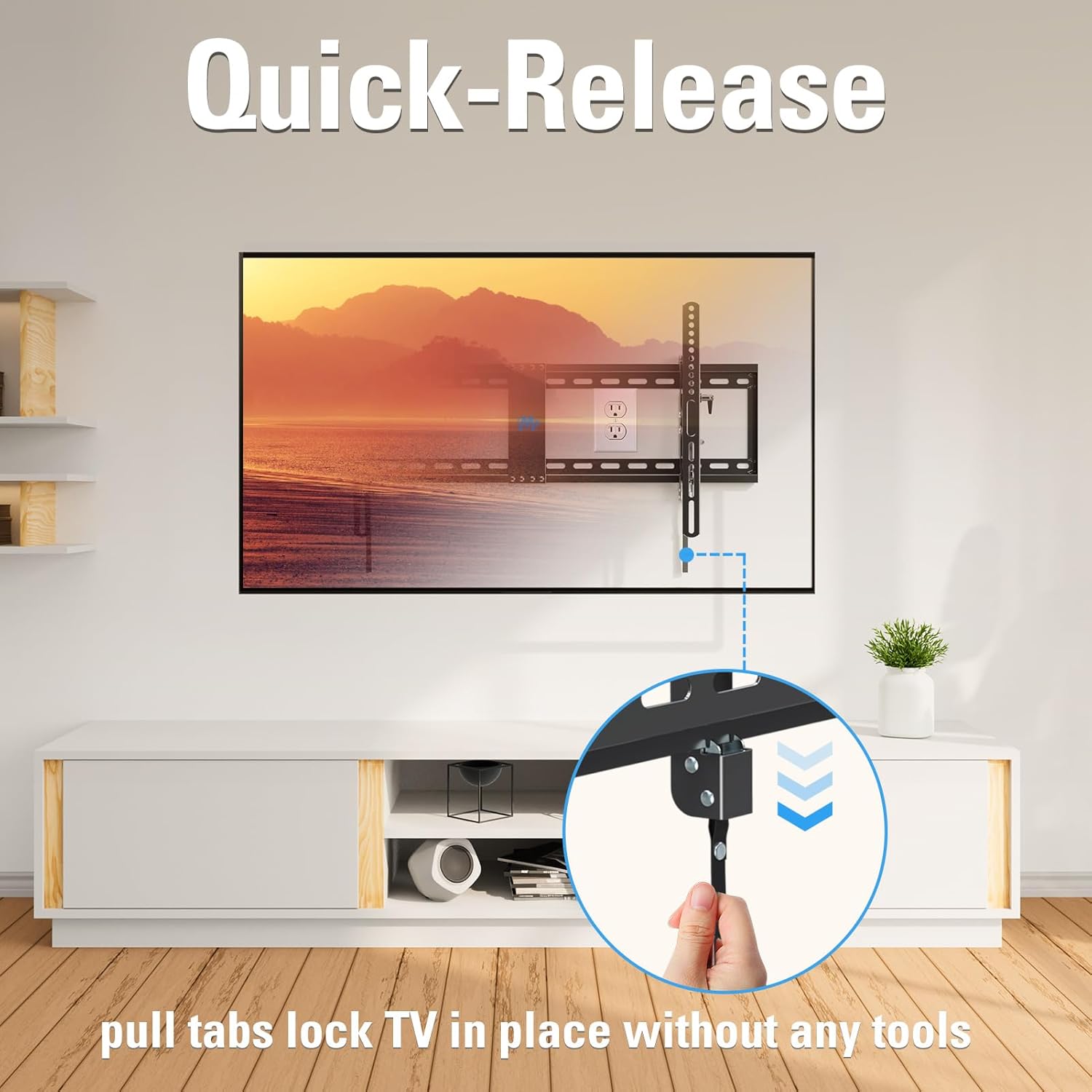
Figure 1: Verify TV VESA pattern and ensure no ports are blocked by the mount. VESA = Horizontal x Vertical.

Figure 2: Confirm your TV's weight is within 120 lbs and size is between 42-90 inches.
Passi ta 'installazzjoni
Segwi dawn il-passi għal installazzjoni sigura:
- Waħħal il-Brakketti mat-TV: Secure the vertical TV brackets to the back of your television using the provided hardware. Ensure they are centered and firmly tightened.
- Immuntar il-Pjanċa tal-Ħajt mal-Ħajt: Locate your wood studs using a stud finder. Position the wall plate at the desired height and mark the drilling locations. Use the provided wall drilling template for accuracy. Drill pilot holes and secure the wall plate to the studs using the lag bolts. For concrete walls, use appropriate concrete anchors (available upon request).
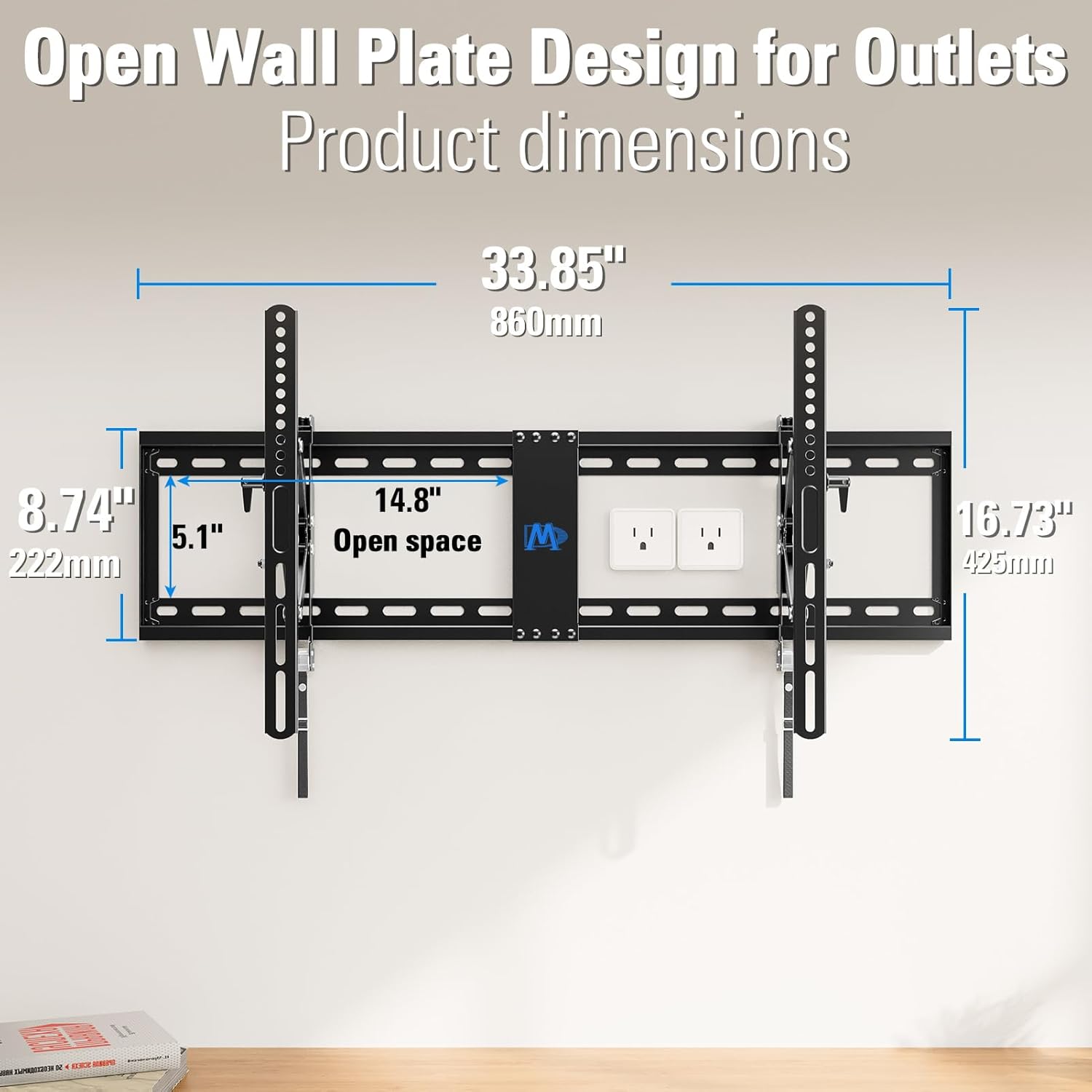
Figure 3: The open wall plate design allows for mounting over electrical outlets. Dimensions are 33.85" (860mm) wide with a 14.8" open space.

Figure 4: This mount is compatible with wood stud walls (16", 24", 32" spacing) and brick/concrete walls (requires anchors).
- Iddendel it-TV fuq pjanċa tal-ħajt: Carefully lift the TV with the attached brackets and hook them onto the top edge of the wall plate. Gently lower the TV until the brackets engage with the bottom locking mechanism. Pull the drawstring to lock the TV securely in place.
Operazzjoni
Adjusting Your TV Mount
This mount offers flexible viewgħażliet:
- Aġġustament tal-inklinazzjoni: Easily tilt your TV +2°/-15° to reduce glare and achieve the optimal viewing angle. Use the tool-free handles located on the TV brackets to adjust the tilt.
- Estensjoni: Extend your TV up to 7 inches from the wall for maximum tilting range and convenient access to cables.
- Irtirar: Retract the TV back to 2.68 inches from the wall to save space when not extended.
- Rilaxx Mgħaġġel: The quick-release drawstring allows for convenient locking and unlocking of the TV from the wall plate without tools, making it easy to remove the TV when needed.

Figure 5: Adjust the tilt from +2° to -15° using the tool-free handles for optimal viewing and glare reduction.

Figure 6: The mount extends up to 7 inches from the wall, providing ample space for cable access and full range of motion.

Figure 7: The quick-release pull tabs allow you to easily lock and release the TV from the wall plate without any tools.
Manutenzjoni
Biex tiżgura l-lonġevità u t-tħaddim sikur tal-muntatura tal-ħajt tat-TV tiegħek, wettaq il-manutenzjoni li ġejja:
- Iċċekkja l-viti u l-boltijiet kollha perjodikament biex tiżgura li jibqgħu ssikkati. Erġa' ssikkahom jekk meħtieġ.
- Dust the mount regularly with a soft, dry cloth. Avoid using abrasive cleaners or solvents.
- Inspect the mount for any signs of wear, damage, or corrosion. If any issues are found, contact customer support immediately.
Issolvi l-problemi
If you encounter any issues with your TV mount, refer to the following common problems and solutions:
- It-TV mhux livellat: Check the horizontal leveling screws on the TV brackets and adjust as needed. Ensure the wall plate is level during installation.
- Difficulty tilting or extending: Ensure all adjustment knobs or levers are loosened before attempting to move the TV. Check for any obstructions behind the TV or mount.
- Il-muntatura tħossha instabbli: Immediately remove the TV from the mount. Re-check all installation steps, especially the wall attachment. Ensure lag bolts are securely fastened into the center of the wood studs or that concrete anchors are properly installed. If unsure, consult a professional installer.
Speċifikazzjonijiet
| Karatteristika | Speċifikazzjoni |
|---|---|
| Brand | Dream Dream |
| Numru tal-Mudell | B0BNN55LXH |
| Tip ta 'Immuntar | Mount Wall |
| Tip ta' Moviment | Mejjel |
| Materjal | Azzar Liga |
| Kulur | Iswed |
| Daqs Massimu Kompatibbli | 90 Pulzier |
| Daqs Minimu Kompatibbli | 42 Pulzier |
| VESA massimu | 800mm x 400mm |
| Kapaċità massima tat-Tagħbija | 120 lbs |
| Estensjoni mill-Ħajt | Sa 7 pulzier |
| Retraction to Wall | 2.68 pulzieri |
| Angolu ta 'Mejjel Massimu | 17 Degrees (+2°/-15°) |
| Dimensjonijiet tal-Pakkett | 17.25 x 9 x 3 pulzieri |
| Piż tal-oġġett | 10.14 liri |
Garanzija u Appoġġ
Mounting Dream TV wall mounts are constructed of heavy-duty steel and tested strictly to ensure safety. Your product is backed by a 10-year warranty.
For any pre-purchase or installation questions, US-based customer support is available 7 days a week to assist you. Please visit the official Mounting Dream website or refer to the contact information provided with your product for support.


