Prodott Overview
The Ankilo 3-in-1 Magnetic Foldable Wireless Charger is a versatile charging station designed to simultaneously charge your cell phone, headphones, and smartwatch. Its compact and foldable design makes it ideal for both home and travel use, providing a tidy and efficient charging solution.

Image: The Ankilo 3-in-1 charger actively charging an iPhone, AirPods, and Apple Watch, demonstrating its multi-device capability.
Karatteristiċi ewlenin:
- Iċċarġjar 3-in-1: Integrates modules for cell phones (up to 15W), AirPods (3W), and Apple Watch (2.5W), allowing simultaneous charging of three devices.
- Foldable Design & Magnetic Suction: Can be folded 180° to function as a phone stand. Features strong magnetic suction for secure attachment of compatible iPhone models (12/13/14/15 series).
- Portabbli: Made of soft silicone, slim, and compact, making it easy to carry in a pocket or backpack for travel.
- Protezzjoni tas-Sigurtà: Built-in smart chip provides over-voltage, over-current, short-circuit, temperature control, and foreign object detection for safe charging.
- Dawl Indikatur: Features a charging indicator (green for standby, blue breathing for charging) with a button to turn off the light for undisturbed sleep.
Setup Istruzzjonijiet
- Spakkja l-Ċarġer: Carefully remove the 3-in-1 wireless charger and the included Type-C data cable from the packaging.
- Qabbad l-Adapter tal-Enerġija: Connect the Type-C data cable to the charging station. For optimal performance and to charge three devices simultaneously, use an 18W or higher QC3.0 fast charging adapter (not included) with the Type-C cable.
- Ipplaggja l-Power Outlet: Plug the power adapter into a wall outlet. The phone module's indicator light will show green when in standby mode.

Image: The charging station connected to an 18W power adapter, illustrating the recommended power input for simultaneous charging.
Note: A power adapter is not included with this product. Using an adapter below 18W may result in slower charging or inability to charge all three devices simultaneously.
Istruzzjonijiet Operattivi
Apparat li jiċċarġja:
- Għall-iPhone: Place your compatible iPhone (12/13/14/15 series) on the designated phone charging pad. The magnetic suction will help align the device. The indicator light will turn blue and breathe when charging.
- Għal Apple Watch: Place your Apple Watch on the dedicated watch charging module. Ensure it is properly aligned for charging.
- Għall-AirPods: Place your AirPods (2/3/Pro Wireless Charging Version) on the central charging pad.
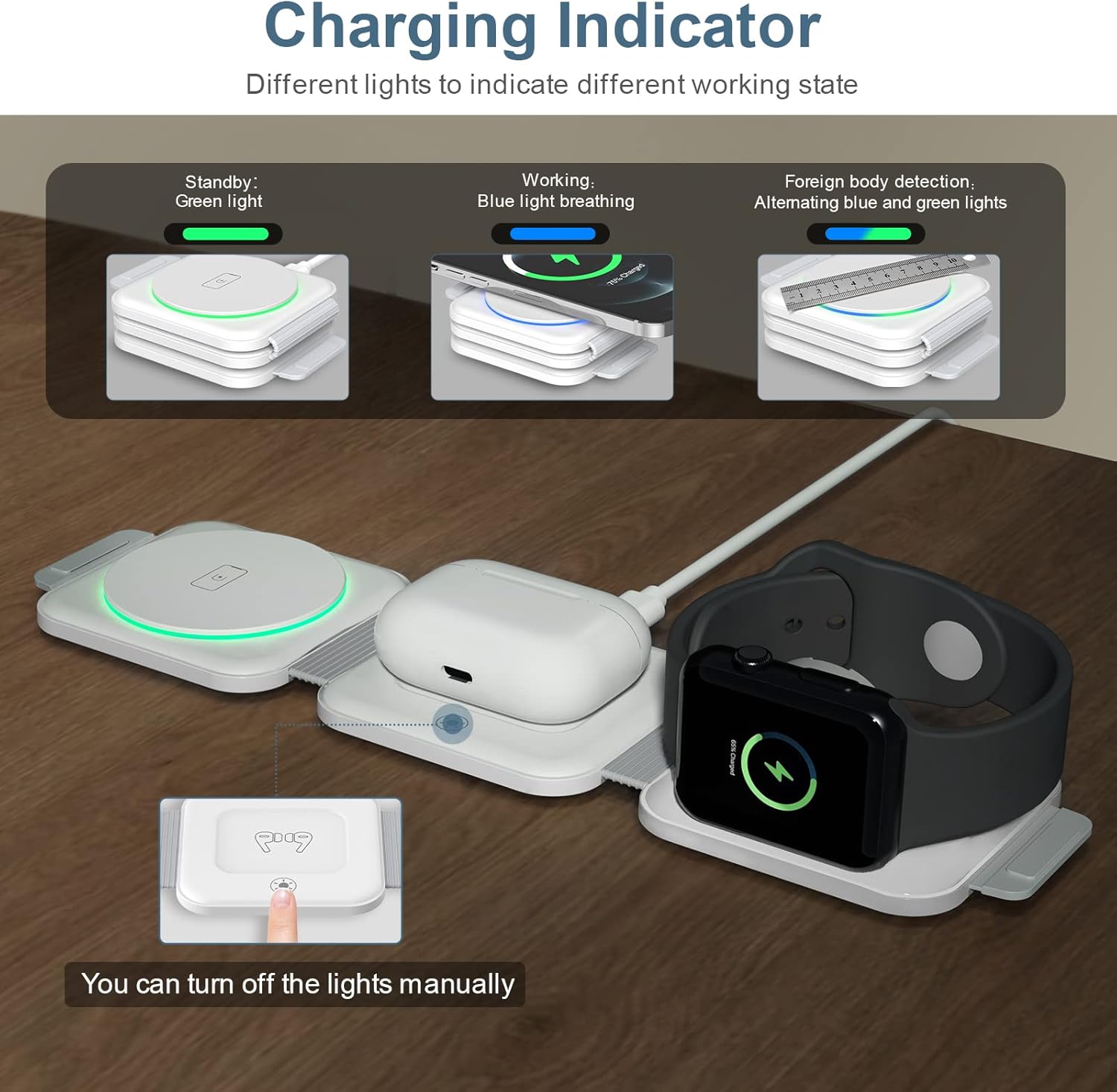
Image: Visual representation of the charging indicator lights: green for standby, blue breathing for active charging, and the light control button.
Using as a Phone Stand:
The charger can be folded 180° to transform into a phone stand. This allows for convenient viewing of content in both horizontal and vertical orientations while charging.

Image: The charger configured as a stand, demonstrating its magnetic hold for an iPhone and simultaneous Apple Watch charging. Important notes on foreign objects are also shown.
Kontroll tad-Dawl tal-Indikatur:
The phone module features a light button. Press this button to turn off the indicator light at any time, which is useful for undisturbed sleep in a bedroom environment.
Video: An official demonstration of the Ankilo 3-in-1 Magnetic Foldable Wireless Charger, showcasinil-karatteristiċi u l-operat tiegħu.
Kompatibilità
This wireless charger is designed for wide compatibility with various devices:
- iPhones: Compatible with iPhone 15 series, iPhone 14, iPhone 14 Plus, iPhone 14 Pro, iPhone 14 Pro Max, iPhone 13, iPhone 13 Pro, iPhone 12, iPhone 12 Pro, iPhone 12 Pro Max, iPhone 12 mini.
- Note: iPhone 15 Pro/Max may not be triangularly supported due to enlarged camera position.
- Apple Watch: Compatible with Apple Watch Series 2, 3, 4, 5, SE, 6, 7, 8, 9, Ultra, Ultra 2.
- Note: Not supported for Samsung Watch.
- AirPods: Compatible with AirPods Pro, AirPods 2/3 (Wireless Charging Version).
- Note: Not supported for AirPods 1.
- Mezzi Oħrajn: All other Qi-enabled wireless earbuds and devices.

Image: A visual guide detailing the compatible iPhone, Apple Watch, and AirPods models, along with other Qi-enabled devices.
Safety Information and Protection
The Ankilo 3-in-1 Wireless Charger incorporates advanced safety features to ensure a secure charging experience:
- Vol-żejjedtage Protezzjoni: Jipprevjeni l-ħsara minn volum eċċessivtaginput.
- Protezzjoni ta' kurrent żejjed: Salvagwardji kontra fluss eċċessiv ta' kurrent.
- Protezzjoni kontra ċirkwit qasir: Jipproteġi kontra xorts elettriċi.
- Kontroll tat-temperatura: Manages the device's temperature to prevent overheating.
- Sejbien ta' Oġġetti Barranin (FOD): Detects metallic foreign objects on the charging surface to prevent heating and potential hazards.

Image: An illustration highlighting the internal safety mechanisms, including protection against overcharge, overvoltage, overcurrent, and high temperatures.
Konsiderazzjonijiet Importanti:
- Ensure no metal objects, credit cards, or cases with magnets/metal rings are placed between your device and the charging pad, as this can interfere with charging and trigger safety features.
- Keep the charging surface clean and free of debris.
- Tiżżarmax jew tippruvax issewwi l-ċarġer int stess.
Speċifikazzjonijiet tal-Prodott
| Karatteristika | Dettall |
|---|---|
| Numru tal-Mudell | CP257-AK |
| Dimensjonijiet | 4.06 x 3.43 x 2.36 pulzieri (Pakkett) |
| Piż tal-oġġett | 4 uqija |
| Teknoloġija tal-Konnettività | Iċċarġjar bla fili, manjetiku |
| Tip ta' Konnettur | USB Tip Ċ |
| Input Voltage | 9 Volts |
| Ħruġ tal-Iċċarġjar tat-Telefon | Sa 15W |
| Ħruġ tal-Iċċarġjar tal-AirPods | 3W |
| Ħruġ tal-Iċċarġjar tal-Apple Watch | 2.5W |
| Komponenti Inklużi | 3-in-1 wireless charger, Type-C data cable, instruction manual |
| Karatteristiċi Speċjali | Magnetic, Foldable, Travel, Portable |
| Kulur | White - New Version |
| Tip ta 'Immuntar | Immonta fuq il-mejda |
Issolvi l-problemi
| Problema | Kawża / Soluzzjoni Possibbli |
|---|---|
| L-apparat mhux qed jiċċarġja jew qed jiċċarġja bil-mod. |
|
| Id-dawl indikatur mhuwiex mixgħul. |
|
| Charger or device feels warm during charging. |
|
Garanzija u Appoġġ
Ankilo provides support for its products. While specific warranty details are not provided in this manual, the product is generally backed by a 12-month support period.
For any questions, technical assistance, or support inquiries, please contact Ankilo customer service through the platform where you purchased the product or refer to the contact information provided on the product packaging.
Jekk jogħġbok żomm l-irċevuta tax-xiri tiegħek għal talbiet ta' garanzija.


