Introduzzjoni
Thank you for choosing the Havit Gaming Mouse MS955. This optical gaming mouse features a USB interface, adjustable DPI settings, and RGB backlighting, designed to enhance your gaming experience. This manual provides essential information for setting up, operating, and maintaining your mouse.
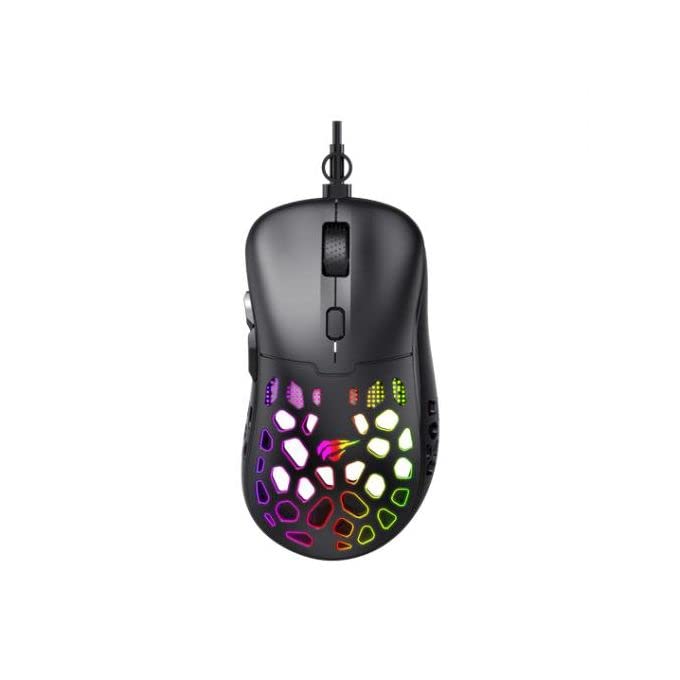
Immaġni: Minn fuq għal isfel view of the Havit Gaming Mouse MS955, showcasing its ergonomic design and vibrant RGB lighting through the honeycomb shell.
Setup
- Oħroġ il-Maws mill-pakkett: Carefully remove the Havit Gaming Mouse MS955 from its packaging.
- Qabbad mal-Kompjuter: Locate an available USB port on your computer. Insert the USB connector of the mouse into the USB port.
- Installazzjoni tas-sewwieq: The mouse is plug-and-play. Your operating system (Windows XP, Windows 7, Linux, etc.) will automatically detect and install the necessary drivers. No additional software installation is typically required for basic functionality.
- Funzjonalità tat-Test: Once connected, move the mouse and click the buttons to ensure it is working correctly.
Istruzzjonijiet Operattivi
The Havit Gaming Mouse MS955 features 6 programmable buttons and adjustable DPI settings for precise control.

Immaġni: Ġenb view of the Havit Gaming Mouse MS955, highlighting the left-side buttons and scroll wheel.
- Buttuna tal-Ikklikkjar tax-Xellug: Primary button for selection and interaction.
- Buttuna tal-Ikklikkjar bil-Lemin: Secondary button for context menus and alternative actions.
- Scroll Wheel: Użat biex tiskrollja fid-dokumenti u web pages. It also functions as a clickable middle button.
- Buttuna tal-Aġġustament tad-DPI: Located behind the scroll wheel. Press this button to cycle through different DPI sensitivity levels (800-1200-2400-3200 DPI). Each press changes the sensitivity, allowing you to adapt to various gaming or work scenarios.
- Buttuni tal-ġenb: Two buttons are located on the left side of the mouse. These are typically used for 'forward' and 'backward' navigation in web browsers jew jistgħu jiġu programmati għal azzjonijiet fil-logħba.
Dawl RGB
The Havit Gaming Mouse MS955 features an integrated RGB backlight system. The lighting effects are typically automatic and may change with DPI settings or cycle through various colors. There are no dedicated buttons for controlling the RGB lighting directly on the mouse.
Manutenzjoni
- Tindif: To clean the mouse, disconnect it from your computer. Use a soft, dry cloth to wipe the surface. For stubborn dirt, a slightly damp cloth can be used, ensuring no liquid enters the mouse. Do not use harsh chemicals or abrasive cleaners.
- Ħażna: Aħżen il-maws f'ambjent nadif u niexef 'il bogħod minn temperaturi estremi u dawl tax-xemx dirett.
- Kura tal-Cable: Evita li tgħawweġ jew iddawwar il-kejbil USB b'mod eċċessiv biex tevita l-ħsara.
Issolvi l-problemi
- Il-Maws Mhux Jirrispondi:
- Kun żgur li l-kejbil tal-USB huwa mdaħħal sew f'port USB li jaħdem fuq il-kompjuter tiegħek.
- Ipprova qabbad il-maws ma' port USB differenti.
- Ibda mill-ġdid il-kompjuter tiegħek.
- DPI Mhux qed Jinbidel:
- Press the DPI button firmly. Ensure you are pressing the correct button.
- The mouse cycles through fixed DPI settings; there is no visual indicator other than cursor speed change.
- Dwal RGB Ma Jaħdmux:
- Verify the mouse is properly connected to your computer.
- The RGB lighting is automatic; if the mouse is functioning otherwise, the lighting should also be active.
Speċifikazzjonijiet
| Karatteristika | Dettall |
|---|---|
| Brand | Havit |
| Mudell | MS955 |
| Tip ta' Interface | USB |
| Dimensjonijiet | 115.2 x 63 x 37.6 mm |
| Numru ta' Ċwievet | 6 |
| Chipset | NST5311 |
| Riżoluzzjoni DPI | 800-1200-2400-3200 DPI |
| Vol Operattivtage | 5V |
| Tul ta' Ħajja Ewlieni | 3,000,000 klikks |
| Tul tal-Cable | 1.5 m |
| Sejbien tal-Moviment | Ottiċi |
| Orjentazzjoni tal-Idejn | Dritt |
| Użu Rakkomandat | Logħob |
| Sistemi Operattivi | Linux, Windows 7, Windows XP |
| Kulur | Iswed |
Garanzija u Appoġġ
For warranty information or technical support, please refer to the documentation included with your purchase or visit the official Havit websit. Żomm il-prova tax-xiri tiegħek għal talbiet ta' garanzija.


