1. Introduzzjoni
Thank you for choosing the White Shark GK-2022 SHINOBI Mechanical Keyboard. This compact 61-key keyboard is designed for optimal performance and durability, featuring OUTEMU Red mechanical switches and vibrant RGB backlighting. This manual provides detailed instructions for setup, operation, maintenance, and troubleshooting to ensure you get the most out of your new keyboard.
2. Kontenut tal-Pakkett
Jekk jogħġbok iċċekkja l-pakkett għall-oġġetti li ġejjin:
- White Shark GK-2022 SHINOBI Mechanical Keyboard
- Kejbil USB-A għal USB-C (1.8m)
- Manwal għall-Utent (dan id-dokument)
3. Prodott Aktarview
The White Shark GK-2022 SHINOBI is a 61-key compact mechanical keyboard, ideal for users seeking a minimalist design without compromising on functionality. It features durable mechanical switches and customizable backlighting.

Figura 3.1: Fuq view of the White Shark GK-2022 SHINOBI keyboard, showcasing its compact 61-key layout and vibrant RGB backlighting.

Figura 3.2: Angolat view of the keyboard, highlighting its ergonomic profile and keycap design.
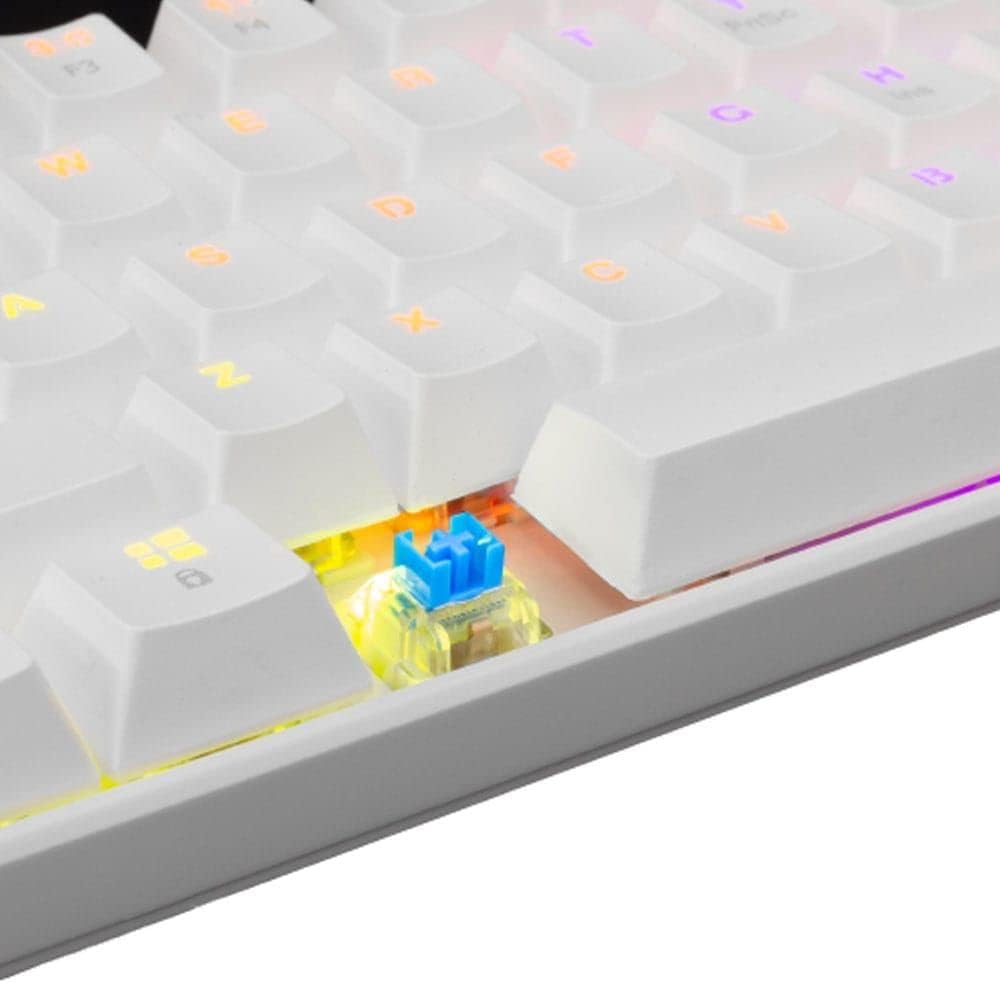
Figura 3.3: Close-up view of an OUTEMU Red mechanical switch, known for its linear and quiet operation.
4. Setup
Follow these steps to set up your White Shark GK-2022 SHINOBI keyboard:
- Unpack the keyboard and the USB cable from the box.
- Sib il-port USB-C fuq it-tastiera.
- Insert the USB-C end of the cable into the keyboard's port.
- Connect the USB-A end of the cable to an available USB 2.0 port on your computer (PC, Laptop, etc.).
- The keyboard is plug-and-play and should be automatically recognized by your operating system. No additional drivers are typically required.

Figure 4.1: Connecting the USB-C cable to the keyboard's port for power and data transmission.
5. Istruzzjonijiet Operattivi
5.1 Operazzjoni Bażika
Once connected, the keyboard is ready for immediate use. Type as you would on any standard keyboard.
5.2 Function Keys and Shortcuts
Due to its compact 61-key layout, many standard functions are accessed via a combination of the Function (Fn) key and other keys. Refer to the keycaps for specific Fn layer markings.
- Fn + [Ċavetta]: Access secondary functions printed on the keycaps (e.g., F1-F12, multimedia controls, navigation keys).
- Kontroll tad-Dawl ta' Wara: The keyboard features single-color backlighting. Use Fn key combinations to cycle through lighting modes or adjust brightness. Specific combinations are usually marked on the keys (e.g., Fn + \ for lighting modes, Fn + arrow keys for brightness/speed).
5.3 Kontra l-Ghosting
The GK-2022 SHINOBI supports full 61-key anti-ghosting, ensuring that every key press is registered accurately, even during rapid, simultaneous keystrokes, which is beneficial for gaming and fast typing.
6. Manutenzjoni
Manutenzjoni xierqa testendi l-ħajja tat-tastiera tiegħek:
- Tindif: Use a soft, dry cloth to wipe the surface of the keyboard. For deeper cleaning, you may use compressed air to remove dust and debris from between the keycaps.
- It-tixrid: In case of liquid spills, immediately unplug the keyboard from your computer. Turn it upside down to drain any liquid and allow it to dry completely before reconnecting. Do not use a hairdryer as excessive heat can damage components.
- ĦażnaAħżen it-tastiera f'post frisk u niexef 'il bogħod mix-xemx diretta u minn temperaturi estremi.
7 Issolvi l-problemi
Jekk tiltaqa' ma' problemi bit-tastiera tiegħek, ipprova s-soluzzjonijiet li ġejjin:
- It-tastiera ma tirrispondix:
- Kun żgur li l-kejbil USB huwa konness sew kemm mat-tastiera kif ukoll mal-kompjuter.
- Ipprova qabbad it-tastiera ma' port USB differenti fuq il-kompjuter tiegħek.
- Ibda mill-ġdid il-kompjuter tiegħek.
- Ittestja t-tastiera fuq kompjuter ieħor biex tiddetermina jekk il-problema hijiex fit-tastiera jew fis-sistema tiegħek.
- Iċ-ċwievet mhux qed jirreġistraw jew qed jittajpjaw darbtejn:
- Iċċekkja għal xi debris jew oġġetti barranin taħt il-keycap affettwat.
- Kun żgur li l-għatu taċ-ċwievet ikun imwaħħal sew mas-swiċċ.
- Id-dawl ta' wara mhux qed jaħdem:
- Kun żgur li t-tastiera hija mħaddma kif suppost.
- Try cycling through the lighting modes using the Fn key combinations.
- Aġġusta s-settings tal-luminożità.
If the problem persists after trying these steps, please contact White Shark customer support.
8. Speċifikazzjonijiet
| Karatteristika | Deskrizzjoni |
|---|---|
| Mudell | GK-2022 SHINOBI |
| Brand | Kelb il-baħar abjad |
| Numru ta' Ċwievet | 61 |
| Tip ta' Swiċċ | Mechanical - OUTEMU (Red) |
| Pressjoni Ewlenin | 60 g +/- 15 g |
| Kontra l-Ghosting | 61 keys (Full Anti-Ghosting) |
| Kulur | Abjad |
| Interface | USB 2.0 |
| Tul tal-Cable | 1.8-il metru |
| Apparati Kompatibbli | PC, Laptop, Tablet, Smartphone (via USB) |
| Użi Rakkomandati | Gaming, Office Work, Multimedia Editing |
| Backlight tat-Tastiera | Single Color (RGB effects) |
| Materjal | Plastik |
| Piż tal-oġġett | 556 g |
| Dimensjonijiet tal-Pakkett | 31 x 13 x 5 ċm |
9. Garanzija u Appoġġ
White Shark products are manufactured to the highest quality standards. For information regarding warranty coverage, technical support, or service inquiries, please refer to the warranty card included with your product or visit the official White Shark websit. Jekk jogħġbok żomm il-prova tax-xiri tiegħek għal talbiet ta' garanzija.
For further assistance, you may contact White Shark customer support through their official channels.


