Introduzzjoni
Thank you for choosing the Steelplay Slimpack 2.4GHz Wireless Controller. This manual provides detailed instructions for the proper setup, operation, and maintenance of your controller. Designed for compatibility with PlayStation 4, PlayStation 3, and PC, this controller features dual vibration feedback and four programmable rear paddles for an enhanced gaming experience.
Kontenut tal-Pakkett
- Steelplay Slimpack 2.4GHz Wireless Controller
- Riċevitur USB 2.4GHz
- Cable tal-Iċċarġjar tal-USB
- Manwal għall-Utent (dan id-dokument)
Layout tal-Kontrollur
Familiarize yourself with the buttons and features of your Steelplay Slimpack Wireless Controller.
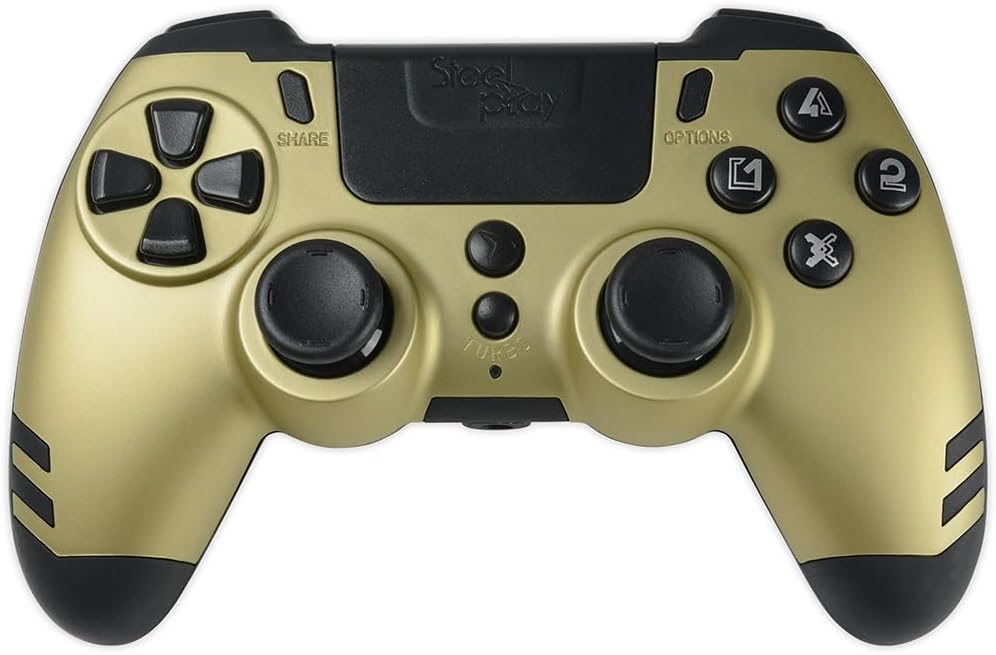
Figura 1: Minn fuq għal isfel view of the Steelplay Slimpack Wireless Controller. This image displays the layout of the directional pad, action buttons (triangle, circle, cross, square), dual analog sticks, SHARE and OPTIONS buttons, and the central touchpad area.
- Kuxxinett Direzzjonali (D-Pad): Għal input direzzjonali preċiż.
- Buttuni ta' Azzjoni (Triangolu, Ċirku, Salib, Kwadru): Primary input buttons.
- Sticks Analogiċi tax-Xellug/Lemin: Għall-moviment u l-kontroll tal-kamera.
- Buttuna SHARE: Access sharing features (PS4).
- Buttuna GĦAŻLIET: Access in-game menus or system options.
- Buttuna PS: Power on/off the controller, access system menu.
- Buttuni L1/R1: Buttuni fuq l-ispalla.
- Triggers L2/R2: Triggers analogi.
- Rear Paddles (P1, P2, P3, P4): Four programmable buttons located on the back of the controller.
- Buttuna TURBO: Activates turbo function for selected buttons.
Setup
1. Iċċarġjar tal-Kontrollur
- Connect the small end of the USB charging cable to the charging port on the controller.
- Connect the large end of the USB charging cable to a USB port on your console (PS4/PS3) or PC, or a compatible USB wall adapter (not included).
- The LED indicator on the controller will slowly flash while charging and turn off when fully charged.
- Ċarġ sħiħ tipikament jieħu madwar 2-3 sigħat.
2. Connecting to PS4/PS3/PC (2.4GHz Wireless)
The controller connects wirelessly via the included 2.4GHz USB receiver.
- Insert the 2.4GHz USB receiver into an available USB port on your PlayStation 4, PlayStation 3, or PC.
- Agħfas il- Buttuna PS on the controller to power it on.
- The controller will automatically attempt to pair with the USB receiver. The LED indicator will flash rapidly during pairing and remain solid when successfully connected.
- If the controller does not connect, ensure the receiver is properly inserted and try pressing the PS button again.
Istruzzjonijiet Operattivi
Kontrolli Bażiċi
Once connected, the controller functions similarly to standard PS4/PS3/PC controllers. Refer to your game's instructions for specific button mappings.
Feedback ta 'Vibrazzjoni Doppju
The controller features dual vibration motors that provide tactile feedback during gameplay, enhancing immersion. This feature is automatically active when supported by the game.
Programming Rear Paddles
The four rear paddles (P1, P2, P3, P4) can be programmed to replicate other buttons on the controller, allowing for quick access to frequently used commands without repositioning your fingers.

Figura 2: Angolat view of the Steelplay Slimpack Wireless Controller. This image shows the ergonomic design of the grips and the placement of the four programmable rear paddles on the underside of the controller.
- Daħħal il-Mod ta 'Programmar: Agħfas u żomm il- Buttuna TURBO u l- Buttuna SHARE simultaneously for 3 seconds. The LED indicator will start flashing rapidly to indicate programming mode.
- Select Paddle: Press the rear paddle (P1, P2, P3, or P4) you wish to program. The LED indicator will flash slowly.
- Assign Button: Press the button on the front of the controller (e.g., X, O, Triangle, Square, L1, R1, L2, R2, D-Pad directions, Left/Right Stick clicks) that you want the paddle to emulate.
- Ħruġ mill-Modalità tal-Ipprogrammar: Agħfas il- Buttuna TURBO again. The LED indicator will return to solid, indicating the paddle is programmed and programming mode is exited.
- Repeat for other paddles as desired.
- To clear a programmed paddle, enter programming mode, select the paddle, and then press the TURBO button without assigning another button.
Funzjoni Turbo
The Turbo function allows a button to be repeatedly pressed automatically as long as it is held down.
- Attiva t-Turbo: Agħfas u żomm il- Buttuna TURBO, then press the desired action button (e.g., X, O, Triangle, Square, L1, R1, L2, R2). The button will now have turbo functionality.
- Iddiżattiva t-Turbo: To remove turbo from a button, press and hold the Buttuna TURBO again, then press the same action button.
Manutenzjoni
- Tindif: Uża drapp artab u niexef biex tnaddaf il-kontrollur. Tużax kimiċi ħarxa jew materjali li joborxu.
- Ħażna: Aħżen il-kontrollur f'post frisk u niexef 'il bogħod mix-xemx diretta u minn temperaturi estremi.
- Kura tal-batterija: To prolong battery life, avoid fully discharging the controller frequently. Charge it regularly.
- Evita l-Impatt: Twaqqax il-kontrollur jew tissottomettihx għal impatti qawwija, għax dan jista' jagħmel ħsara lill-komponenti interni.
Issolvi l-problemi
| Problema | Kawża Possibbli | Soluzzjoni |
|---|---|---|
| Il-kontrollur ma jixgħelx. | Batterija baxxa. | Iċċarġja l-kontrollur billi tuża l-kejbil USB provdut. |
| Il-kontrollur ma jikkonnettjax mingħajr fili. | USB receiver not properly inserted or not recognized. Controller not paired. | Ensure the 2.4GHz USB receiver is fully inserted into a working USB port. Press the PS button on the controller to initiate pairing. Try a different USB port. |
| Dewmien fl-input jew konnessjoni mitlufa. | Interference from other wireless devices. Controller too far from receiver. Low battery. | Move closer to the USB receiver. Ensure no major obstructions. Charge the controller. Minimize other 2.4GHz wireless devices nearby. |
| Il-buttuni jew l-istikks analogi ma jirrispondux. | Software glitch. Physical damage. | Try resetting the controller (if a reset button is available, typically a small pinhole on the back). If the issue persists, contact customer support. |
Speċifikazzjonijiet
- Numru tal-Mudell: JVAMUL00154
- Konnettività: Wireless 2.4GHz
- Kompatibilità: PlayStation 4, PlayStation 3, PC
- Karatteristiċi: Dual Vibration Feedback, 4 Programmable Rear Paddles, Turbo Function
- Sors tal-Enerġija: Batterija Rikarikabbli Inkorporata
- Dimensjonijiet tal-pakkett: 20.4 x 18.2 x 7.8 ċm
- Piż tal-oġġett: 360 g
Garanzija u Appoġġ
For warranty information or technical support, please refer to the documentation provided with your purchase or visit the official Steelplay websit. Żomm il-prova tax-xiri tiegħek għal talbiet ta' garanzija.


