1. Introduzzjoni
The Café Couture Countertop Oven is designed to flawlessly prepare a wide range of recipes, from snacks to elaborate meals. It features 14 essential cooking modes, including Air Fry, CrispFinish, Bake, Broil, Roast, Toast, Bagel, Pizza, Cookies, Proof, Dehydrate, Slow Cook, Reheat, and Keep Warm. This manual provides detailed instructions for safe and efficient operation of your new appliance.

Quddiem view of the Café Couture Countertop Oven in Matte White, showcasing a roasted chicken on a baking tray inside the illuminated oven cavity.
2. Informazzjoni Importanti dwar is-Sigurtà
Always read all instructions before using this appliance. Basic safety precautions should be followed, including:
- Tmissx uċuħ sħan. Uża manki jew pumi.
- Biex tipproteġi kontra xokk elettriku, tgħaddix korda, plaggs, jew apparat fl-ilma jew likwidu ieħor.
- Superviżjoni mill-qrib hija meħtieġa meta xi apparat jintuża minn jew ħdejn it-tfal.
- Spluggja mill-iżbokk meta ma tkunx qed tuża u qabel tnaddaf. Ħallih jiksaħ qabel ma tpoġġi jew tneħħi l-partijiet.
- Tħaddim l-ebda apparat b'korda jew plagg bil-ħsara jew wara li l-apparat ma jaħdimx jew ikun ġie bil-ħsara b'xi mod.
- L-użu ta' aċċessorji aċċessorji mhux rakkomandati mill-manifattur tal-apparat jista' jikkawża korrimenti.
- Tużax barra.
- Tħallix il-korda tistrieħ fuq it-tarf tal-mejda jew tal-bank, jew tmiss uċuħ sħan.
- Tpoġġix fuq jew ħdejn burner tal-gass sħun jew elettriku, jew f'forn imsaħħan.
- Għandha tintuża kawtela kbira meta tiċċaqlaq apparat li jkun fih żejt jaħraq jew likwidi oħra jaħarqu.
- Dejjem waħħal il-plagg mal-apparat l-ewwel, imbagħad daħħal il-korda fis-sokit tal-ħajt. Biex tiskonnettja, itfi kwalunkwe kontroll, imbagħad neħħi l-plagg mis-sokit tal-ħajt.
- Tużax l-apparat għal użu ieħor minbarra dak maħsub.
3. X'hemm fil-Kaxxa
Your Café Couture Countertop Oven comes with the following accessories:
- Heavy-Duty Wire Rack
- Trej tal-Ħami
- Taġen tal-Pizza ta' 12"
- Air Fry/Dehydrate Basket
- Cry Tray
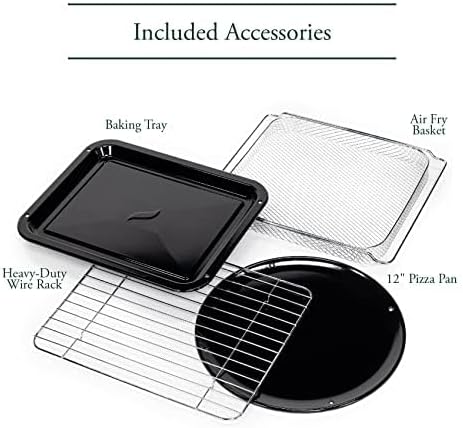
A collection of accessories included with the oven: a heavy-duty wire rack, a baking tray, a 12-inch pizza pan, and an air fry/dehydrate basket.
This video showcases the various accessories included with the Café Couture Oven, such as the heavy-duty wire rack, pizza pan, baking pan, and air fry basket, demonstrating their use with different foods like bagels, pizza, and avocado fries.
4. Setup
4.1 Preparazzjoni Inizjali
- Before first use, wipe the interior walls of the oven with a damp sponża.
- Accessories may be cleaned in the dishwasher, but hand washing with warm, soapy water is recommended for longevity.
4.2 Tqegħid
- Place the oven on a level, heat-resistant surface.
- Ensure at least 4 inches of clearance on all sides for proper ventilation.
- Tpoġġix jew taħżen ebda oġġett fuq il-forn, ħlief għall-aċċessorji inklużi.
4.3 First Use Operation
- Plug in the oven. The appliance alarm will sound, and the control display will illuminate.
- It is recommended to operate the oven empty on Air Fry mode for 20 minutes at 400°F (205°C) before cooking for the first time. This helps to eliminate any manufacturing odors.
- During this initial operation, the unit may emit visible vapors and a slight odor. This is normal, safe, and not detrimental to the oven.
This video provides initial setup instructions for the Café Couture Oven, including wiping the interior, cleaning accessories, proper placement on a heat-resistant surface, and the recommended first-time operation on Air Fry mode to eliminate manufacturing odors.
5. Istruzzjonijiet Operattivi
5.1 Selecting a Cooking Mode
- Rotate the 'Cook Mode' knob until your desired cooking mode is shown on the control display.
- When using the oven for the first time, default cooking settings will be displayed. Otherwise, the oven will always store the last used settings for any given cooking mode.
5.2 Adjusting Cooking Mode Settings
- The settings for each cooking mode can be adjusted using the 'Temp/Time/Slices/Shade' knob.
- Rotate the knob clockwise to increase the temperature or time.
- Rotate the knob counter-clockwise to decrease the temperature or time.
- The 'Temp/Time/Slices/Shade' knob also functions as a button. Pushing the button toggles the setting being adjusted (e.g., between temperature and time).
5.3 Starting the Oven
- After selecting your desired cooking mode and adjusting the settings, place the food in the oven.
- Agħfas il-buttuna 'Start' biex tibda ssajjar.
- For Bake, Roast, and Cookies modes, the 'Preheating' indicator will illuminate on the control display, and the oven will begin heating to the set temperature.
- When the oven has reached the set temperature, the oven alarm will sound, and the 'Preheating' indicator will disappear. The 'Press Start' reminder will illuminate. If the 'Start' button is not pressed within 10 minutes, the oven will automatically turn off.
- The preheat mode may be skipped manually by pressing the 'Start' button a second time. The cooking timer will begin counting down immediately.
- All other cooking modes do not require preheating. When starting one of these modes, the cooking timer will begin counting down immediately.
5.4 Cancelling a Cooking Mode
- When the oven has finished cooking, it will shut off automatically, and the oven alarm will sound to indicate that the cooking cycle is complete.
- The cooking cycle can also be ended manually by pressing the 'Cancel' button.
5.5 Turning on the Oven Light
- To turn on the oven light, press the 'Light' button to the left of the control display.
- To turn off the light, press the 'Light' button again.
- The oven light will also automatically turn on whenever the oven door is opened.
5.6 Activating the Convection Fan
- Some cooking modes offer an optional convection feature.
- To manually activate the convection fan for these cooking modes, press the 'Conv.' button to the right of the control display.

The Café Couture Countertop Oven's control panel showing 'ROAST' mode, alongside a comprehensive list of its 14 cooking modes: Air Fry, Crisp Finish, Bake, Broil, Roast, Toast, Bagel, Pizza, Cookies, Proof, Dehydrate, Slow Cook, Reheat, and Keep Warm.
This video demonstrates the CrispFinish feature of the Café Couture Oven, showing how it can be used to brown, caramelize, melt, or crisp dishes like crème brûlée.
This video provides a guide on how to use the Café Couture Oven, covering selection of cooking modes, adjusting settings, starting the oven, and cancelling a cooking cycle. It also shows how to turn the oven light on/off and activate the convection fan.
This video highlights the large capacity of the Café Couture Oven, demonstrating how it can accommodate various dishes like a whole roasted chicken, lasagna, and pizza.
6. Tindif u Manutenzjoni
6.1 Tindif tal-Intern
- Dejjem aqla’ l-forn mill-plagg u ħallih jiksaħ kompletament qabel ma tnaddfu.
- Imsaħ il-ħitan ta 'ġewwa b'adamp sponge and mild detergent. Avoid abrasive cleaners or scouring pads.
- Għal tbajja’ iebsa, tista’ tapplika pejst magħmul minn baking soda u ilma, titħalla għal ftit minuti, imbagħad titnaddaf.
6.2 Aċċessorji tat-Tindif
- All included accessories (wire rack, baking tray, pizza pan, air fry/dehydrate basket, crumb tray) can be washed by hand with warm, soapy water.
- Most accessories are dishwasher safe, but hand washing is recommended to preserve their finish and extend their lifespan.
- Tpoġġix it-trej tal-frak fil-magna tal-ħasil tal-platti.
6.3 Tindif ta' barra
- Imsaħ l-uċuħ ta 'barra b'artab, damp drapp.
- Evita li tuża kimiċi ħarxa jew materjali li joborxu li jistgħu jagħmlu ħsara lill-finitura.
7 Issolvi l-problemi
| Problema | Kawża Possibbli | Soluzzjoni |
|---|---|---|
| Il-forn ma jixgħelx. | Mhux imdaħħal fil-plagg; mitfitage; is-circuit breaker qata'. | Kun żgur li l-forn huwa pplaggjat sew f'sokit li jaħdem. Iċċekkja s-circuit breaker tad-dar. |
| L-ikel mhux qed jissajjar b'mod uniformi. | Incorrect rack position; overcrowding; uneven food distribution. | Refer to recipe for recommended rack position. Avoid overcrowding the oven. Arrange food in a single layer for best results. |
| Oven emits smoke or strong odor during first use. | Żjut residwi tal-manifattura. | This is normal. Operate empty on Air Fry mode at 400°F for 20 minutes to burn off residues. Ensure adequate ventilation. |
| Display shows "Press Start" but oven doesn't start. | Preheating cycle complete, awaiting confirmation. | Press the 'Start' button again to begin the cooking timer. |
8. Speċifikazzjonijiet
- Ditta: Kafè
- Isem tal-Mudell: Café™ Couture™ Oven with Air Fry
- Numru tal-Mudell: C9OAAAS4RW3
- Kulur: Abjad Matte
- Dimensjonijiet tal-Prodott: 17"D x 18.6"W x 14"H
- Piż tal-oġġett: 28 liri
- Kapaċità: 0.8 cu. pied.
- Tip ta' Kontroll: Pum
- Stil tal-Bieb: Dropdown Bieb
- Tip ta' Materjal tal-Bieb: Ħġieġ ittemprat
- Sors tal-Enerġija: AC
- Firxa tat-Temperatura: 80 - 450 Gradi Fahrenheit
- Numru ta' Xkafef: 1
- Karatteristika Speċjali: CrispFinish™ - Use CrispFinish at the end of any standard cooking mode to melt, caramelize, brown or crisp, and put the perfect finishing touch on any of your signature dishes.
- Konnettività: WiFi & Smart Connected, Voice Control (via SmartHQ app, Echo, or Google Home devices)
- UPC: 084691857563

Ġenb view of the Café Couture Countertop Oven in Matte White, illustrating its dimensions: 18.6 inches width, 14 inches height, and 17 inches depth. An air fry basket is visible inside.

A hand interacting with the SmartHQ app on a smartphone, demonstrating remote control capabilities for the Café Couture Countertop Oven. The oven's display shows 'AIR FRY' mode.
9. Garanzija u Appoġġ
For detailed warranty information, please refer to the warranty card included with your product packaging or visit the official Café Appliances website. For customer support, technical assistance, or to register your product, please visit the Café Appliances support page or contact their customer service line.
You can also connect your Café Smart Appliance by downloading the free SmartHQ app from your Apple or Android smartphone. Open the app, sign in or create an account, and follow the instructions to connect your appliance.
- Appoġġ onlajn: Żur il- Café Store on Amazon għal informazzjoni dwar il-prodott u riżorsi.
- SmartHQ App: Available on Apple App Store and Google Play Store.


