1. Introduzzjoni
Welcome to the user manual for your new Formuler Z11 Pro streaming media player. This guide provides essential information for setting up, operating, maintaining, and troubleshooting your device. Please read this manual thoroughly to ensure optimal performance and longevity of your product.
2. Prodott Aktarview
The Formuler Z11 Pro is a powerful 4K Android 11 streaming media player designed to deliver a superior entertainment experience. It features robust hardware and versatile connectivity options.
Karatteristiċi ewlenin:
- Formuler Z11 Pro Android 11 Operating System
- 2GB RAM u 16GB ROM għal prestazzjoni bla xkiel u ample ħażna
- 4K (3840 x 2160) Output Resolution for stunning visuals
- Dual Band 5G 2x2 AC Wi-Fi for fast and stable wireless connectivity
- Gigabit LAN (1000M) for high-speed wired network connections
Speċifikazzjonijiet Tekniċi:
- CPU: RealTek RTD1319C
- GPU: Mali-G57 MC1
- RAM: 2GB DDR @2400MHz
- Ħażna: 16GB eMMC
- Sistema Operattiva: Android 11
- Wireless: Wireless AC b'Doppju Banda 2x2
- Bluetooth: 5.0
- Ethernet: 1000M (Gigabit)
- Dimensions (L/W/T): 105mm / 105mm / 21mm
- Kulur: Iswed
- Portijiet: 1x Dħul tal-Enerġija, 1x USB 3.0, 1x USB 2.0, 1x HDMI, 1x Gigabit LAN, 1x Karta Mikro SD, 1x Estensjoni IR

Figure 2.1: The Formuler Z11 Pro streaming media player, its remote control, and product packaging.
3. Setup
Follow these steps to set up your Formuler Z11 Pro for the first time:
- Qabbad mat-TV: Use an HDMI cable (not included) to connect the HDMI port on the Formuler Z11 Pro to an available HDMI input on your television.
- Qabbad mal-Enerġija: Plug the power adapter into the "Power Input" port on the device and then into a wall outlet.
- Qabbad mal-Internet:
- Konnessjoni bil-fili: For optimal performance, connect an Ethernet cable from your router to the "Gigabit LAN" port on the device.
- Konnessjoni bla fili: If using Wi-Fi, the device will prompt you to select your network and enter the password during the initial setup wizard.
- Daħħal il-Karta Mikro SD (Mhux obbligatorja): If you wish to expand storage, insert a Micro SD card into the designated slot.
- Estensjoni IR (Mhux obbligatorja): If you plan to place the device out of sight, connect the IR extension cable to the "IR Extension" port and position the IR receiver in a visible location.
- Qawwa Mixgħul: The device should power on automatically. If not, press the power button on the remote control.
- Inizjali Setup Wizard: Follow the on-screen instructions to complete the initial setup, including language selection, network configuration, and Google account sign-in.

Figure 3.1: Rear ports of the Formuler Z11 Pro, including Gigabit LAN, HDMI, USB 2.0, Micro SD, IR Extension, and Power Input.
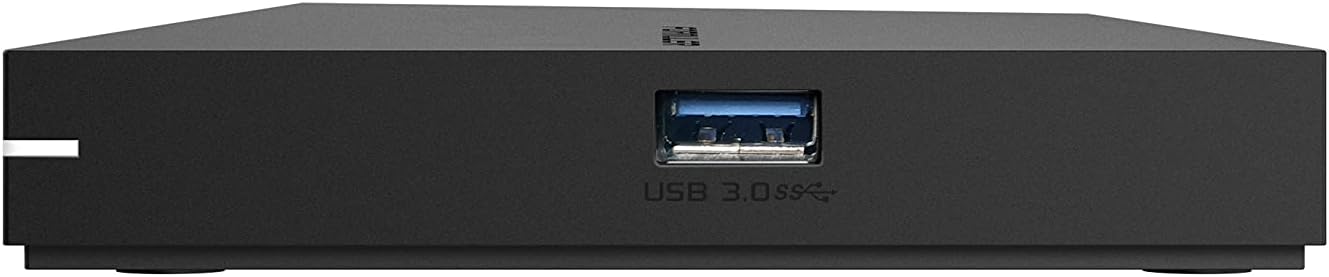
Figura 3.2: Ġenb view of the Formuler Z11 Pro, highlighting the USB 3.0 port.
4. Istruzzjonijiet Operattivi
Your Formuler Z11 Pro runs on Android 11, providing access to a wide range of applications and features.
4.1 Funzjonijiet ta' Kontroll mill-bogħod
The included remote control is your primary interface for navigating the device. Familiarize yourself with its buttons:

Figure 4.1: Formuler IR1 Premium Learning IR Remote with TV Control. Key buttons include Power (TV/STB), Number Pad, Navigation (OK, Vol, Ch), Info, Guide, Menu, Back, Home, Playback controls, and colored function buttons.
- Power (TV/STB): Press once to put TV/STB into standby mode. Press and hold for Learning mode.
- Kontroll tat-TV: OK, Source, Vol-, Vol+ (Learning mode).
- Kuxxinett tan-Numru: Dħul dirett tan-numru tal-kanal.
- Kanali Favoriti: Uri/issettja l-kanali favoriti.
- Buttuni kkuluriti: Hotkey functions, follow on-screen instructions.
- Informazzjoni: Agħfas darbtejn biex turi informazzjoni dettaljata.
- Gwida: Uri l-grilja EPG (Gwida Elettronika tal-Programmi).
- Vol: Aġġusta l-volum tal-STB.
- KOLLOX SEW: Agħżel.
- Vleġeġ tan-Navigazzjoni: Move Cursor, Channel List navigation.
- Ch: Change channels Page Up/Down.
- Menu: Uri l-Menù Prinċipali.
- Dahar: Menù preċedenti.
- Dar: Mur fl-iskrin tad-Dar tas-Sistema.
- Kontrolli tal-daqq: Timeshift/Resume, Pause playback, Start recording.
4.2 Applications and Features
- MyTVOnline3: This is the best media viewing client for IPTV services. It offers advanced features for professional and user-friendly experience.
- Google Play Store: Download and install a wide variety of Android applications, including streaming services, VPNs, games, and web browsers.
- YouTube: Access YouTube content directly from your device.
- Browser tal-Midja: Browse and play local media files from connected USB drives or Micro SD cards.
- USB Recording (DVR): Utilize the USB ports to connect external storage and record your favorite shows. The remote includes a dedicated record button.
- Appoġġ VPN: The device supports VPN integration, allowing for secure and private browsing. A 30-day free trial to ExpressVPN may be included.
5. Manutenzjoni
Proper maintenance ensures the longevity and optimal performance of your Formuler Z11 Pro.
- Tindif: Uża drapp artab u niexef biex tnaddaf il-barra tal-apparat. Tużax prodotti tat-tindif likwidi jew materjali li joborxu.
- Ventilazzjoni: Ensure the device is placed in a well-ventilated area. Do not cover ventilation openings.
- Temperatura: Evita li tesponi l-apparat għal temperaturi estremi jew dawl tax-xemx dirett.
- Aġġornamenti tal-Firmware: Periodically check for and install firmware updates to ensure your device has the latest features and security enhancements. These are typically found in the device's settings menu.
6 Issolvi l-problemi
If you encounter issues with your Formuler Z11 Pro, try the following solutions:
- Ebda Qawwa:
- Iċċekkja jekk l-adapter tal-enerġija huwiex imqabbad sew mat-tagħmir u mas-sokit tal-ħajt.
- Ensure the wall outlet is functioning correctly.
- Ebda Stampa/Ħoss:
- Verify the HDMI cable is securely connected to both the device and the TV.
- Kun żgur li t-TV tiegħek huwa ssettjat għas-sors tad-dħul HDMI korrett.
- Check the volume settings on both the device and your TV.
- Ebda Konnessjoni tal-Internet:
- Għal konnessjonijiet bil-fili, kun żgur li l-kejbil Ethernet huwa konness sew u li r-router tiegħek qed jaħdem.
- For wireless connections, re-enter your Wi-Fi password in the network settings. Ensure your Wi-Fi router is on and broadcasting.
- Erġa' ibda r-router tiegħek u l-Formuler Z11 Pro.
- Il-Kontroll mill-bogħod ma Jirrispondix:
- Ibdel il-batteriji fil-kontroll remot.
- Kun żgur li m'hemm l-ebda ostaklu bejn ir-remote u r-riċevitur IR tal-apparat.
- Iffriżar/Ħabta tal-App:
- Agħlaq u erġa' iftaħ l-applikazzjoni.
- Clear the app's cache and data in the Android settings.
- Restart the Formuler Z11 Pro.
7. Warranty and Protection Plans
For information regarding the product warranty, please refer to the warranty card included in your product packaging or visit the official Formuler website. Additionally, extended protection plans may be available for purchase to cover your device beyond the standard warranty period. These plans typically offer:
- Pjan ta' Protezzjoni ta' Sentejn
- Pjan ta' Protezzjoni ta' Sentejn
- Complete Protect: Pjan ta' kull xahar li jkopri xiri eliġibbli tal-passat u tal-futur.
Please check with your retailer or the Formuler website for details on coverage, terms, and pricing of these protection plans.
8. Appoġġ
If you require further assistance or have questions not covered in this manual, please contact Formuler customer support through their official website or consult their online resources.
Uffiċjali Websit: www.formuler.tv (Eżample, replace with actual if known)
For the latest FAQs, software updates, and community forums, please visit the support section of the Formuler websit.


