Introduzzjoni
Thank you for choosing the YINDIAO K68 60% Wireless Mechanical Gaming Keyboard. This compact and versatile keyboard offers dual-mode connectivity (Bluetooth 5.0 and 2.4 GHz wireless) and features hot-swappable mechanical switches for a customizable typing and gaming experience. This manual provides detailed instructions on setting up, operating, maintaining, and troubleshooting your keyboard to ensure optimal performance.

The YINDIAO K68 keyboard, showcasing its compact 60% layout and the included USB-C 2-in-1 receiver.
Karatteristiċi tal-Prodott
- Konnettività b'Modalità Doppja: Supports Bluetooth 5.0 and 2.4 GHz wireless connections with a 2-in-1 USB-C receiver, allowing connection to PC, laptop, iPad, mobile phone, and PS4.
- Appoġġ għal Multi-Tagħmir: Connects up to 3 devices simultaneously (1 via 2.4 GHz, 2 via Bluetooth) with easy switching.
- Disinn Kompatt ta' 60%: 68-key layout with separate arrow keys, optimizing desktop space while retaining essential functions.
- Swiċċijiet li jistgħu jinbidlu bis-sħana: Features a hot-swappable PCB compatible with 3-pin switches, allowing for easy customization and replacement without soldering.
- Blue Clicky Switches: Equipped with blue switches providing a clear "click" sound and tactile feedback, ideal for gaming and typing.
- Iffrankar tal-Enerġija Intelliġenti: Automatic sleep mode after 30 seconds of inactivity to conserve battery life.
- Keycaps Durabbli: Mixed-color ABS keycaps made with Doubleshot Injection Moulding for enhanced durability.
- Kompatibilità Wiesgħa: Compatible with Windows 7/8/10/11/2000/XP, Vista, Mac OS, and Android systems.

An fuqview of the YINDIAO K68's main features, including its compact layout, wireless capabilities, and hot-swappable design.
Gwida ta' Setup
1. Unboxing
Carefully remove the keyboard and its accessories from the packaging. The package typically includes the YINDIAO K68 keyboard, a 2-in-1 USB-C receiver, and tools for keycap and switch removal.
2. Installazzjoni tal-batterija
The YINDIAO K68 keyboard requires żewġ (2) batteriji AAA (not included). Locate the battery compartment on the underside of the keyboard. Open the compartment cover, insert the batteries according to the polarity indicators (+/-), and close the cover securely.

The underside of the keyboard, highlighting the battery compartment for two AAA batteries and the power switch.
3. Power On/Off
After installing the batteries, locate the power switch on the underside of the keyboard, near the battery compartment. Slide the switch to the 'ON' position to power on the keyboard.
Operating Modes & Connection
The YINDIAO K68 supports two wireless connection modes: 2.4 GHz and Bluetooth 5.0. It can connect to up to three devices simultaneously.
1. Konnessjoni bla fili ta' 2.4 GHz
- Kun żgur li t-tastiera tkun mixgħula.
- Locate the 2-in-1 USB-C receiver. This receiver can be used in both USB-A and USB-C ports.
- Plug the receiver into an available USB-A or USB-C port on your computer or device.
- Fuq it-tastiera, agħfas FN+Q to switch to 2.4 GHz mode. The keyboard should automatically connect to the receiver.

The versatile 2-in-1 USB-C receiver, compatible with both USB-A and USB-C ports for wireless connectivity.
2. Konnessjoni Bluetooth 5.0
The keyboard supports two Bluetooth channels (BT1 and BT2).
- Kun żgur li t-tastiera tkun mixgħula.
- Agħfas FN + W to select Bluetooth channel 1 (BT1) or FN + E to select Bluetooth channel 2 (BT2). The corresponding indicator light on the keyboard will flash, indicating it's in pairing mode.
- Fuq l-apparat tiegħek (PC, laptop, tablet, smartphone), attiva l-Bluetooth u fittex apparati ġodda.
- Select "K68TB5.0" or "K68TB3.0" (depending on the Bluetooth version) from the list of available devices to pair.
- Once paired, the indicator light on the keyboard will stop flashing and remain solid.

The keyboard's ability to connect to three devices simultaneously, illustrating both 2.4 GHz and Bluetooth connections.
3. Tibdil bejn Apparati Konnessi
To switch between your connected devices, simply press FN+Q for the 2.4 GHz connection, FN + W for Bluetooth channel 1, or FN + E for Bluetooth channel 2.
Funzjonijiet Ewlenin u Tqassim
The YINDIAO K68 features a compact 68-key US layout, providing essential keys while saving space. It includes dedicated arrow keys and supports 19-key anti-ghosting for accurate input during fast typing or gaming.
Swiċċijiet Hot-Swappable
The keyboard's PCB supports 3-pin hot-swappable switches, allowing you to easily change switches without soldering. This enables customization of your typing feel or replacement of faulty switches.
- Uża l-puller tal-keycap inkluż biex tneħħi bil-mod il-keycap mixtieq.
- Use the included switch puller to carefully grip and pull out the switch from its socket.
- Align the pins of the new 3-pin switch with the holes on the PCB and gently press it into place until it clicks. Ensure the pins are straight to avoid bending.
- Ibdel il-għatu taċ-ċwievet.

A close-up view demonstrating the hot-swappable socket, allowing for easy removal and replacement of 3-pin switches.
Tappijiet ewlenin
The keyboard features mixed-color ABS keycaps manufactured using Doubleshot Injection Moulding. This process ensures the legends are durable and will not fade over time.
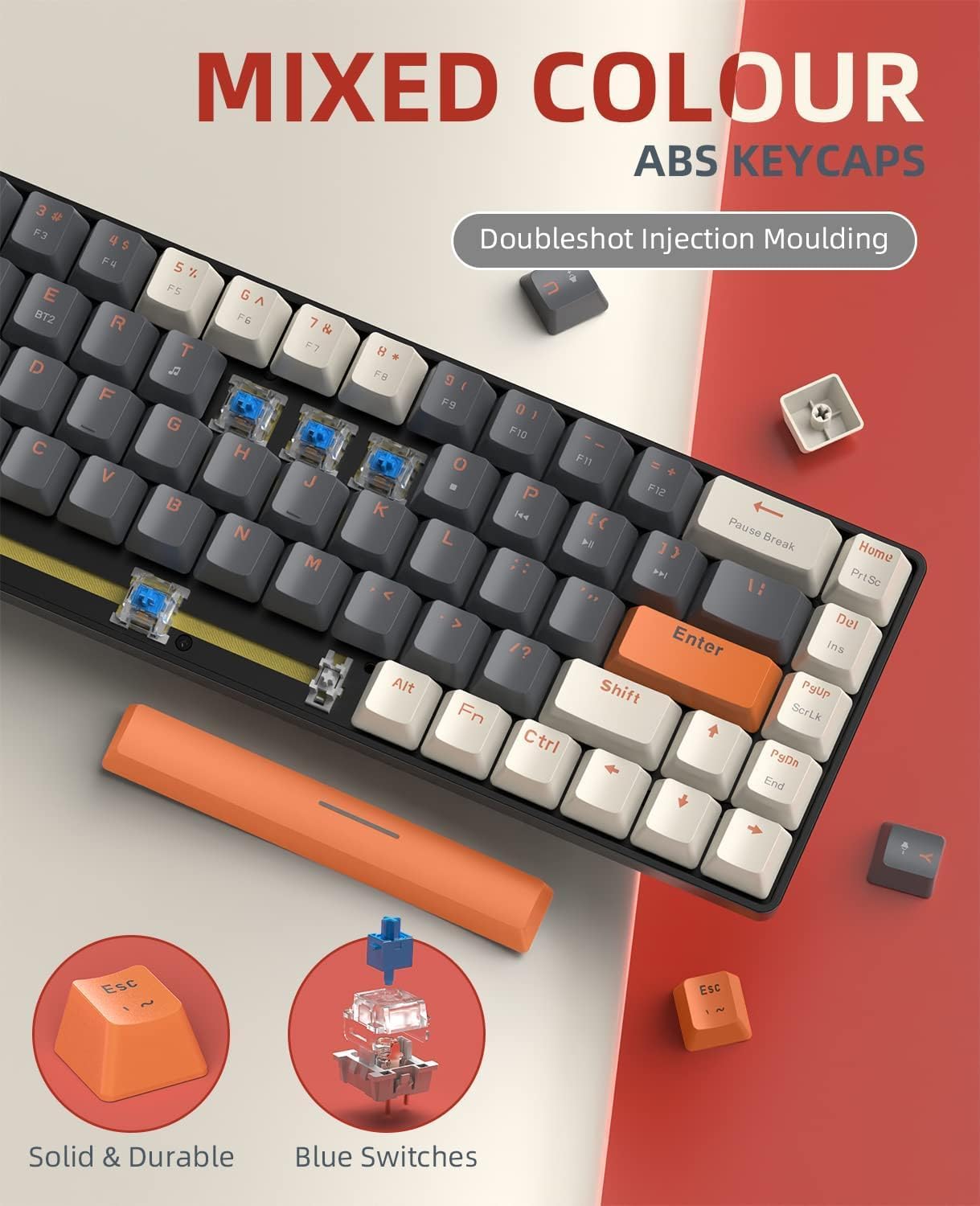
Detail of the mixed-color ABS keycaps, highlighting their Doubleshot Injection Moulding process and the blue mechanical switches.
Ġestjoni tal-Enerġija
The YINDIAO K68 keyboard is designed with smart power-saving features to maximize battery life.
- Modalità Sleep Awtomatika: If the keyboard is idle for 30 seconds, it will automatically enter sleep mode to conserve power.
- Waking Up: To wake the keyboard from sleep mode, simply press any key.
- Ħajja tal-batterija: Under normal usage, the keyboard can operate for approximately 3 to 6 months on a single set of AAA batteries.
- Indikazzjoni Baxxa tal-Batterija: If keys stop functioning correctly or connection becomes unstable, it may indicate low battery. Replace the AAA batteries as needed.

Visual representation of the keyboard's battery power and smart power-saving capabilities, including its automatic sleep mode.
Manutenzjoni
Proper maintenance will extend the life and performance of your YINDIAO K68 keyboard.
- Tindif: Regularly clean the keyboard with a soft, dry cloth. For deeper cleaning, remove keycaps using the provided puller and use compressed air to clear debris from between the switches.
- Keycap and Switch Replacement: Refer to the "Key Functions and Layout" section for instructions on how to safely remove and replace keycaps and switches.
- Ħażna: When not in use for extended periods, turn off the keyboard using the power switch and store it in a dry, dust-free environment.
Issolvi l-problemi
| Problema | Kawża Possibbli | Soluzzjoni |
|---|---|---|
| It-tastiera mhux qed tikkonnettja/tirrispondi. | Low batteries, keyboard off, incorrect mode, pairing issue, receiver not plugged in. | Replace batteries, turn on keyboard, switch to correct mode (2.4G/BT1/BT2), re-pair Bluetooth, ensure receiver is fully inserted. |
| Keys not registering input. | Low batteries, faulty switch, debris under keycap. | Replace batteries, try swapping the switch with a known good one, clean under the keycap. |
| Bluetooth connection unstable/laggy. | Interferenza, distanza mill-apparat, batterija baxxa. | Move closer to device, reduce interference from other wireless devices, replace batteries. |
| 2.4 GHz connection unstable. | Interference, distance from receiver, receiver not properly inserted. | Move closer to receiver, ensure receiver is fully inserted, try a different USB port. |
Speċifikazzjonijiet
| Karatteristika | Dettall |
|---|---|
| Brand | YINDIAO |
| Mudell | K68 |
| Teknoloġija tal-Konnettività | Bluetooth 5.0 / 2.4 GHz Wireless |
| Numru ta' Ċwievet | 68 |
| Deskrizzjoni tat-Tastiera | Mekkaniċi |
| Tip ta' Swiċċ | Blue Clicky Switch (Hot-swappable 3-pin) |
| Materjal Keycap | ABS (Doubleshot Injection Moulding) |
| Sors tal-Enerġija | 2 x Batteriji AAA (mhux inklużi) |
| Apparati Kompatibbli | PC, Laptop, Smartphone, Tablet, Gaming Console |
| Sistema Operattiva | Windows 7/8/10/11/2000/XP, Vista, Mac OS, Android |
| Piż tal-Prodott | 670 g |
| Dimensjonijiet tal-Prodott | 33 x 10.8 x 5.7 ċm |
Garanzija u Appoġġ
For warranty information and technical support, please refer to the product packaging or contact your retailer. Keep your purchase receipt as proof of purchase for any warranty claims.
For common issues, please refer to the Troubleshooting section of this manual. If you require further assistance, please reach out to the customer support provided by your point of purchase.


