1. Introduzzjoni
Thank you for choosing the Beafon SL605 Silverline Flip Phone. This manual provides essential information for setting up, operating, and maintaining your device. The SL605 is designed with ease of use in mind, featuring large buttons, a clear display, and an SOS emergency call function, making it ideal for seniors.

Figure 1.1: Beafon SL605 Silverline Flip Phone (Closed)
This image shows the Beafon SL605 flip phone in its closed state, displaying the external screen with the current time and date. The phone has a sleek black and silver design.
2. Kontenut tal-Pakkett
Jekk jogħġbok iċċekkja l-kontenut tal-pakkett meta tiftaħ il-kaxxa. Jekk xi oġġetti huma nieqsa jew bil-ħsara, ikkuntattja lill-bejjiegħ tiegħek.
- Beafon SL605 Flip Phone
- Batterija tal-jone tal-litju rikarikabbli
- Iċċarġjar Cable
- Charging Cradle (if included with your model)
- Manwal għall-Utent (dan id-dokument)
3. Device Overview
Familiarize yourself with the key components of your Beafon SL605.

Figure 3.1: Beafon SL605 Silverline Flip Phone (Open)
This image displays the Beafon SL605 flip phone in its open position, revealing the internal color display and the large, illuminated keypad. The keypad features clearly marked buttons for easy dialing and navigation.
3.1 Quddiem View (Magħluq)
- Display Estern: Shows time, date, battery status, and incoming call information.
- LED ta' notifika: Indicates new messages or missed calls.
3.2 Quddiem View (Miftuħ)
- Wiri Intern: 2.4-inch color screen for menus, contacts, and messages.
- Tastiera: Large, illuminated buttons for dialing and navigation. Includes dedicated call, end call, and SOS buttons.
- Ċwievet tan-Navigazzjoni: Up, Down, Left, Right, and OK/Confirm buttons.
- Photo Contact Indicator: Feature to display contact photos.
3.3 Wara View

Figura 3.2: Wara View of Beafon SL605
This image shows the back of the Beafon SL605 flip phone, highlighting the prominent SOS emergency call button and the speaker grille at the bottom.
- Buttuna ta' Emerġenza SOS: Press and hold to activate the emergency call sequence.
- Kelliem: For loud ringtones and hands-free calls.
3.4 Ġenb View
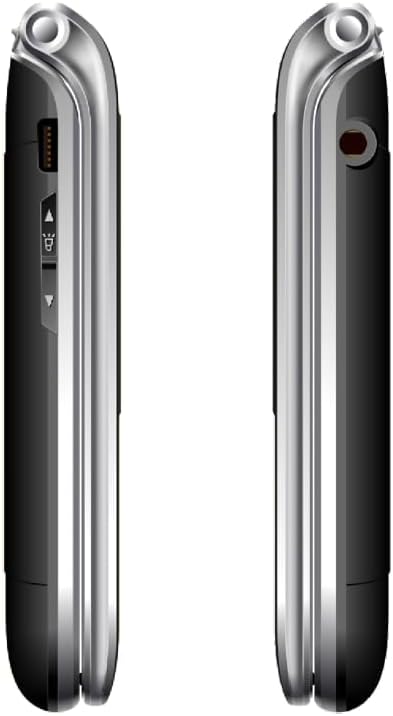
Figura 3.3: Ġenb View of Beafon SL605
Din l-immaġni tippreżenta naħa view of the Beafon SL605 flip phone, illustrating the charging port and volume control buttons located on the side of the device.
- Port tal-Iċċarġjar: For connecting the charging cable or placing in the charging cradle.
- Buttuni tal-Volum: Adjust call volume and ringtone volume.
- Jack tal-headphone: Port ta' 3.5 mm għall-headphones.
4. Setup
4.1 Installazzjoni tal-Batterija u s-SIM Card
- Neħħi l-għatu ta' wara tat-telefon billi tiftaħu bil-mod mill-islott.
- Insert your SIM card into the designated slot. Ensure the gold contacts face downwards and the cut corner aligns with the slot.
- Insert the Lithium-ion battery, aligning the contacts with those in the phone.
- Erġa’ poġġi l-għatu ta’ wara, billi tagħfas sew sakemm tikklikkja f’postu.
4.2 Iċċarġjar tal-batterija
Qabel l-ewwel użu, iċċarġja l-batterija tat-telefon kompletament.
- Connect the charging cable to the phone's charging port or place the phone in its charging cradle.
- Ipplaggja t-tarf l-ieħor tal-kejbil fi żbokk tad-dawl.
- L-ikona tal-batterija fuq id-displej tindika l-istatus tal-iċċarġjar. Iċċarġjar sħiħ tipikament jieħu sagħtejn jew tlieta.
4.3 Tixgħel/Jitfi
- Biex Tixgħel: Agħfas u żomm il- Tmiem is-Sejħa/Qawwa buttuna sakemm l-iskrin jixgħel.
- Biex Tifi: Agħfas u żomm il- Tmiem is-Sejħa/Qawwa button until a power-off prompt appears, then confirm.
5. Istruzzjonijiet Operattivi
5.1 Tagħmel u Riċeviment Sejħiet
- To Dial: Open the phone, enter the phone number using the keypad, and press the Ċempel buttuna.
- Mill-Kuntatti: Navigate to the "Contacts" menu, select a contact, and press the Ċempel buttuna.
- Biex Twieġeb: Meta jdoqq it-telefon, iftaħ il-flip jew agħfas il-buttuna Ċempel buttuna.
- Biex Tispiċċa s-Sejħa: Agħfas il- Tmiem Sejħa button or close the flip.
5.2 SOS Emergency Call Function
The SOS button is located on the back of the phone. It allows you to quickly contact pre-set emergency numbers.
- Issettjar tan-Numri SOS: Mur fuq Menu > SOS Settings to add up to 5 emergency contacts.
- Attivazzjoni tal-SOS: Agħfas u żomm il- Buttuna SOS on the back of the phone for 3 seconds.
- The phone will automatically call the first number in the SOS list. If unanswered, it will call the next number, and so on, cycling through the list up to 3 times.
- An emergency SMS message will also be sent to all SOS contacts.
5.3 Messaging (SMS)
- To Send: Mur fuq Menu > Messages > Write Message. Enter your message and select a recipient from contacts or enter a number.
- To Read: New messages will be indicated by a notification. Go to Menu > Messaġġi > Inbox biex taqra.
5.4 Settings tat-Telefon
Access various settings via the Menu buttuna.
- Volum tat-Telefon: Adjust using the side volume buttons or in Menu> Settings> Profiles.
- Number Announcement: Enable or disable the feature that announces dialed numbers by button press in Menu > Settings > Call Settings.
- Lingwa: The device supports multiple languages. Change the interface language in Menu > Settings > Phone Settings > Language. (Note: Some models may have limited language options, such as German as a primary language.)

Figure 5.1: Beafon SL605 Photo Contact Feature
This image shows two open Beafon SL605 phones side-by-side. The phone on the right demonstrates the photo contact feature, where a contact's picture is displayed on the screen, making it easier to identify callers.
6. Manutenzjoni u Kura
- Keep the phone dry. Liquids can corrode electronic circuits.
- Tużax kimiċi ħarxa, solventi tat-tindif, jew deterġenti qawwija biex tnaddaf it-telefon. Imsaħ b'ċarruta ratba u nadifa.amp drapp.
- Do not store the phone in high temperatures, as this can shorten the life of electronic devices, damage batteries, and warp or melt certain plastics.
- Do not store the phone in cold temperatures, as moisture can form inside the phone when it returns to normal temperature, which could damage the electronic circuit boards.
- Do not drop, knock, or shake the phone. Rough handling can break internal circuit boards and fine mechanics.
- The phone has IP54 protection against dust and splashes. While it offers some protection, it is not waterproof and should not be submerged in water.
7 Issolvi l-problemi
| Problema | Kawża Possibbli | Soluzzjoni |
|---|---|---|
| It-telefon ma jixgħelx. | Il-batterija hija eżawrita jew mhux installata sew. | Iċċarġja l-batterija. Kun żgur li l-batterija hija mdaħħla sew. |
| Ma nistax nagħmel jew nirċievi telefonati. | No SIM card, SIM card not inserted correctly, or no network signal. | Ensure SIM card is properly inserted. Check network signal strength. Contact your service provider if issues persist. |
| Sound is too low/high. | Volume settings are incorrect. | Adjust volume using the side buttons during a call or in the phone's settings. |
| Il-buttuna SOS mhux qed taħdem. | SOS numbers not set or incorrect. | Verify that SOS emergency numbers are correctly configured in the settings. |
| External display is blank or white. | Possible software glitch or hardware issue. | Try restarting the phone. If the problem persists, contact customer support. |
8. Speċifikazzjonijiet
- Mudell: Beafon SL605
- Tip ta' Prodott: Telefon Mobbli li Jintrewa
- Kulur: Iswed
- Sistema Operattiva: Beafon OS
- Wiri Intern: 2.4 inches (6.09 cm) Color LCD
- Display Estern: 1.44 inches (3.65 cm) Color LCD
- Teknoloġija Ċellulari: 2G
- Konnettività: Bluetooth, Ġakk ta' 3.5 mm
- Karatteristiċi Speċjali: IP54 Dust and Splash Protection, Rubberized Surface, Ergonomic Design, Extra Large Illuminated Buttons, Extra Loud Ringtone, Photo Contact Indicator, Number Announcement (optional)
- Batterija: Jonju tal-litju (inkluż)
- Kapaċità tal-Ħżin tal-Memorja: 32 GB
- Manifattur: Beafon
- Pajjiż ta' Oriġini: Iċ-Ċina
9. Garanzija u Appoġġ
For warranty information, please refer to the warranty card included in your product packaging or contact your point of purchase. Beafon provides customer support for product inquiries and technical assistance.
Appoġġ onlajn: Visit the official Beafon websit għal FAQs, aġġornamenti tas-softwer, u informazzjoni ta' kuntatt.
Servizz tal-Klijent: Contact details for customer service can typically be found on the manufacturer's webis-sit jew fid-dokumentazzjoni tax-xiri tiegħek.
10. Informazzjoni Importanti dwar is-Sigurtà
- Do not attempt to disassemble or modify the phone. This can void the warranty and cause damage.
- Uża biss batteriji, ċarġers u aċċessorji approvati.
- Dispose of the phone and battery responsibly according to local regulations. Do not dispose of them in household waste.
- Avoid using the phone in extreme temperatures or highly humid environments.
- Keep the phone away from pacemakers and other medical devices.
- Do not use the phone while driving or operating heavy machinery.
11. Vidjows Uffiċjali tal-Prodott
Ma nstab l-ebda vidjow uffiċjali tal-prodott mill-bejjiegħ għal dan il-mudell fid-dejta pprovduta.


