1. Introduzzjoni
This manual provides comprehensive instructions for the installation, operation, and maintenance of the CAS CL5200-P Barcode Label Printing Scale. Please read this manual thoroughly before using the device to ensure proper functionality and safety.
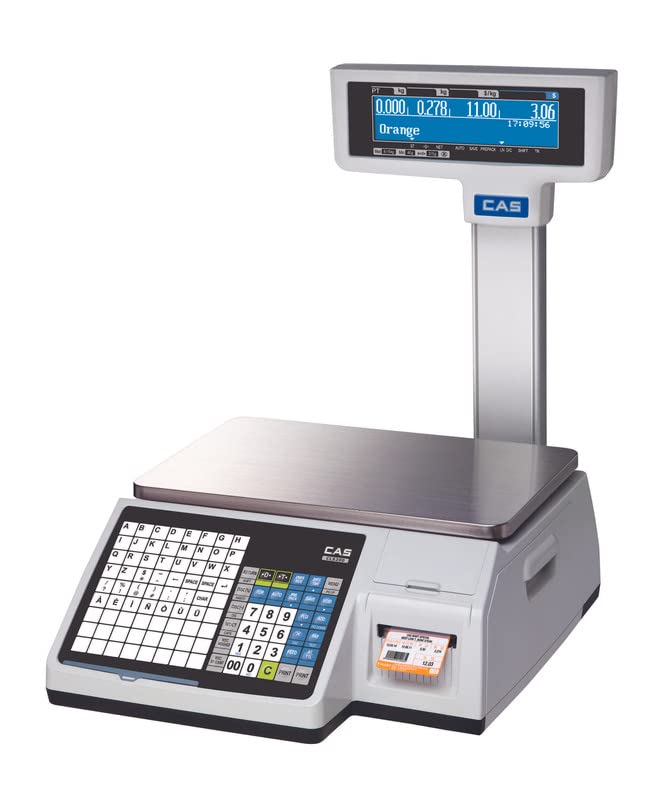
Figure 1.1: CAS CL5200-P Barcode Label Printing Scale. This image shows the complete scale unit with its weighing platter, keypad, display, and integrated label printer.
2. Informazzjoni dwar is-Sigurtà
Osserva l-prekawzjonijiet ta' sigurtà li ġejjin biex tevita korrimenti u ħsara lill-apparat:
- Ensure the scale is placed on a stable, level surface.
- Do not expose the scale to excessive moisture or direct sunlight.
- Uża biss l-adapter tal-enerġija fornut mal-unità.
- Evita li twaqqa’ l-iskala jew li tissottomettiha għal impatti qawwija.
- Do not attempt to disassemble or repair the scale yourself. Refer to qualified service personnel.
- Keep hands clear of moving parts during label printing.
3. Kontenut tal-Pakkett
Iċċekkja li l-oġġetti kollha elenkati hawn taħt huma inklużi fil-pakkett tiegħek:
- CAS CL5200-P Scale
- Kejbil tal-Enerġija
- Label Roll Starter Pack
- Manwal għall-Utent (dan id-dokument)
4. Prodott Aktarview
The CAS CL5200-P is a high-performance barcode label printing scale designed for retail environments. Key features include:
- Integrated Barcode Label Printer: Prints item-specific labels with pricing, weight, and barcodes.
- Networking Ready (LAN): Connects to your store network for central price updates and data synchronization.
- Stampar b'Veloċità Għolja: Produces labels quickly with 202 dpi resolution.
- Wiri Doppju: Features LCD screens for both operator and customer viewing.
- User-Friendly PLU Management: Stores up to 10,000 PLUs (Price Look-Up units) for fast item lookup.
- Retail-Focused Design: Optimized for use with fresh produce, meats, deli items, and pre-packaged goods.

Figura 4.1: Aktarview of CL5200-P features, highlighting its capacity, platter size, and printing speed.

Figure 4.2: The scale supports 45 pre-installed label formats for various applications.

Figure 4.3: Capability to store 10,000 PLUs and 1,000 ingredients for extensive product management.

Figure 4.4: The display shows menu codes for simplified navigation and operation.
5. Setup
- Spakkjar: Neħħi l-iskala u l-komponenti kollha mill-imballaġġ bir-reqqa. Żomm l-imballaġġ għal trasport jew ħażna fil-futur.
- Pjazzament: Place the scale on a firm, level, and stable surface, away from direct sunlight, vibrations, and drafts. Ensure adequate ventilation around the unit.
- Konnessjoni tal-Enerġija: Connect the power cable to the scale's power input port and then plug it into a suitable electrical outlet.
- Qawwa Inizjali Mixgħula: Press the power button. The display will illuminate, and the scale will perform a self-test.
- Konnessjoni man-Netwerk (Mhux obbligatorja): For LAN connectivity, connect an Ethernet cable from the scale's LAN port to your network router or switch. Refer to the network setup guide for detailed configuration.
- Installazzjoni tar-Romblu tat-Tikketti:
- Iftaħ il-qoxra tal-printer.
- Daħħal ir-romblu tat-tikketti fl-islott apposta, waqt li tiżgura li t-tikketti jidħlu b'mod korrett.
- Pull a small length of labels out and close the cover. The scale may automatically feed the first label to align.
6. Istruzzjonijiet Operattivi
6.1 Użin Bażiku
- Ensure the scale displays "0.000 kg" before placing an item. If not, press the ŻERO ċavetta.
- Place the item to be weighed on the center of the weighing platter.
- The weight will be displayed on both the operator and customer LCD screens.
6.2 Funzjoni tat-tara
To weigh an item in a container, use the tare function:
- Place the empty container on the weighing platter.
- Agħfas il- TARE key. The display will return to "0.000 kg".
- Place the item inside the container. The display will show only the net weight of the item.
- Biex tneħħi t-tara, neħħi l-kontenitur u agħfas il-buttuna TARE ċavetta mill-ġdid.
6.3 PLU Management and Label Printing
The CL5200-P allows for efficient management of Price Look-Up (PLU) items and printing of corresponding labels.
- Meta tfakkar PLU:
- Enter the PLU number using the numeric keypad.
- Agħfas il- PLU key. The item name and unit price will appear on the display.
- Weighing and Printing with PLU:
- Recall the desired PLU (as above).
- Place the item on the weighing platter. The total price will be calculated.
- Agħfas il- ISTAMPAR key to print the label.
- Programming a New PLU (Advanced):
Refer to the detailed programming section in the full user manual for advanced PLU setup, including item name, unit price, tare weight, and label format assignment. This typically involves entering a programming mode and navigating through menu codes.
7. Manutenzjoni
- Tindif:
- Skonnettja l-enerġija qabel it-tindif.
- Imsaħ il-barra tal-iskala b'ċarruta ratba u damp drapp. Uża deterġent ħafif jekk meħtieġ.
- Tużax prodotti tat-tindif li joborxu, solventi, u lanqas tgħaddasx l-iskala fl-ilma.
- Regularly clean the weighing platter, especially after weighing food items.
- Tindif tar-Ras tal-Printer:
If print quality degrades, gently wipe the thermal print head with an alcohol swab. Ensure the print head is cool before cleaning.
- Sostituzzjoni tar-Roll tat-Tikketti:
Replace the label roll when it runs out, following the installation steps outlined in Section 5.
8 Issolvi l-problemi
| Problema | Kawża Possibbli | Soluzzjoni |
|---|---|---|
| L-iskala ma tixgħelx. | No power supply; faulty power cable. | Check power cable connection; try a different outlet; ensure power button is pressed. |
| Qari tal-piż mhux preċiż. | Scale not level; external vibrations; foreign objects under platter. | Ensure scale is on a level surface; remove any obstructions; recalibrate if necessary (refer to service manual). |
| Labels not printing or poor print quality. | Label roll empty or incorrectly installed; dirty print head; incorrect label format. | Replace label roll; re-install label roll correctly; clean print head (Section 7); verify label format settings. |
| Problemi bil-konnessjoni tan-netwerk. | Loose Ethernet cable; incorrect network settings. | Check Ethernet cable; verify network configuration (IP address, subnet mask) in scale settings. |
9. Speċifikazzjonijiet
| Karatteristika | Dettall |
|---|---|
| Mudell | CL5200N-15KG-P |
| Brand | CAS |
| Kapaċità | 15 kg |
| Accuracy (Readout) | 5g |
| Daqs Pan | 382x246mm (15x10 pulzieri) |
| Tip ta 'Wiri | LCD (Wiri Doppju) |
| PLU Storage | Up to 10,000 PLUs |
| Formati tat-Tikketti | 45 fixed, 20 customized |
| Riżoluzzjoni tal-Istampar | 202 dpi |
| Konnettività | LAN (Networking Ready) |
| Materjal | Stainless Steel (platter), other components |
| Sors tal-Enerġija | AC/DC |
| Piż tal-oġġett | 3.5 kg |
| Dimensjonijiet (Pakkett) | 30 x 20 x 10 ċm |
| Pajjiż ta' Oriġini | Indja |
10. Garanzija u Appoġġ
For warranty information, technical support, or service requests, please contact CAS Weighing India Pvt Ltd. Keep your purchase receipt and product serial number readily available when contacting support.
- Manifattur: CAS Corporation
- Importatur/Min Ippakkja: CAS Weighing India Pvt Ltd
- Numru ta' Kuntatt: 9212559707 (as per packer information)
- Riżorsi onlajn: Visit the official CAS website for additional resources, FAQs, and software updates.


