1. Introduzzjoni
This manual provides essential information for setting up, operating, and maintaining your realme C30 smartphone. Please read it carefully to ensure optimal performance and longevity of your device.

Image: realme C30 smartphone in Lake Blue, showcasing its rear design and camera.
2. X'hemm fil-Kaxxa
Kun żgur li l-oġġetti kollha huma preżenti fil-pakkett:
- Realme C30 Smartphone
- Adapter
- Cable USB
- SIM Trej Ejector
- Ċarġer tal-karozza veloċi
3. Device Overview
Karatteristiċi Fiżiċi
- Dimensjonijiet: 1.97 x 3.31 x 6.65 pulzieri
- Piż tal-oġġett: 6 uqija
- Kulur: Lag Blu
Karatteristiċi Ewlenin
- Wiri: 6.5" HD+ Fullscreen with 88.7% Screen-to-body Ratio, 120Hz Touch Sampling Rate, 16.7M Screen Colors
- Proċessur: Unisoc T612 Octa-core, 12nm, up to 1.82GHz, ARM Mali-G57 GPU
- RAM: 2 GB (Note: Some variants may have 4GB RAM)
- Ħażna: 32 GB
- Kamera ta' wara: 8MP AI Camera with f/2.0 aperture, 4P lens
- Kamera ta' quddiem: 5MP
- Batterija: 5000mAh (Typical) Massive Battery, 4890mAh (Minimum)
- Sistema Operattiva: realme UI R Edition Based on Android 11
Layout tal-Apparat
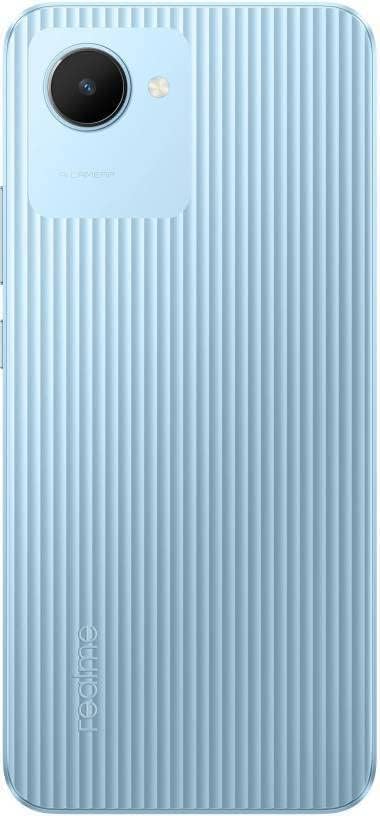
Immaġni: Wara view of the realme C30, highlighting the single camera and textured back panel.

Image: Top and bottom edges of the realme C30, showing the 3.5mm headset jack, Micro USB port, and speaker grille.

Immaġni: Ġenb views of the realme C30, illustrating the power button, volume rockers, and SIM tray slot.
4. Setup
4.1. SIM Card and Micro SD Installation
- Locate the SIM tray slot on the side of your device.
- Daħħal l-għodda tal-ejecter tat-trej tas-SIM fit-toqba ż-żgħira ħdejn it-trej.
- Imbotta bil-mod sakemm it-trej joħroġ 'il barra.
- Place your Nano SIM cards (supports Dual SIM) and Micro SD card into the designated slots on the tray.
- Daħħal mill-ġdid it-trej b'attenzjoni fl-apparat.
4.2. L-Ewwel Tixgħil u l-Konfigurazzjoni
- Agħfas u żomm il-buttuna tal-Power sakemm jidher il-logo ta' realme.
- Segwi l-istruzzjonijiet fuq l-iskrin biex tagħżel il-lingwa u r-reġjun preferut tiegħek.
- Qabbad ma' netwerk Wi-Fi biex tipproċedi bis-setup u tniżżel l-aġġornamenti meħtieġa.
- Review u aċċetta l-Ftehim tal-Liċenzja tal-Utent Aħħari u l-Politika tal-Privatezza.
- Idħol bil-kont Google tiegħek jew oħloq wieħed ġdid.
- Set up your preferred screen lock method (PIN, Password, Pattern, Face recognition, or Fingerprints).
- Choose your display mode (Light or Dark).
- Complete the remaining setup steps to access your device's home screen.
5. Tħaddim tat-Tagħmir Tiegħek
5.1. Navigazzjoni Bażika
Navigate your device using intuitive touch gestures. Swipe up, down, left, or right to move between screens and menus. Tap to select items, and long-press for additional options.
5.2. Ġestjoni tal-batterija
Your realme C30 is equipped with a 5000mAh massive battery for extended usage. To optimize battery life:
- Ippermettiet Ultra Saving Mode from the Quick Settings panel for prolonged standby time at low power levels.
- Aġġusta s-settings tal-luminożità tal-iskrin u t-timeout tal-iskrin.
- Close background applications when not in use.
5.3. Użu tal-kamera
Launch the Camera app to capture photos and videos. The 8MP AI rear camera and 5MP front camera offer various modes and features.
- Tektek il-buttuna tax-shutter biex tieħu ritratt.
- Aqleb bejn il-modi tar-ritratti u tal-vidjo.
- Utilize AI features for enhanced image quality.
5.4. Konnettività
L-apparat tiegħek jappoġġja diversi għażliet ta' konnettività:
- 4G LTE: Enjoy fast mobile data speeds. (Note: Not for USA Market. Supports Latin Europe bands.)
- Wi-Fi: Qabbad ma' netwerks mingħajr fili għal aċċess għall-internet.
- Bluetooth: Pair with compatible accessories like headphones or speakers.
- GPS/GLONASS/GALILEO: For accurate location services.
- Mikro USB: Għall-iċċarġjar u t-trasferiment tad-dejta.
- Jack tal-headset ta' 3.5mm: Għal aċċessorji awdjo bil-fili.
6. Manutenzjoni
6.1. Iċċarġjar
Use the provided 10W charging adapter and USB cable to charge your device. Connect the Micro USB end to your phone and the adapter to a power outlet.
6.2. Aġġornamenti tas-Software
Żomm is-softwer tat-tagħmir tiegħek aġġornat biex tiżgura prestazzjoni u sigurtà ottimali. Mur fuq Settings > About phone > realme UI version biex tiċċekkja u tinstalla aġġornamenti.
6.3. Tindif
Gently wipe your device with a soft, lint-free cloth. Avoid using harsh chemicals or abrasive materials that could damage the screen or body.
7 Issolvi l-problemi
7.1. L-Apparat Mhux Qed Jixgħel
- Ensure the battery is charged. Connect the device to the charger for at least 15 minutes before attempting to power on.
- Agħfas u żomm il-buttuna tal-Qawwa għal 10-15-il sekonda biex twettaq restart furzat.
7.2. L-Applikazzjonijiet Jiffriżaw jew Jiġġarraf
- Agħlaq l-app problematika u erġa' iftaħha.
- Neħħi l-cache u d-dejta tal-app permezz ta' Settings > Apps > [Isem tal-App] > Ħażna.
- Ensure your device's software and all apps are updated to their latest versions.
7.3. Ħajja Fqira tal-Batterija
- Naqqas il-luminożità tal-iskrin u ssettja timeout iqsar tal-iskrin.
- Iddiżattiva l-Wi-Fi, il-Bluetooth, u l-GPS meta ma tkunx qed tużahom.
- Identify and close power-consuming background apps.
- Enable Ultra Saving Mode for critical situations.
8. Speċifikazzjonijiet
| Karatteristika | Speċifikazzjoni |
|---|---|
| Isem tal-Mudell | RMX3511 |
| Dimensjonijiet tal-Prodott | 1.97 x 3.31 x 6.65 pulzieri |
| Piż tal-oġġett | 6 uqija |
| Sistema Operattiva | realme UI R Edition Based on Android 11 |
| Veloċità tas-CPU | 1820 MHz (1.82GHz) |
| RAM | 2 GB (Note: Some variants may have 4GB) |
| Kapaċità tal-Ħżin tal-Memorja | 32 GB |
| Daqs tal-Iskrin | 6.5 Pulzier |
| Riżoluzzjoni | 1280 x 720 (HD+) |
| Kapaċità tal-batterija | 5000 Milliampqabel is-siegħa (mAh) |
| Ħin tat-Taħdit bit-Telefon | 45.3 Sigħat |
| Kamera ta' wara | Kamera AI 8MP |
| Kamera ta' Quddiem | 5MP |
| Karatteristiċi Speċjali | 4K Video Recording, Dual SIM, Fast Charging Support |
| Teknoloġiji tal-Konnettività | USB, Cellular (LTE) |
| Awdjo Jack | 3.5 mm |
9. Garanzija u Appoġġ
For warranty information and customer support, please refer to the documentation included with your product or visit the official realme websit. Tista' wkoll iżżur il- Ħanut realme fuq Amazon għal aktar dettalji dwar il-prodott u riżorsi ta' appoġġ.


