1. Introduzzjoni
Thank you for choosing the COOKTRON 2000W Portable Induction Cooktop. This appliance is designed for efficient and convenient cooking, featuring rapid heating, precise temperature control, and a sleek, portable design. Please read this manual thoroughly before use to ensure safe operation and optimal performance.

Image 1.1: COOKTRON Portable Induction Cooktop in use.
Karatteristiċi ewlenin:
- Tisħin Rapidu: 2000W power with Boost function for quick and efficient cooking.
- Kontroll preċiż: 10 power levels and temperature adjustment for versatile cooking.
- Convenient Timer: Up to 4-hour timer for precise cooking duration.
- Karatteristiċi tas-Sigurtà: Equipped with a child safety lock for enhanced protection.
- Faċli biex tnaddaf: High-quality scratch-resistant glass surface for simple maintenance.
- Kompatibilità versatili ta' Cookware: Works with various magnetic cookware types.
2. Informazzjoni Importanti dwar is-Sigurtà
Jekk jogħġbok aqra u ifhem l-istruzzjonijiet kollha tas-sigurtà qabel ma tuża l-apparat. Jekk ma ssegwix dawn l-istruzzjonijiet, dan jista' jirriżulta f'xokk elettriku, nar, jew korriment serju.
Prekawzjonijiet Ġenerali tas-Sigurtà:
- Tgħaddix il-cooktop fl-ilma jew f'xi likwidu ieħor.
- Żgura li l-iżbokk tad-dawl jaqbel mal-voltage speċifikat fuq l-apparat.
- Always place the cooktop on a stable, flat, heat-resistant surface.
- Do not touch the cooktop surface immediately after use, as it may still be hot from residual heat.
- Keep the appliance out of reach of children and pets. Use the child safety lock feature.
- Do not place metallic objects such as knives, forks, spoons, or lids on the induction cooktop surface, as they can become hot.
- Aċċerta ruħek li jkun hemm ventilazzjoni adegwata madwar il-cooktop waqt it-tħaddim. Timblokkax il-ventijiet tal-arja.
- Unplug the cooktop from the power outlet when not in use and before cleaning.
- Tħaddimx l-apparat jekk il-korda tal-enerġija jew il-plagg ikunu bil-ħsara, jew jekk l-apparat ma jaħdimx sew jew ikun ġarrab xi ħsara b'xi mod.
- Only use compatible magnetic cookware. Non-magnetic cookware will not heat.

Image 2.1: Child Safety Lock feature for enhanced protection.
3. Prodott Aktarview
Familiarize yourself with the components and control panel of your COOKTRON Induction Cooktop.
Komponenti:
- Induction Cooking Surface (Glass)
- Control Panel (Touch Buttons)
- Wiri Diġitali
- Air Vents (for cooling)
- Korda tal-Enerġija

Image 3.1: Control Panel and Key Features.
Funzjonijiet tal-Panew tal-Kontroll:
- Buttuna mixgħul/mitfi: Jixgħel jew jitfi l-unità.
- Buttuna tal-Funzjoni: Switches between Power (Wattage) mode and Temperature mode.
- Buttuni '+' / '-': Adjusts power level, temperature, or timer settings.
- Booster Button: Activates maximum power for rapid heating.
- Buttuna tat-Tajmer: Jissettja t-tajmer tat-tisjir.
- Indikatur tal-Lock tat-Tfal: Indicates when the child lock is active.
4. Setup
Before first use, follow these steps to set up your induction cooktop.
- Spakkjar: Carefully remove the cooktop from its packaging. Retain the packaging for future storage or transport.
- Pjazzament: Place the cooktop on a dry, stable, flat, and heat-resistant surface. Ensure there is at least 10 cm (4 inches) of clear space around all sides of the cooktop for proper ventilation. Do not place it near heat sources or on metallic surfaces that could interfere with induction.
- Konnessjoni tal-Enerġija: Plug the power cord into a standard electrical outlet. Ensure the outlet's voltage matches the cooktop's requirements (220-240V for European models).
- Tindif Inizjali: Imsaħ il-wiċċ tal-ħġieġ b'ċarruta ratba u damp drapp qabel l-ewwel użu.

Image 4.1: Portable design and dimensions for placement consideration.
5. Istruzzjonijiet Operattivi
5.1 Oġġetti tat-Tisjir Kompatibbli
The COOKTRON Induction Cooktop requires cookware with a magnetic base. Compatible materials include:
- Ħadid fondut
- Azzar Inossidabbli Manjetiku
- Enamelled Iron
- Cookware with a magnetic base (test with a magnet)
Materjali inkompatibbli: Ceramic, Glass, Aluminum, Copper, or any non-magnetic cookware.
Ensure the cookware base diameter is between 12 cm (4.73 inches) and 26 cm (10.23 inches) for optimal performance.

Image 5.1: Cookware Compatibility Guide.
5.2 Operazzjoni Bażika
- Poġġi oġġetti tat-tisjir kompatibbli mal-ikel fiċ-ċentru tal-cooktop.
- Agħfas il- Mixgħul/Mitfi button to turn on the cooktop. The display will light up.
- The cooktop will default to Power mode. Use the '+' u '-' buttons to adjust the power level (from 200W to 2000W).
- To switch to Temperature mode, press the Funzjoni buttuna. Uża '+' u '-' biex tissettja t-temperatura mixtieqa.

Image 5.2: Power and Temperature Settings.
5.3 Boost Funzjoni
Agħfas il- Booster button to instantly activate the maximum power (2000W) for rapid boiling or searing. This function is ideal when you need to heat quickly.
5.4 Funzjoni Timer
- Waqt li l-cooktop ikun qed jaħdem, agħfas il-buttuna Timer buttuna.
- Uża l- '+' u '-' buttons to set the desired cooking time (up to 4 hours).
- The timer will count down, and the cooktop will automatically turn off when the set time expires.

Image 5.3: 4-Hour Timer Function.
5.5 Lock tas-Sigurtà tat-Tfal
Biex tattiva s-serratura tas-sigurtà tat-tfal, agħfas u żomm il-buttuna Lock tat-Tfal button (or the designated combination, refer to control panel icons) for a few seconds until the lock indicator appears. This will disable all control panel functions to prevent accidental operation. To deactivate, press and hold the button again until the indicator disappears.
6. Manutenzjoni u Tindif
Proper maintenance ensures the longevity and performance of your cooktop.
Tindif tal-Cooktop:
- Dejjem aqla’ l-cooktop u ħallih jiksaħ kompletament qabel ma tnaddfu.
- Imsaħ il-wiċċ tal-ħġieġ b'ċarruta ratba u damp drapp u deterġent ħafif. Għal tbajja’ iebsa, uża prodott tat-tindif mhux abrażiv iddisinjat speċifikament għal cooktops tal-ħġieġ.
- Dry the surface thoroughly with a clean, dry cloth to prevent water spots.
- Do not use abrasive pads, harsh chemicals, or steel wool, as these can scratch the glass surface.
- Clean the air vents regularly to prevent dust buildup, which can affect performance. Use a soft brush or vacuum cleaner.

Image 6.1: Easy to Clean and Scratch-Resistant Surface.
7 Issolvi l-problemi
If you encounter issues with your cooktop, refer to the following common problems and solutions.
| Problema | Kawża Possibbli | Soluzzjoni |
|---|---|---|
| Il-cooktop ma jixgħelx. | Mhux imdaħħal fil-plagg; mitfitage; sokit difettuż. | Iċċekkja l-konnessjoni tal-korda tal-enerġija; iċċekkja s-salvavita; ipprova sokit differenti. |
| Cookware not heating / Error code displayed. | Incompatible cookware; cookware not centered; no cookware present. | Use magnetic cookware; center cookware on the cooking zone; place cookware on the cooktop. |
| Loud fan noise during operation. | Normal operation (cooling fan); obstructed air vents. | A cooling fan operates during and after cooking. Ensure air vents are not blocked. |
| Il-cooktop jintefa bla mistenni. | Overheating protection activated; timer expired; power fluctuation. | Allow cooktop to cool; check timer settings; ensure stable power supply. |
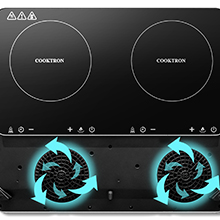
Image 7.1: Internal cooling fans for optimal performance.
Jekk il-problema tippersisti wara li tipprova dawn is-soluzzjonijiet, jekk jogħġbok ikkuntattja l-appoġġ għall-klijenti.
8. Speċifikazzjonijiet
| Brand | COOKTRON |
| Numru tal-Mudell | AKDEU-CT-FS-IC312-G |
| Kulur | Mess |
| Dimensjonijiet tal-Prodott (L x W x H) | 38.6 x 29 x 6.4 ċm (15.2 x 11.4 x 2.5 pulzieri) |
| Piż | 2.64 Kilogramma (5.82 lbs) |
| Qawwa | 2000 Watts |
| Materjal | Ħġieġ |
| Karatteristiċi Speċjali | 4-hour timer, Temperature adjustment |
| Elementi li jsaħħnu | 1 |
| Tip ta 'Kontrolli | Touch buttuni |
| Tip ta' Burner | Induzzjoni |
| Sors tal-Enerġija | Elettriku |
9. Garanzija u Appoġġ
For warranty information and customer support, please refer to the documentation included with your purchase or contact COOKTRON directly through their official website or the retailer where you purchased the product. Please have your model number (AKDEU-CT-FS-IC312-G) and purchase date ready when contacting support.


