Introduzzjoni
This manual provides detailed instructions for the setup, operation, and maintenance of your PCsensor 3-Key Mini Keypad. This wireless mechanical gaming keyboard is designed for customized hotkey programming, offering flexibility and enhanced control for various applications.

Image: The PCsensor 3-Key Mini Keypad in white, showcasing its three mechanical keys with red RGB backlighting. The compact design highlights its portability and functionality.
X'hemm fil-Kaxxa
Ivverifika li l-oġġetti kollha huma preżenti fil-pakkett:
- PCsensor 3-Key Mini Keypad (White-Bluetooth model)
- USB Type-C to USB-A Charging Cable
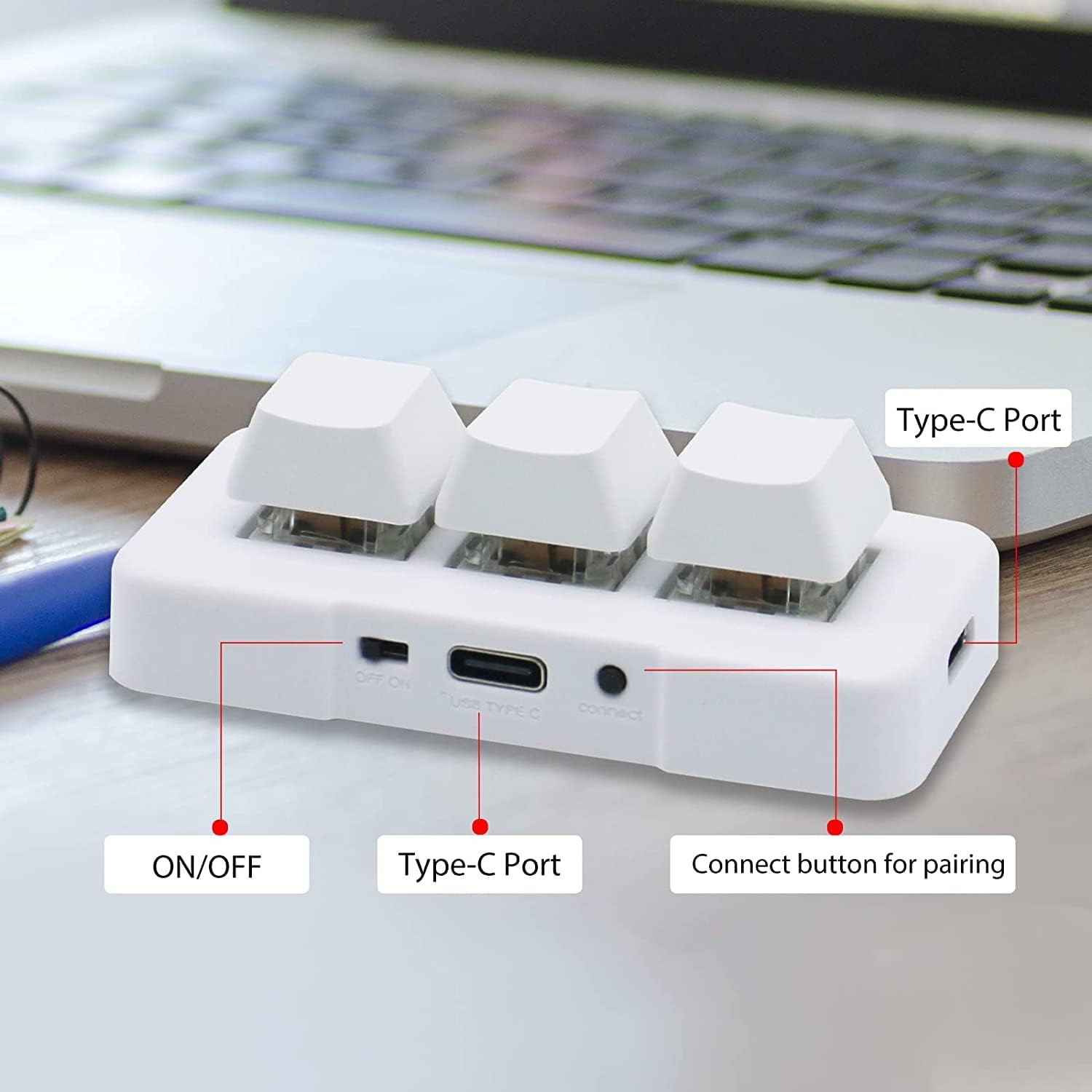
Image: A diagram illustrating the dimensions of the 3-Key Mini Keypad (approximately 3 inches long) and the included 59-inch (1500mm) USB Type-C charging cable.
Prodott Overview
Familiarize yourself with the components of your mini keypad:
- Ċwievet mekkaniċi: Three programmable keys with durable mechanical switches.
- Swiċċ mixgħul / mitfi: Located on the side for power control.
- Port USB tat-Tip Ċ: Għal konnessjoni bil-fili u ċċarġjar.
- Buttuna Qabbad: Used for Bluetooth pairing.
- Dawl ta' wara LED RGB: Customizable lighting under each key.

Immaġni: Close-up view of the white 3-Key Mini Keypad, clearly labeling the ON/OFF switch, USB Type-C port, and the small connect button for pairing.
Setup
Charging the Keypad
- Connect the provided USB Type-C cable to the keypad's Type-C port.
- Qabbad it-tarf l-ieħor tal-kejbil ma' sors ta' enerġija USB (eż., port USB tal-kompjuter, adapter tal-ħajt).
- The keypad's LED light will indicate charging status. A full charge typically takes 2 hours and can provide up to 3 months of use. The LED will flash every 3 seconds when the battery is low.
Għażliet ta' Konnettività
The keypad supports both wired (USB) and wireless (Bluetooth) connections.
Konnessjoni bil-fili (Modalità USB)
- Ensure the keypad is turned OFF billi tuża l-iswiċċ ON/OFF.
- Connect the USB Type-C cable from the keypad to your computer's USB port.
- The keypad will automatically be recognized as a standard keyboard. In USB mode, the key backlighting will typically display a blue light.
Wireless Connection (Bluetooth Mode)
- Turn the keypad ON billi tuża l-iswiċċ ON/OFF.
- Long press the "connect" button on the side of the keypad until the LED light starts flashing rapidly, indicating pairing mode.
- On your device (computer, smartphone, tablet), navigate to Bluetooth settings and search for new devices.
- Select "3 Key Mini Keypad" or a similar name from the list of available devices to pair.
- Once successfully paired, the LED light will stop flashing and remain solid, typically displaying a red light in wireless mode.

Image: The 3-Key Mini Keypad illustrating the different LED colors for connectivity modes: blue light indicates USB mode, and red light indicates wireless (Bluetooth) mode.
Nota: For initial setup and programming, it is recommended to connect the keypad to a Windows system first. Once programmed, it can be freely used with Windows, Linux, Mac OS, Android, and iOS systems.
Istruzzjonijiet Operattivi
Programmazzjoni Ewlenin
The 3-Key Mini Keypad is fully programmable, allowing you to assign custom hotkeys, shortcuts, or macros to each of its three keys. Programming is done via dedicated software.
- Download the official programming software from the PCsensor website. (Refer to the product packaging or manufacturer's website for the download link).
- Installa s-softwer fuq il-kompjuter Windows tiegħek.
- Connect the keypad to your computer via USB. Ensure the software recognizes the device.
- Within the software interface, select the key you wish to program.
- Assign the desired function (e.g., single key press, key combination, multimedia control, macro).
- Save the configuration to the keypad's onboard memory. The programmed functions will work across all compatible operating systems without needing the software running.

Image: A screenshot of the PCsensor programming software interface, showing options for customizing key functions and device settings. This software is essential for assigning specific commands to each key.

Image: A person interacting with the PCsensor programming software on a desktop computer, demonstrating the user interface for customizing the keypad's functions.
Kontroll LED RGB
The keypad features RGB LED backlighting. The lighting can often be controlled through the programming software, allowing you to adjust colors, effects, or turn them off to conserve battery life.
Manutenzjoni
Biex tiżgura l-lonġevità u l-prestazzjoni ottimali tat-tastiera tiegħek, segwi dawn il-linji gwida ta' manutenzjoni:
- Tindif: Uża drapp artab u niexef biex timsaħ il-wiċċ tat-tastiera. Għal ħmieġ iebes, neħħi ftitamp Jista' jintuża drapp b'sapun ħafif, biex tiżgura li l-ebda likwidu ma jidħol fl-apparat.
- Ħażna: Aħżen it-tastiera f'post frisk u niexef 'il bogħod mix-xemx diretta u minn temperaturi estremi.
- Kura tal-batterija: Avoid fully discharging the battery frequently. Charge the keypad regularly to maintain battery health.
- Evita Likwidi: Do not expose the keypad to water or other liquids.
- Immaniġġja b'Kura: Avoid dropping or subjecting the keypad to strong impacts.
Issolvi l-problemi
If you encounter issues with your PCsensor 3-Key Mini Keypad, refer to the following common problems and solutions:
| Problema | Soluzzjoni |
|---|---|
| Keypad not responding (Wired) |
|
| Keypad not connecting (Bluetooth) |
|
| Keys not performing programmed functions |
|
| Il-batterija tiskula malajr |
|
Speċifikazzjonijiet
| Karatteristika | Dettall |
|---|---|
| Numru tal-Mudell | 3 Key Mini Keypad |
| Konnettività | Bluetooth, USB-C (Bil-fili) |
| Numru ta' Ċwievet | 3 |
| Tip taċ-ċavetta | Mekkaniċi |
| Backlighting | LED RGB |
| Distanza bla fili | Sa 33 pied (10 metri) |
| Tip ta 'batterija | 1 Lithium Ion (inkluż) |
| Ħajja tal-batterija | Up to 3 months on a 2-hour charge (usage dependent) |
| Kompatibilità | Windows, Linux, Mac OS, Android, iOS |
| Dimensjonijiet | 3.11 x 2.2 x 1.54 pulzieri |
| Piż tal-oġġett | 2.82 uqija |
| Manifattur | PCsensor |
Garanzija u Appoġġ
PCsensor products are designed for durability and performance. For specific warranty information, please refer to the product packaging or the official PCsensor websit.
For technical support, troubleshooting assistance, or inquiries regarding your 3-Key Mini Keypad, please visit the PCsensor Store on Amazon or contact PCsensor customer service directly.
Verżjoni PDF tal-manwal tal-utent hija wkoll disponibbli biex titniżżel: Manwal għall-Utent (PDF)


