Introduzzjoni
This manual provides essential instructions for the safe and efficient operation of your Soundstream Smart Refrigerator Coffee Table. Please read this manual thoroughly before use and retain it for future reference.
Informazzjoni Importanti dwar is-Sigurtà
Dejjem segwi l-prekawzjonijiet bażiċi ta' sigurtà meta tuża apparati elettriċi biex tnaqqas ir-riskju ta' nar, xokk elettriku, u korriment personali.
- Ensure the product is placed on a stable, level surface.
- Tesponix l-unità għax-xita jew l-umdità.
- Żomm il-fetħiet tal-ventilazzjoni mingħajr ostakli.
- Tħaddimx b'korda tal-enerġija jew plagg bil-ħsara.
- Spluggja l-unità qabel it-tindif jew il-manutenzjoni.
- Tħallix lit-tfal jilagħbu bl-apparat.
Kontenut tal-Pakkett
- Soundstream Smart Refrigerator Coffee Table
- Korda tal-Enerġija
- Manwal għall-Utent
Prodott Overview
The Soundstream Smart Refrigerator Coffee Table combines a functional coffee table with integrated refrigeration, Bluetooth speakers, wireless charging, and additional power outlets.
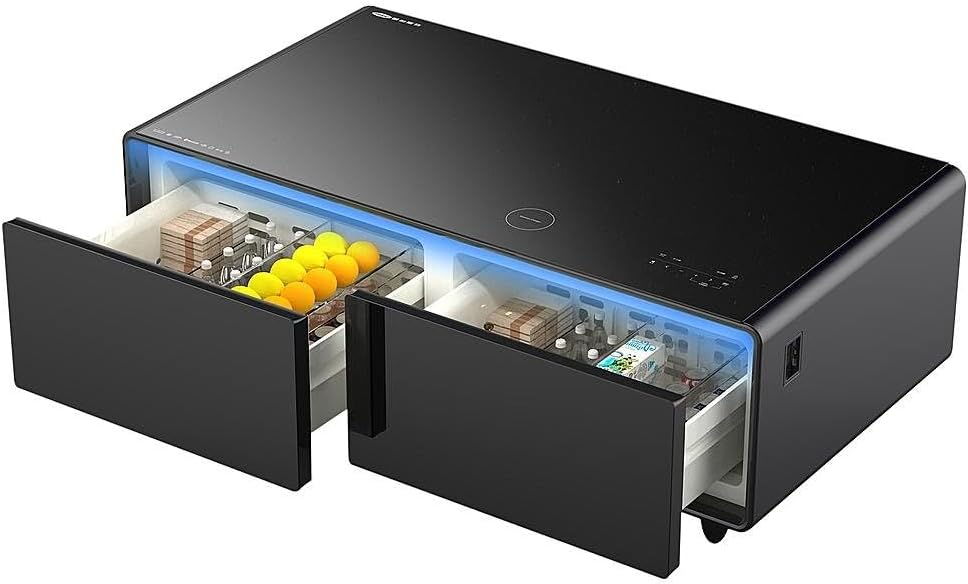
Figura 1: Quddiem view of the Soundstream Smart Refrigerator Coffee Table with both refrigerated drawers open, displaying beverages and snacks.
Karatteristiċi ewlenin:
- Dual Refrigerated Drawers: Two independent drawers with adjustable temperature settings. Each drawer has a capacity of 70 Liters.
- Bluetooth Speaker System: Integrated speakers for audio streaming.
- Iċċarġjar bla fili: 15W wireless charging pad on the tempered glass top.
- Portijiet USB: Two USB Type-A ports and one USB Type-C port for device charging.
- 110V Outlets: Two standard 110V AC outlets for powering other devices.
- Fuq tal-Ħġieġ Ittemprat: Durable and scratch-resistant surface with integrated touch controls.
- RGB Accent Lighting: Customizable lighting for ambiance.
- Xkaffa tal-Ħażna: Open shelf for additional storage or decorative items.

Figure 2: Annotated diagram showing the various features and components of the smart refrigerator coffee table, including the tempered glass top, wireless charger, touch controls, RGB accent lighting, USB ports, and the capacity of each drawer.

Figura 3: Wara view of the smart refrigerator coffee table, indicating the location of the 110V outlets, storage shelf, power AC input, and the Bluetooth speaker system.
Setup Istruzzjonijiet
- Spakkjar: Carefully remove the unit from its packaging. Retain packaging for future transport if needed.
- Pjazzament: Place the refrigerator coffee table on a flat, stable surface, ensuring adequate ventilation around the unit. Avoid direct sunlight or heat sources.
- Konnessjoni tal-Enerġija: Connect the power cord to the unit and then to a standard 110V AC wall outlet.
- Tkessiħ Inizjali: Allow the unit to stand upright for at least 2 hours before plugging it in. After plugging in, allow the drawers to cool for approximately 2-4 hours before placing items inside.
Istruzzjonijiet Operattivi
1. Refrigerator Drawer Controls
The tempered glass top features capacitive touch controls for managing the refrigerator drawers.

Figura 4: Dettaljat view of the smart touch controls on the glass surface, illustrating options for temperature, audio, and lighting adjustments.
- Activate Settings: Double-click the circular icon above the temperature display to activate the settings for the drawers.
- Select Drawer: Use the left/right arrow icons to select either the left or right drawer for temperature adjustment.
- Aġġusta t-Temperatura: Use the '+' and '-' icons to set the desired temperature. The temperature range for Drawer 1 is 37.4°F - 46.4°F (3°C - 8°C) and for Drawer 2 is 42.8°F - 53.6°F (6°C - 12°C).
- Modalità ECO: Press the 'ECO' icon to activate energy-saving mode.
Video 1: Demonstrates how to adjust the temperature settings for the refrigerator drawers using the touch controls on the glass top.
2. Bluetooth Speaker System
- Activate Sound Settings: Double-click the circular icon below the volume display to activate the settings for the sound system. The Bluetooth connection will initiate.
- Tqabbil: On your device, search for "Soundstream Fridge" in your Bluetooth settings and pair.
- Aġġusta Volum: Use the '+' and '-' icons to set the desired volume level. The accent lighting will reflect volume adjustments.
- Equalizer/Sound Modes: Use the equalizer icon to cycle through different sound modes (if available).

Figure 5: The smart refrigerator coffee table with its blue accent lighting activated, indicating the aesthetic feature of the device.
3. Iċċarġjar bla fili
Place your Qi-compatible device on the "Wireless Charger" circle on the tempered glass top. Ensure the device is centered for optimal charging.

Figure 6: A smartphone being charged wirelessly on the integrated charging pad located on the tempered glass surface of the table.
4. USB Ports and 110V Outlets
The unit includes two USB Type-A ports, one USB Type-C port, and two 110V AC outlets for charging and powering additional devices.
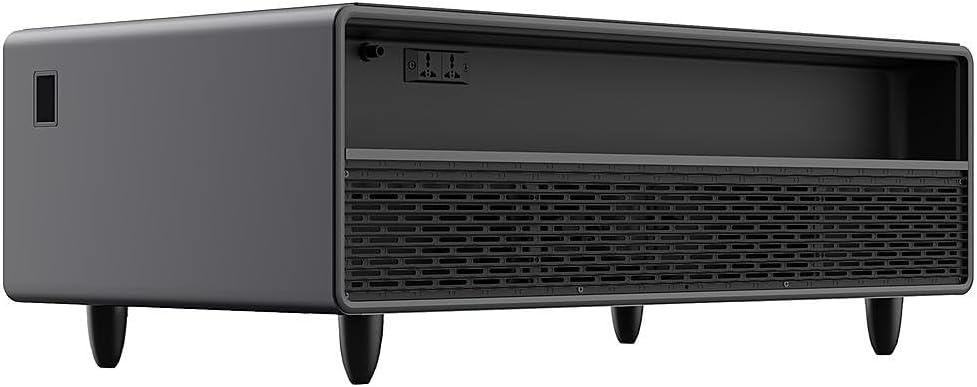
Figure 7: Side panel of the smart refrigerator coffee table, highlighting the accessible USB ports and 110V power outlets.
Manutenzjoni u Kura
- Tindif: Skonnettja l-unità qabel ma tnaddafha. Imsaħ il-barra b'ċarruta ratba u nadifa.amp cloth. For the glass top, use a glass cleaner. Do not use abrasive cleaners or solvents.
- Tindif tal-kexxun: Remove drawers and wash with mild soap and water. Ensure they are completely dry before reinserting.
- Ventilazzjoni: Regularly check and clean the ventilation grilles to ensure proper airflow and efficient cooling.
- Korda tal-Enerġija: Inspect the power cord periodically for any damage. If damaged, contact customer support for replacement.
Gwida dwar is-sejbien ta 'problemi
| Problema | Kawża Possibbli | Soluzzjoni |
|---|---|---|
| L-unità ma tixgħelx. | L-ebda provvista tal-enerġija; il-korda tal-enerġija mhux imqabbda sew. | Ensure the power cord is securely plugged into both the unit and a working wall outlet. Check the circuit breaker. |
| Drawers are not cooling. | Temperature setting too high; ventilation blocked; door not closed properly. | Adjust temperature to a lower setting. Ensure adequate space around the unit for ventilation. Check that drawers are fully closed. |
| Bluetooth speakers not connecting. | Bluetooth not activated; device not in pairing mode. | Double-click the sound icon on the touch panel to activate Bluetooth. Ensure your device's Bluetooth is on and searching for devices. |
| L-iċċarġjar mingħajr fili mhux qed jaħdem. | Device not Qi-compatible; device not properly aligned; foreign objects on charging pad. | Verify your device supports Qi wireless charging. Reposition the device on the charging pad. Remove any objects between the device and the pad. |
Speċifikazzjonijiet
| Karatteristika | Dettall |
|---|---|
| Brand | Soundstream |
| Numru tal-Mudell | CT51-FRIDGE-BK |
| Dimensjonijiet tal-Prodott (L x W x H) | 51.25 x 27.5 x 18.25 pulzieri |
| Kapaċità tal-friġġ | 70 Liters per drawer (140 Liters total) |
| Temperature Range (Drawer 1) | 37.4°F - 46.4°F (3°C - 8°C) |
| Temperature Range (Drawer 2) | 42.8°F - 53.6°F (6°C - 12°C) |
| Tip ta' Installazzjoni | Countertop |
| Sistema ta 'Defrost | Awtomatiku |
| Iċċarġjar bla fili | 15W Qi-compatible |
| Portijiet USB | 2x USB Type-A, 1x USB Type-C |
| Ħwienet AC | 2x 110V |
| Tip ta' Materjal tal-Bieb | Stainless Steel |
| Materjal ta 'fuq | Ħġieġ ittemprat |
Garanzija u Appoġġ
For warranty information or technical support, please refer to the warranty card included with your product or visit the official Soundstream websit. Żomm il-prova tax-xiri tiegħek għal talbiet ta' garanzija.
Informazzjoni ta' Kuntatt: Jekk jogħġbok irreferi għal tal-manifattur website or product packaging for the most up-to-date contact details for customer service.


