Introduzzjoni
This manual provides detailed instructions for the installation, operation, and maintenance of your Blaupunkt MEMPHIS440BT 6.2" In-Dash Touch Screen DVD Receiver. Please read this manual thoroughly before using the product to ensure proper functionality and to prevent damage.
Prodott Overview
The Blaupunkt MEMPHIS440BT is a versatile in-dash multimedia receiver featuring a 6.2-inch touch screen display. It supports DVD/CD playback, Bluetooth connectivity for hands-free calling and audio streaming, USB and SD card media playback, and AM/FM radio. The unit is designed to be the central entertainment system in your vehicle.

Immaġni: Quddiem view of the Blaupunkt MEMPHIS440BT in-dash receiver with its remote control. The receiver features a 6.2-inch touch screen displaying various function icons like Radio, Disc, USB, SD, and Bluetooth. The remote control has numerous buttons for navigation and media control.
Informazzjoni dwar is-Sigurtà
- Always operate the vehicle safely. Do not operate the unit's functions that distract you from safe driving.
- Ensure proper wiring connections to prevent short circuits and electrical hazards.
- Ikkonsulta professjonist għall-installazzjoni jekk m'intix ċert dwar xi passi.
- Tesponix l-unità għall-umdità jew temperaturi estremi.
Setup u Installazzjoni
Kontenut tal-Pakkett
- Blaupunkt MEMPHIS440BT DVD Receiver
- Kontroll mill-bogħod
- Qfil tal-Wajers
- Ħardwer tal-Immuntar
- Manwal għall-Utent (dan id-dokument)
Dijagramma tal-Wiring
Refer to the detailed wiring diagram provided in the separate installation guide for specific connections. Ensure all connections are secure and correctly matched to your vehicle's electrical system.
Immaġni: Ġenb view of the Blaupunkt MEMPHIS440BT receiver, illustrating the various ports and connections on the rear and side panels, including the USB and Mini SD slots on the front left side.
Immuntar tal-Unità
- Neħħi l-istereo tal-karozza eżistenti mid-dashboard.
- Connect the wiring harness to the vehicle's wiring and the MEMPHIS440BT.
- Slide the MEMPHIS440BT into the dashboard opening until it clicks into place.
- Secure the unit using the provided mounting screws.
Istruzzjonijiet Operattivi
Qawwa mixgħul/mitfi
Agħfas il- QAWWA button (usually a knob on the left side) to turn the unit on or off. Hold for 2 seconds to power off.
Touch Screen Interface
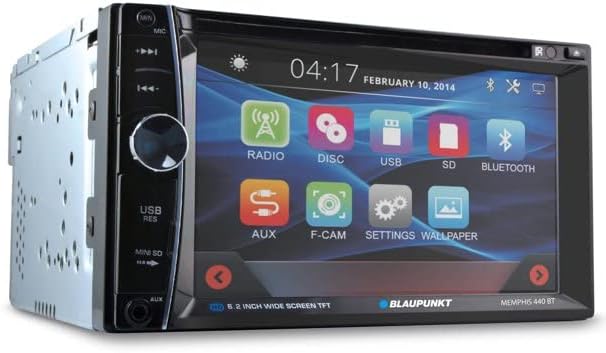
The 6.2-inch touch screen allows for intuitive control of all functions. Tap icons to select modes (Radio, Disc, USB, SD, Bluetooth, AUX, F-CAM, Settings, Wallpaper).

Immaġni: Quddiem angolat view of the Blaupunkt MEMPHIS440BT receiver, highlighting the touch screen interface with its main menu icons and the physical control knob on the left side.
Tqabbil tal-Bluetooth
- Fuq il-menu prinċipali, tektek il-buttuna Bluetooth ikona.
- Ippermetti Bluetooth fuq it-tagħmir mobbli tiegħek u fittex tagħmir disponibbli.
- Select "MEMPHIS440BT" from the list.
- Enter the default PIN "0000" if prompted.
- Ladarba tkun imqabbad, tista' tagħmel/tirċievi telefonati u tixxandar l-awdjo.
Media Playback (DVD/CD/USB/SD)
- DVD/CD: Daħħal diska fl-islott. L-unità awtomatikament taqleb għall-modalità Diska.
- USB: Insert a USB drive into the USB port. Tap the USB icon to access files.
- SD: Insert a miniSD card into the SD card slot. Tap the SD icon to access files.

Immaġni: Close-up view of the USB port and Mini SD card slot located on the front left side of the Blaupunkt MEMPHIS440BT receiver, beneath a protective flap.
Operazzjoni tar-Radju
- Tektek il- Radju icon to enter radio mode.
- Use the touch screen controls to scan for stations, tune manually, or select preset stations.
- To save a station, tune to the desired frequency, then press and hold a preset button on the screen.
Manutenzjoni
- Tindif: Use a soft, dry cloth to clean the touch screen and unit exterior. Do not use abrasive cleaners or solvents.
- Kura tad-Diska: Immaniġġja d-diski mit-truf tagħhom. Żommhom nodfa u ħielsa mill-grif.
- Aġġornamenti tal-Firmware: Check the official Blaupunkt webżur is-sit perjodikament għal kwalunkwe aġġornamenti tal-firmware disponibbli.
Issolvi l-problemi
| Problema | Kawża Possibbli | Soluzzjoni |
|---|---|---|
| Ebda qawwa | Wajers mhux korretti; Fjus maħruq | Iċċekkja l-konnessjonijiet tal-enerġija u tal-art; Ibdel il-fjus jekk meħtieġ. |
| L-ebda ħoss | Volume too low; Mute activated; Speaker wiring issue | Żid il-volum; Iddiżattiva l-mute; Iċċekkja l-konnessjonijiet tal-ispiker. |
| Il-Bluetooth mhux qed jgħaqqad | Device not in pairing mode; Incorrect PIN | Ensure device is discoverable; Re-enter PIN "0000". |
| Żball tad-diska | Diska maħmuġa jew imxarrba; Format tad-diska mhux korrett | Clean disc; Try a different disc; Ensure disc is compatible. |
Speċifikazzjonijiet
- Daqs tal-iskrin: 6.2 Pulzier
- Tip ta' wiri: LCD Touch Screen
- Tip tal-Midja: DVD, CD, USB, SD
- Konnettività: Bluetooth
- Numru tal-Mudell tal-Oġġett: MEMPHIS440BT
- Piż tal-oġġett: 4.25 liri
- Dimensjonijiet tal-pakkett: 9.69 x 9.17 x 6.85 pulzieri
- Manifattur: BLAUPUNKT
Garanzija u Appoġġ
For warranty information and technical support, please refer to the warranty card included with your product or visit the official Blaupunkt websit. Żomm l-irċevuta tax-xiri tiegħek bħala prova tax-xiri għal talbiet ta' garanzija.
Blaupunkt Official Websit: www.blaupunkt.com


