1. Introduzzjoni
The NETUM NT-2050 is a high-performance 2D/QR omnidirectional barcode scanner designed for efficient and accurate data capture. This device can read various 1D and 2D barcodes from labels, paper, and digital displays such as mobile phones or computer screens. Its plug-and-play design ensures easy integration into existing systems, making it suitable for retail, inventory management, and other applications requiring fast and reliable barcode scanning.

Quddiem view of the NETUM NT-2050 2D/QR Omnidirectional Barcode Scanner, showing its compact design and scanning window.
2. Komponenti tal-Prodott
Familiarize yourself with the main components of your NT-2050 scanner:

A detailed diagram of the NETUM NT-2050 barcode scanner, highlighting its key components such as the indicator light, scanning window, button, brand logo, USB interface, and buzzer, along with its physical dimensions (145mm height, 85mm width, 105mm depth).
- Dawl Indikatur: Provides status feedback (e.g., power, scan successful).
- Tieqa tal-Iskennjar: Żona fejn jinqraw il-barcodes.
- Buttuna: For specific functions or manual trigger (if applicable).
- Brand Logo: NETUM branding.
- Interface USB: For connecting to a host device.
- Buzzer: Provides audible feedback for scanning actions.
3. Setup u Konnettività
The NT-2050 scanner is designed for simple plug-and-play operation.
3.1. Konnessjoni tal-Iskaner
- Locate an available USB port on your computer (Windows, Linux, Mac).
- Insert the scanner's USB cable into the USB port.
- The scanner will automatically install necessary drivers (no manual driver installation required).
- The scanner is ready for use once the indicator light confirms power and readiness.
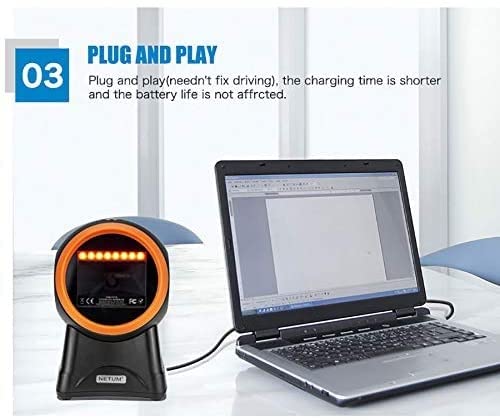
The NETUM NT-2050 barcode scanner connected to a laptop, illustrating its plug-and-play functionality via a USB port, requiring no additional driver installation.
3.2. Kompatibilità tas-Sistema
The NT-2050 is compatible with various operating systems:
- Windows (7, 8, 10)
- Linux
- Mac OS

An image illustrating the NETUM NT-2050 barcode scanner's compatibility with different operating systems, including Windows 7, Windows 8, Windows 10, and Mac OS.
4. Operazzjoni
The NT-2050 scanner offers efficient and versatile scanning capabilities.
4.1. Skennjar Bażiku
Position the barcode within the scanner's field of view. The omnidirectional design allows for scanning from various angles without precise alignment. A successful scan is typically indicated by an audible beep and/or a change in the indicator light.

An illustration showing the NETUM NT-2050 scanner's strong recognition ability and fast decoding speed across a variety of 1D and 2D barcode types, including those found on products and labels.
4.2. Multi-Function Scanning
The NT-2050 supports scanning from various sources, including:
- Physical labels on products and packaging.
- Documents such as courier receipts and express lists.
- Digital displays, including smartphone screens, even in low backlight conditions.
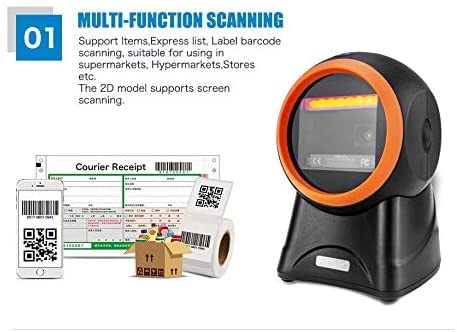
The NETUM NT-2050 scanner shown in a multi-function scanning scenario, capable of reading barcodes from items, express lists, labels, and smartphone screens, suitable for various retail and inventory environments.
4.3. Language and Sound Settings
The scanner supports automatic recognition of various keyboard languages (e.g., UK, US, French, German, Italian, Japanese, Spanish, Russian, Turkish). It also allows for beep volume adjustment and setting of prefixes or suffixes to scanned data. Refer to the included configuration guide (if separate) for specific barcode commands to modify these settings.
5. Barcode Symbologies
The NETUM NT-2050 scanner is capable of decoding a wide range of 1D and 2D barcode symbologies:
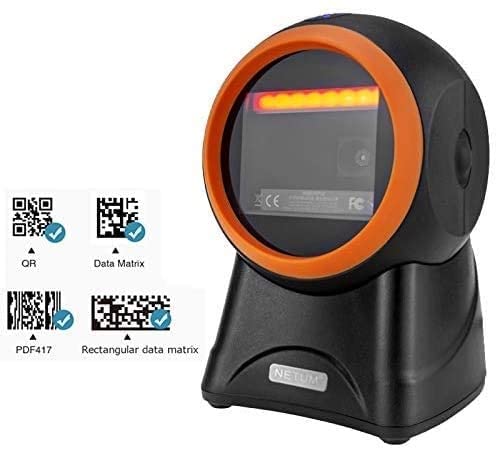
The NETUM NT-2050 barcode scanner positioned next to examples of QR Code, Data Matrix, and PDF417 barcodes, indicating its ability to read these formats.
5.1. 1D Barcodes
- UPC, EAN, JAN, UPC-A, UPC-E, EAN-8, EAN-13, JAN-8, JAN-13
- ISBN, ISSN
- Code 39 (with full ASCII)
- Codabar (NW7)
- Code 128, EAN 128, Code 93
- Interleaved 2 of 5 (ITF), Addendum 2 of 5
- IATA Code, MSI/Plessy
- China Postal Code, Code 32 (Italian Pharmacode)
- RSS 14, RSS Limited, RSS Expanded
5.2. 2D Barcodes
- Matriċi tad-Data
- QR Code, Micro QR Code
- Kodiċi Aztec
- MaxiCode
6. Manutenzjoni
To ensure optimal performance and longevity of your NETUM NT-2050 scanner, follow these maintenance guidelines:
- Tindif: Regularly clean the scanning window with a soft, lint-free cloth. For stubborn dirt, use a mild glass cleaner applied to the cloth (not directly to the scanner).
- Ħażna: Aħżen l-iskaner f'post frisk u niexef 'il bogħod mix-xemx diretta u minn temperaturi estremi.
- Immaniġġjar: Evita li twaqqa' l-iskaner jew li tissottomettih għal impatti qawwija.
- Kura tal-Cable: Do not bend or twist the USB cable excessively.
7 Issolvi l-problemi
If you encounter issues with your NT-2050 scanner, consider the following common solutions:
- L-iskaner mhux qed jirrispondi: Kun żgur li l-kejbil tal-USB huwa konness sew kemm mal-iskaner kif ukoll mal-kompjuter. Ipprova port USB differenti.
- L-ebda Output ta' Skennjar: Verify that the scanner is powered on (check indicator light). Ensure the barcode is clean, undamaged, and within the scanning window.
- Output tad-Data Skorretta: Check the keyboard language settings on your computer and ensure they match the scanner's configuration.
- Skanjar bil-mod: Ensure the scanning window is clean. Try scanning in different lighting conditions.
- Apparat Mhux Rikonoxxut: Restart your computer. If the issue persists, try connecting the scanner to another computer to rule out a computer-specific problem.
Għal problemi persistenti, irreferi għat-taqsima tal-appoġġ jew ikkuntattja lis-servizz tal-konsumatur.
8. Speċifikazzjonijiet Tekniċi
| Karatteristika | Speċifikazzjoni |
|---|---|
| Brand | NETUM |
| Mudell | NETUM 2050 |
| Dimensjonijiet tal-Prodott | 20 x 10 x 5 ċm |
| Piż tal-oġġett | 300 g |
| Kompatibilità tas-Sistema Operattiva | Linux, Mac, Windows |
| Apparati Kompatibbli | Kompjuter Personali |
| Sors tal-Enerġija | Corded Elettriku |
| Tip ta' Konnettur | USB |
| Teknoloġija ta 'Sejbien tal-Moviment | Ottiċi |
| Kapaċità ta' Dekodifikazzjoni (1D) | UPC, EAN, JAN, Code 39, Codabar, Code 128, Code 93, Interleaved 2 of 5, RSS, etc. |
| Kapaċità ta' Dekodifikazzjoni (2D) | Data Matrix, QR Code, Micro QR Code, Aztec Code, MaxiCode |
9. Garanzija u Appoġġ
9.1. Informazzjoni dwar Garanzija
Dan il-prodott jiġi ma 'a 3-il XAHAR GARANZIJA mid-data tax-xiri. Jekk jogħġbok żomm il-prova tax-xiri tiegħek għal talbiet ta' garanzija.
9.2. Appoġġ għall-Klijent
For technical assistance, troubleshooting, or warranty inquiries, please contact Megaa Electronics:
- Email: megaaelectronics@gmail.com
- Email: Support@megaaelectronics.com


