Introduzzjoni
This manual provides detailed instructions for the setup, operation, maintenance, and troubleshooting of your seenda IWG-FGM02 Rechargeable LED Wireless Mouse. Please read this manual thoroughly before using the product to ensure optimal performance and longevity.
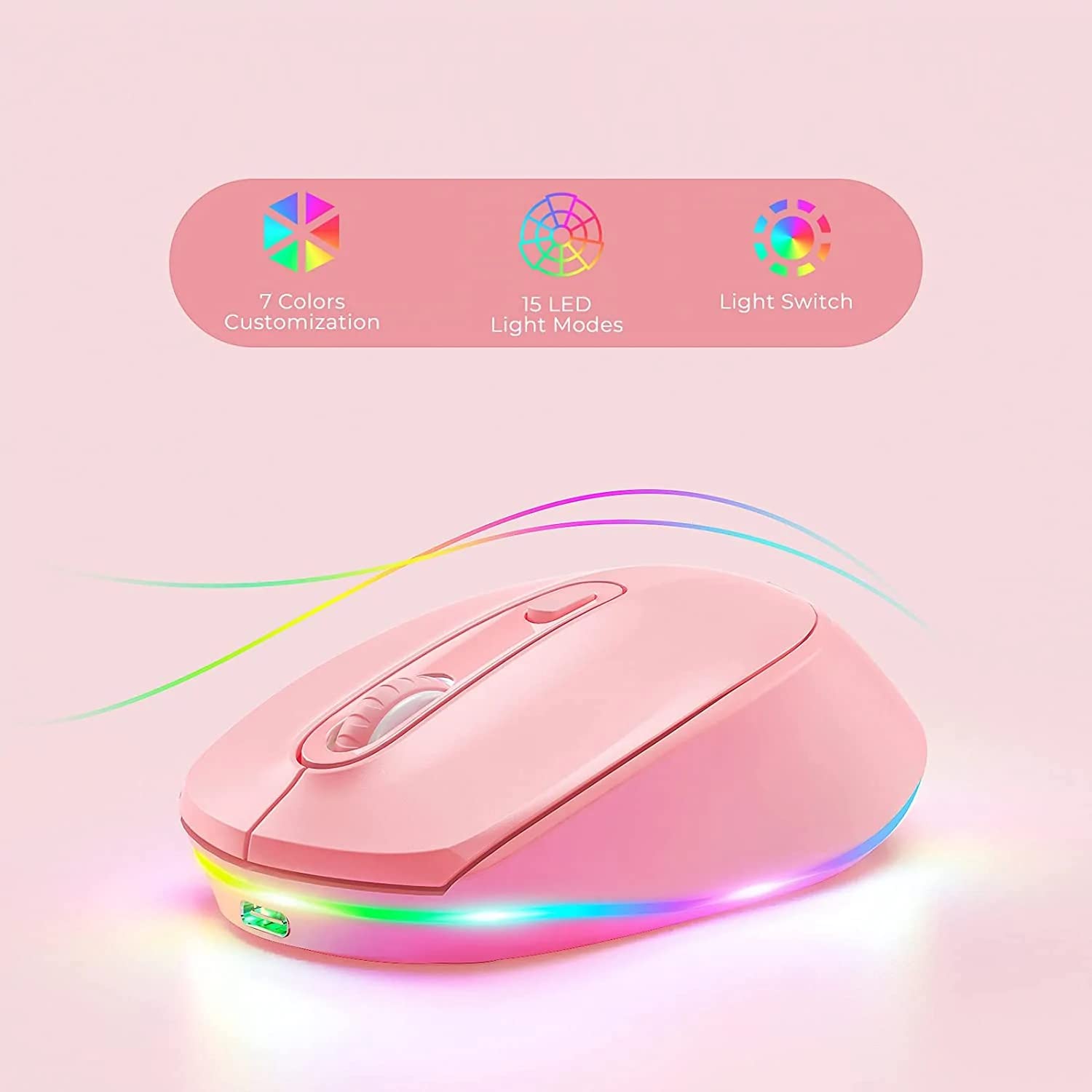
Figure 1: seenda IWG-FGM02 Rechargeable LED Wireless Mouse. This image displays the overall design of the mouse, highlighting its ergonomic shape and LED lighting.
Kontenut tal-Pakkett
Kun żgur li l-oġġetti kollha huma preżenti fil-pakkett:
- seenda IWG-FGM02 Rechargeable LED Wireless Mouse
- USB Receiver (typically stored in the mouse's battery compartment)
- Cable tal-Iċċarġjar tal-USB
- Manwal għall-Utent (dan id-dokument)
Setup Istruzzjonijiet
1. Iċċarġjar tal-Maws
Before first use, fully charge the mouse. Connect the provided USB charging cable to the charging port on the front of the mouse and the other end to a USB power source (e.g., computer USB port, USB wall adapter).
- The LED indicator will typically show charging status (e.g., red light for charging, off when fully charged).
- A full charge usually takes 2-3 hours.
2. Konnessjoni tar-Riċevitur USB
The mouse connects wirelessly via a 2.4 GHz USB receiver.
- Locate the USB receiver, usually stored in a slot on the bottom of the mouse.
- Remove the receiver and plug it into an available USB port on your computer.
- Il-kompjuter tiegħek għandu jiskopri u jinstalla awtomatikament id-drajvers meħtieġa. Dan jista' jieħu ftit mumenti.
3. Tixgħil / Mitfi
Locate the power switch on the bottom of the mouse. Slide the switch to the "ON" position to activate the mouse. Slide it to "OFF" when not in use to conserve battery life.
Istruzzjonijiet Operattivi
1. Funzjonijiet Bażiċi tal-Maws
The seenda IWG-FGM02 mouse features standard left-click, right-click, and scroll wheel functions. Use these for navigation and interaction with your computer's operating system and applications.
2. Aġġustament tad-DPI
The mouse typically includes a DPI (Dots Per Inch) button, often located near the scroll wheel, to adjust cursor sensitivity. Press this button to cycle through different DPI settings (e.g., 800, 1200, 1600 DPI). A higher DPI setting results in faster cursor movement across the screen.
3. LED Lighting Control
The mouse features LED lighting. Depending on the model, the lighting may be static, breathing, or switchable. Refer to the product packaging or specific model features for details on how to change or disable the LED effects. Some models may have a dedicated button for LED control, while others may integrate it with DPI or power functions.
Manutenzjoni
1. Tindif tal-Maws
Biex iżżomm prestazzjoni u iġjene ottimali, naddaf il-maws tiegħek regolarment.
- Uża drapp ratba u mingħajr ħelu ftit dampimdaħħla bl-ilma jew soluzzjoni ħafifa għat-tindif.
- Evita li tuża kimiċi ħarxa, prodotti tat-tindif li joborxu, jew li tisprejja likwidi direttament fuq il-maws.
- Clean the optical sensor on the bottom of the mouse periodically to prevent tracking issues.
2. Kura tal-batterija
As a rechargeable mouse, proper battery care extends its lifespan.
- Avoid completely draining the battery frequently. Recharge when the low battery indicator appears.
- Tesponix il-maws għal temperaturi estremi.
- Jekk taħżen il-maws għal perjodu estiż, iċċarġjah sa madwar 50% qabel ma taħżnu.
Issolvi l-problemi
If you encounter issues with your seenda IWG-FGM02 mouse, refer to the following common solutions:
1. Il-Maws Ma Jirrispondix
- Iċċekkja l-Enerġija: Ensure the mouse is switched "ON" and has sufficient battery charge. Recharge if necessary.
- Iċċekkja r-Riċevitur USB: Kun żgur li r-riċevitur tal-USB huwa mdaħħal sew f'port USB li jaħdem fuq il-kompjuter tiegħek. Ipprova port USB ieħor.
- Erġa 'par: In some cases, you may need to re-pair the mouse with its receiver. This usually involves turning the mouse off and on, or pressing a connect button on the mouse/receiver (if available).
- Interferenza: Move the mouse closer to the receiver or away from other wireless devices that might cause interference.
2. Cursor Movement is Erratic or Jumpy
- Sensor Nadif: Naddaf is-senser ottiku fil-qiegħ tal-maws b'ċarruta ratba.
- Wiċċ: Use the mouse on a clean, non-reflective, opaque surface. Avoid glass or highly reflective surfaces. A mouse pad is recommended.
- Twaqqif DPI: Aġġusta s-setting tad-DPI għal valur aktar baxx jekk il-cursor ikun sensittiv wisq.
3. LED Lights Not Working
- Livell tal-batterija: Ensure the mouse has enough charge. Low battery can sometimes affect LED functionality.
- Kontroll tal-LED: If your mouse has a dedicated LED control button, press it to cycle through modes or turn the lights on.
4. Kwistjonijiet ta' Iċċarġjar
- Iċċekkja tal-Cable: Ensure the USB charging cable is not damaged and is securely connected. Try a different USB cable if available.
- Sors tal-Enerġija: Try a different USB power source (e.g., another USB port on your computer, a different wall adapter).
Speċifikazzjonijiet
| Karatteristika | Dettall |
|---|---|
| Brand | seenda |
| Mudell | IWG-FGM02 |
| Teknoloġija tal-Konnettività | Wireless (Riċevitur USB ta' 2.4 GHz) |
| Karatteristika Speċjali | Rechargeable, LED Lighting |
| Orjentazzjoni tal-Idejn | Ambidestru |
| Kompatibilità tas-Sistema Operattiva | Linux, Windows 7, Windows XP (and generally newer Windows/macOS versions) |
| Pjattaforma tal-Ħardwer | Laptop, Kompjuter Personali |
| Dimensjonijiet tal-Prodott (LxWxH) | 10 x 6.5 x 6.5 ċm |
| Piż tal-oġġett | 140 g |
| Ħajja Medja tal-Batterija | Up to 12 Months (standby/usage dependent) |
Informazzjoni dwar Garanzija
The seenda IWG-FGM02 Rechargeable LED Wireless Mouse comes with a 1 Snin Garanzija from the date of purchase. This warranty covers manufacturing defects and material faults under normal use. It does not cover damage caused by misuse, accidents, unauthorized modifications, or normal wear and tear. Please retain your proof of purchase for warranty claims.
Appoġġ u Kuntatt
For further assistance, technical support, or warranty inquiries, please contact the importer or manufacturer:
- Importatur: Pinna Diġitalitagmuntun
- Email: t.yadav@digitalpentagram.com
- Telefon: 09999325592
- Manifattur: Seenda, Shenzen Seenda, www.seenda.com
When contacting support, please have your product model (IWG-FGM02) and proof of purchase available.


