1. Introduzzjoni
The Lenco PDR-046GY is a portable DAB+ radio designed to provide high-quality digital audio reception. This device also functions as a portable Bluetooth speaker, allowing wireless streaming from compatible devices. Featuring an integrated rechargeable battery, it offers portability for use in various locations. The PDR-046GY incorporates sustainable design principles, utilizing eco-friendly materials and packaging.
2. Informazzjoni dwar is-Sigurtà
- Tesponix l-unità għax-xita jew għall-umdità biex tevita nar jew xokk elettriku.
- Do not expose the unit to direct sunlight, heat sources, or extreme temperatures.
- Kun żgur li jkollok ventilazzjoni xierqa; timblokkax il-fetħiet tal-ventilazzjoni.
- Use only the specified power adapter/USB-C cable for charging.
- Do not attempt to disassemble or modify the unit. Refer servicing to qualified personnel.
- Żomm l-unità 'l bogħod minn kampi manjetiċi qawwija.
- Naddaf l-unità b'ċarruta ratba u niexfa. Tużax prodotti tat-tindif jew solventi li joborxu.
3. Kontenut tal-Pakkett
Iċċekkja li l-oġġetti kollha huma preżenti meta tiftaħ il-pakkett:
- Lenco PDR-046GY DAB+ Portable Radio
- Cable tal-Iċċarġjar tal-USB-C
- Gwida ta' Bidu Mgħaġġel (Manwal sħiħ disponibbli online)
4. Karatteristiċi tal-prodott
- DAB+ u Radju FM: Enjoy digital and analog radio broadcasts.
- Bluetooth 5.0: Wireless audio streaming from smartphones, tablets, and other Bluetooth-enabled devices.
- Batterija Rikarikabbli Integrata: Provides up to 7 hours of wireless playback.
- Wiri LCD bil-Kulur ta' 2.4 pulzieri: Shows station information, track details, time, and other relevant data.
- Dual 2.5W Speakers with Passive Cooler: Delivers clear audio with enhanced bass.
- Funzjoni ta 'Arloġġ ta' Allarm: Features dual alarms, snooze, and dimmable display.
- 30 Stazzjonijiet Presetjati: Store your favorite DAB+ and FM stations for quick access.
- Timer ta 'l-Irqad: Automatically turns off the radio after a set duration.
- Input AUX: Connect external audio devices via a 3.5mm cable.
- Jack tal-headphone: Għal smigħ privat.
5. Kontrolli u Wiri
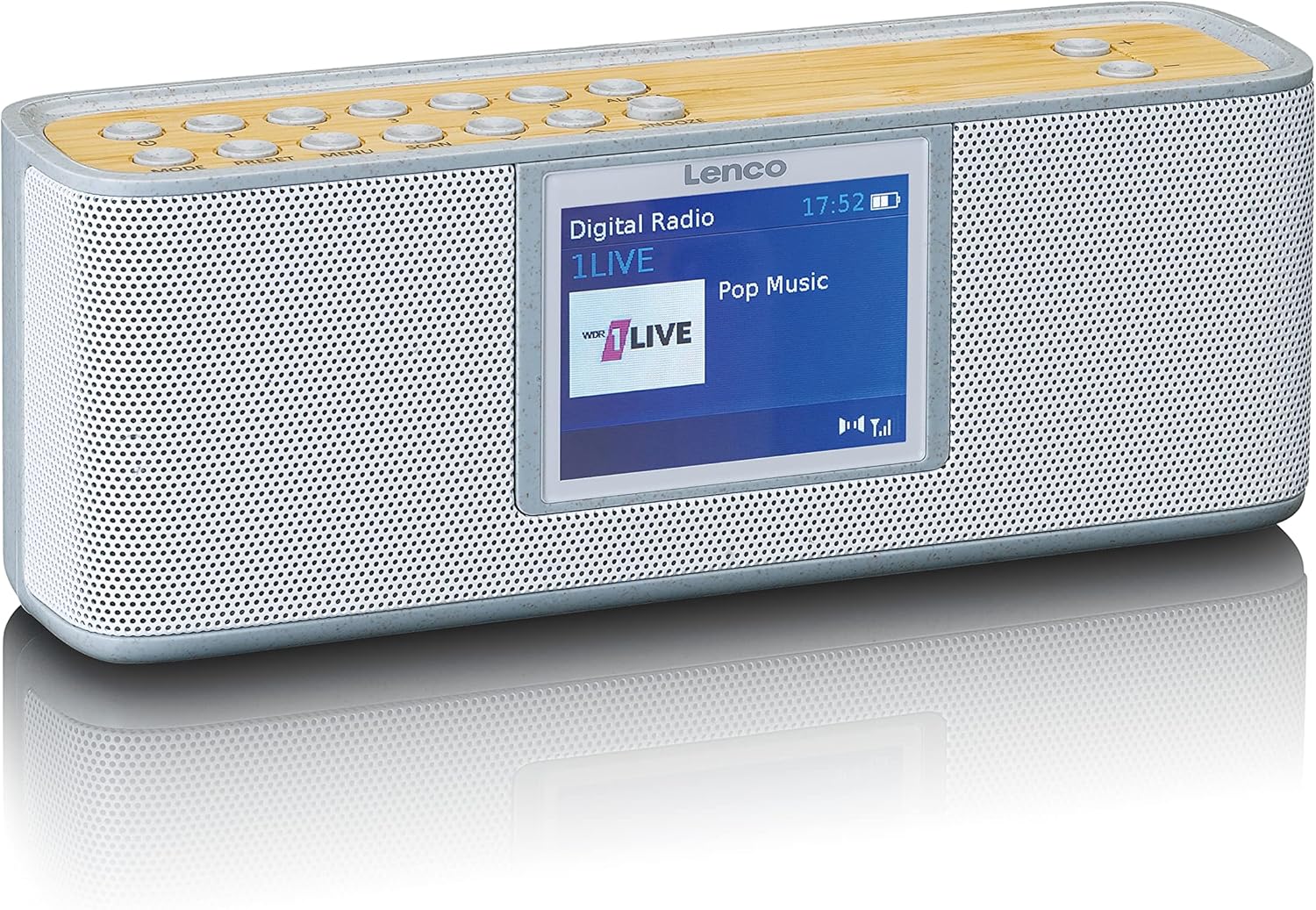
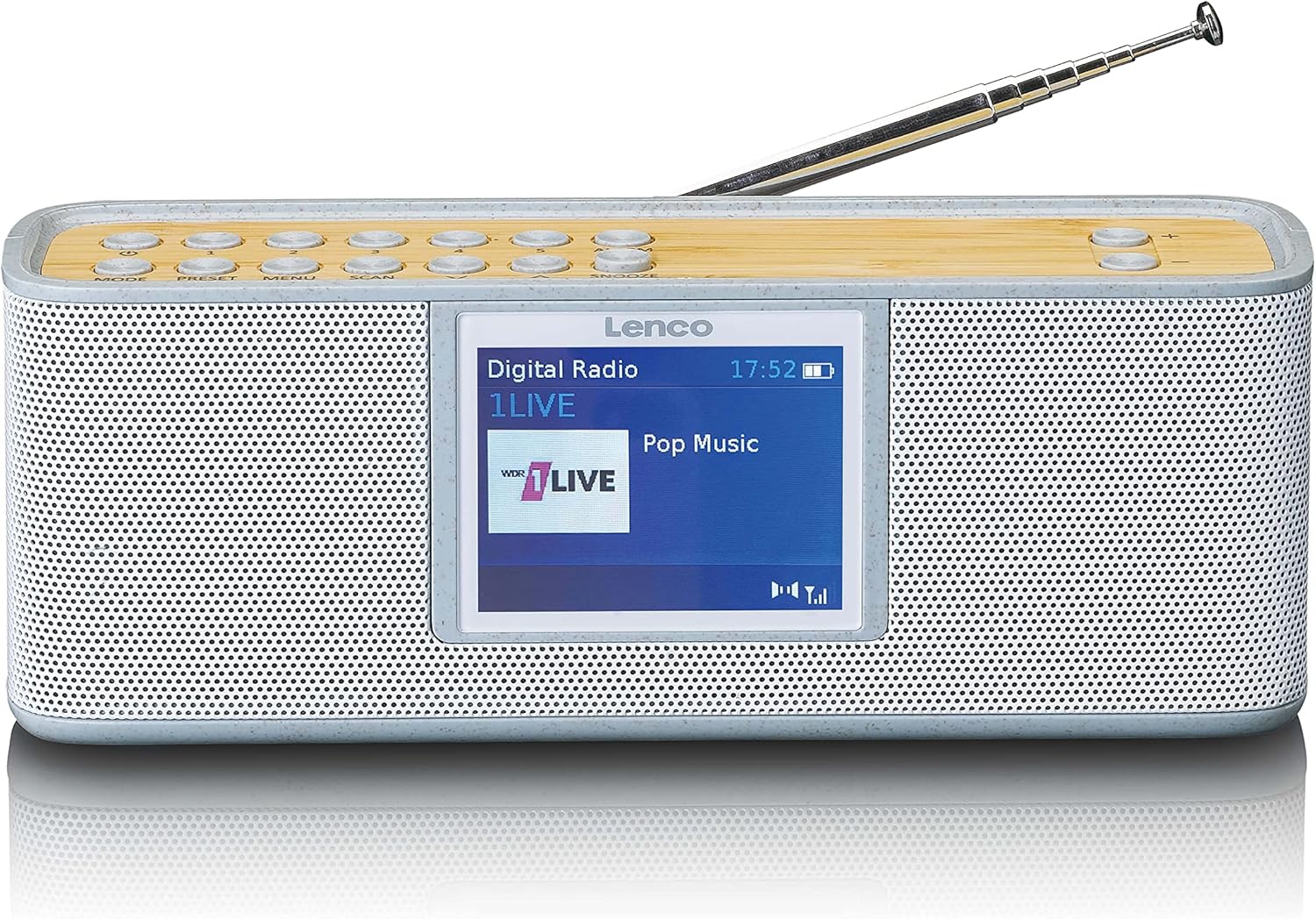
Control Buttons (Top Panel)
- MODALITÀ: Jaqleb bejn il-modi DAB+, FM, Bluetooth, u AUX.
- IPPRESETAT: Accesses and saves preset radio stations.
- MENU: Enters the system menu for settings and options.
- SKANJA: Initiates a scan for available radio stations.
- ALLARM: Jissettja u jimmaniġġja l-funzjonijiet tal-allarm.
- SNOOZE: Jissikket l-allarm temporanjament.
- Volum +/-: Jaġġusta l-volum tal-awdjo.
- Buttuni tan-Navigazzjoni: Used for navigating menus and tuning stations.
Wiri
The 2.4-inch color LCD display provides visual feedback on the current mode, station information, track details, time, and menu options.
6. Setup
6.1. Iċċarġjar tal-batterija
- Connect the supplied USB-C cable to the charging port on the back or side of the radio.
- Qabbad it-tarf l-ieħor tal-kejbil USB-C ma' adapter tal-enerġija USB kompatibbli (mhux inkluż) jew port USB li jaħdem bl-enerġija.
- L-indikatur tal-iċċarġjar fuq id-displej se juri l-istatus tal-iċċarġjar. Iċċarġjar sħiħ tipikament jieħu diversi sigħat.
- Once fully charged, disconnect the USB-C cable.
6.2. L-Ewwel Tixgħil
- Estendi l-antenna teleskopika kompletament għal riċeviment ottimali.
- Press and hold the Power button (usually combined with MODE) to turn on the radio.
- Upon first use, the radio may automatically perform a DAB+ scan to find available stations.
7. Istruzzjonijiet Operattivi
7.1. DAB+ Radio Mode
- Agħfas il- MODALITÀ button until "DAB+" is displayed.
- If it's the first time or if stations need updating, press SKANJA to perform a full scan.
- Use the navigation buttons to browse through the list of available stations.
- Agħfas il- SELECT/OK button to choose a station.
- Biex issalva stazzjon bħala preset, agħfas u żomm il-buttuna Issettjat minn qabel button, then use navigation to select a preset number and confirm.
7.2. Modalità tar-Radju FM
- Agħfas il- MODALITÀ Agħfas il-buttuna sakemm tintwera "FM".
- Agħfas SKANJA to automatically search for and store available FM stations.
- Alternatively, use the navigation buttons to manually tune to a frequency.
- Biex issalva stazzjon bħala preset, agħfas u żomm il-buttuna Issettjat minn qabel button, then use navigation to select a preset number and confirm.
7.3. Modalità Bluetooth
- Agħfas il- MODALITÀ button until "Bluetooth" is displayed. The radio will enter pairing mode, indicated by a flashing Bluetooth icon.
- Fuq l-ismartphone jew it-tablet tiegħek, ippermetti l-Bluetooth u fittex it-tagħmir disponibbli.
- Select "Lenco PDR-046GY" from the list of devices.
- Once paired, the Bluetooth icon will stop flashing, and you can stream audio from your device to the radio.
7.4. Modalità tad-Dħul AUX
- Connect one end of a 3.5mm audio cable (not included) to the AUX IN port on the radio.
- Connect the other end to the headphone jack or audio output of your external audio device.
- Agħfas il- MODALITÀ Agħfas il-buttuna sakemm tidher "AUX".
- Ikkontrolla d-daqq u l-volum mit-tagħmir estern tiegħek.
7.5. Funzjoni tal-Arloġġ tal-Allarm
- Agħfas il- ALLARM buttuna biex taċċessa s-settings tal-allarm.
- Use navigation buttons to set Alarm 1 or Alarm 2.
- Configure the alarm time, source (buzzer, DAB+, FM), volume, and frequency (daily, weekdays, weekends, once).
- Agħfas SELECT/OK biex tikkonferma settings.
- Meta l-allarm ħsejjes, agħfas SNOOZE to temporarily pause it, or press the Power button to turn it off.
7.6. Sleep Timer
- Agħfas il- MENU buttuna.
- Navigate to the "Sleep Timer" option.
- Select a duration (e.g., 15, 30, 45, 60, 90 minutes). The radio will automatically turn off after the selected time.
8. Manutenzjoni
- Tindif: Wipe the radio with a soft, dry, lint-free cloth. Do not use liquid cleaners or aerosols.
- Antenna: Handle the telescopic antenna carefully to avoid damage.
- Ħażna: If storing for an extended period, ensure the battery is partially charged (around 50%) and store in a cool, dry place.
9 Issolvi l-problemi
| Problema | Kawża Possibbli | Soluzzjoni |
|---|---|---|
| Ebda enerġija/L-unità ma tixgħelx | Il-batterija hija eżawrita. | Iċċarġja l-batterija billi tuża l-kejbil USB-C. |
| Riċeviment DAB+/FM fqir | L-antenna mhux estiża jew is-sinjal fiż-żona huwa fqir. | Extend the telescopic antenna fully. Try repositioning the radio. Perform a full scan. |
| Bluetooth device cannot pair | Ir-radju mhux fil-modalità ta' tqabbil jew l-apparat wisq 'il bogħod. | Ensure the radio is in Bluetooth mode and flashing. Move the device closer. Forget the device on your phone and try pairing again. |
| L-ebda ħoss mill-input AUX | Cable not connected properly or incorrect mode. | Ensure the 3.5mm cable is fully inserted. Select AUX mode on the radio. Check volume on both the radio and the external device. |
| L-allarm ma ħossx | L-allarm mhux attivat jew issettjat ħażin. | Verify alarm settings (time, source, volume, frequency). Note: Alarm function may require AC power for continuous operation in some models. |
10. Speċifikazzjonijiet
- Mudell: PDR-046GY
- Tuner tar-Radju: DAB+, FM
- Output Awdjo: Stereo 2.0
- Stazzjonijiet issettjati minn qabel: 30
- Verżjoni Bluetooth: 5.0
- Medda Bluetooth: Sa 10 metri (33 pied)
- Kelliema: 2 x 2.5 W with passive cooler
- Inputs: Input AUX 3.5 mm
- Outputs: 3.5 mm Headphone Jack
- Batterija: Integrated rechargeable 2000 mAh Lithium-ion
- Ħajja tal-batterija: Up to 7 hours (wireless listening)
- Dimensjonijiet (H x W x D): 6.8 x 18 x 5.50 ċm (2.68 x 7.09 x 2.17 pulzieri)
- Sors tal-Enerġija: Battery powered / USB-C (for charging)
11. Garanzija u Appoġġ
Lenco products are designed and manufactured to the highest quality standards. For warranty information, please refer to the warranty card included with your product or visit the official Lenco website. For technical support or service inquiries, please contact Lenco customer service through their official channels. Keep your proof of purchase for warranty claims.
Riżorsi onlajn: For the most up-to-date information, full manuals, and support, please visit the official Lenco websit: www.lenco.com


