Introduzzjoni
Welcome to the user manual for your new Amkette Pocket Blast 5-in-1 FM Radio. This versatile device combines an FM radio, Bluetooth speaker, MP3 player, voice recorder, and FM song recorder into a compact and portable unit. Please read this manual carefully to understand the features and operation of your device and ensure optimal performance.

Figure 1: Amkette Pocket Blast 5-in-1 FM Radio
Kontenut tal-Pakkett
Jekk jogħġbok immarka l-kaxxa għall-oġġetti li ġejjin:
- 1 x Amkette Pocket Blast Unit
- 1 x Manwal għall-Utent
- 1 x Kejbil tal-Iċċarġjar (Tip Ċ)
- 1 x Cable AUX
Karatteristiċi tal-Prodott
The Amkette Pocket Blast is designed for versatile audio entertainment and utility.
- Funzjonalità 5-in-1: FM Radio, Bluetooth Speaker, MP3 Player (USB/SD/AUX), Voice Recorder, and FM Song Recorder.
- Kwalità tal-Ħoss Superjuri: Equipped with a 6W speaker for clear audio with well-defined bass and pleasing vocals.
- Navigazzjoni Faċli: Full number pad for direct song and FM station selection.
- Daqq Twil: Over 7 hours of battery life on Bluetooth mode.
- Mikrofonu inkorporat: For voice recording and hands-free calls when connected via Bluetooth.
- Iċċarġjar tat-Tip C: Modern and reliable charging port.
- Antenna Esterna: Għal riċezzjoni FM imtejba.

Figure 2: Key Features of the Pocket Blast

Figure 3: Compact Size with Powerful Audio
Kontrolli u Portijiet
Familiarize yourself with the buttons and ports on your Amkette Pocket Blast for seamless operation.
Front Panel (Number Pad and Display)
- Tastiera tan-Numri (0-9): Used for direct input of FM frequencies or song numbers in MP3 mode.
- Buttuna REC: Initiates voice or FM recording.
- Buttuna DEL: Iħassar irreġistrat files.
- Buttuna M (Modalità): Switches between FM, Bluetooth, USB, SD, and AUX modes.
- Buttuna Play/Pause: Jikkontrolla daqq.
- Buttuni tal-Track ta' Preċedenti/Li jmiss: Navigates through songs or FM stations.
- Buttuni Volum 'il fuq /' l isfel: Jaġġusta l-volum tal-awdjo.
- Display LCD: Shows current mode, FM frequency, track number, etc.
Side Panel (Ports)
- Swiċċ mixgħul / mitfi: Jixgħel jew jitfi l-apparat.
- DC 5V (Type-C) Port: Għall-iċċarġjar tal-apparat.
- Port USB: For USB flash drives (MP3 playback, recording storage).
- Slot tal-Kard TF (Mikro SD): For Micro SD cards (MP3 playback, recording storage).
- Input AUX: Għall-konnessjoni ta' apparati awdjo esterni permezz ta' kejbil awdjo ta' 3.5mm.
- Antenna Esterna: Antenna li tista' tiġġebbed għal riċeviment FM imtejjeb.

Figure 4: Number Pad for Direct Selection

Figure 5: Multi Playback Options
Setup
Iċċarġjar Inizjali
Before first use, fully charge your Amkette Pocket Blast.
- Connect the provided Type-C charging cable to the DC 5V port on the device.
- Qabbad it-tarf l-ieħor tal-kejbil ma' adapter tal-enerġija USB (mhux inkluż) jew mal-port USB tal-kompjuter.
- The charging indicator on the device will illuminate. It will turn off or change color once fully charged.
- Ċarġ sħiħ tipikament jieħu madwar 2 sigħat.
Tixgħel/Jitfi
Slide the ON/OFF switch located on the side of the device to power it on or off.
Istruzzjonijiet Operattivi
Modalità Bluetooth
Connect your smartphone or other Bluetooth-enabled devices to the Pocket Blast for wireless audio streaming and hands-free calls.
- Power on the Pocket Blast. It will automatically enter Bluetooth pairing mode (indicated by a flashing Bluetooth icon or voice prompt).
- Fuq it-tagħmir tiegħek, ippermetti l-Bluetooth u fittex tagħmir disponibbli.
- Select "Amkette Pocket Blast" from the list.
- Once paired, the device will confirm the connection. You can now play audio from your connected device.
- To answer/end calls, press the Play/Pause button. Use the built-in microphone for communication.
Operazzjoni tar-Radju FM
Enjoy your favorite FM radio stations with clear reception.
- Agħfas il- M (Modalità) button until "FM" mode is displayed.
- Extend the external antenna for optimal reception.
- Skanjar Awtomatiku: Agħfas fit-tul il- Play/Pawsa buttuna biex tiskennja u ssalva awtomatikament l-istazzjonijiet FM disponibbli.
- Irfinar Manwali: Uża l- Trekk ta 'qabel / li jmiss buttuni biex tirfina l-frekwenza.
- Input ta' Frekwenza Diretta: Use the number pad to directly enter the desired FM frequency (e.g., 94.3 for 94.3 MHz).
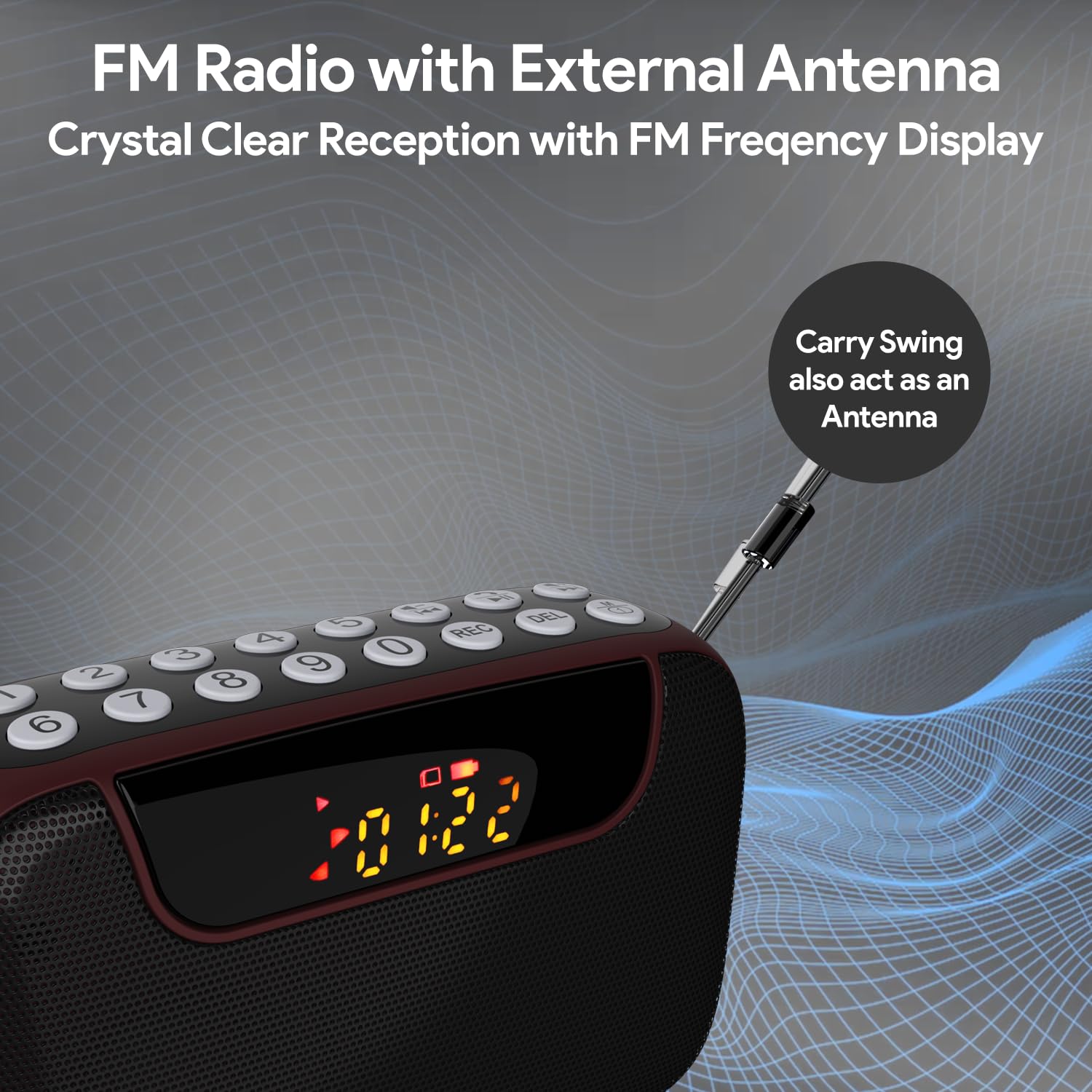
Figure 6: FM Radio with External Antenna
MP3 Playback (USB/SD/AUX)
Play music from USB drives, Micro SD cards, or external audio devices.
- Karta USB/SD: Daħħal USB flash drive jew Micro SD card (b'MP3 card) files) into the corresponding port. The device will automatically switch to USB/SD mode and begin playback. If not, press the M (Modalità) buttuna biex tagħżel il-modalità korretta.
- Input AUX: Connect an external audio device (e.g., smartphone, laptop) to the AUX port using the provided 3.5mm audio cable. Press the M (Modalità) buttuna biex tagħżel il-modalità AUX.
- Uża l- Play/Pawsa u Trekk ta 'qabel / li jmiss buttuni biex jikkontrollaw daqq.
- Use the number pad for direct song selection (e.g., enter "007" for the 7th song).

Figure 7: MP3 Player with Track Selection
Reġistrazzjoni tal-Vuċi
Record voice notes directly onto a connected USB drive or Micro SD card.
- Ensure a USB drive or Micro SD card is inserted into the device.
- Agħfas il- REC button to start recording. The display will show a recording indicator.
- Tkellem b'mod ċar fil-mikrofonu inkorporat.
- Agħfas il- REC button again to stop and save the recording.
- To play back recordings, switch to USB/SD mode and navigate to the recorded files.
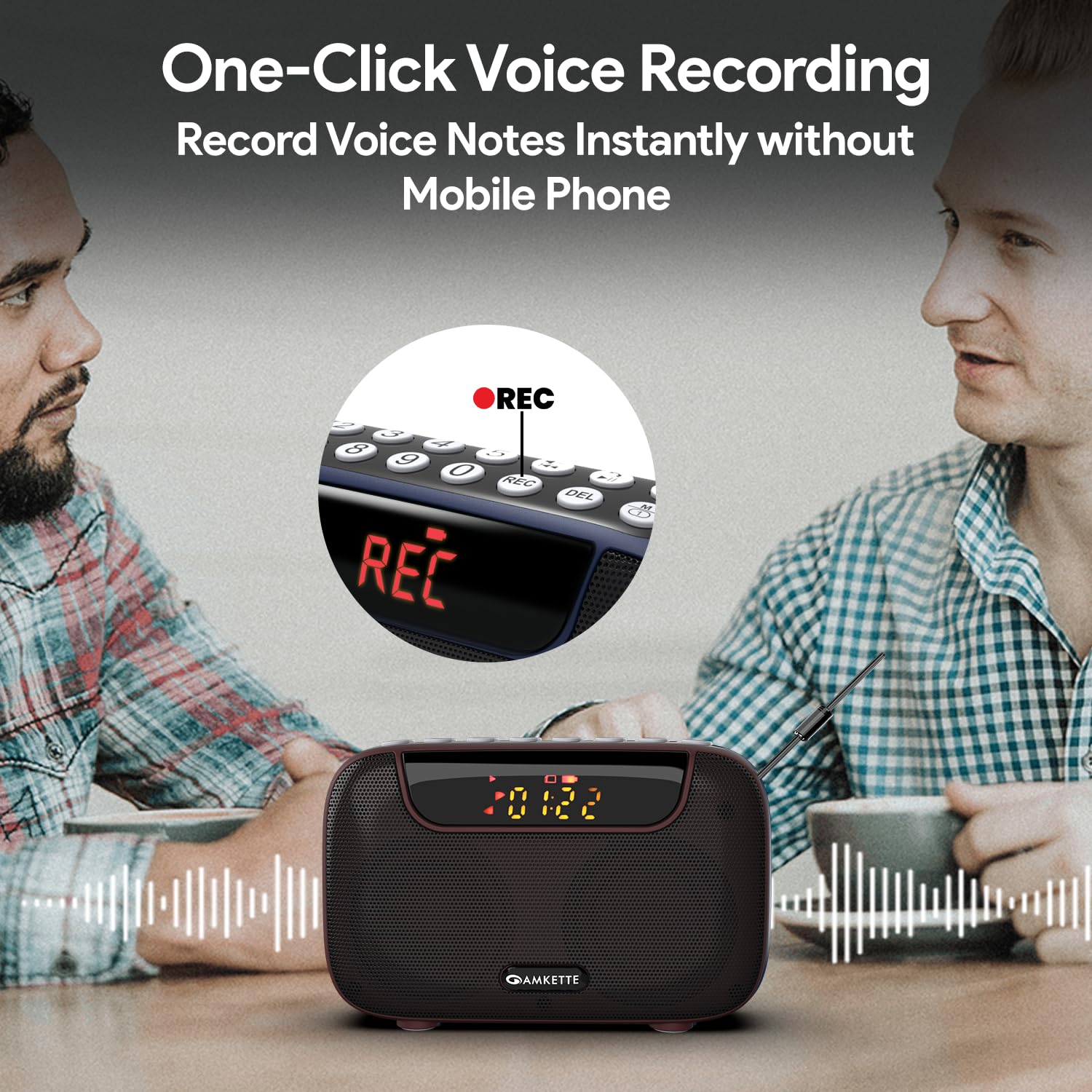
Figure 8: One-Click Voice Recording
FM Song Recording
Capture your favorite FM radio programs or songs directly from the radio.
- Ensure a USB drive or Micro SD card is inserted into the device.
- Switch to FM mode and tune to the desired station.
- Agħfas il- REC button to start recording the FM broadcast. The display will show a recording indicator.
- Agħfas il- REC button again to stop and save the recording.
- Recorded FM songs will be saved on the inserted storage device.

Figure 9: Built-in FM Song Recorder
Iċċarġjar
The Amkette Pocket Blast is equipped with a rechargeable Lithium Ion battery.
- Use only the provided Type-C charging cable.
- Connect to a standard USB power source (5V/1A recommended).
- Avoid using damaged cables or chargers.
- Tiċċarġjax f'temperaturi estremi.
- The device offers over 7 hours of playback on a full charge (Bluetooth mode).

Figure 10: Extended Playback Time
Manutenzjoni
To ensure the longevity and optimal performance of your device, follow these maintenance guidelines:
- Żomm l-apparat niexef. Evita l-espożizzjoni għall-ilma jew umdità eċċessiva.
- Naddaf l-apparat b'ċarruta ratba u niexfa. Tużax prodotti tat-tindif jew solventi li joborxu.
- Aħżen l-apparat f'post frisk u niexef meta ma jkunx qed jintuża.
- Evita li twaqqa’ jew tissuġġetta l-apparat għal impatti qawwija.
- Tippruvax tiżżarma jew issewwi l-apparat int stess. Dan jannulla l-garanzija.
Issolvi l-problemi
If you encounter any issues with your Amkette Pocket Blast, refer to the following common problems and solutions:
| Problema | Kawża Possibbli | Soluzzjoni |
|---|---|---|
| L-apparat ma jixgħelx. | Low battery; Power switch is off. | Charge the device fully; Ensure the ON/OFF switch is in the "ON" position. |
| L-ebda ħoss. | Volum baxx wisq; Modalità magħżula ħażin; Apparat mhux imqabbad (Bluetooth). | Increase volume; Press "M" button to select correct mode; Re-pair Bluetooth device. |
| Riċeviment fqir tal-FM. | Antenna mhux estiża; Żona b'sinjal dgħajjef. | Fully extend the external antenna; Try moving to a location with better signal. |
| Ma jistax jirreġistra. | No USB/SD card inserted; Storage full; Card format issue. | Insert a compatible USB/SD card; Delete old files or use a new card; Ensure card is formatted correctly (FAT32). |
| Bluetooth jiskonnettja spiss. | Device too far from Pocket Blast; Obstructions; Interference. | Keep devices within 10 meters (33 feet); Remove obstructions; Avoid strong electromagnetic interference. |
Speċifikazzjonijiet
Detailed technical specifications for the Amkette Pocket Blast.
| Karatteristika | Dettall |
|---|---|
| Brand | Amkette |
| Isem tal-Mudell | Pocket Blast |
| Dimensjonijiet tal-Prodott | 12 x 4.1 x 7.8 ċm |
| Piż tal-oġġett | 264 g |
| Qawwa tal-Ħruġ tal-Ispeaker | 6 Watts |
| Sors tal-Enerġija | Mħaddma bil-batterija |
| Tip ta 'batterija | Lithium Ion (inkluż) |
| Ħajja tal-Batterija (Medja) | 7+ Hours (Bluetooth) |
| Port tal-Iċċarġjar | Type-C (DC 5V) |
| Konnettività | Bluetooth, USB, SD Card, AUX |
| Teknoloġija Tuner | FM |
| Tip ta 'Wiri | LCD |
| Pajjiż ta' Oriġini | Iċ-Ċina |
Garanzija u Appoġġ
Your Amkette Pocket Blast comes with a Garanzija tal-Manifattura ta' Sena.
For any issues, queries, or support, please contact our customer support team.
- Appoġġ għall-Klijent: Please Call or WhatsApp our customer support team in case of any issues.
- Talbiet ta' Garanzija: Żomm l-irċevuta tax-xiri tiegħek bħala prova tax-xiri għal talbiet ta' garanzija.


