1. Introduzzjoni
Grazzi tax-xiriasing the DXQ K-1028E Universal Air Conditioner Remote Control. This remote is designed to provide convenient and comprehensive control over a wide range of air conditioning units. Its simple structure, large LCD display, and intelligent features make it an ideal replacement or secondary remote for your AC.
Karatteristiċi ewlenin:
- Kompatibilità Universali: Controls over 1000 different global air conditioner brands.
- Setup faċli: Features a one-button setting for quick configuration.
- Display LCD kbir: Provides clear visibility of settings and status.
- Distanza ta' Kontroll twila: Effective range of approximately 8 to 10 meters.
- Disinn umanizzat: Includes built-in clock, ON/OFF timer, and night light functions.
- Konsum ta 'Enerġija Baxxa: Efficient operation for extended battery life.

Image 1.1: Front and angled view of the DXQ K-1028E Universal AC Remote Control.

Image 1.2: The universal remote control demonstrating compatibility with various air conditioning units.
2. Setup
2.1 Installazzjoni tal-batterija
Il-kontroll remot jeħtieġ żewġ (2) batteriji AAA (mhux inklużi). Segwi dawn il-passi biex tinstallahom:
- Iftaħ l-għatu tal-kompartiment tal-batterija fuq wara tal-kontroll mill-bogħod.
- Daħħal żewġ batteriji AAA, waqt li tiżgura l-polarità korretta (+ u -) kif indikat ġewwa l-kompartiment.
- Agħlaq l-għatu tal-kompartiment tal-batterija sew.

Image 2.1: Illustration of battery installation in the remote control.
2.2 Code Setting (Pairing with AC Unit)
There are two methods to set up the remote control with your air conditioner:
Method 1: Manual Code Input
- Turn on your air conditioner manually.
- Refer to the "Applicable Brand and Code List" (Image 2.2) to find the 3-digit code(s) for your AC brand.
- Agħfas u żomm il- SET button on the remote control until the 3-digit code on the LCD display starts flashing.
- Uża l- Temperatura + or Temperatura - buttons to adjust the code until your brand's code appears.
- Once the correct code is displayed, press the OK button to confirm. The code will stop flashing.
- Test the remote control by pressing the ON/OFF button. If the AC unit responds, the setup is complete. If not, try the next code for your brand or proceed to Method 2.
Method 2: Automatic Code Search
- Ensure your air conditioner is turned on manually.
- Ipponta l-kontroll remot lejn l-unità tal-AC.
- Agħfas u żomm il- SET button for approximately 6 seconds until the 3-digit code on the LCD display starts flashing and automatically cycles through codes.
- Observe your AC unit. When the AC unit responds (e.g., turns off, changes mode, or makes a sound), immediately release the SET buttuna.
- Agħfas il- OK button to confirm the code.
- Test the remote control by pressing various function buttons. If the AC unit responds correctly, the setup is complete. If not, repeat the automatic search process.
Nota: For some popular brands, the remote may work directly after battery installation without needing to set a code.

Image 2.2: Applicable Brand and Code List for the K-1028E remote.
3. Istruzzjonijiet Operattivi
3.1 It-Tqassim u l-Funzjonijiet tal-Kontroll mill-Bogħod
Familiarize yourself with the buttons and display on your K-1028E remote control:
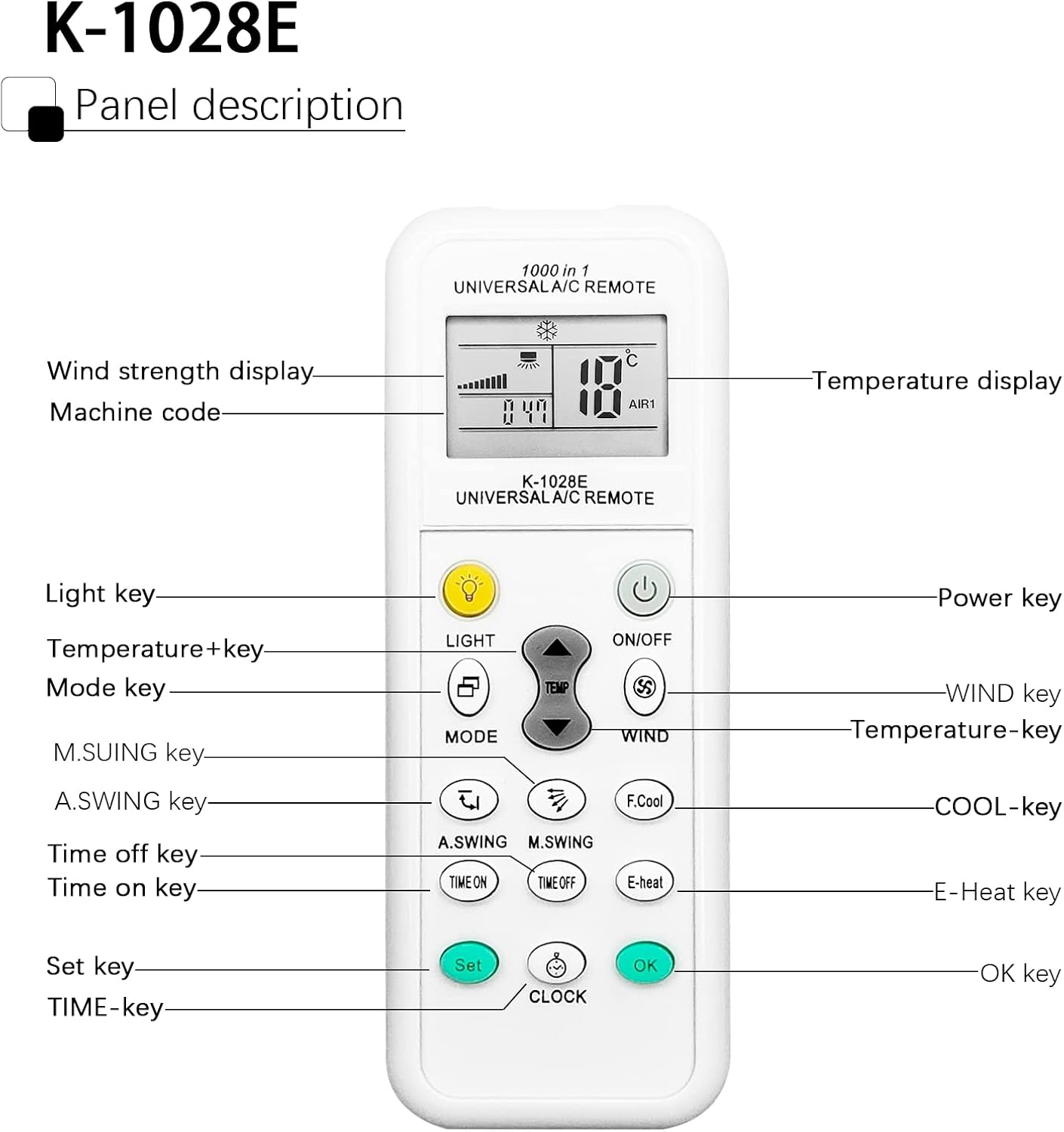
Image 3.1: Panel Description of the K-1028E Universal AC Remote.
- Display LCD: Shows temperature, mode, fan speed, timer status, and machine code.
- LIGHT Key: Activates the built-in night light function.
- Ċavetta ON/OFF: Jixgħel jew jitfi l-unità tal-AC.
- Ċavetta MODE: Jiċċikla bejn il-modi ta' tħaddim (eż., Kessaħ, Tisħin, Fann, Nixxiefa, Awtomatiku).
- TEMP + / TEMP - Keys: Jaġġusta l-issettjar tat-temperatura.
- WIND Key: Jaġġusta l-veloċità tal-fann (Awtomatika, Baxxa, Medja, Għolja).
- A.SWING / M.SWING Keys: Controls the vertical (A.SWING) and horizontal (M.SWING) swing of the air deflector.
- F.Cool Key: Activates the fast cool mode (if supported by AC).
- E-Heat Key: Activates the electric heat mode (if supported by AC).
- TIME ON / TIME OFF Keys: Sets the automatic power-on or power-off timer.
- CLOCK Key: Issettja l-ħin kurrenti.
- Ċavetta SET: Used for code setting (as described in Section 2.2).
- Ċavetta OK: Jikkonferma s-settings.
3.2 Operazzjoni Bażika
- Power On/Off: Agħfas il- ON/OFF buttuna.
- Agħżel il-Modalità: Agħfas il- MODALITÀ button repeatedly to cycle through available modes (e.g., Cool, Heat, Fan, Dry, Auto). The selected mode will be displayed on the LCD.
- Aġġusta t-Temperatura: Uża l- TEMP + or TEMP - buttuni biex tissettja t-temperatura mixtieqa tiegħek.
- Aġġusta l-Veloċità tal-Fan: Agħfas il- RIĦ button to cycle through fan speed options.
- Kontroll tad-Direzzjoni tal-Fluss tal-Arja: Użu A.SWING u M.SWING buttons to adjust the louver direction.

Image 3.2: Remote control effective distance and available operating modes.
3.3 Funzjonijiet tat-Tajmer
The remote control allows you to set a timer for the AC unit to automatically turn on or off.
- L-issettjar tal-ħin kurrenti: Agħfas il- ARLOĠĠ button. The time display will flash. Use TEMP + or TEMP - biex taġġusta s-siegħa, imbagħad agħfas ARLOĠĠ again to adjust minutes. Press OK biex tikkonferma.
- Setting ON Timer: Agħfas il- ĦIN MIXTEL button. The time display will flash. Use TEMP + or TEMP - to set the desired power-on time. Press OK biex tikkonferma.
- Setting OFF Timer: Agħfas il- ĦIN LIBERU button. The time display will flash. Use TEMP + or TEMP - to set the desired power-off time. Press OK biex tikkonferma.
- Canceling Timer: Agħfas il-korrispondenti ĦIN MIXTEL or ĦIN LIBERU button again, then press OK.

Image 3.3: The remote's time switch function for automated operation.
4. Manutenzjoni
4.1 Sostituzzjoni tal-batterija
Meta d-displej tal-kontroll remot isir mudlam jew il-kontroll remot ma jibqax jirrispondi, ikun wasal iż-żmien li tibdel il-batteriji. Segwi l-passi tal-installazzjoni tal-batteriji fit-Taqsima 2.1.
- Dejjem ibdel iż-żewġ batteriji fl-istess ħin.
- Tħallatx batteriji qodma u ġodda, jew tipi differenti ta 'batteriji.
- Neħħi l-batteriji jekk ir-remote ma se jintużax għal perjodu estiż biex tevita t-tnixxija.
- Armi l-batteriji użati b'mod responsabbli skont ir-regolamenti lokali.
4.2 Tindif
To clean the remote control, use a soft, dry cloth. Do not use liquid cleaners, sprays, or abrasive materials, as these can damage the remote's surface or internal components.
5 Issolvi l-problemi
| Problema | Kawża Possibbli | Soluzzjoni |
|---|---|---|
| Remote does not work or AC does not respond. | Incorrect code setting; Dead or weak batteries; Obstruction between remote and AC unit; Remote not pointed correctly. | Re-perform code setting (Section 2.2); Replace batteries; Remove any obstructions; Ensure remote is pointed directly at the AC unit's receiver. |
| Limited control distance. | Weak batteries; Obstruction; Interference. | Replace batteries; Ensure clear line of sight to AC unit; Avoid strong light sources or other infrared devices. |
| Xi funzjonijiet ma jaħdmux. | AC unit does not support the function; Incorrect code. | Not all AC units support every function (e.g., F.Cool, E-Heat). Verify if your AC unit has this feature. Try another code for your brand (if available). |
| Id-displej tal-LCD huwa mċajpar jew vojt. | Batteriji baxxi. | Ibdel il-batteriji. |
6. Speċifikazzjonijiet
| Karatteristika | Speċifikazzjoni |
|---|---|
| Brand | DXQ |
| Numru tal-Mudell | K-1028E |
| Kulur | Abjad |
| Teknoloġija tal-Konnettività | Infra-aħmar |
| Apparati Kompatibbli | Air Conditioner |
| Medda Massimu | 10 Metri (madwar 33 pied) |
| Numru ta' Buttuni | 20 |
| Sors tal-Enerġija | 2 x Batteriji AAA (mhux inklużi) |
| Piż tal-oġġett | 30 Gramm |
7. Garanzija u Appoġġ
7.1 Informazzjoni dwar Garanzija
Specific warranty information for this product is not available in the provided documentation. Please refer to the seller or manufacturer's website for details regarding warranty coverage and terms.
7.2 Appoġġ għall-Klijent
If you encounter any issues or have questions not covered in this manual, please contact the seller or manufacturer's customer support. Keep your purchase receipt or order details handy for faster service.


