1. Introduzzjoni
Thank you for choosing the ICON Morpheus GX 66 Wired Gaming Mouse. This manual provides essential information for setting up, operating, and maintaining your new gaming mouse. Please read this guide thoroughly to ensure optimal performance and longevity of your device.
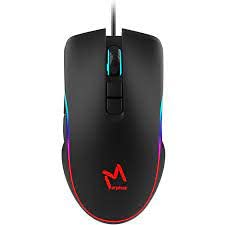
The ICON Morpheus GX 66 is a high-performance wired gaming mouse featuring customizable LED lighting and a precise 7200 DPI optical sensor, designed for an optimal gaming experience. It offers a modern style and ambidextrous design, compatible with Windows 7, Windows XP, and Linux operating systems.
2. Karatteristiċi tal-prodott
- Sensor ta' Preċiżjoni Għolja: Equipped with a 7200 DPI optical sensor for accurate tracking and responsiveness.
- Dawl LED personalizzabbli: Dynamic LED illumination enhances your gaming setup.
- 7 Buttuni Programmabbli: Offers extensive customization for various gaming commands.
- Konnettività bil-fili: Ensures a stable and lag-free connection.
- Disinn Ambidestru: Comfortable for both left and right-handed users.
- Bini Durabbli: Designed for long-lasting use in intense gaming sessions.
- Kompatibilità Wiesgħa: Supports Windows 7, Windows XP, and Linux operating systems.

3. Setup
- Oħroġ il-Maws mill-pakkett: Carefully remove the ICON Morpheus GX 66 mouse from its packaging.
- Qabbad mal-Kompjuter: Locate an available USB port on your computer. Plug the USB connector of the mouse firmly into the USB port.
- Installazzjoni tas-sewwieq: The mouse is plug-and-play. Your operating system (Windows 7, Windows XP, or Linux) should automatically detect and install the necessary drivers. This process may take a few moments.
- Funzjonalità tat-Test: Once installed, move the mouse and click the buttons to ensure it is working correctly.
4. Istruzzjonijiet Operattivi
4.1 Funzjonijiet Bażiċi
- Ikklikkja Xellug: Primary action, selection, activation.
- Ikklikkja bil-lemin: Menù tal-kuntest, azzjonijiet sekondarji.
- Scroll Wheel: Scroll up/down, middle click for specific functions.
4.2 Aġġustament DPI
The mouse features a dedicated DPI button (often located behind the scroll wheel) to cycle through different sensitivity levels. Press this button to adjust the DPI (Dots Per Inch) to your preferred setting for various tasks or games. The LED lighting may change color to indicate the current DPI level.
4.3 Dawl LED
The ICON Morpheus GX 66 features dynamic LED lighting. The lighting patterns and colors are typically pre-programmed and may change based on the selected DPI setting or cycle automatically. There are no user-configurable software controls for the LED lighting on this model.

5. Manutenzjoni
- Tindif: Uża drapp artab u niexef biex timsaħ il-wiċċ tal-maws. Għal ħmieġ iebes, nixxef ftit.ampLaħlaħ id-drapp bl-ilma. Evita li tuża kimiċi ħarxa jew materjali li joborxu.
- Tindif tas-Sensor: Kultant, trab jew debris jistgħu jakkumulaw madwar is-senser ottiku. Uża swab tal-qoton jew arja kkompressata biex tnaddaf bil-mod iż-żona tas-senser fuq in-naħa ta’ taħt tal-maws.
- Kura tal-Cable: Avoid sharp bends or excessive pulling on the mouse cable to prevent damage. Store the cable neatly when not in use.
- Ħażna: Meta ma tkunx qed tużah għal perjodi twal, aħżen il-maws f'ambjent nadif u niexef 'il bogħod mix-xemx diretta u minn temperaturi estremi.

6 Issolvi l-problemi
- Il-Maws Mhux Jirrispondi:
- Kun żgur li l-kejbil tal-USB huwa mdaħħal sew fil-port tal-USB tal-kompjuter.
- Ipprova qabbad il-maws ma' port USB differenti.
- Ibda mill-ġdid il-kompjuter tiegħek.
- Moviment Erratiku tal-Kurser:
- Naddaf is-senser ottiku fuq in-naħa ta' taħt tal-maws.
- Kun żgur li qed tuża l-maws fuq wiċċ nadif, mhux riflettiv, u uniformi. Evita l-ħġieġ jew uċuħ li jirriflettu ħafna.
- LED Lighting Not Working:
- Iċċekkja l-konnessjoni USB.
- The LED lighting is typically powered directly via USB. If the mouse functions but LEDs do not, contact support.
- Buttuni Mhux Jaħdmu:
- Kun żgur li l-maws huwa konness sew.
- Test the mouse on another computer to rule out software issues.
7. Speċifikazzjonijiet
| Manifattur | IKONA |
| Mudell | Morpheus GX 66 |
| ASIN | B0B5PLWQXC |
| Karatteristiċi Speċjali | Dawl LED |
| Teknoloġija ta 'Sejbien tal-Moviment | Ottiċi |
| DPI | 7200 |
| Orjentazzjoni tal-Idejn | Ambidestru |
| Użi Rakkomandati | Logħob |
| Kompatibilità tas-Sistema Operattiva | Linux, Windows 7, Windows XP |
| Stil | Moderna |
| Tip Finish | Matte |
| Sors tal-Enerġija | Corded Electric (USB) |
| Kulur | Multi-kulur |
8. Garanzija u Appoġġ
The ICON Morpheus GX 66 Wired Gaming Mouse comes with a standard manufacturer's warranty. For specific warranty terms and conditions, please refer to the warranty card included with your product or visit the official ICON websit.
For technical support, troubleshooting assistance, or to inquire about replacement parts, please contact ICON customer service through their official support channels. Keep your purchase receipt and product model information (GX 66) handy when contacting support.


