Introduzzjoni
This manual provides detailed instructions for the setup, operation, and maintenance of your Wiszodet Kids Smart Game Watch S16. Please read this manual thoroughly to ensure proper use and to maximize the watch's features.

Immaġni: Quddiem view of the Wiszodet Kids Smart Game Watch S16 in blue, showing the digital time and date.
X'hemm fil-Kaxxa
Malli tiftaħ il-pakkett, ivverifika li l-oġġetti kollha li ġejjin huma inklużi:
- Wiszodet Kids Smart Watch (S16)
- Protettur tal-ħġieġ tal-iskrin
- Cable tal-Iċċarġjar tal-USB
Prodott Overview
Familiarize yourself with the physical components of your smart watch.

Image: Diagram illustrating the watch's features including the camera, soft band, flashlight (torch), home button, USB charging port, and aluminum casing.
- Kamera: Jinsab fil-parti ta' fuq tal-wiċċ tal-arloġġ għar-ritratti u l-vidjows.
- Soft Band: Comfortable and adjustable strap.
- Torch (Flashlight): Dawl integrat għall-illuminazzjoni.
- Buttuna tad-dar: Used to return to the main screen or activate certain functions.
- Sokit tal-USB: For charging the watch and transferring data.
- Qoxra tal-Aluminju: Ċ ta' barra durabbliasing.
- Touch Screen: 1.54-inch display for interactive control.
Setup
1. Iċċarġjar tal-Għassa
Before first use, fully charge the watch.
- Connect the provided USB charging cable to the USB socket on the watch.
- Ipplaggja t-tarf l-ieħor tal-kejbil USB ma' adapter tal-enerġija USB kompatibbli (mhux inkluż) jew mal-port USB tal-kompjuter.
- The watch screen will indicate charging status. Allow approximately 2-3 hours for a full charge.
2. Tixgħil / Mitfi
- Biex Tixgħel: Press and hold the Home button until the screen lights up.
- Biex Tifi: Press and hold the Home button, then follow the on-screen prompts to confirm power off.
3. Initial Settings (Time and Date)
Upon first power-on or after a factory reset, you may need to set the correct time and date.
- From the main screen, swipe to find and tap the "Settings" icon.
- Navigate to "Time & Date" or a similar option.
- Adjust the hour, minute, year, month, and day as needed.
- Select 12-hour or 24-hour format.
- Ikkonferma s-settings tiegħek.
Istruzzjonijiet Operattivi
The Wiszodet S16 Smart Watch offers a variety of functions accessible via its touch screen.

Image: The watch interface showing various application icons, including Camera, Games, Music, and more.
1. Reġistrazzjoni tal-Kamera u tal-Vidjo
Capture photos and record videos directly from your watch.
- From the main menu, tap the "Camera" icon to open the camera application.
- Tap the screen to take a photo.
- To switch to video recording, look for a video camera icon within the camera app and tap it.
- Tap again to start recording, and tap once more to stop.
- Photos and videos are saved to the watch's internal storage.

Image: The watch demonstrating its selfie camera function, with options for video recording and playback.
2. Logħob
The watch includes 24 built-in puzzle games designed to engage and entertain.
- Tap the "Game" icon from the main menu.
- Select from the list of available games.
- Follow the on-screen instructions to play.

Image: A visual representation of the 24 puzzle games available on the watch, such as 'Fruit Weighing' and 'Time Teaching'.
3. Music Player
Isma' l-mużika files stored on the watch.
- Tap the "Music" icon.
- Browse and select the desired audio file.
- Use the on-screen controls for playback (play, pause, skip).
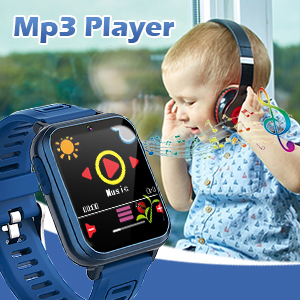
Image: The watch displaying its MP3 player interface, with a child listening to music in the background.
4 Pedometru
Track daily steps and estimated calories burned.
- Tap the "Pedometer" icon.
- L-arloġġ jibda jsegwi l-passi awtomatikament meta jintlibes.
- View your daily step count and calorie estimates on the screen.

Image: The watch highlighting its fitness tracking features, including pedometer, stopwatch, and timer, with children engaged in physical activity.
5. Arloġġ ta 'allarm
Issettja allarmi għal tfakkiriet jew rutini ta' kuljum.
- Tap the "Alarm" icon.
- Tap "+" or "Add Alarm" to set a new alarm.
- Adjust the time and select repeat days if desired.
- Salva l-allarm.
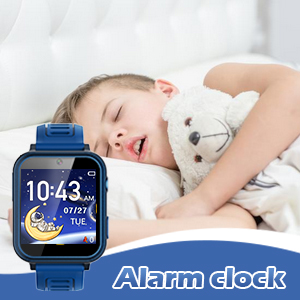
Image: The watch displaying the alarm clock feature, with a child sleeping, suggesting its use for morning routines.
6. Flashlight
Activate the built-in flashlight for quick illumination.
- Tap the "Torch" or "Flashlight" icon.
- Tap again to turn it off.
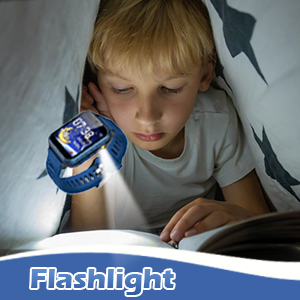
Image: The watch's flashlight feature in use, providing light for a child reading under a blanket.
7. Voice Recorder
Record short audio messages or notes.
- Tap the "Voice Recorder" icon.
- Tap the record button to start recording.
- Tap again to stop and save the recording.

Image: The watch displaying the voice recorder function, with children singing, indicating its use for capturing audio.
8. Kalkulatur
Agħmel kalkoli aritmetiċi bażiċi.
- Tap the "Calculator" icon.
- Use the on-screen keypad to input numbers and operations.
9. Karatteristiċi oħra
- Tema: Customize the watch face and interface theme.
- Screensaver: Select different screensaver options.
- Kronometru: Kejjel intervalli ta' ħin.
- Timer: Set countdown timers.
- Kalendarju: View the current date and navigate through months.
- Aġġustament tal-Volum: Control the watch's audio output level.
- Ħin tad-dawl ta' wara: Adjust how long the screen stays lit.

Immaġni: Wirja ta' kollaġġasing various watch functions including alarm, recorder, music, calculator, flashlight, and calendar, with children demonstrating their use.
Manutenzjoni
Proper care will extend the life of your Wiszodet S16 Smart Watch.
- Tindif: Wipe the watch screen and band with a soft, dry cloth. Avoid harsh chemicals or abrasive materials.
- Reżistenza għall-Ilma: The watch is designed for daily use and splash resistance, but it is not suitable for swimming or showering. Avoid submerging the watch in water.
- Ħażna: Aħżen l-arloġġ f'post frisk u niexef 'il bogħod mix-xemx diretta u minn temperaturi estremi.
- Protettur tal-iskrin: Apply the included screen glass protector to prevent scratches.
Issolvi l-problemi
| Problema | Kawża Possibbli | Soluzzjoni |
|---|---|---|
| L-arloġġ ma jixgħelx. | Batterija baxxa. | Iċċarġja l-arloġġ għal mill-inqas 30 minuta. |
| L-iskrin ma jirrispondix. | Problema temporanju tas-softwer. | Restart the watch by holding the Home button. |
| Ma nistax insalva r-ritratti/vidjows. | Spazju għall-ħażna insuffiċjenti. | Ħassar il-qadim files or transfer them to a computer. |
| Il-Ħin/Data mhumiex korretti. | Settings need adjustment. | Go to Settings > Time & Date to adjust. |
Speċifikazzjonijiet
| Karatteristika | Dettall |
|---|---|
| Isem tal-Mudell | S16 |
| Brand | Wiszodet |
| Daqs tal-Iskrin | 1.54 Pulzier |
| Tip ta 'Wiri | Touchscreen |
| Tip ta 'batterija | 1 Polimer tal-litju (inkluż) |
| Konnettività | USB |
| GPS | L-ebda GPS |
| Riżoluzzjoni tal-Kamera | HD (not full HD) |
| Dimensjonijiet tal-Prodott | 9.4 x 2.4 x 0.71 pulzieri |
| Piż tal-oġġett | 0.353 uqija (10 Grammi) |
Garanzija u Appoġġ
For warranty information or technical support, please refer to the contact details provided with your purchase or visit the official Wiszodet websit. Żomm il-prova tax-xiri tiegħek għal kwalunkwe talba ta' garanzija.


