Introduzzjoni
The Logitech MX Keys Mini for Mac is a minimalist wireless illuminated keyboard designed for enhanced productivity across Apple macOS, iPadOS, and iOS devices. This compact keyboard features backlit keys, USB-C charging, and tactile typing for a comfortable user experience.
Note: This product is a renewed item, professionally inspected and tested to function and appear like new. Renewed products are eligible for replacement or refund under the Amazon Renewed Guarantee if not satisfied with the purchase.

Image: Logitech MX Keys Mini for Mac keyboard in Pale Grey, showcasing id-disinn kompatt tiegħu.
X'hemm fil-Kaxxa
Upon unboxing your Logitech MX Keys Mini for Mac, you will find the following items:
- Logitech MX Keys Mini for Mac Wireless Illuminated Keyboard
- Cable tal-Iċċarġjar tal-USB-C

Image: The Logitech MX Keys Mini for Mac keyboard and its included USB-C charging cable, as packaged.
Setup
1. Iċċarġjar tat-Tastiera
Before initial use, ensure your keyboard is fully charged. Connect the included USB-C cable to the USB-C port located on the back of the keyboard and plug the other end into a compatible USB-C power source (e.g., your Mac, a wall adapter). The keyboard can be used while charging.
2. Pairing via Bluetooth Low Energy
The MX Keys Mini for Mac utilizes Bluetooth Low Energy for wireless connectivity. It can be paired with up to three different devices simultaneously.
- Ixgħel it-tastiera billi tuża l-iswiċċ tal-enerġija li jinsab fuq wara.
- Press and hold one of the Easy-Switch keys (labeled 1, 2, or 3) on the top row of the keyboard until the LED indicator above the key starts blinking rapidly. This indicates the keyboard is in pairing mode.
- On your Mac, iPad, or iPhone, navigate to Bluetooth settings.
- Select "MX Keys Mini for Mac" from the list of available devices to complete the pairing process.
- Irrepeti għal massimu ta' żewġ apparati oħra billi tuża ċ-ċwievet l-oħra tal-Easy-Switch.
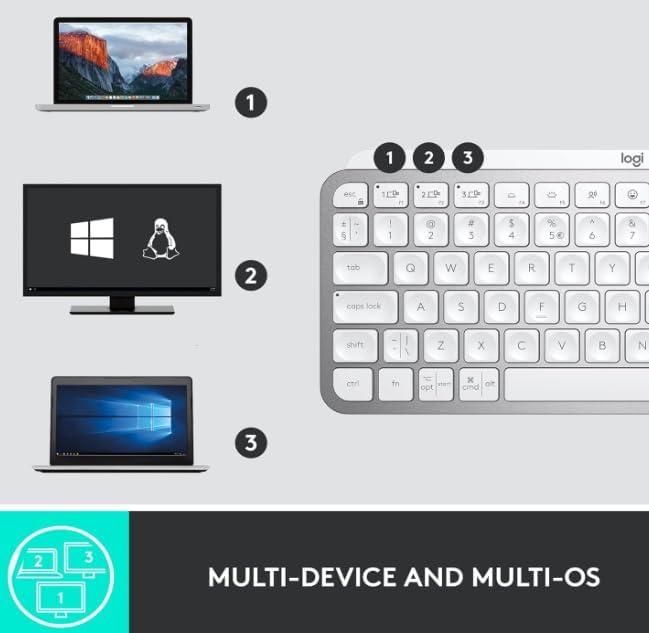
Image: The keyboard demonstrating multi-device connectivity with a MacBook, an iMac, and an iPad, highlighting the Easy-Switch functionality.
Operazzjoni
Funzjonijiet Ewlenin
The MX Keys Mini for Mac features a Mac-specific layout with Perfect Stroke keys designed for comfortable and precise typing. The top row includes dedicated multimedia keys and smart keys.
- Ċwievet Faċli biex Tibdel (1, 2, 3): Quickly switch between up to three paired devices.
- Ċwievet intelliġenti: Includes dedicated keys for voice-to-text Dictation, Mic Mute/Unmute, and Emoji access.
- Kontrolli Multimedjali: Play/pause, volume up/down, and mute controls.
- Luminożità tad-dawl ta' wara: Adjust the illumination level of the keys.

Immaġni: Dettaljata view of the keyboard highlighting key features such as Easy Switch buttons, Smart Keys, USB-C charging port, compact size, Perfect Stroke keys, and Smart Backlighting.
Illuminazzjoni Intelliġenti
The keyboard features smart backlighting that automatically adjusts to ambient lighting conditions. The keys illuminate when your hands approach and dim when you move away, conserving battery life.
Personalizzazzjoni
Customize your keyboard experience using the Logitech Options+ software (available for download from the Logitech website). This software allows you to:
- Remap function keys to perform specific actions.
- Adjust global settings or create application-specific key assignments.
- Immaniġġja l-konnessjonijiet tat-tagħmir Easy-Switch.
- Configure backlighting behavior and battery saving modes.
Manutenzjoni
Ħajja tal-batterija u Iċċarġjar
The MX Keys Mini for Mac is equipped with a USB-C rechargeable battery. A full charge provides approximately 10 days of battery life with backlighting enabled, or up to 5 months with backlighting turned off. To maximize battery life, consider disabling backlighting when not needed via the Logitech Options+ software.
Tindif
Biex tnaddaf it-tastiera tiegħek, imsaħ bil-mod iċ-ċwievet u l-wiċċ b'ċarruta ratba u mingħajr suf. Evita li tuża kimiċi ħarxa jew materjali li joborxu.
Issolvi l-problemi
Kwistjonijiet ta' Konnettività
- It-tastiera mhux qed tikkonnettja: Ensure the keyboard is powered on and fully charged. Verify that Bluetooth is enabled on your device and the keyboard is in pairing mode (blinking LED on Easy-Switch key).
- Konnessjoni intermittenti: Move the keyboard closer to your device to reduce interference. Ensure no other devices are causing Bluetooth interference.
- Apparat tal-bidla: Press the corresponding Easy-Switch key (1, 2, or 3) to connect to a previously paired device.
Id-Dawl ta' Wara Mhux Jaħdem
- Check battery level; backlighting may be disabled when the battery is low.
- Ensure backlighting is not disabled in the Logitech Options+ software.
- Adjust backlighting brightness using the dedicated keys on the top row.
Speċifikazzjonijiet
| Karatteristika | Dettall |
|---|---|
| Dimensjonijiet tal-Prodott | 5.19 x 7.72 x 0.83 pulzieri |
| Piż tal-oġġett | 1.48 liri |
| Batteriji | 1 batterija tal-polimer tal-litju (inkluża) |
| Teknoloġija tal-Konnettività | Bluetooth, USB-C |
| Deskrizzjoni tat-Tastiera | Membrana |
| Apparati Kompatibbli | Laptop, Tablet (macOS, iPadOS, iOS) |
| Karatteristiċi Speċjali | LED Lights, Portable, Rechargeable, Ten Key Less, Wireless |
| Kulur | Griż ċar |
| Backlight tat-Tastiera | Single Color, Smart Illumination |
Garanzija u Appoġġ
For information regarding product warranty, technical support, and additional resources, please visit the official Logitech support website. As a renewed product, it is covered by the Amazon Renewed Guarantee, offering replacement or refund if you are not satisfied with your purchase.


