1. Introduzzjoni
This manual provides detailed instructions for the installation, operation, and maintenance of the ZKTeco IN01-A/3G Fingerprint Time Attendance and Access Control Terminal. Please read this manual thoroughly before using the device to ensure proper functionality and to prevent damage.
2. Prodott Aktarview
The ZKTeco IN01-A/3G is a sophisticated 3-inch TFT screen terminal designed for both time attendance and access control applications. It integrates advanced fingerprint recognition technology to provide secure and efficient user identification.
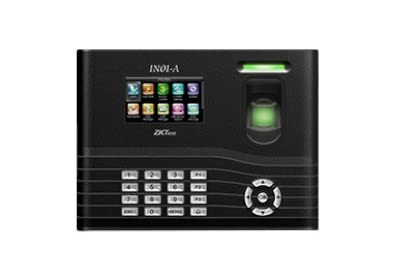
Figura 1: Quddiem view of the ZKTeco IN01-A/3G terminal, showing the 3-inch TFT screen, numeric keypad, navigation buttons, and the fingerprint sensor with an illuminated ring.
Key components include a high-resolution TFT display for user interaction, a numeric keypad for data entry, navigation buttons for menu control, and a robust fingerprint sensor for biometric authentication.
3. Karatteristiċi
- Kapaċità tal-marki tas-swaba': Supports storage for up to 3000 fingerprints.
- Wiri: Equipped with an LCD (3-inch TFT screen) for clear visual feedback.
- Identification Method: Primarily uses fingerprint recognition for user authentication.
- Durabilità: Features a scratch-proof design for enhanced longevity.
- Funzjonalità: Combines time attendance tracking with access control capabilities.
4. Setup
4.1 Spakkjar u Spezzjoni
Carefully unpack the device and verify that all components are present and undamaged. Report any discrepancies to your supplier immediately.
4.2 Immuntar tal-Apparat
- Choose a suitable location for installation, ensuring it is protected from direct sunlight, extreme temperatures, and moisture.
- Use the provided mounting template to mark drilling positions on the wall.
- Drill toqob u daħħal plugs tal-ħajt.
- Waħħal il-pjanċa tal-immuntar mal-ħajt billi tuża l-viti.
- Attach the IN01-A/3G terminal to the mounting plate.
4.3 Konnessjoni tal-Enerġija
Connect the provided power adapter to the device's power input port and then plug it into a standard electrical outlet. Ensure the power supply matches the device's requirements.
4.4 Konnessjoni tan-Netwerk (Mhux obbligatorja)
If network connectivity is required for data transfer or remote management, connect an Ethernet cable to the device's LAN port and to your network router/switch.
4.5 Konfigurazzjoni Inizjali
Upon first power-up, the device may prompt for initial setup, including date, time, and administrator registration. Follow the on-screen instructions to complete these steps.
5. Istruzzjonijiet Operattivi
5.1 Reġistrazzjoni tal-Amministratur
The first step is to register an administrator fingerprint. This user will have access to all device settings and user management functions.
- Agħfas il- MENU buttuna.
- Innaviga lejn Ġestjoni tal-Utenti u agħżel Utent Ġdid.
- Enter a User ID and then select Irreġistra marki tas-swaba'.
- Place your finger on the sensor three times as prompted, ensuring full contact each time.
- Set the user's privilege level to Amministratur.
- Issejvja s-settings.
5.2 User Fingerprint Enrollment
To allow other users to record attendance or gain access, their fingerprints must be enrolled.
- Access the menu as an administrator.
- Innaviga lejn Ġestjoni tal-Utenti u agħżel Utent Ġdid or select an existing user to add a fingerprint.
- Enter or confirm the User ID.
- Agħżel Irreġistra marki tas-swaba' and follow the on-screen prompts to scan the user's finger three times.
- Issejvja l-informazzjoni tal-utent.
5.3 Reġistrazzjoni tal-Attendenza
Users can record their attendance by simply placing their enrolled finger on the fingerprint sensor. The device will provide visual and audible confirmation of a successful scan.
5.4 Access Control Functionality
For access control, the device will verify the enrolled fingerprint against its database. Upon successful verification, it will trigger the connected access mechanism (e.g., door lock) according to the configured access rules.
6. Manutenzjoni
6.1 Tindif tal-Apparat
Regularly clean the fingerprint sensor and screen with a soft, dry, lint-free cloth. Do not use abrasive cleaners or solvents, as these can damage the surface.
6.2 Backup tad-Dejta
It is recommended to regularly back up attendance records and user data to an external storage device (e.g., USB drive) or a connected server to prevent data loss.
6.3 Aġġornamenti tal-Firmware
Iċċekkja perjodikament l-uffiċjal ta' ZKTeco website for firmware updates. Keeping the device's firmware up-to-date ensures optimal performance and access to new features.
7 Issolvi l-problemi
- L-apparat ma jixgħelx:
- Kun żgur li l-adapter tal-enerġija huwa konness sew kemm mal-apparat kif ukoll ma' sokit tal-enerġija li jaħdem.
- Ivverifika li l-iżbokk tad-dawl huwa funzjonali.
- Marka tas-swaba' mhux rikonoxxuta:
- Kun żgur li subgħajk ikun nadif u niexef.
- Poġġi subgħajk ċatt u ċċentrat fuq is-sensor.
- Try enrolling the fingerprint again if the issue persists.
- Clean the fingerprint sensor surface.
- Cannot access menu:
- Ensure you are using an enrolled administrator fingerprint or password.
- Kwistjonijiet ta' trasferiment tad-dejta:
- Check network cable connections.
- Verify network settings on the device and server.
8. Speċifikazzjonijiet
| Karatteristika | Dettall |
|---|---|
| Brand | ZKTeco |
| Mudell | IN01-A/3G |
| Kapaċità tal-marki tas-swaba' | 3000 |
| Wiri | TFT LCD ta '3 pulzieri |
| Metodu ta' Identifikazzjoni | Marki tas-swaba' |
| Dimensjonijiet tal-Prodott (LxWxH) | 21.2 x 158.9 x 4.8 Ċentimetru |
| Numru tal-Parti tal-Oġġett | 8765 |
| Pajjiż ta' Oriġini | Indja |
| L-Ewwel Data Disponibbli | 22 ta’ Ġunju 2022 |
9. Garanzija u Appoġġ
Għal informazzjoni dwar il-garanzija u appoġġ tekniku, jekk jogħġbok irreferi għad-dokumentazzjoni pprovduta max-xiri tiegħek jew żur is-sit uffiċjali ta' ZKTeco. websit. Żomm l-irċevuta tax-xiri tiegħek bħala prova tax-xiri għal talbiet ta' garanzija.
For further assistance, you may contact ZKTeco customer service or your local distributor.


