1. Introduzzjoni
Thank you for choosing the Steelplay Impulse Gaming Headset. This manual provides detailed instructions for setting up, operating, and maintaining your headset. The Steelplay Impulse offers versatile connectivity, supporting both Bluetooth wireless and 3.5mm wired connections, making it compatible with a wide range of devices including PC, Mac, Nintendo Switch, smartphones, tablets, PlayStation 4, PlayStation 5, Xbox One, and Xbox Series consoles.
Key features include a detachable microphone, up to 28 hours of battery life, comfortable ear cushions, an adjustable headband, and integrated controls for audio and microphone management.
2. Prodott Aktarview u Komponenti
The Steelplay Impulse Gaming Headset package includes the following components:
- Steelplay Impulse Gaming Headset
- Mikrofonu li jinqala'
- 3.5mm Audio Jack Cable (2 meters)
- USB-C Charging Cable (1.5 meters)
Familiarize yourself with the headset's main parts:

Figure 2.1: Steelplay Impulse Gaming Headset with detachable microphone attached.
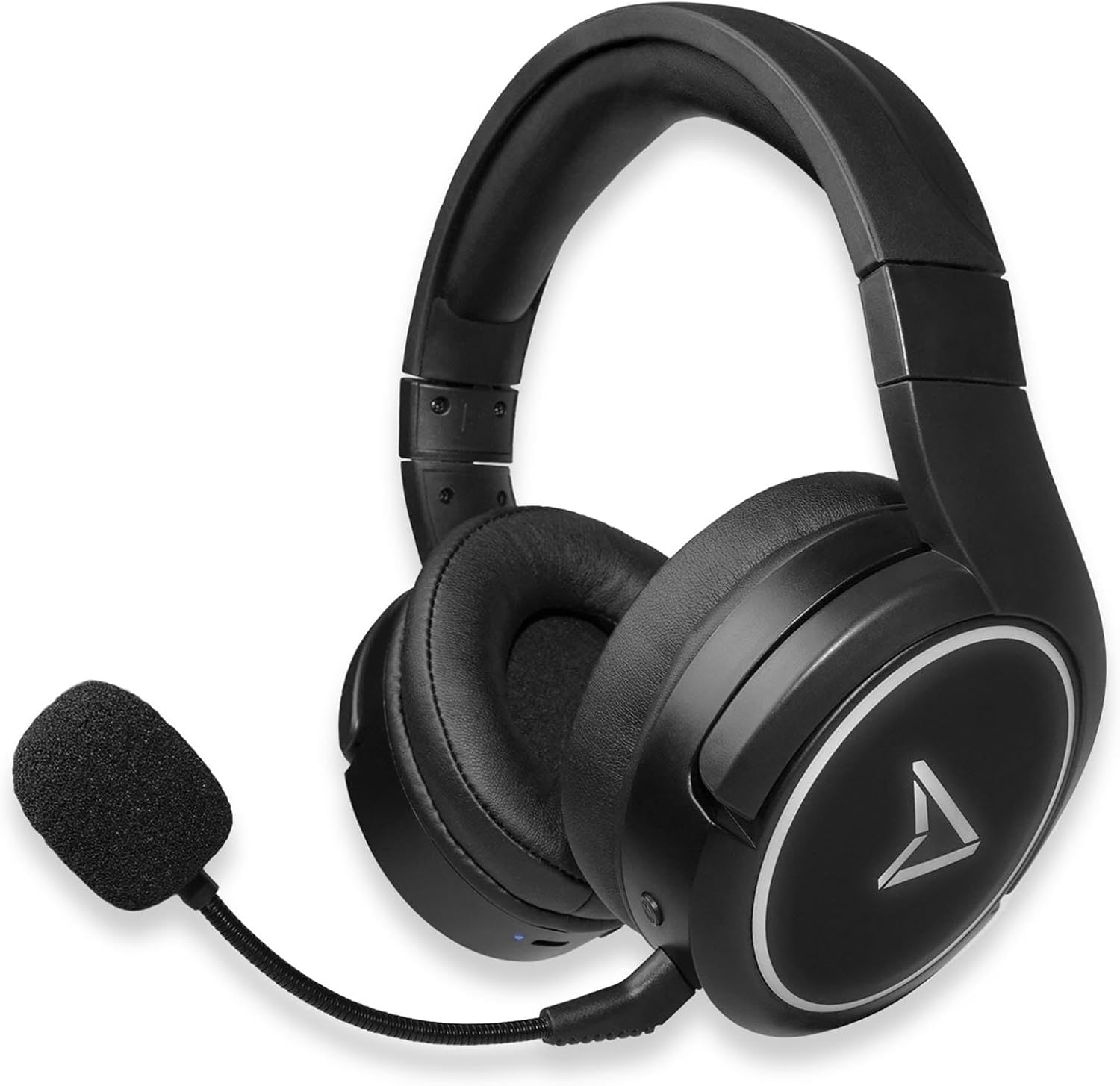
Figure 2.2: Steelplay Impulse Gaming Headset, highlighting the left earcup with integrated controls and microphone port.

Figura 2.3: Close-up view of the detachable microphone, showing its flexible arm and 3.5mm jack connector.
3. Setup
3.1 Iċċarġjar inizjali
Before first use, fully charge the headset. Connect the supplied USB-C charging cable to the headset's USB-C port and the other end to a compatible USB power source (e.g., computer USB port, USB wall adapter). The charging indicator light will show the charging status and turn off or change color when fully charged. A full charge provides up to 28 hours of autonomy.
3.2 Konnessjoni bla fili Bluetooth
The Steelplay Impulse headset can connect wirelessly via Bluetooth to compatible devices such as PC, Mac, Nintendo Switch, Android smartphones, iOS smartphones, and tablets.
- Qawwa Mixgħul: Press and hold the Power button on the headset until the indicator light flashes, indicating it is in pairing mode.
- Ippermetti Bluetooth: On your device (PC, Mac, Switch, smartphone, tablet), navigate to the Bluetooth settings.
- Par: Select "Steelplay Impulse" from the list of available devices. Once connected, the indicator light on the headset will typically show a solid color or slow flash.
3.3 Wired Connection (3.5mm Jack)
For wired use, connect the supplied 3.5mm audio jack cable to the headset's 3.5mm port and the other end to your device. This connection is compatible with PS5, PS4, Xbox Series X/S, Xbox One, Nintendo Switch, PC, laptops, Mac, smartphones, and tablets.
- Microphone Note: When using the 3.5mm wired connection, the detachable microphone functions on all compatible platforms.
- Ensure the 3.5mm jack is fully inserted into both the headset and your device for optimal audio and microphone performance.
4. Istruzzjonijiet Operattivi
4.1 Power On/Off
- Biex Tixgħel: Agħfas u żomm il-buttuna tal-Power għal madwar 3 sekondi sakemm id-dawl indikatur jixgħel.
- Biex Tifi: Agħfas u żomm il-buttuna tal-Power għal madwar 5 sekondi sakemm id-dawl indikatur jintefa.
4.2 Kontroll tal-Volum
The headset features integrated volume controls, typically located on one of the earcups. Use the volume up (+) and volume down (-) buttons or wheel to adjust the audio level.
4.3 Użu tal-Mikrofonu
- It-twaħħil tal-mikrofonu: Insert the detachable microphone's 3.5mm jack into the dedicated microphone port on the headset.
- Kompatibbiltà tal-mikrofonu: The detachable microphone is designed for use with PC, Mac, and mobile devices when connected via Bluetooth. When using the 3.5mm wired connection, the microphone is compatible with all listed platforms (PS5, PS4, Xbox Series X/S, Xbox One, Switch, PC, Mac, smartphone, tablet).
- Funzjoni Mute: The headset includes integrated microphone controls. Refer to the specific button layout on your headset for the microphone mute function.
5. Manutenzjoni
Proper maintenance ensures the longevity and performance of your Steelplay Impulse Gaming Headset.
- Tindif: Use a soft, dry cloth to clean the earcups and headband. For stubborn dirt, a slightly damp cloth can be used, but ensure no moisture enters the speaker grilles or ports. Avoid harsh chemicals or abrasive cleaners.
- Ħażna: Store the headset in a cool, dry place away from direct sunlight and extreme temperatures. If storing for an extended period, ensure the battery is partially charged (around 50%) to help preserve battery health.
- Kura tal-Cable: Avoid sharply bending or twisting the audio and charging cables. Disconnect cables by pulling the plug, not the cable itself.
- Reżistenza għall-Ilma: Dan il-prodott mhuwiex reżistenti għall-ilma. Evita l-espożizzjoni għal-likwidi.
6 Issolvi l-problemi
Jekk tiltaqa' ma' problemi bil-headset tiegħek, irreferi għas-soluzzjonijiet komuni li ġejjin:
- Ebda Ħsejjes:
- Ensure the headset is powered on and connected (Bluetooth or wired).
- Iċċekkja l-livelli tal-volum kemm fuq il-headset kif ukoll fuq l-apparat konness tiegħek.
- If using Bluetooth, try re-pairing the headset.
- If wired, ensure the 3.5mm cable is fully inserted and try a different audio port if available.
- Mikrofonu Mhux Jaħdem:
- Ensure the detachable microphone is securely attached.
- Iċċekkja jekk il-mikrofonu huwiex siekta fuq il-headset jew fis-settings tat-tagħmir tiegħek.
- Verify microphone input settings on your PC or console.
- Remember the microphone's specific compatibility for Bluetooth (PC, Mac, mobile) vs. wired (all platforms).
- Kwistjonijiet ta' Tqabbil tal-Bluetooth:
- Ensure the headset is in pairing mode (flashing indicator light).
- Itfi u ixgħel il-Bluetooth fuq l-apparat tiegħek.
- Remove "Steelplay Impulse" from your device's Bluetooth list and attempt to re-pair.
- Kun żgur li l-headset huwa ċċarġjat biżżejjed.
- Problemi tal-iċċarġjar:
- Verify the USB-C cable is correctly connected to both the headset and the power source.
- Ipprova kejbil USB-C jew sors ta' enerġija differenti.
- Ensure the charging port on the headset is clean and free of debris.
7. Speċifikazzjonijiet
| Karatteristika | Deskrizzjoni |
|---|---|
| Isem tal-Mudell | JVAMUL00143 |
| Brand | Steelplay |
| Teknoloġija tal-Konnettività | Bluetooth, Bil-fili (Ġakk ta' 3.5mm) |
| Teknoloġija tal-Komunikazzjoni mingħajr Fili | Bluetooth |
| Apparati Kompatibbli | PC, Mac, Switch, Android/iOS smartphones, tablets, PS5, PS4, Xbox Series X/S, Xbox One |
| Mikrofonu | Detachable, included |
| Ħajja tal-batterija | Sa 28 sigħat |
| Medda ta' Frekwenzi | 20 Hz - 20000 Hz |
| Materjal | Plastik |
| Kulur | Iswed |
| Tqegħid tal-widnejn | Fuq il-Widna (Ċirkumasowjali) |
| Tip ta' Kontroll | Kontroll Integrat |
| Karatteristika tal-Cable | Jinqala' |
| Livell ta 'Reżistenza għall-Ilma | Mhux Reżistenti għall-Ilma |
8. Garanzija u Appoġġ
The Steelplay Impulse Gaming Headset comes with a standard manufacturer's warranty. Please refer to the warranty card included in your product packaging or visit the official Steelplay websit għal termini u kundizzjonijiet dettaljati tal-garanzija.
For technical support, troubleshooting assistance beyond this manual, or warranty claims, please contact Steelplay customer service through their official webis-sit jew il-bejjiegħ bl-imnut li mingħandu xtrajt il-prodott.


