HCDZ Replacement Voice Remote Control User Manual
For Thomson LED 4K Smart Ultra HD Android TVs
1. Introduzzjoni
This manual provides instructions for the HCDZ Replacement Voice Remote Control. This remote is designed as a direct replacement for various Thomson LED 4K Smart Ultra HD Android TV models. It operates using infrared (IR) technology and requires no programming for immediate use.
2. Setup: Installing Batteries
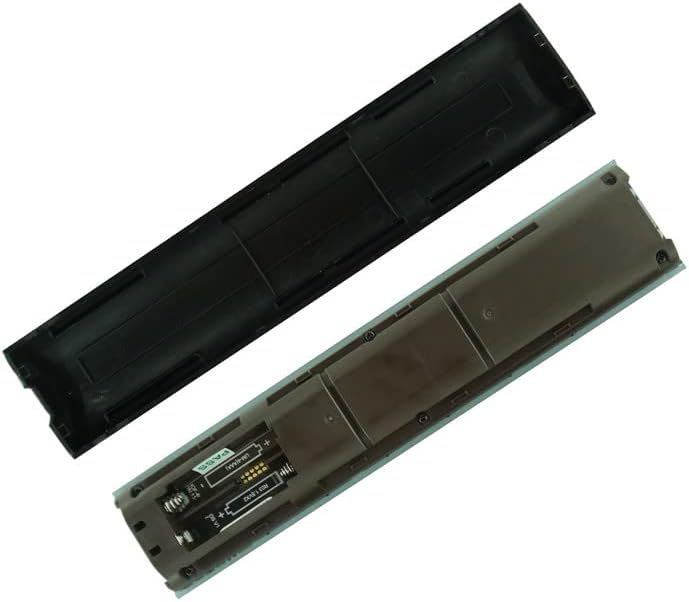
- Iftaħ il-Kompartiment tal-Batterija: Locate the battery compartment cover on the back of the remote control. Gently slide or press the latch to open the cover.
- Daħħal Batteriji: Insert two (2) AAA batteries (not included) into the compartment. Ensure the positive (+) and negative (-) terminals of the batteries align correctly with the markings inside the compartment. Incorrect insertion can prevent the remote from functioning.
- Agħlaq il-Kompartiment tal-Batterija: Erġa’ poġġi l-għatu tal-kompartiment tal-batterija, waqt li tiżgura li jikklikkja sew f’postu.

Stampa 1: Wara view of the HCDZ Replacement Remote Control with the battery compartment open, illustrating where to insert AAA batteries.
3. It-tħaddim tal-Kontroll mill-bogħod
This HCDZ Replacement Voice Remote Control is designed to work immediately after battery installation, without the need for any programming. It functions as an infrared (IR) replacement.
- Point and Operate: Point the remote control directly towards your Thomson TV's IR sensor.
- Funzjonijiet Bażiċi: All standard functions such as Power, Volume, Channel, Menu navigation, and Smart TV features should be accessible.
- Kontroll tal-Vuċi: If your original TV remote supported voice control and this replacement remote has a microphone button, press and hold the microphone button to activate voice commands. Ensure your TV's settings are configured for voice input.
Stampa 2: Quddiem view of the HCDZ Replacement Remote Control, showing the button layout for operation.
4. Manutenzjoni u Kura
- Sostituzzjoni tal-batterija: Replace both batteries when the remote's performance degrades or it stops responding. Always replace old batteries with new ones; do not mix old and new batteries.
- Ħażna: If the remote will not be used for an extended period, remove the batteries to prevent leakage and corrosion. Store the remote in a cool, dry place.
- Tindif: Imsaħ ir-remote b'ċarruta ratba u niexfa. Tużax prodotti tat-tindif likwidi jew materjali li joborxu.
- Kundizzjonijiet Ambjentali: Do not expose the remote to extreme heat, humidity, or direct sunlight, as this can cause malfunction or damage.
5 Issolvi l-problemi
- Remote Mhux Jirrispondi:
Iċċekkja jekk il-batteriji humiex imdaħħla sew bil-polarità korretta (+/-).
Ibdel il-batteriji qodma b'batteriji AAA ġodda.
Kun żgur li m'hemm l-ebda ostaklu bejn ir-remote u s-senser IR tat-TV.
Iċċekkja li r-remote huwa ppuntat direttament lejn it-TV.
- Il-Kontroll tal-Vuċi Mhux Jaħdem:
Confirm that your specific Thomson TV model supports voice control and that the feature is enabled in the TV's settings.
Ensure you are pressing and holding the microphone button while speaking.
- Funzjonalità intermittenti:
Dan jista' jindika li l-batterija hija baxxa. Ibdel il-batteriji.
Ensure the remote is not exposed to strong light sources that might interfere with the IR signal.
6. Speċifikazzjonijiet
| Karatteristika | Dettall |
|---|---|
| Brand | HCDZ |
| Teknoloġija tal-Konnettività | Infra-aħmar (IR) |
| Apparati Kompatibbli | Television (Thomson LED 4K Smart Ultra HD Android TV models) |
| Karatteristika Speċjali | No programming needed, works out of package |
| Batteriji Meħtieġa | 2 batteriji AAA (mhux inklużi) |
| Numru Massimu ta' Apparat Appoġġjat | 1 |
7. Informazzjoni Importanti dwar is-Sigurtà
- Żarmax jew timmodifikax il-kontroll mill-bogħod.
- Keep the remote control out of reach of small children to prevent accidental ingestion of batteries.
- Armi l-batteriji użati skont ir-regolamenti lokali. Tarmix il-batteriji fin-nar.


