1. Introduzzjoni
Welcome to the user manual for your new Avtex W195TS Smart TV. This television is specifically designed for mobile living, offering versatile power options (12V, 24V, and 240V) and a range of smart features, including Wi-Fi, Bluetooth, and an integrated Freesat satellite decoder. This manual provides essential information for setting up, operating, maintaining, and troubleshooting your device to ensure optimal performance and enjoyment.
2. Informazzjoni dwar is-Sigurtà
Jekk jogħġbok aqra l-istruzzjonijiet kollha tas-sigurtà bir-reqqa qabel ma tuża t-televiżjoni. Żomm dan il-manwal għal referenza futura.
- Provvista tal-Enerġija: Tiżgura l-vol korretttage is used (12V, 24V DC or 240V AC). Do not overload power outlets.
- Ventilazzjoni: Timblokkax il-fetħiet tal-ventilazzjoni. Ħalli biżżejjed spazju madwar it-TV għal fluss tal-arja xieraq.
- Ilma u Umdità: Tesponix it-TV għax-xita jew għall-umdità. Tpoġġix oġġetti mimlija b'likwidi fuq it-TV.
- Tindif: Skonnettja t-TV qabel ma tnaddaf. Uża drapp artab u niexef. Tużax prodotti tat-tindif likwidi jew prodotti tat-tindif bl-ajrusol.
- Pjazzament: Place the TV on a stable, flat surface or mount securely to a wall/bracket. Avoid direct sunlight or heat sources.
- Servizzi: Tippruvax isservi dan il-prodott int stess. Irreferi l-manutenzjoni kollha lil persunal tas-servizz kwalifikat.
3. Kontenut tal-Pakkett
Before setup, please check that all items are present in the box:
- Avtex W195TS Smart TV
- Kontroll mill-bogħod bil-batteriji
- Kejbil tal-Enerġija DC 12V/24V
- Adapter tal-Enerġija AC 240V
- Stand tal-Mejda (jekk applikabbli)
- Manwal għall-Utent (dan id-dokument)
4. Prodott Aktarview
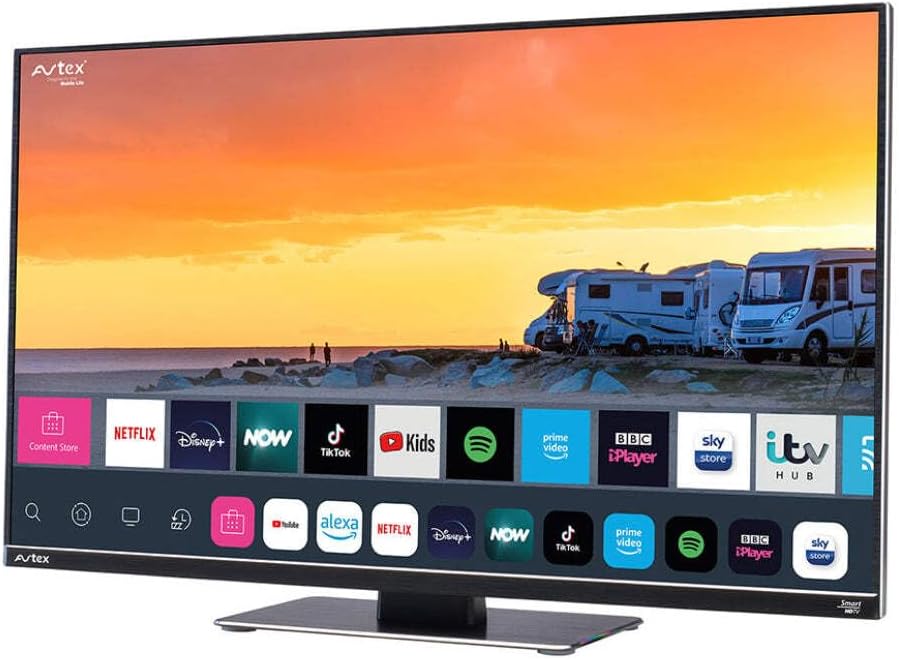
Figure 4.1: Avtex W195TS Smart TV Front View
This image shows the Avtex W195TS Smart TV from a slight angle, highlighting its slim design and the vibrant display. The screen shows a user interface with icons for popular streaming services like Netflix, Disney+, Now, TikTok, Kids, Spotify, Prime Video, BBC iPlayer, Sky Store, and ITV Hub. The background on the screen depicts a scenic view of motorhomes parked near a beach at sunset. The Avtex logo is visible on the top left and bottom left of the TV frame.
4.1. Portijiet u Konnessjonijiet
- Portijiet HDMI: For connecting external devices like Blu-ray players, game consoles, or set-top boxes.
- Portijiet USB (2): For media playback from USB drives or connecting USB accessories.
- Input ta' l-antenna: For connecting a terrestrial TV antenna.
- Input tas-Satellita: For connecting a satellite dish for Freesat or other satellite services.
- Input ta' Enerġija DC: For 12V/24V DC power connection.
- Input tal-Enerġija AC: For 240V AC power connection via adapter.
- Port Ethernet: Għal konnessjoni ta' netwerk bil-fili.
- Output Awdjo: Għall-konnessjoni ta' sistemi awdjo esterni jew headphones.
5. Setup
5.1. Installing the Stand (Optional)
- Poġġi t-TV b'wiċċu 'l isfel bir-reqqa fuq wiċċ artab u nadif biex tevita li tagħmel ħsara lill-iskrin.
- Allinja l-istand mat-toqob tal-immuntar fil-qiegħ tat-TV.
- Żgura l-istand billi tuża l-viti pprovduti.
5.2. Konnessjoni tal-Enerġija
The Avtex W195TS supports multiple power inputs:
- 12V/24V DC: Connect the supplied 12V/24V DC power cable to the DC input on the TV and to your vehicle's 12V or 24V power outlet.
- 240V AC: Connect the supplied 240V AC power adapter to the AC input on the TV, then plug the adapter into a standard 240V AC wall socket.
Nota: Do not connect both DC and AC power simultaneously.
5.3. Antenna/Satellite Connection
- Terrestrial TV: Connect your aerial cable to the 'ANTENNA IN' port.
- Satellite TV (Freesat): Connect your satellite dish cable to the 'SATELLITE IN' port.
5.4. L-Ewwel Tixgħil u l-Ewwel Setup
- Connect the TV to power and press the power button on the remote control or TV.
- The First-Time Setup Wizard will appear. Follow the on-screen prompts to select your language, country, and time zone.
- Perform an automatic channel scan for both terrestrial and satellite channels.
- Qabbad man-netwerk Wi-Fi tiegħek billi tagħżel l-isem tan-netwerk tiegħek u ddaħħal il-password.
6. Joperaw
6.1. Funzjonijiet ta 'Kontroll mill-bogħod
Familiarize yourself with the remote control buttons for easy navigation and control of your TV's features.
- Buttuna tal-Qawwa: Ixgħel/itfi t-TV.
- Buttuna tas-Sors: Selects input sources (HDMI, USB, TV, Satellite).
- Volum +/-: Jaġġusta l-livell tal-volum.
- Kanal +/-: Jibdel il-kanali tat-TV.
- Buttuni tan-Navigazzjoni ('Il fuq/'l isfel/Xellug/Lemin/OK): Għan-navigazzjoni u l-għażla tal-menù.
- Smart Hub/Home Button: Jaċċessa l-interfaċċja tat-TV Intelliġenti.
- Buttuni tal-App: Dedicated buttons for popular streaming apps (if available).
6.2. Karatteristiċi tat-TV Intelliġenti
Your Avtex W195TS is equipped with smart TV capabilities:
- App Store: Download and install various applications for streaming, news, and entertainment.
- Servizzi ta' Streaming: Access pre-installed or downloaded apps like Netflix, Disney+, Prime Video, BBC iPlayer, etc. (subscription may be required).
- Web Browser: Fittex l-internet direttament fuq it-TV tiegħek.
- Mirror tal-iskrin: Connect your smartphone or tablet to display content on the TV screen (compatibility may vary).
6.3. Konnettività Bluetooth
Pair Bluetooth devices such as headphones or external speakers for enhanced audio experience.
- Mur fil-menù tas-settings tat-TV.
- Select 'Bluetooth' or 'Connected Devices'.
- Enable Bluetooth and put your device into pairing mode.
- Agħżel it-tagħmir tiegħek mil-lista biex tqabbadh.
6.4. Daqq tal-Midja permezz tal-USB
Insert a USB drive into one of the USB ports to view photos, play videos, or listen to music.
- The TV will usually prompt you to open the media player.
- Innaviga permezz tiegħek files juża l-kontroll remot.
7. Manutenzjoni
7.1. Tindif tat-TV
- Skrin: Imsaħ l-iskrin bil-mod b'ċarruta ratba u mingħajr suf. Għal marki persistenti, nixxef ftit.ampLaħlaħ id-drapp bl-ilma jew b'soluzzjoni tat-tindif speċifika għall-iskrin (tisprejjax direttament fuq l-iskrin).
- Casing: Uża drapp artab u niexef biex timsaħ it-TV.asing. Evita prodotti tat-tindif jew solventi li joborxu.
7.2. Aġġornamenti tas-Software
Periodically check for software updates to ensure your TV has the latest features and bug fixes. Updates can usually be found in the TV's settings menu under 'System' or 'Software Update'.
8 Issolvi l-problemi
If you encounter issues with your Avtex W195TS, refer to the following common problems and solutions:
| Problema | Kawża Possibbli | Soluzzjoni |
|---|---|---|
| Ebda Qawwa | Il-kejbil tal-enerġija mhux imqabbad; l-ebda enerġija mis-sokit. | Check power cable connection; test outlet with another device; ensure correct voltage (12V / 24V / 240V). |
| L-ebda Stampa, iżda l-Ħoss huwa Preżenti | Sors ta' input mhux korrett magħżul; kejbil difettuż. | Press the 'Source' button on the remote to select the correct input; check HDMI/antenna cables. |
| L-ebda ħoss, iżda l-istampa hija preżenti | Volum immut jew baxx wisq; problema bis-sistema awdjo esterna. | Unmute volume or increase level; check connections to external audio devices. |
| Ma nistax nikkonnettja mal-Wi-Fi | Password mhux korretta; problema bir-router; it-TV wisq 'il bogħod mir-router. | Re-enter Wi-Fi password; restart router; move TV closer to router or use an extender. |
| Il-Kontroll Remot Mhux Jaħdem | Batteriji mejta; ostruzzjoni; problema ta' tqabbil. | Replace batteries; remove obstructions; re-pair remote if it's a Bluetooth remote. |
9. Speċifikazzjonijiet
| Karatteristika | Speċifikazzjoni |
|---|---|
| Brand | Avtex |
| Numru tal-Mudell | AVTEX W195TS |
| Daqs tal-Iskrin | 19.5 Pulzier |
| Riżoluzzjoni | 1080p (Full HD) |
| Proporzjon ta' l-aspett | 16:9 |
| Teknoloġija tal-Konnettività | Bluetooth, HDMI, Wi-Fi |
| Portijiet USB totali | 2 |
| Voltage | 12 Volts, 24 Volts, 240 Volts |
| Piż tal-oġġett | 2.5 Kilogrammi |
| Sena Mudell | 2018 |
10. Garanzija u Appoġġ
Your Avtex W195TS Smart TV comes with a manufacturer's warranty. Please refer to the warranty card included in your product packaging for specific terms and conditions, including warranty period and coverage details. Keep your proof of purchase for warranty claims.
For technical support, troubleshooting assistance beyond this manual, or warranty inquiries, please contact Avtex customer service through their official website or the contact information provided with your product. When contacting support, please have your model number (AVTEX W195TS) and serial number ready.


