1. Introduzzjoni
This manual provides essential information for the safe and efficient operation of your ONN 43-Inch Class 4K UHD (2160P) LED Smart TV. This television offers a 4K Ultra High Definition display, High Dynamic Range (HDR) compatibility, and integrated smart TV functionalities powered by Roku. It supports popular streaming services and voice assistants like Alexa and Google Assistant. Please read this manual thoroughly before using your television and retain it for future reference.

Image 1: ONN 43-Inch 4K UHD Smart TV in a typical living room environment.
2. Informazzjoni dwar is-Sigurtà
Always follow basic safety precautions when using this product to reduce the risk of fire, electric shock, and injury. Keep this manual handy for reference.
- Sors tal-Enerġija: Qabbad it-TV biss mal-provvista tal-enerġija speċifikata.
- Ventilazzjoni: Aċċerta ruħek li jkun hemm ventilazzjoni adegwata madwar it-TV. Timblokkax il-fetħiet tal-ventilazzjoni.
- Ilma u Umdità: Tesponix it-TV għax-xita jew għall-umdità. Tpoġġix oġġetti mimlija b'likwidi fuq it-TV.
- Tindif: Skonnettja t-TV qabel ma tnaddaf. Uża drapp artab u niexef.
- Immuntar tal-ħajt: If wall mounting, ensure the mount is compatible with VESA 400x400 standards and installed by qualified personnel.
- Tfal: Issorvelja lit-tfal biex tevita li jitilgħu fuq it-TV jew jilagħbu bit-TV.
3. Kontenut tal-Pakkett
Ivverifika li l-oġġetti kollha huma preżenti fil-pakkett. Jekk xi oġġetti huma neqsin jew bil-ħsara, ikkuntattja lill-bejjiegħ tiegħek.
- ONN 43-Inch Class 4K UHD LED Smart TV
- Kontroll mill-bogħod
- Wall Mount (Note: For renewed products, TV stands may not be included as a wall mount is provided for installation.)
- Korda tal-Enerġija
- Gwida ta' Bidu Mgħaġġel (mhux inkluża f'dan il-manwal)

Image 2: The ONN 43-Inch 4K UHD Smart TV alongside its included wall mount.
4. Setup
4.1 Installazzjoni tal-Wall Mount
Your ONN 43-Inch Smart TV is designed for wall mounting using a VESA 400x400 compatible bracket. Follow these general steps for installation:
- Ipprepara l-Ħajt: Locate wall studs and ensure the mounting area can support the TV's weight (approximately 16.9 pounds) plus the mount.
- Attach Mount Brackets to TV: Secure the wall mount brackets to the VESA holes on the back of the TV using appropriate screws.
- Installa Pjanċa tal-Ħajt: Mount the wall plate securely to the wall studs according to the wall mount manufacturer's instructions.
- Dendel it-TV: Carefully lift the TV and attach it to the wall plate. Ensure it is securely locked in place.
Note: Always refer to the specific instructions provided with your wall mount for detailed installation steps. Professional installation is recommended.
4.2 Konnessjoni tal-Periferali
It-TV joffri diversi portijiet għall-konnessjoni ta' apparati esterni:
- HDMI: 3 HDMI ports (including 1 eARC) for high-definition audio/video devices like Blu-ray players, gaming consoles, or cable boxes.
- USB: 1 USB port for media playback from USB drives.
- LAN: Port Ethernet wieħed għal konnessjoni tal-internet bil-fili.
- Ottiċi: 1 Optical digital audio output for connecting to soundbars or home theater systems.
- Kompost: 1 Composite video input for older devices.
- Koassjali/Kejbil: 1 Coaxial input for antenna or cable TV connection.
- Headphone: 1 Headphone jack for private listening.
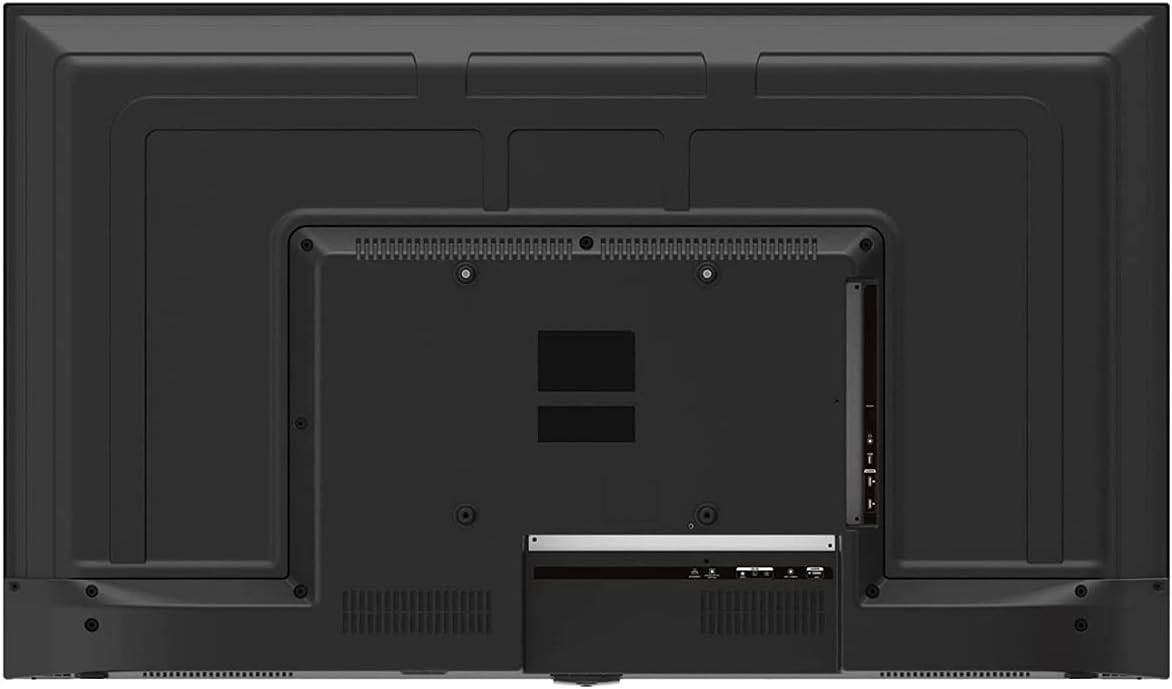
Image 3: Rear panel of the ONN 43-Inch Smart TV, highlighting the available connectivity ports.
4.3 L-Ewwel Tixgħel u s-Setup tan-Netwerk
- Qawwa Mixgħul: Connect the power cord to the TV and a power outlet. Press the power button on the remote control.
- Għażla tal-Lingwa: Segwi l-istruzzjonijiet fuq l-iskrin biex tagħżel il-lingwa preferuta tiegħek.
- Konnessjoni tan-Netwerk: Select your Wi-Fi network from the list and enter the password. Alternatively, connect an Ethernet cable for a wired connection.
- Konfigurazzjoni tal-Kont Roku: Follow the instructions to create or sign in to your Roku account. This is necessary to access streaming channels and features.
5. Tħaddem it-TV tiegħek
5.1 Kontroll mill-Bogħod
The included remote control provides easy access to all TV functions and streaming services. It features dedicated buttons for popular streaming apps like Netflix, Apple TV+, Paramount+, and HBO Max.
5.2 Smart TV Interface (Roku TV)
The Roku TV home screen provides a centralized hub for all your entertainment. You can easily navigate through streaming channels, live TV inputs, and device connections.

Image 4: The Roku TV home screen on the ONN 43-Inch Smart TV, showing available streaming applications.

Immaġni 5: Angolata view of the ONN 43-Inch Smart TV, showcasing the user interface from a different perspective.
- Dar: Access the main Roku TV interface.
- Live TV: Browse available live television channels.
- Ħanut tal-istriming: Discover and add new streaming channels.
- Applikazzjonijiet u Inputs: Select connected devices (e.g., HDMI 1, HDMI 2) or launch installed applications.
5.3 Integrazzjoni tal-Assistent tal-Vuċi
The TV is compatible with Alexa and Google Assistant. You can use a compatible voice assistant device (sold separately) or the Roku mobile app to control your TV with voice commands, such as turning it on/off, changing channels, or launching apps.
5.4 Settings tal-Istampa
To adjust picture quality, navigate to Settings > Picture Settings on the Roku TV menu. Options typically include Brightness, Contrast, Color, Tint, Sharpness, and various picture modes (e.g., Movie, Sports, Vivid, Standard).
5.5 Settings tal-Ħoss
To adjust audio settings, navigate to Settings > Audio Settings. Options may include Volume Mode, Audio Delay, and various sound modes (e.g., Standard, Theater, Music).
6. Manutenzjoni
6.1 Tindif tat-TV
- Dejjem aqla’ t-TV qabel ma tnaddaf.
- Uża drapp artab u mingħajr suf biex timsaħ bil-mod l-iskrin u l-kabinett.
- Għal marki iebsa, ħassar bil-modampLaħlaħ id-drapp bl-ilma jew b'deterġent tal-iskrin ħafif u mhux abrażiv. Qatt ma tisprejjax id-deterġent direttament fuq l-iskrin.
6.2 Aġġornamenti tas-Software
Your ONN Roku TV automatically receives software updates to improve performance and add new features. Ensure your TV is connected to the internet for these updates. You can manually check for updates via Settings > Sistema > Aġġornament tas-Sistema.
7 Issolvi l-problemi
Jekk tiltaqa' ma' problemi bit-TV tiegħek, irreferi għas-soluzzjonijiet komuni li ġejjin:
| Problema | Soluzzjoni |
|---|---|
| Ebda Qawwa | Kun żgur li l-korda tal-enerġija hija pplaggjata sew kemm fit-TV kif ukoll f'sokit elettriku li jaħdem. Ipprova sokit differenti. |
| Ebda Stampa/Ħoss | Check all cable connections (HDMI, coaxial). Ensure the correct input source is selected on the TV. |
| Remote Mhux Taħdem | Ibdel il-batteriji fir-remote control. Kun żgur li m'hemm l-ebda ostaklu bejn ir-remote u s-sensor IR tat-TV. |
| Ma nistax nikkonnettja mal-Wi-Fi | Verify your Wi-Fi password. Restart your router and modem. Move the TV closer to the router if possible. |
| Kwalità Fqira tal-Istampa | Check the resolution settings of your connected device. Adjust picture settings on the TV. Ensure you are viewkontenut 4K għal riżoluzzjoni ottimali. |
8. Speċifikazzjonijiet
| Karatteristika | Dettall |
|---|---|
| Daqs tal-Iskrin | 43 Pulzier |
| Teknoloġija tal-Wiri | LED |
| Riżoluzzjoni | 4K Ultra HD (2160p) |
| Kompatibilità HDR | Iva |
| Pjattaforma Smart TV | Roku TV |
| Appoġġ għall-Assistent tal-Vuċi | Alexa, Google Assistent |
| Konnettività | 3 HDMI (1 eARC), 1 Composite, 1 USB, 1 LAN, 1 Optical, 1 Coaxial/Cable, 1 Headphone |
| Proporzjon ta' l-aspett | 16:9 |
| Dimensjonijiet tal-Prodott (P x W x H) | 7" x 38" x 23" |
| Piż tal-oġġett | 16.9 liri |
| Kulur | Iswed |

Immaġni 6: Proġett tal-ġenbfile of the ONN 43-Inch Smart TV, illustrating its slim design.

Image 7: Energy Guide label providing estimated yearly energy cost and consumption for the television.
9. Garanzija u Appoġġ
For warranty information and technical support, please refer to the documentation included with your product or visit the official ONN support website. As this is a renewed product, specific warranty terms may vary. Please consult the seller or product listing for details regarding the renewed product warranty.


