Introduzzjoni
The EVOLAND Under-Desk Pedal Exerciser (Model X1224) is a compact and portable fitness device designed for low-impact exercise of both arms and legs. It features adjustable resistance and an LCD display to track your workout progress, making it suitable for home, office, or rehabilitation use. This manual provides essential information for safe and effective operation.
Informazzjoni dwar is-Sigurtà
- Ikkonsulta professjonist mediku qabel tibda xi programm ġdid ta' eżerċizzju.
- Place the exerciser on a stable, flat surface. Always use the included non-slip mat to prevent movement.
- Ensure all parts are securely assembled and tightened before each use.
- Do not stand on the pedals. This device is designed for seated use only.
- Keep children and pets away from the exerciser during operation.
- Stop exercising immediately if you experience pain, dizziness, or any discomfort.
- The maximum user weight for this device is 110 kg (242 lbs).
Kontenut tal-Pakkett
Jekk jogħġbok iċċekkja l-pakkett biex tiżgura li l-oġġetti kollha huma preżenti:
- 1 x EVOLAND Pedal Exerciser Unit
- 1 x Manwal għall-Utent
- 1 x Anti-slip Strap (for stabilization)
- 1 x Set of Assembly Accessories (screws, tools)
- 1 x Tapit li ma jiżloqx
Karatteristiċi tal-Prodott

A white and black EVOLAND under-desk pedal exerciser, featuring an integrated LCD screen for tracking workout data and an adjustable resistance knob.
- Reżistenza aġġustabbli: Customize your workout intensity by turning the resistance knob.
- Wiri LCD b'ħafna funzjonijiet: Tracks time, count, distance, total count, and calories burned.
- Użu versatili: Suitable for both arm and leg exercises.
- Disinn portabbli: Lightweight and compact with an integrated carry handle for easy transport and storage.
- Ergonomic Pedals: Non-slip surface with adjustable straps for secure and comfortable use.
- Kostruzzjoni Durabbli: Made with a sturdy steel frame and plastic components.
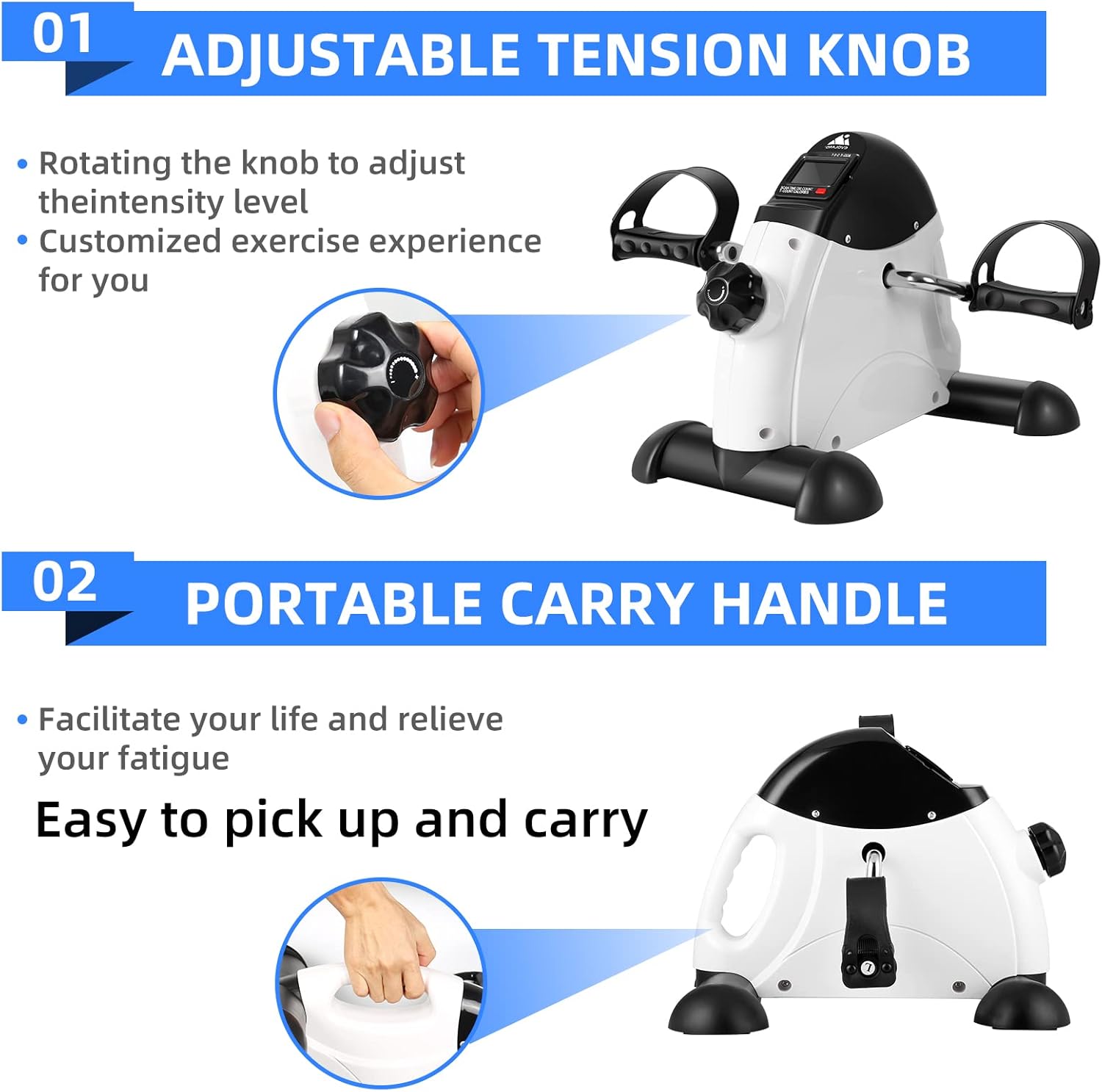
Dettaljati views highlighting the adjustable tension knob for customizing exercise intensity and the integrated portable carry handle for easy transport.

L-immaġini juruasing the ergonomic, non-slip pedals with adjustable straps and the safe, wear-resistant base, including a non-slip mat for stability during use.
Setup Istruzzjonijiet
- Ħoll il-Komponenti: Carefully remove all items from the packaging and verify against the 'Package Contents' list.
- Waħħal il-Bars tal-Istabilizzatur: Secure the front and rear stabilizer bars to the main unit using the provided screws and tools. Ensure they are firmly attached.
- Installa Pedali: Attach the left and right pedals to their respective cranks. Note that the left pedal typically tightens counter-clockwise, and the right pedal clockwise. Ensure both are tightened securely to prevent loosening during use.
- Insert Battery (for LCD): Locate the battery compartment for the LCD display. Insert the required battery (not included) according to the polarity markings.
- Position Exerciser: Place the assembled exerciser on a flat, stable surface. For optimal stability and to prevent movement, place the included non-slip mat underneath the unit.
- Attach Anti-slip Strap (Optional): If desired for additional stability, follow the instructions to secure the anti-slip strap to the exerciser and a stable object, such as a chair leg.
Istruzzjonijiet Operattivi

Two images demonstrating the versatility of the exerciser: one showing a person using it on a table for arm exercise, and another showing it on the floor for leg exercise.
1. Power On/Off
The LCD display typically activates automatically when pedaling begins. It will power off automatically after a period of inactivity to conserve battery life.
2. Eżerċizzju tad-Driegħ
- Place the exerciser on a sturdy, flat table.
- Sit comfortably in front of the table.
- Grip the pedals with your hands and begin rotating them in a circular motion.
3. Eżerċizzju tar-Riġlejn
- Place the exerciser on the floor, ensuring it is on the non-slip mat.
- Sit on a stable chair with your feet placed securely in the pedal straps. Adjust straps if necessary.
- Begin pedaling in a forward or backward motion.
4. Aġġustament tar-Reżistenza
Turn the resistance knob located on the top of the unit. Turn clockwise to increase resistance for a more challenging workout, and counter-clockwise to decrease it for easier pedaling.
5. L-Użu tad-Displej LCD

Close-up views of the multi-functional LCD display, showing metrics such as Time, Distance, Count, Total Counts, and Calories Burned, with a hand pressing the scan button on the exerciser.
- Press the red button on the display to cycle through different metrics: Ħin (duration of workout), Għadd (pedal rotations during current session), Distanza (estimated distance in meters), Għadd Totali (cumulative pedal rotations), and Kaloriji (estimated calories burned).
- Hold the button down for a few seconds to reset the current workout data (Time, Count, Distance, Calories). The Total Count will not reset.
Manutenzjoni
- Tindif: After each use, wipe down the exerciser with a soft, damp cloth. Do not use abrasive cleaners or solvents, as they may damage the finish or electronic components.
- Ħażna: Store the exerciser in a cool, dry place away from direct sunlight and extreme temperatures. Its compact size allows for easy storage under a desk or in a closet.
- Spezzjoni: Periodically check all screws, bolts, and connections to ensure they remain tight. Tighten any loose fasteners to maintain stability and safety.
Issolvi l-problemi
| Problema | Kawża Possibbli | Soluzzjoni |
|---|---|---|
| Display LCD Mhux Taħdim | Il-batterija hija mejta jew installata ħażin. | Check if the battery is correctly installed with proper polarity. Replace the battery if necessary (battery not included). |
| Exerciser Moves During Use | Not placed on a stable surface; non-slip mat not used; anti-slip strap not secured. | Ensure the exerciser is on a flat, stable surface. Always use the included non-slip mat. Secure the anti-slip strap to a stable object (e.g., chair leg). Using on a carpeted surface can also help. |
| Pedals are Stiff or Too Loose | Resistance knob setting; loose pedal connection. | Adjust the resistance knob to your desired level. Check that the pedals are securely tightened to their cranks. |
Speċifikazzjonijiet
| Karatteristika | Dettall |
|---|---|
| Brand | EVOLAND |
| Numru tal-Mudell | X1224 |
| Kulur | Abjad |
| Materjal Prinċipali | Plastik u Metall |
| Dimensjonijiet (L x W x H) | 41 x 32 x 19 ċm (16.1 x 12.6 x 7.5 pulzieri) |
| Piż | 4 kg (8.8 lbs) |
| Kapaċità massima tal-piż | 110 kg (242 lbs) |
| Tip ta' Kontroll | Push-button (for LCD) |
| Tip ta 'Wiri | LCD |
| Reżistenza | Adjustable (via knob) |
| Modalità Operattiva | Manwal |
| Sors tal-Enerġija | Battery powered (for LCD) |
| Metrika tal-Kontro | Calories burned, Time, Distance, Count, Total Count |
| Komponenti Inklużi | Pedal Exerciser, User Manual, Anti-slip Strap, Assembly Accessories, Non-slip Mat |
Garanzija u Appoġġ
For warranty information or technical support regarding your EVOLAND Under-Desk Pedal Exerciser Model X1224, please refer to the contact details provided with your purchase documentation or visit the official EVOLAND website. Please have your model number (X1224) and purchase date ready when contacting support.


