1. Introduzzjoni
This manual provides detailed instructions for the installation, configuration, and operation of the Newgoal 4 Channel Smart Switch (Ewelink AC/DC7V-32V). This device is designed to integrate with your smart home system, allowing remote control of connected appliances via the eWeLink application, Bluetooth, and voice assistants like Alexa and Google Home.
2. Informazzjoni dwar is-Sigurtà
- Sigurtà Elettrika: Installation should only be performed by qualified personnel or individuals with a thorough understanding of electrical wiring. Ensure power is disconnected before any wiring work.
- Voltage Kompatibilità: Ivverifika li l-input voltage (USB 5V or AC/DC 7V-32V) matches your power source.
- Limiti tat-Tagħbija: Do not exceed the maximum current of 10A per channel or a total of 16A for all 4 channels. The maximum total power is 3500W.
- Ambjent: Operate the device within the specified temperature range of -20℃ to 70℃. Avoid exposure to moisture or extreme conditions.
- Ħruġ tar-Relay: The relay provides a dry contact switch output. It does not supply power to the connected device.
3. Prodott Aktarview
The Newgoal 4 Channel Smart Switch is a versatile relay module designed for smart home automation. It features four independent channels, allowing control of multiple devices. The module supports Wi-Fi and Bluetooth connectivity for flexible control options.

Stampa 3.1: Quddiem view of the Newgoal 4 Channel Smart Switch module alongside a smartphone displaying the eWeLink application interface for controlling the switch.
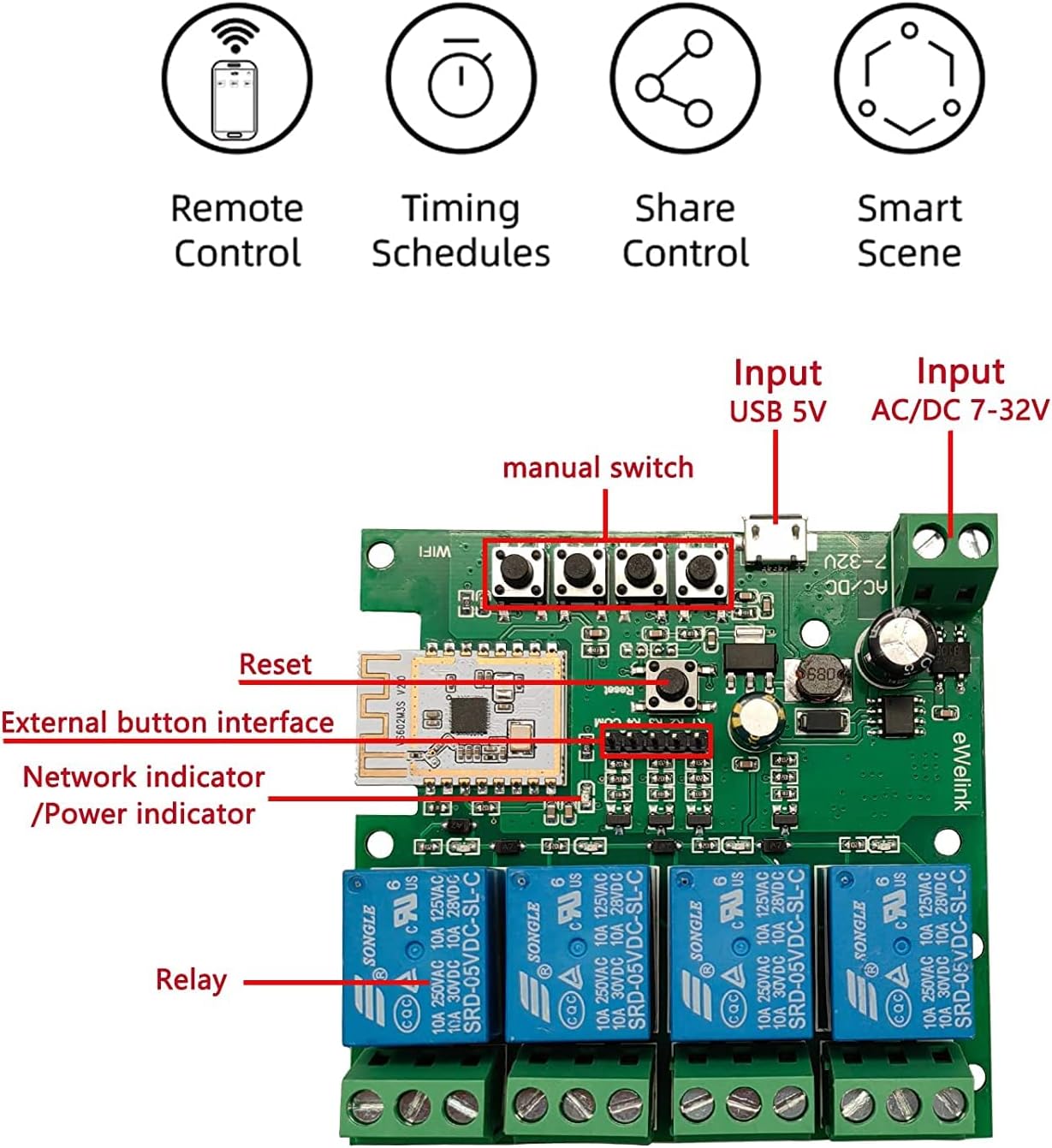
Stampa 3.2: Dettaljati view of the internal circuit board of the smart switch, highlighting key components such as manual switches (K1-K4), reset button, network/power indicators, and the four relays.
Karatteristiċi ewlenin:
- Kontroll mill-bogħod: Control devices from anywhere via the eWeLink app over a 2.4GHz Wi-Fi network.
- Kontroll Bluetooth: Operate devices locally via Bluetooth, even without an internet connection.
- Kontroll tal-Vuċi: Kompatibbli ma' Amazon Alexa u Google Home għal tħaddim mingħajr idejn.
- Modi ta' Ħidma Multipli: Supports Locking/Self-locking, Jog/Momentary, and Interlock modes.
- Skedar: Set timers and schedules for automated device operation.
- Kondiviżjoni tal-Apparat: Share control of the switch with other users.
- DIY Smart Home Integration: Ideal for various smart home projects.
4. Speċifikazzjonijiet
| Parametru | Valur |
|---|---|
| Input Voltage | USB 5V or AC/DC 7V-32V |
| Kurrent Massimu (Kanal Uniku) | 10A |
| Maximum Total Current (4 Channels) | 16A |
| Qawwa Totali | 3500W |
| Standard Wireless | Wi-Fi 2.4GHz b/g/n + Bluetooth |
| Frekwenza tal-Kontroll mill-bogħod | 2.4G |
| Temperatura tax-Xogħol | -20℃ sa 70℃ |
| Materjal tal-Korp | ABS ritardant tan-nar |
| Dimensjonijiet | 81 x 77 x 29mm |
| Numru tal-Mudell | NG8000007ew-RF |
5. Setup
5.1. eWeLink App Installation
- Niżżel l-app eWeLink mill-App Store (iOS) jew Google Play Store (Android).
- Irreġistra kont ġdid jew idħol b'wieħed eżistenti.
5.2. Device Wiring
Importanti: Ensure all power is disconnected before performing any wiring. Incorrect wiring can damage the device or connected appliances.

Stampa 5.1: Wiring diagram for connecting the smart switch to AC 85V-250V power and controlling multiple light bulbs. The input power (L and N) is connected to the module, and the outputs (NC, COM, NO) are wired to the lights.

Stampa 5.2: Wiring diagram for controlling a 2-line motor using the smart switch with AC/DC 7V-32V input. This setup typically requires the interlock mode in the app.

Stampa 5.3: Wiring diagram for controlling a 3-line motor using the smart switch with AC 85V-250V input. This configuration also typically utilizes the interlock mode for proper motor operation.
5.3. Pairing and Network Connection
- Power on the smart switch. The network indicator LED will begin to flash.
- Iftaħ l-app eWeLink u tektek l-ikona '+' biex iżżid apparat.
- Select the appropriate pairing mode (e.g., Quick Pairing Mode).
- Follow the on-screen instructions to connect the device to your 2.4GHz Wi-Fi network. Nota: The device does not support 5.0GHz Wi-Fi networks.
- Once successfully paired, you can rename the device and individual channels within the app.
6. Modi Operattivi
The Newgoal Smart Switch supports three distinct working modes, configurable within the eWeLink app:
- Locking/Self-locking Mode: In this mode, each channel operates independently. Pressing the button (physical or in-app) turns the connected device ON, and pressing it again turns it OFF. This mode is suitable for controlling lights or other devices that require a persistent ON/OFF state.
- Jog/Momentary Mode: When activated, the relay will turn ON for a brief, adjustable duration (e.g., 1 second) and then automatically turn OFF. This mode is useful for applications like garage door openers or electric strikes that require a momentary pulse. You can configure the duration within the eWeLink app.
- Interlock Mode: (Supported on 2-channel and 4-channel versions) In this mode, only one channel can be ON at a time. If one channel is active and another is selected, the first channel will automatically turn OFF before the second one turns ON. This is ideal for controlling motors with forward/reverse functions or other applications where only one output should be active at any given time.

Stampa 6.1: Illustration depicting the various control methods for the smart switch, including mobile app control, remote control (with an optional 2.4G remote), and manual control via onboard buttons.
7. App Funzjonijiet
The eWeLink app provides comprehensive control and automation features for your smart switch:
- Kontroll mill-bogħod: Turn connected devices ON or OFF from anywhere with an internet connection.
- Kontroll Bluetooth: Control devices via Bluetooth when within range, even if Wi-Fi is unavailable.
- Skeda/Timer: Set one-time, recurring, or countdown timers to automate device operation.
- Kondiviżjoni tal-Apparat: Grant access to family members or other users to control the smart switch.
- Ġestjoni tal-Grupp: Group multiple smart switches or other eWeLink devices to control them simultaneously.
- Xeni intelliġenti: Create custom automation rules based on conditions like time, device status, or sensor input.
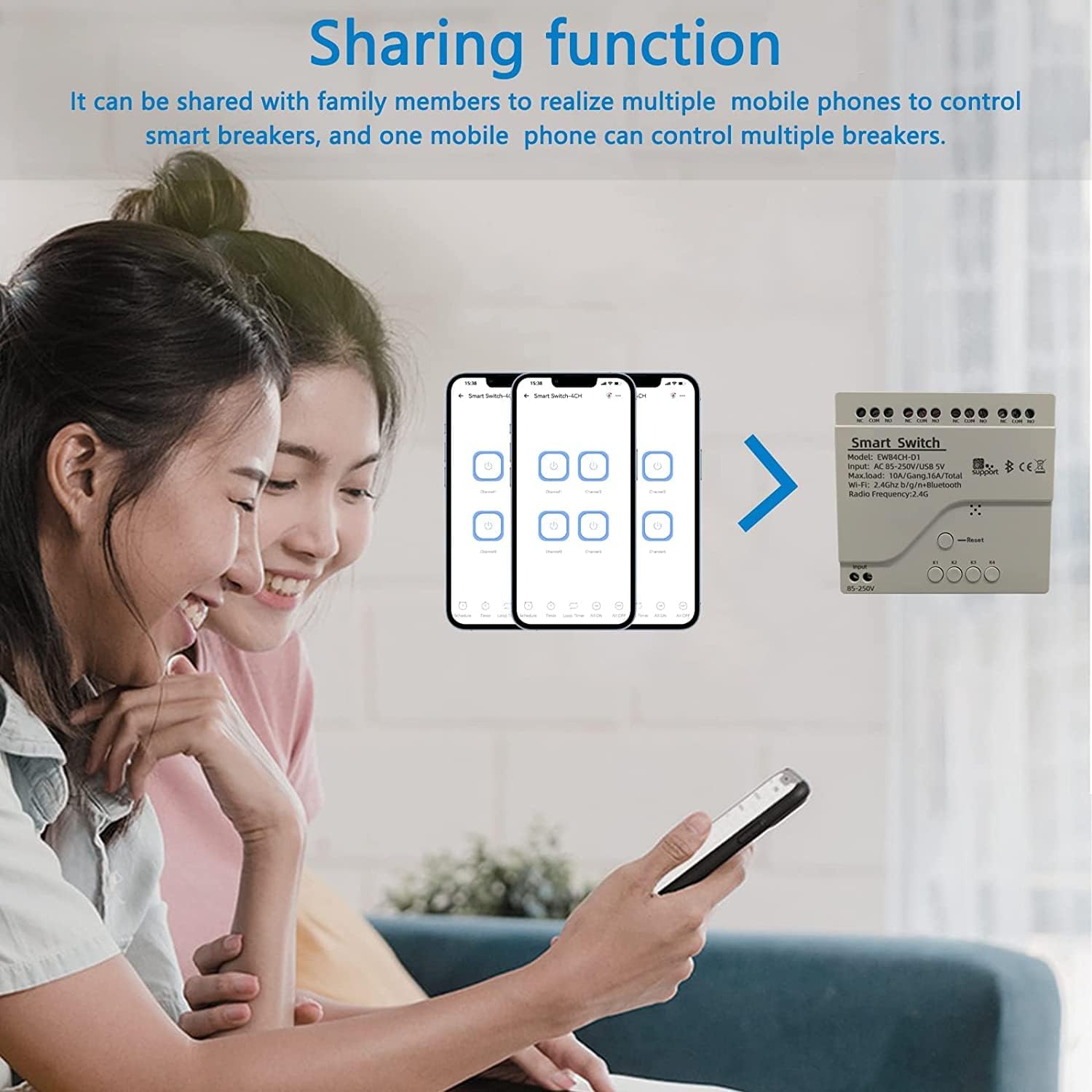
Stampa 7.1: Screenshot illustrating the device sharing function within the eWeLink app, showing how multiple users can control smart devices.
8. Integrazzjoni tal-Kontroll tal-Vuċi
The Newgoal Smart Switch is compatible with popular voice assistants:
- Amazon Alexa: Link your eWeLink account to Alexa through the Alexa app. Once linked, you can use voice commands like "Alexa, turn on Channel 1" or "Alexa, turn off the living room light" (if you've renamed the channel).
- Google Home: Connect your eWeLink account to Google Home via the Google Home app. Use commands such as "Hey Google, activate Channel 2" or "Hey Google, switch off the fan."
9. Manutenzjoni
- Tindif: Use a dry, soft cloth to clean the device. Do not use liquid cleaners or solvents.
- Aġġornamenti tal-Firmware: Iċċekkja l-app eWeLink perjodikament għal aġġornamenti tal-firmware disponibbli biex tiżgura prestazzjoni u sigurtà ottimali.
- Kundizzjonijiet Ambjentali: Ensure the device is not exposed to excessive heat, cold, or humidity, which can affect its lifespan and functionality.
10 Issolvi l-problemi
- Apparat Mhux Konnessjoni mal-Wi-Fi:
- Kun żgur li n-netwerk Wi-Fi tiegħek huwa 2.4GHz. L-apparat ma jappoġġjax netwerks ta' 5GHz.
- Check that the Wi-Fi password is entered correctly in the eWeLink app.
- Move the device closer to your Wi-Fi router to improve signal strength.
- Try resetting the device by pressing and holding the reset button until the LED indicator flashes rapidly, then attempt pairing again.
- Apparat Offline fl-App:
- Verify your home Wi-Fi network is active and has internet access.
- Check the device's power supply.
- Erġa' ibda r-router Wi-Fi tiegħek u s-swiċċ intelliġenti.
- Il-Kontroll tal-Vuċi Mhux Jaħdem:
- Ensure your eWeLink account is correctly linked to your Alexa or Google Home account.
- Check that the device is online in the eWeLink app.
- Ipprova erġa' skopri apparati fl-app Alexa jew Google Home tiegħek.
- Relay Not Responding:
- Check the wiring connections for any loose or incorrect terminals.
- Verify that the connected appliance is functioning correctly.
- Ensure the load does not exceed the maximum current or power ratings.
11. Garanzija u Appoġġ
For warranty information or technical support, please refer to the contact details provided with your purchase or visit the official Newgoal website. Please have your model number (NG8000007ew-RF) and purchase date available when contacting support.


