1. Introduzzjoni
This manual provides comprehensive instructions for the Naxa NDS-6501 Portable Dual 6.5-inch Bluetooth Speaker. Please read this manual thoroughly before operating the device to ensure proper use and to maximize your experience. Keep this manual for future reference.
2. Kontenut tal-Pakkett
Iċċekkja li l-oġġetti kollha elenkati hawn taħt huma inklużi fil-pakkett tiegħek:
- Naxa NDS-6501 Portable Bluetooth Speaker
- Mikrofonu bil-fili
- Cable tal-Iċċarġjar tal-USB
- Manwal għall-Utent (dan id-dokument)
3. Karatteristiċi tal-prodott
The Naxa NDS-6501 speaker offers a range of functionalities designed for portable audio entertainment:
- Dual 6.5-inch full-frequency speakers for clear audio output.
- Bluetooth connectivity for wireless audio streaming from compatible devices.
- Integrated multi-color flame lights with various lighting effects.
- True Wireless Stereo (TWS) function for connecting two NDS-6501 speakers wirelessly.
- Wired microphone input for vocal use.
- Built-in FM radio tuner for local station access.
- USB port and MicroSD/TF card slot for playing audio files minn ħażna esterna.
- Auxiliary (3.5mm) input for wired audio connections.
- Rechargeable battery providing up to 2 hours of playback time.
4. Kontrolli u Portijiet
The speaker features various controls and input/output ports. A typical layout includes a power button, volume controls, mode selection, playback controls (play/pause, skip tracks), microphone input, USB port, MicroSD card slot, auxiliary input, and a charging port. Refer to the diagram below for specific locations.
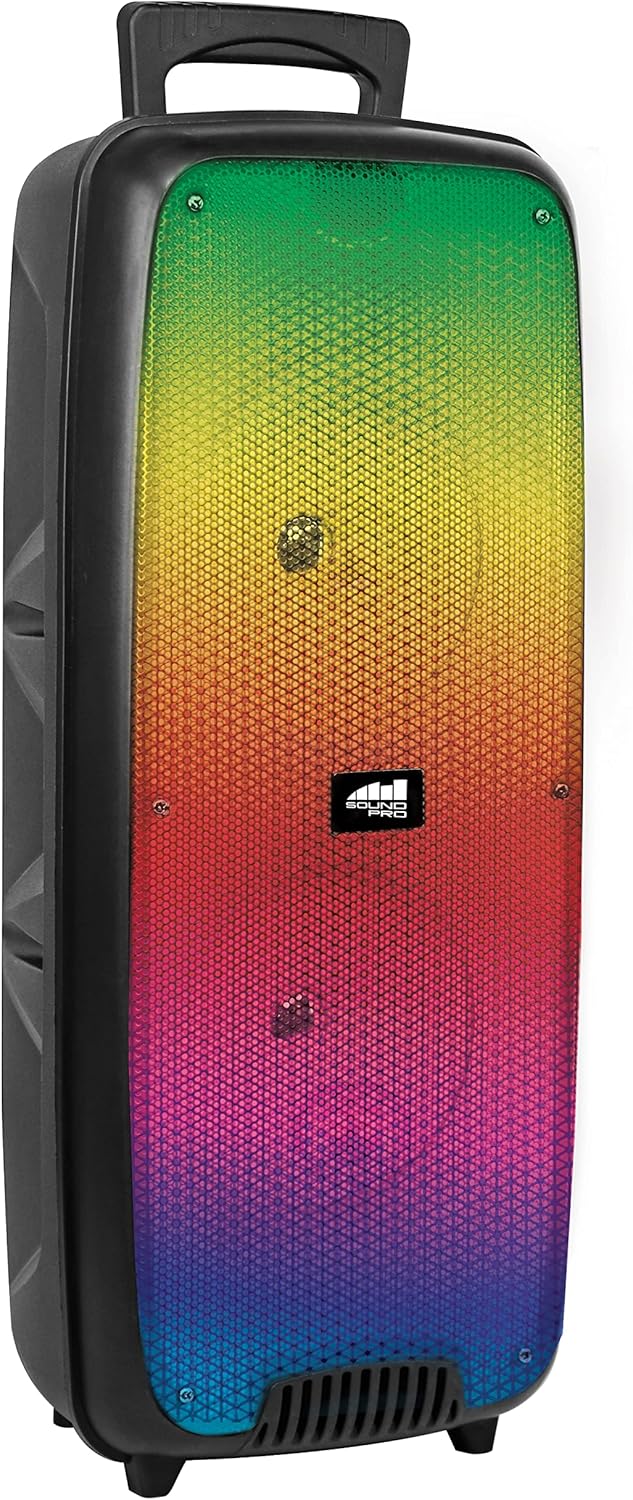
Figura 4.1: Quddiem view of the Naxa NDS-6501 speaker, showcasing the dual 6.5-inch drivers and multi-color flame lights.

Figura 4.2: Ġenb view of the Naxa NDS-6501 speaker, illustrating its portable design with an integrated handle.
5. Setup
5.1 Iċċarġjar tal-Ispeaker
- Qabbad il-kejbil tal-iċċarġjar USB fornut mal-port tal-iċċarġjar tal-ispiker.
- Qabbad it-tarf l-ieħor tal-kejbil USB ma' adapter tal-enerġija USB kompatibbli (mhux inkluż) jew mal-port USB tal-kompjuter.
- Id-dawl indikatur tal-iċċarġjar jixgħel, tipikament aħmar, waqt l-iċċarġjar.
- Once fully charged, the indicator light will change color or turn off (refer to specific LED behavior in your product). A full charge provides approximately 2 hours of playback.
5.2 Tixgħel/Jitfi
- To power on: Press and hold the Power button for a few seconds until the speaker activates.
- Biex titfi: Agħfas u żomm il-buttuna tal-Power mill-ġdid sakemm l-ispiker jintefa.
6. Istruzzjonijiet Operattivi
6.1 Tqabbil tal-Bluetooth
- Ensure the speaker is powered on and in Bluetooth mode. If not, press the Mode button to switch to Bluetooth. The speaker will indicate it is ready for pairing (e.g., a flashing LED or an audible prompt).
- Fuq l-apparat tiegħek li jaħdem bil-Bluetooth (smartphone, tablet, eċċ.), mur fis-settings tal-Bluetooth.
- Fittex għal available devices. You should see "NDS-6501" or a similar name in the list.
- Select "NDS-6501" to initiate pairing.
- Once successfully paired, the speaker will provide an audible confirmation, and the Bluetooth indicator light will become solid.
6.2 Tqabbil ta' Stereo Veru Wireless (TWS)
The TWS function allows you to connect two NDS-6501 speakers for a stereo sound experience.

Figura 6.1: Illustration of the True Wireless Stereo (TWS) function, enabling two speakers to connect wirelessly from a single Bluetooth source.
- Ensure both NDS-6501 speakers are powered on and in Bluetooth mode, but not yet paired to any device.
- On one of the speakers (this will be the primary speaker), press and hold the TWS button (or a designated pairing button) for a few seconds.
- L-ispiker primarju se jfittex l-ispiker sekondarju. Ladarba jkunu konnessi, iż-żewġ kelliema se jipprovdu konferma li tinstema'.
- Now, pair your Bluetooth device to the primary speaker as described in Section 6.1. Audio will play through both speakers in stereo.
6.3 Tħaddim tar-Radju FM
- Agħfas il-buttuna tal-Modalità biex taqleb għall-modalità tar-Radju FM.
- Agħfas il-buttuna Play/Pause biex tiskennja u ssalva awtomatikament l-istazzjonijiet FM disponibbli.
- Use the Previous/Next track buttons to navigate between saved stations.
6.4 USB/MicroSD Playback
- Insert a USB flash drive or a MicroSD/TF card (with audio files) fil-port korrispondenti.
- L-ispiker għandu jaqleb awtomatikament għall-modalità USB jew MicroSD u jibda jdoqq l-awdjo. Jekk le, agħfas il-buttuna Mode biex tagħżel l-input korrett.
- Use the playback controls (Play/Pause, Previous/Next) to manage your music.
6.5 Użu tal-Mikrofonu
- Connect the wired microphone to the microphone input jack on the speaker.
- Adjust the microphone volume control (if available) on the speaker to your desired level.
- The microphone audio will be mixed with any music playing through the speaker.
6.6 Effetti tad-Dawl
- The speaker features integrated multi-color flame lights.
- Press the Light button (if available) to cycle through different lighting modes or to turn the lights on/off.
- The lights may synchronize with the music playback.
7. Manutenzjoni
- Tindif: Uża drapp artab u niexef biex tnaddaf il-barra tal-ispiker. Tużax prodotti tat-tindif, xama' jew solventi li joborxu.
- Ħażna: Meta ma tkunx qed tużah għal perjodi twal, aħżen l-ispiker f'post frisk u niexef 'il bogħod mix-xemx diretta u minn temperaturi estremi.
- Kura tal-batterija: Biex ittawwal il-ħajja tal-batterija, evita li tiċċarġja kompletament il-batterija ta’ spiss. Iċċarġja l-ispiker regolarment, anke jekk ma jkunx qed jintuża.
- Espożizzjoni għall-Ilma: Dan l-ispiker mhuwiex reżistenti għall-ilma. Evita li tesponih għall-ilma jew umdità eċċessiva.
8 Issolvi l-problemi
| Problema | Kawża Possibbli | Soluzzjoni |
|---|---|---|
| L-ispiker ma jixgħelx. | Il-batterija hija eżawrita. | Iċċarġja l-kelliem billi tuża l-kejbil USB ipprovdut. |
| L-ebda ħoss mill-ispiker. | Il-volum huwa baxx wisq; mod ta' input mhux korrett; apparat mhux imqabbad. | Increase volume; press Mode button to select correct input; re-pair Bluetooth device. |
| L-apparat Bluetooth ma jistax isib l-ispiker. | L-ispiker mhux fil-modalità ta' tqabbil; l-apparat wisq 'il bogħod; interferenza. | Ensure speaker is in Bluetooth pairing mode; move device closer; avoid obstacles. |
| It-tqabbil tat-TWS ifalli. | Speakers already paired to a device; too far apart. | Ensure both speakers are unpaired from other devices; place speakers within 33 feet of each other. |
| Il-mikrofonu mhux qed jaħdem. | Microphone not fully plugged in; microphone volume low. | Ensure microphone is securely connected; adjust microphone volume. |
9. Speċifikazzjonijiet
| Karatteristika | Speċifikazzjoni |
|---|---|
| Numru tal-Mudell | NDS-6501 |
| Daqs tal-Kelliem | Doppju ta' 6.5 pulzieri |
| Teknoloġija tal-Konnettività | Bluetooth, USB, MicroSD, Aux (3.5mm) |
| Input Awdjo | Mikrofonu bil-fili |
| Modalità tal-Ħruġ tal-Awdjo | Stereo |
| Qawwa massima tal-Ħruġ | 3 Watts |
| Speaker AmpTip ta' lifikazzjoni | Attiva |
| Tip ta 'batterija | Lithium Ion (rechargeable, included) |
| Ħajja Medja tal-Batterija | Sa 2-il Siegħa |
| Dimensjonijiet tal-Prodott (L x W x H) | 24.13 x 19.05 x 57.91 ċm (9.5 x 7.5 x 22.8 pulzieri) |
| Piż tal-oġġett | 2.81 kg (6.2 lbs) |
| Kulur | Iswed |
| UPC | 840005017555 |
10. Garanzija u Appoġġ
Għal informazzjoni dwar il-garanzija jew appoġġ tekniku, jekk jogħġbok irreferi għall-karta tal-garanzija inkluża mal-prodott tiegħek jew żur is-sit uffiċjali ta' Naxa Electronics. websit. Żomm l-irċevuta tax-xiri tiegħek bħala prova tax-xiri għal kwalunkwe talba ta' garanzija.


