Introduzzjoni
Thank you for choosing the Byron Wireless Doorbell Kit DBY-22321NP. This kit provides a reliable and convenient solution for your home or office, featuring a wireless range of up to 150 meters, 16 selectable melodies, and adjustable volume control. This manual will guide you through the installation, operation, and maintenance of your new doorbell system to ensure optimal performance and longevity.
Informazzjoni dwar is-Sigurtà
- Aqra l-istruzzjonijiet kollha bir-reqqa qabel l-installazzjoni u l-użu.
- Tesponix l-unitajiet għal temperaturi estremi, dawl tax-xemx dirett, jew umdità eċċessiva.
- Use only the specified battery types. Ensure correct polarity when inserting batteries.
- Żomm il-batteriji fejn ma jintlaħaqx mit-tfal. Jekk tibela', fittex attenzjoni medika immedjata.
- Tippruvax tiftaħ jew issewwi l-unitajiet int stess. Irreferi għal kull manutenzjoni f'idejn persunal kwalifikat.
- Dispose of old batteries and electronic waste responsibly according to local regulations.
Kontenut tal-Pakkett
Jekk jogħġbok iċċekkja l-kontenut tal-pakkett biex tiżgura li l-oġġetti kollha huma preżenti:
- 1x Wireless Doorbell Chime Unit (Receiver)
- 1x Wireless Push Button (Transmitter)
- Mounting hardware (screws, wall plugs, adhesive pad)
- Batteries (for push button, and possibly for chime if battery-operated)
- Manwal għall-Utent (dan id-dokument)

Figure 1: Main components of the Byron Wireless Doorbell Kit.
Setup u Installazzjoni
1. Installazzjoni ta 'batteriji
For the Push Button (Transmitter):
- Gently pry open the back cover of the push button unit.
- Insert the supplied battery (e.g., CR2032 lithium battery) into the battery compartment, ensuring correct polarity (+/-).
- Agħlaq il-qoxra ta' wara sew.
For the Chime Unit (Receiver):
The chime unit may be battery-operated or plug-in. If battery-operated, open the battery compartment on the back and insert the required batteries (e.g., 3x AA batteries), observing polarity. If plug-in, simply plug it into a standard wall outlet.
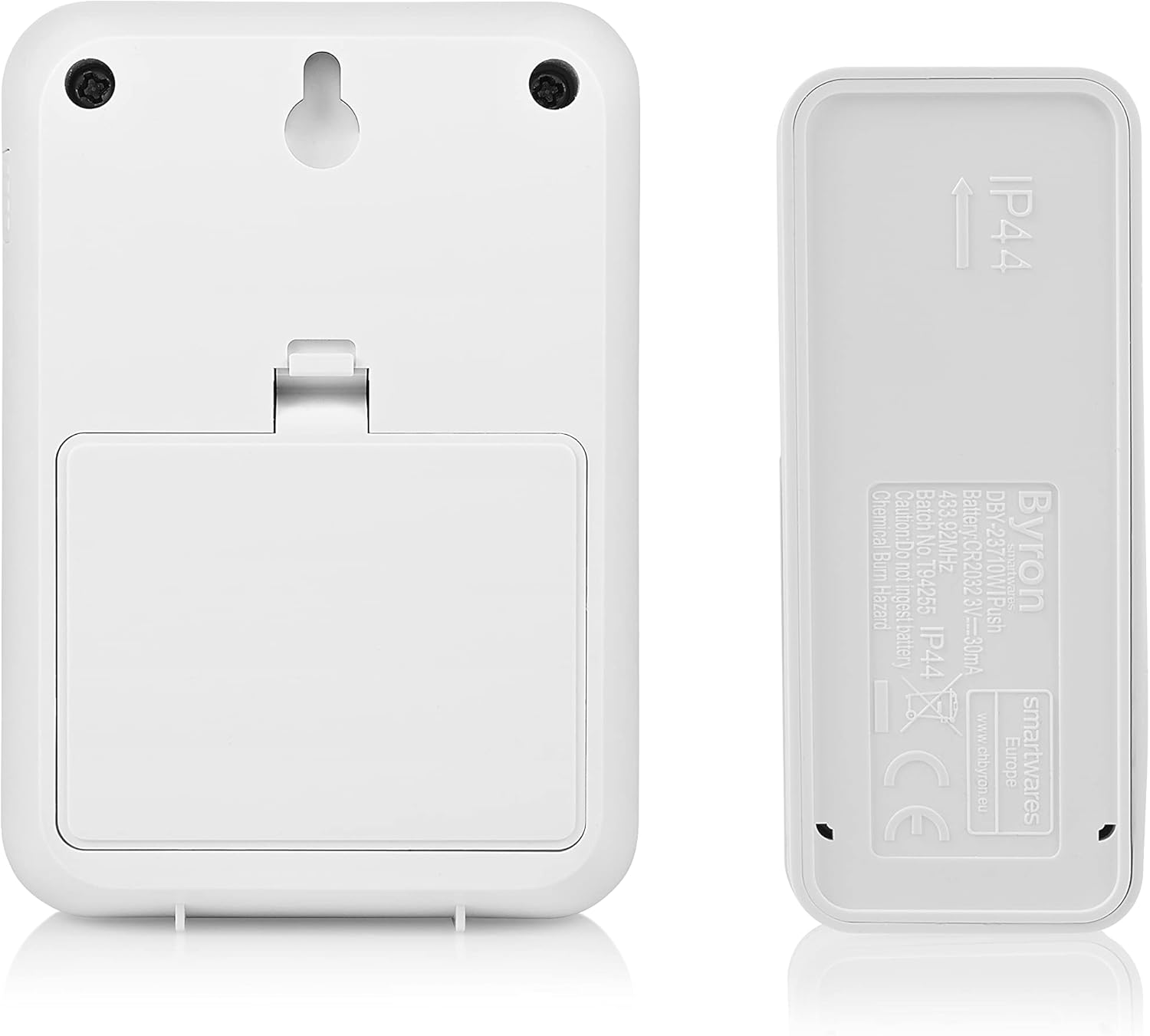
Figura 2: Wara view of the chime unit and push button, illustrating battery compartments and mounting options.
2. Immuntar tal-Buttuna tal-Imbottatura
Choose a suitable location near your entrance, away from direct metal surfaces which can interfere with the wireless signal. The push button is typically weather-resistant (IP44 rated).
- L-użu tal-viti: Mark the desired mounting holes, drill pilot holes if necessary, and secure the push button using the provided screws and wall plugs.
- Bl-użu ta' Kuxxinett Adeżiv: Clean the mounting surface thoroughly. Peel off the protective film from the adhesive pad and firmly press the push button onto the surface for at least 30 seconds.
3. Pożizzjonament tal-Unità taċ-Ċime
Place the chime unit in a central location within your home where the sound can be easily heard. Consider the maximum wireless range of 150 meters. Avoid placing it near large metal objects or other electronic devices that might cause interference.

Figure 3: Close-up of the push button, showing the clear nameplate cover.
4. Pairing (if necessary)
Most Byron doorbell kits come pre-paired. If your chime does not ring when the push button is pressed, you may need to pair them:
- On the chime unit, locate the pairing button (often a small button inside the battery compartment or on the side).
- Press and hold the pairing button for a few seconds until an indicator light flashes or a sound is heard.
- Within 10 seconds, press the push button. The chime unit should ring, indicating successful pairing.
- Jekk it-tqabbil jonqos, irrepeti l-proċess.
Istruzzjonijiet Operattivi
1. Tibdil tal-Melodiji
Your doorbell kit offers 16 different melodies. To change the melody:
- Locate the melody selection button on the chime unit. This is often a small button on the side or front.
- Press the button repeatedly to cycle through the available melodies. The chime will play each melody as you select it.
- Stop pressing when you hear your desired melody. It will be saved automatically.

Figura 4: Ġenb view of the chime unit, indicating the location of control buttons.
2. Volum ta 'aġġustament
To adjust the volume level of the chime unit:
- Locate the volume control button on the chime unit. This might be a dedicated button or integrated with the melody selection.
- Press the button to cycle through different volume levels (e.g., High, Medium, Low, Mute).
- Select the volume level that best suits your needs.
Manutenzjoni
- Tindif: Imsaħ l-unitajiet b'ċarruta ratba u niexfa. Tużax prodotti tat-tindif jew solventi li joborxu.
- Sostituzzjoni tal-batterija:
- If the push button stops working or its range decreases, replace the battery (e.g., CR2032).
- If the chime unit's sound becomes weak or it stops ringing (and it's battery-operated), replace its batteries (e.g., AA).
- Always replace all batteries at the same time and ensure correct polarity.
- Protezzjoni Ambjentali: Tarmix apparat elettriku bħala skart muniċipali mhux magħżul. Uża faċilitajiet ta 'ġbir separati. Ikkuntattja lill-gvern lokali tiegħek għal informazzjoni dwar is-sistemi ta' ġbir disponibbli.
Issolvi l-problemi
| Problema | Kawża Possibbli | Soluzzjoni |
|---|---|---|
| Chime does not ring when push button is pressed. |
|
|
| Chime rings intermittently or has reduced range. |
|
|
| Il-volum taċ-ċime huwa baxx wisq jew għoli wisq. | L-issettjar tal-volum jeħtieġ aġġustament. | Adjust the volume using the volume control button on the chime unit. |
Speċifikazzjonijiet
| Karatteristika | Dettall |
|---|---|
| Numru tal-Mudell | DBY-22321NP |
| Dimensjonijiet (L x W x H) | 2.91 x 7 x 10.05 cm (Chime Unit); (Push Button dimensions not specified, but implied to be smaller) |
| Piż | 104 gramma (kit totali) |
| Firxa Wireless | Sa 150 metru (għalqa miftuħa) |
| Melodiji | 16 melodija magħżula |
| Livelli tal-Volum | Aġġustabbli |
| Power Supply (Push Button) | Battery (e.g., CR2032, included) |
| Power Supply (Chime Unit) | Battery (e.g., 3x AA, required) or Plug-in (model dependent) |
| Voltage | 4.5 Volts (for battery-operated chime) |
| IP Rating (Push Button) | IP44 (reżistenti għat-temp) |
Garanzija u Appoġġ
Byron products are manufactured to high quality standards. This product is covered by a standard manufacturer's warranty against defects in materials and workmanship. Please refer to the warranty card included in your package or visit the official Byron websit għal termini u kundizzjonijiet dettaljati tal-garanzija.
For technical support, troubleshooting assistance, or to inquire about spare parts, please contact Byron customer service through their official website or the contact information provided with your purchase. When contacting support, please have your product model number (DBY-22321NP) and purchase details ready.
Tista' ssib aktar informazzjoni u appoġġ fuq: www.byron.com


