Prodott Overview
The MEILAN M3 is a compact, lightweight, and wireless GPS bicycle computer designed to accurately track your cycling data. It features a high-sensitivity GPS chip for fast and precise positioning, supporting Beidou, GPS, and GLONASS systems. This device is an essential tool for serious cyclists and fitness enthusiasts looking to record and manage their ride statistics.

Image: The MEILAN M3 Wireless GPS Bicycle Computer, displaying speed and time.
Karatteristiċi Ewlenin
- Integrated High-Sensitivity GPS Chip: Supports Beidou, GPS, and GLONASS for rapid global positioning. Automatically calibrates time based on local timezone settings.
- Multifunctional Data Tracking: Measures speed, altitude, distance, riding time, and more. Ideal for recording and managing cycling data during training.
- Dual Brightness Levels: Features day and night backlight modes. Easily switch between levels by pressing the back and right buttons simultaneously for optimal visibility in various lighting conditions. The 1.7-inch anti-glare LCD screen ensures clear data viewmill-angoli kollha.
- Mingħajr fili u rikarikabbli mill-USB: Offers a hassle-free wireless design for easy installation. The 400mAh lithium battery provides up to 8 hours of usage and is conveniently rechargeable via any DC 5V USB port.
- Disinn Durabbli: IPX5 waterproof rating ensures reliability in various weather conditions, and an automatic stop function enhances convenience and battery life.
Setup u Installazzjoni
Follow these steps to set up your MEILAN M3 bicycle computer and prepare it for your rides.
1. Iċċarġjar tal-Apparat
Before first use, fully charge the MEILAN M3. Connect the device to any standard DC 5V USB charging port using the provided USB cable. The 400mAh lithium battery provides approximately 8 hours of continuous use on a full charge.
2. Mounting the Computer
The MEILAN M3 features a wireless design for easy installation on your bicycle handlebars. Use the included mounting bracket to securely attach the device. Ensure it is positioned for clear visibility during your ride.

Image: Visual representation of the MEILAN M3's features including LCD display, integrated GPS chip, IPX5 waterproof rating, 400mAh battery, and USB rechargeable design. The image also shows the device mounted on a bicycle handlebar.
For optimal GPS signal reception, ensure the device has a clear view of the sky when in use.
Istruzzjonijiet Operattivi
Learn how to use your MEILAN M3 to track your cycling performance.
1. Power On/Off
- To power on, press and hold the main button until the screen illuminates.
- To power off, press and hold the main button again until the screen turns off. The device also features an automatic stop function to conserve battery.
2. Issettjar taż-Żona tal-Ħin
Before your first ride, it is important to set the correct time zone. Once the time zone is set, the device will automatically calibrate the time and date according to your local time when a stable GPS signal is acquired.

Image: Illustration of the MEILAN M3 acquiring GPS signals from satellites for accurate positioning and time calibration.
3. Aġġustament tad-Dawl ta' Wara
The MEILAN M3 offers two backlight levels for optimal visibility during day and night rides. To switch between backlight levels, simultaneously press the buttuna lura u l- buttuna tal-lemin.
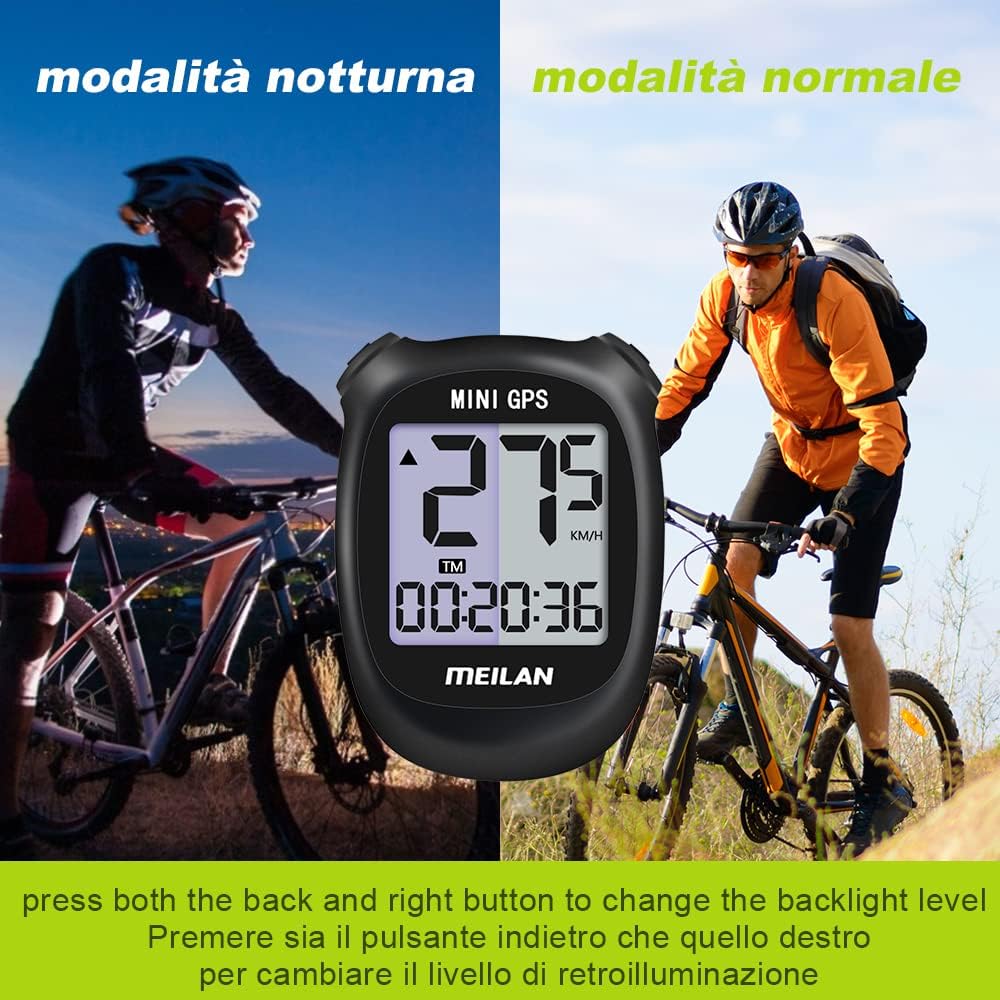
Image: Comparison of the MEILAN M3 display in normal (day) mode and night mode, demonstrating the adjustable backlight feature.
4. Viewing Cycling Data
The device displays various cycling metrics. Use the buttons to navigate through different data screens if available, or simply view the primary metrics shown on the main display.

Image: Diagram illustrating the various cycling metrics tracked by the MEILAN M3, including current speed, average speed, maximum speed, current altitude, total mileage, riding time, total travel time, and memory function.
The MEILAN M3 is suitable for both short commutes and long-distance cycling, providing accurate data for all your rides.

Image: The MEILAN M3 shown in two scenarios: a user cycling for a short distance (e.g., commuting) and another user cycling for a long distance, highlighting the device's versatility.
Manutenzjoni
Proper maintenance will ensure the longevity and optimal performance of your MEILAN M3 bicycle computer.
- Tindif: Imsaħ l-apparat b'artab, damp drapp. Tużax kimiċi ħarxa jew tindif li joborxu.
- Reżistenza għall-Ilma: The MEILAN M3 has an IPX5 waterproof rating, meaning it is protected against low-pressure water jets from any direction. It is suitable for use in light rain but should not be submerged in water.
- Iċċarġjar: Recharge the device when the battery indicator is low. Avoid completely draining the battery frequently to prolong its lifespan.
- Ħażna: Aħżen l-apparat f'post frisk u niexef meta ma jkunx qed jintuża, 'il bogħod mix-xemx diretta u minn temperaturi estremi.
Issolvi l-problemi
If you encounter issues with your MEILAN M3, refer to the following common problems and solutions.
| Problema | Kawża / Soluzzjoni Possibbli |
|---|---|
| No GPS Signal / Inaccurate Data | Kun żgur li l-apparat għandu żona ċara u mingħajr ostakli view of the sky. Avoid using it indoors or under heavy tree cover. Wait a few moments for the device to acquire a stable signal. |
| Display Mhux Jaħdem | Check battery level and charge the device if necessary. Ensure the device is powered on. Try resetting the device (refer to specific reset instructions if available in product packaging, otherwise power cycle). |
| Buttuni ma jirrispondux | Ensure the device is not wet or dirty around the buttons. Try a soft reset by powering the device off and on. |
| Batterija Drejn Malajr | Ensure the backlight is not set to maximum brightness unnecessarily. Fully charge the device before each long ride. Battery life can be affected by extreme temperatures. |
If you continue to experience issues, please refer to the "Support" section for assistance.
Speċifikazzjonijiet
Detailed technical specifications for the MEILAN M3 Wireless GPS Bicycle Computer.
| Karatteristika | Dettall |
|---|---|
| Mudell Kulur | Iswed |
| Daqs | Mini Bicycle Odometer |
| Daqs tal-Iskrin | 1.7 Pulzier |
| Tip ta 'Wiri | LCD |
| Materjal Prinċipali | Plastik |
| Tip ta' Sport | Ċikliżmu |
| Komponenti Inklużi | Mini Bicycle Odometer |
| Batterija Inkluża | Yes (1 Lithium-polymer) |
| Brand | MEILAN |
| Udjenza fil-mira | Adult Unisex |
| Dimensjonijiet tal-Pakkett | 9.8 x 8.1 x 5.3 ċm; 140 gramma |
| ASIN | B0B28NHCCV |
| Tip ta 'Immuntar | Muntaġġ tal-manubriju |
| Input tal-Interface tal-Bniedem | Buttuni |
Garanzija u Appoġġ
MEILAN is committed to providing excellent customer service. If you encounter any problems while using your bicycle computer, please do not hesitate to contact us for a satisfactory solution. Our customer service team is always ready to assist you.
For support inquiries, please refer to the contact information provided with your product packaging or visit the official MEILAN websit.


