1. Introduzzjoni
This manual provides detailed instructions for the installation, operation, and maintenance of your Dexnor heavy-duty protective case for the Samsung Galaxy A33 5G. This case is designed to offer robust protection for your device, featuring a built-in screen protector and a versatile kickstand.
2. Kompatibilità
This Dexnor protective case is specifically designed for the Samsung Galaxy A33 5G (6.4 inches). It is not compatible with the Galaxy A13 5G or Galaxy A53 5G. Please verify your phone model before installation to ensure a perfect fit.
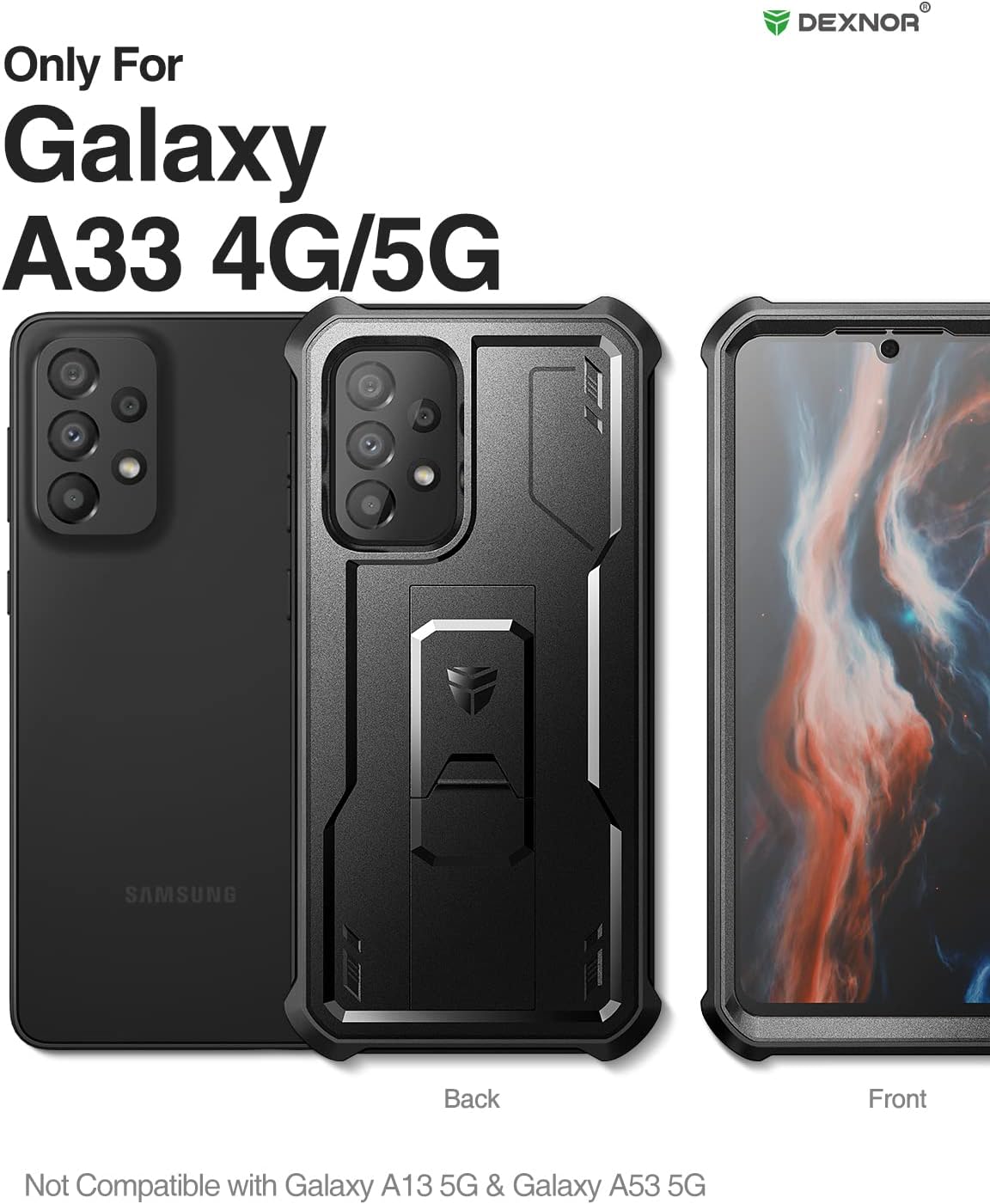
Image: The Dexnor case clearly indicating compatibility with the Galaxy A33 4G/5G model.
3. Karatteristiċi ewlenin
- 360° Heavy Duty Protection: The case provides full-body coverage with reinforced corners and raised edges around the camera and screen, offering enhanced protection against drops, cracks, and scratches.
- Multifunctional Back Kickstand: A retractable kickstand allows for stable hands-free viewing in both portrait and landscape orientations. It can also be used as a finger loop for secure one-handed phone manipulation.
- Kompatibbli għall-Iċċarġjar mingħajr Fili: The case is designed to not interfere with wireless charging functionality, allowing you to charge your device wirelessly without removing the case.
- Touch-sensitive Screen Protection: The built-in screen protector is scratch and smudge-resistant, maintaining touch sensitivity for smooth typing and gaming.

Image: Close-up of the Dexnor case's reinforced corners, illustrating its drop protection capabilities.

Image: Graphic illustrating the Dexnor case's adherence to MIL STD 810H drop test standards for military-grade protection.

Image: The Dexnor case showcasing its integrated kickstand, positioned for both vertical and horizontal viewing.

Image: The Dexnor case placed on a wireless charging pad, demonstrating its compatibility.

Immaġni: Dettaljata view of the Dexnor case's integrated screen protector and raised bezels for camera and screen protection.
4. Setup u Installazzjoni
The Dexnor case consists of two main parts: a front frame with a built-in screen protector and a back cover with a kickstand. Follow these steps for proper installation:
- Separate the Case: Carefully pry apart the front frame from the back cover. There are usually small notches or openings to assist with separation.
- Naddaf l-Apparat Tiegħek: Ensure your Samsung Galaxy A33 5G screen and back are clean and free of dust or smudges.
- Install Front Frame: Place your phone into the front frame, ensuring the screen protector aligns perfectly with your phone's display and all cutouts (camera, sensors) are clear. Press firmly around the edges to secure the phone within the front frame.
- Attach Back Cover: Align the front frame (with your phone inside) with the back cover. Snap the two pieces together, starting from one side and working your way around, ensuring all clips are securely fastened.
- Kontroll Finali: Verify that all buttons are functional and all ports are accessible.

Image: The Dexnor case disassembled into its front frame and back cover, ready for phone installation.

Image: Diagram showing the dual-layer construction of the Dexnor case, highlighting the separate front and back components.
5. Istruzzjonijiet Operattivi
L-użu tal-Kickstand:
- To deploy the kickstand, gently pull it out from the back of the case until it clicks into place.
- Adjust the phone to your desired viewing angle in either portrait or landscape mode.
- To retract, push the kickstand back into its slot until it is flush with the case.
Using as a Finger Holder:
- The kickstand can also serve as a secure finger loop. Extend the kickstand slightly and thread your finger through the opening for a more secure grip on your device.
Image: The Dexnor case demonstrating the kickstand's functionality for both vertical and horizontal viewangoli.
6. Manutenzjoni
To keep your Dexnor case in optimal condition:
- Imsaħ il-każ regolarment b'artab, damp drapp biex tneħħi t-trab u l-ħmieġ.
- For stubborn stains, use a mild soap solution and rinse thoroughly. Ensure the case is completely dry before re-installing your phone.
- Avoid using harsh chemicals or abrasive materials, as these can damage the case's finish or the built-in screen protector.
- Periodically remove the case to clean any dust or debris that may accumulate between the phone and the case, especially around the camera and charging port.
7 Issolvi l-problemi
Issue: Fingerprint Sensor Not Working or Inconsistent
Some users may experience issues with the in-display fingerprint sensor after installing the case. This can be due to several factors:
- Screen Protector Adhesion: Ensure the built-in screen protector is perfectly clean and free of air bubbles or dust particles in the area of the fingerprint sensor. Even small imperfections can affect sensor performance.
- Irreġistra mill-ġdid il-marka tas-swaba': After installing the case, it is highly recommended to delete your existing fingerprint registrations and re-register your fingerprints with the case on. This allows the phone to learn your fingerprint through the screen protector.
- Firm Pressure: Apply firm and consistent pressure to the fingerprint sensor area when attempting to unlock your device.
- Clean Finger/Screen: Ensure both your finger and the screen protector's fingerprint area are clean and dry.
If issues persist after these steps, consider alternative unlock methods or contact customer support.
8. Speċifikazzjonijiet
| Karatteristika | Dettall |
|---|---|
| Dimensjonijiet tal-Prodott | 7.03 x 4.13 x 0.55 pulzieri |
| Piż tal-oġġett | 1.6 uqija |
| Numru tal-Mudell tal-Oġġett | Samsung Galaxy A33 |
| Materjal | Polycarbonate, Thermoplastic Polyurethane |
| Kulur | Iswed |
| Mudelli tat-Telefon Kompatibbli | Samsung Galaxy A33 5G (6.4 inches) |
| Karatteristiċi Speċjali | Built-in Screen Protector, Kickstand, Heavy Duty Protection, Shockproof |
9. Garanzija u Appoġġ
Dexnor products are designed for durability and protection. This product typically comes with a garanzija ta 'sena for phone and tablet cases, covering manufacturing defects. For warranty claims, technical support, or any inquiries regarding your Dexnor case, please refer to the official Dexnor webis-sit jew ikkuntattja lis-servizz tal-klijenti tagħhom direttament.

Image: Dexnor brand information detailing a 10-year warranty for phone and tablet cases.
Tista' ssib aktar informazzjoni u dettalji ta' kuntatt fuq Dexnor Brand Store.


