1. Prodott Aktarview
The Croma 55-inch 4K Ultra HD Smart LED TV (Model CREL055USA024601) offers a high-resolution viewing experience with smart TV functionalities. This manual provides instructions for setup, operation, maintenance, and troubleshooting.

Stampa 1.1: Quddiem view of the Croma 55-inch 4K Ultra HD Smart LED TV.
This television features a 55-inch LED display with 4K (3840x2160 pixels) resolution and a 60 Hz refresh rate. It operates on a Linux-based WebOS system, providing access to various streaming services and applications. The TV includes multiple connectivity options such as HDMI, USB, and Bluetooth.
2. Setup u Installazzjoni
2.1 Disimballaġġ
Neħħi l-komponenti kollha mill-imballaġġ bir-reqqa. Kun żgur li l-oġġetti li ġejjin huma preżenti:
- 1 LED TV
- 2 Table Top Stands
- 1 Manwal tal-Utent (dan id-dokument)
- 1 Remote Control (with 2 AAA batteries included)
- 1 Wall Mount kit
2.2 Installazzjoni tal-Stand (Fuq il-Mejda)
If placing the TV on a surface, attach the two provided table-top stands to the bottom of the television. Refer to the markings on the TV and stands for correct orientation. Secure them using the screws provided in the packaging.
2.3 Immuntar tal-ħajt
If wall-mounting the TV, use the included wall mount kit. It is recommended to seek professional assistance for wall mounting to ensure proper and secure installation. Follow the instructions provided with the wall mount kit for safe installation.
2.4 Konnessjoni tal-Periferali
It-TV għandu diversi portijiet għall-konnessjoni ta' apparati esterni:
- Portijiet HDMI: Qabbad plejers tal-Blu-ray, consoles tal-logħob, set-top boxes, jew apparati oħra li jaħdmu bl-HDMI.
- Portijiet USB: Qabbad apparati tal-ħażna USB għad-daqq tal-midja.
- Jack tal-headphone: Qabbad headphones għal smigħ privat.

Stampa 2.1: Wara view of the television displaying various connectivity ports.
2.5 L-Ewwel Tixgħel u l-Konnessjoni man-Netwerk
After connecting the power cord, press the power button on the remote control or the TV. Follow the on-screen instructions to complete the initial setup, including language selection, time zone, and network configuration. The TV supports dual-band Wi-Fi for internet connectivity.
3. It-Tħaddim tat-Televiżjoni
3.1 Kontroll mill-Bogħod
The television comes with an Intelligent Motion Remote. This remote allows for intuitive navigation using a pointer function, similar to a mouse. Key features include:
- Buttuna tal-Assistent tal-Vuċi: Activates the built-in voice recognition system.
- Buttuni ta' Aċċess Rapidu: Buttuni ddedikati għal servizzi ta' streaming popolari bħal Netflix u Prime Video.

Image 3.1: The Intelligent Motion Remote control with highlighted Voice Assistant and Quick Access buttons.
3.2 Karatteristiċi tat-TV Intelliġenti (WebOS)
The TV runs on WebOS, providing a user-friendly interface for accessing various applications and content. The Home Dashboard allows you to manage connected devices and access streaming platforms. Supported internet services include Amazon Instant Video, Netflix, YouTube, and a web browser.
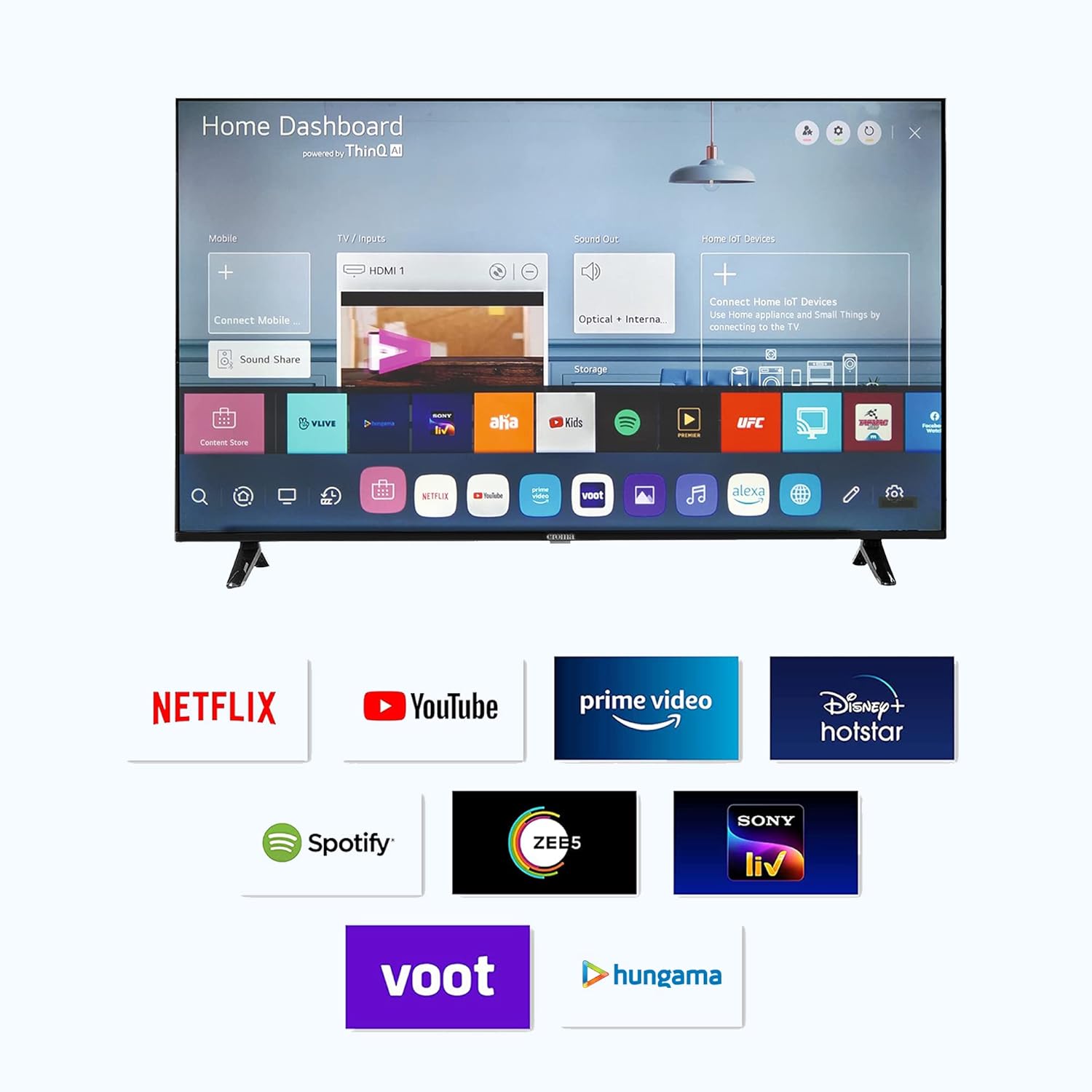
Image 3.2: The Smart TV Home Dashboard displaying available applications and services.
3.3 Issettjar tal-Immaġni u l-Awdjo
Ippersonalizza tiegħek viewesperjenza ta' awdjo u smigħ permezz tal-menu tas-settings tat-TV:
- Settings tal-Istampa: Adjust brightness, contrast, color, and sharpness. The TV features a 4K LED display with a 178-degree viewing angle and a 5000:1 contrast ratio.
- Settings tal-awdjo: Modify sound modes, equalizer settings, and output options. The TV has 20 Watts audio output with 2.0 speaker surround sound channel configuration and supports MP3 audio format.

Image 3.3: Illustration of Dolby Audio feature for enhanced sound experience.
3.4 Voice Control and Alexa Integration
The TV includes a built-in voice recognition assistant accessible via the remote control. It also supports Amazon Alexa integration. While the TV can function as a standalone Alexa device (using the remote's microphone), its control over other Alexa smart devices may be limited. You can turn the TV off using Alexa, but turning it on via Alexa is not supported.
3.5 Konnettività Bluetooth
The television supports Bluetooth 5.0 for connecting wireless audio devices such as soundbars or headphones. To pair a device, navigate to the Bluetooth settings in the TV menu and follow the on-screen instructions.
4. Manutenzjoni
4.1 Tindif tal-Iskrin
Biex tnaddaf l-iskrin, imsaħ bil-mod b'ċarruta ratba, niexfa u mingħajr suf. Għal marki persistenti, imsaħ ftit.ampen the cloth with water or a specialized screen cleaner. Avoid using harsh chemicals, abrasive materials, or excessive pressure, as these can damage the screen.
4.2 Kura Ġenerali
Keep the television in a well-ventilated area, away from direct sunlight, heat sources, and moisture. Do not block the ventilation openings on the back of the TV. Unplug the TV from the power outlet during lightning storms or when it will be unused for extended periods.
5 Issolvi l-problemi
Din it-taqsima tindirizza kwistjonijiet komuni li tista' tiltaqa' magħhom. Jekk il-problema tippersisti, ikkuntattja l-appoġġ għall-klijenti.
- Ebda Qawwa:
- Kun żgur li l-korda tal-enerġija hija pplaggjata sew kemm fit-TV kif ukoll f'sokit elettriku li jaħdem.
- Iċċekkja jekk is-sokit tal-enerġija hux qed jaħdem billi tqabbad apparat ieħor.
- Agħfas il-buttuna tal-qawwa fuq it-TV innifsu, mhux biss fuq ir-remote.
- Ebda Stampa/Ħoss:
- Verify that the correct input source (HDMI 1, HDMI 2, etc.) is selected.
- Iċċekkja l-konnessjonijiet kollha tal-kejbil (HDMI, antenna, eċċ.) biex tiżgura li huma sikuri.
- Aġġusta l-volum u kun żgur li t-TV mhux siekta.
- Il-Kontroll mill-bogħod Mhux Jaħdem:
- Ibdel il-batteriji AAA fil-kontroll remot.
- Kun żgur li m'hemm l-ebda ostaklu bejn ir-remote u s-sensor tat-TV.
- Kwistjonijiet ta' Konnettività Wi-Fi:
- Erġa' ixgħel ir-router Wi-Fi tiegħek u t-TV.
- Kun żgur li t-TV jinsab fil-firxa tan-netwerk Wi-Fi tiegħek.
- Check network settings on the TV to ensure correct password and connection type.
- Dewmien fl-Awdjo tal-Bluetooth:
- Ensure the Bluetooth device is fully charged and within close proximity to the TV.
- Try disconnecting and re-pairing the Bluetooth device.
- Test with a different Bluetooth audio device to determine if the issue is with the TV or the external device.
6. Speċifikazzjonijiet
| Karatteristika | Speċifikazzjoni |
|---|---|
| Brand | KROMA |
| Isem tal-Mudell | CREL055USA024601 |
| Sena Mudell | 2022 |
| Daqs tal-Iskrin | 55 Pulzier (140 ċm) |
| Teknoloġija tal-Wiri | LED |
| Riżoluzzjoni | 4K Ultra HD (3840 x 2160 Pixel) |
| Riffriskar Rata | 60 Hz |
| ViewIng Angolu | 178 Grad |
| Proporzjon tal-Kuntrast tal-Immaġni | 5000:01 |
| Sistema Operattiva | Linux (WebOS) |
| Daqs tal-Memorja RAM Installata | 1.5 GB |
| Kapaċità tal-Ħżin tal-Memorja | 8 GB |
| Modalità tal-Ħruġ tal-Awdjo | Jdawru |
| Awdjo Wattage | 20 Watts |
| Konfigurazzjoni tal-Kanal tal-Ħoss Surround tal-Ispeaker | 2.0 |
| Formati Awdjo Appoġġjati | MP3 |
| Interface tal-Ħardwer | HDMI, Headphone, USB |
| Portijiet USB totali | 2 |
| Teknoloġija tal-Konnettività | HDMI, Bluetooth, Wi-Fi |
| Servizzi tal-Internet Appoġġjati | Amazon Instant Video, Browser, Netflix, YouTube |
| Dimensjonijiet tal-Prodott (LxWxH) | 123 x 27 x 77 ċm |
| Piż tal-oġġett | 7.3 kg |
| Sors tal-Enerġija | Corded Elettriku |
| Konsum tal-Enerġija bil-modalità Mixgħul | 140.00 watt |

Image 6.1: Diagram illustrating the dimensions of the Croma 55-inch TV.
7. Garanzija u Appoġġ
The Croma 55-inch 4K Ultra HD Smart LED TV comes with a garanzija ta 'sena from the date of purchase. For warranty claims or technical assistance, please contact Croma customer support.
Croma offers Assured Lifetime Service and has over 160+ stores that can serve as service centers. For detailed support information, visit the official Croma webis-sit jew irreferi għall-karta tal-garanzija inkluża mal-prodott tiegħek.

Immaġni 7.1: Fuqview of Croma's customer support advantages.


