Prodott Overview
The Mesqool Digital Alarm Clock is a versatile device designed to enhance your living space with its multi-functional display and convenient features. It provides accurate time, date, temperature, and humidity readings, along with dual alarm capabilities and charging ports for your electronic devices.

Figure 1: Mesqool Digital Alarm Clock with charging capabilities.
X'hemm fil-Kaxxa
- Arloġġ ta 'allarm diġitali tal-injam
- US AC Power Adapter
- Cable tal-iċċarġjar
- Manwal tal-karta

Figura 2: Kontenut tal-Pakkett.
Karatteristiċi Ewlenin
- Display Kbir: An 8.7-inch screen clearly displays time, date, and day of the week.
- Monitoraġġ tat-temperatura u l-umdità: Assists in monitoring indoor environment conditions.
- Loud Alarm with Snooze: Adjustable alarm volume from 65dB to 120dB with a 9-minute snooze function.
- Multiple Alarm Settings: Four alarm modes available: Every day, Weekend, Weekdays, or One Time Alarm. Supports dual alarm settings.
- Portijiet tal-Iċċarġjar USB u tat-Tip Ċ: Equipped with both USB and Type-C ports to charge two electronic devices simultaneously.
- 5 Levels Dimmer: Easily adjust display brightness with five levels to suit various lighting conditions.
- Disinn eleganti: Features a wood grain pattern and metal buttons for a modern aesthetic.
- Power Cord Operated with Battery Backup: Primarily AC powered, with 2x AAA batteries (not included) for memory backup during power outages.
Vidjo 1: Fuqview of Mesqool Digital Alarm Clock features, including dual alarm, adjustable brightness, charging ports, and environmental monitoring.
Setup
1. Konnessjoni tal-Enerġija
Connect the provided AC power adapter to the clock's power input port and plug it into a standard wall outlet. The clock is primarily AC powered.

Figure 3: Power connection and battery backup.
2. Installazzjoni ta 'Backup tal-Batterija
For memory backup during power outages, install 2x AAA batteries (not included) into the battery compartment located at the back of the clock. This ensures that time and alarm settings are retained.
Istruzzjonijiet Operattivi
1. L-issettjar tal-Ħin u d-Data
- Agħfas il- DATA button to cycle through date display modes (e.g., MM-DD-YYYY).
- Agħfas il- TIME 12/24H button to switch between 12-hour and 24-hour time formats.
- Biex tissettja l-ħin, agħfas u żomm il- TIME 12/24H button until the hour digits flash. Use the +HOUR u -MIN buttons to adjust the hour and minute. Press SNOOZE/OK biex tikkonferma kull setting.
- To set the date, press and hold the DATA button until the year digits flash. Use the +HOUR u -MIN buttons to adjust the year, month, and day. Press SNOOZE/OK biex tikkonferma kull setting.

Figure 4: Multiple display styles and unit switching.
2. Issettjar ta 'Allarmi
The clock supports dual alarms (ALM1 and ALM2).
- Agħfas il- ALM1 or ALM2 button to select the alarm you wish to set.
- Press and hold the selected alarm button (e.g., ALM1) until the alarm time flashes. Use +HOUR u -MIN to set the desired alarm time. Press SNOOZE/OK biex tikkonferma.
- After setting the time, the alarm mode will flash. Use +HOUR or -MIN to select one of the four alarm modes:
- Mon-Ħadd: L-allarm idoqq kuljum.
- Mon-Gim: Alarm sounds on weekdays only.
- Sib-Xemx: Alarm sounds on weekends only.
- Darba wahda: Alarm sounds once.
- To turn an alarm ON/OFF, short press the corresponding ALM1 or ALM2 buttuna. Ikona ta' allarm tidher/tisparixxi fuq id-displej.

Figure 5: Dual alarm settings and modes.
3. Adjusting Brightness (Dimmer)
Agħfas il- DIMMER button to cycle through 5 levels of display brightness. Select the level that best suits your environment and preference.

Figura 6: Aġġustament tal-luminożità tad-displej.
4. Aġġustament tal-Volum tal-Allarm
Agħfas il- VOL DST button to adjust the alarm volume. The volume can be set between 65dB and 120dB across 5 levels.

Figure 7: Alarm volume adjustment and snooze button.
5. Funzjoni Snooze
Meta jdoqq l-allarm, agħfas il-buttuna l-kbira SNOOZE/OK button on top of the clock to activate the snooze function. The alarm will pause for 9 minutes and then sound again.
6. Wiri tat-Temperatura u l-Umdità
The clock displays indoor temperature and humidity. Press the °F/°C buttuna biex taqleb bejn l-unitajiet tat-temperatura Fahrenheit u Celsius.
7. Iċċarġjar ta' Apparati Elettroniċi
Utilize the USB and Type-C charging ports located at the back of the clock to charge your smartphones, tablets, or other compatible electronic devices.

Figure 8: USB and Type-C charging ports in use.
Manutenzjoni
- Naddaf l-arloġġ b'ċarruta ratba u niexfa. Tużax prodotti tat-tindif jew solventi li joborxu.
- Evita li tesponi l-arloġġ għal temperaturi estremi, dawl tax-xemx dirett, jew umdità għolja.
- Ensure proper ventilation around the clock, especially if using the charging ports for extended periods.
Issolvi l-problemi
| Problema | Kawża Possibbli | Soluzzjoni |
|---|---|---|
| Id-displej huwa vojt jew mudlam. | L-ebda enerġija, l-enerġija mitfijatage, or brightness set too low. | Check power adapter connection. Ensure batteries are installed for backup. Press the DIMMER buttuna biex tiżdied il-luminożità. |
| L-allarm ma jdoqqx. | Alarm is off, volume is too low, or incorrect alarm mode. | Ensure the alarm is activated (icon visible). Increase alarm volume using VOL DST. Verify the alarm mode (Mon-Sun, Mon-Fri, etc.) is correctly set. |
| Il-Ħin/Data mhumiex korretti. | Not set correctly or power interruption without battery backup. | Follow the "Setting Time and Date" instructions to reset. Install fresh AAA batteries for backup. |
| Apparati mhux qed jiċċarġjaw. | Incorrect cable, device not compatible, or clock not powered. | Ensure correct USB/Type-C cable is used. Verify the clock is powered on. Check device compatibility. |
Speċifikazzjonijiet
- Ditta: Mesqool
- Numru tal-Mudell: MQL-CR1019
- Tip ta' wiri: Diġitali
- Dimensjonijiet tal-Prodott: 8.07"W x 3.62"Għ
- Sors tal-Enerġija: Corded Electric (AC Adapter included)
- Backup tal-batterija: 2 x batteriji AAA (mhux inklużi)
- Volum tal-allarm: 65dB - 120dB (5 levels)
- Il-luminożità tal-wiri: 5 livelli aġġustabbli
- Portijiet tal-Iċċarġjar: 1 x USB, 1 x Type-C
- Materjal: Plastic (wood grain finish)
- Karatteristiċi Speċjali: Calendar Display, Temperature Display, Humidity Display, Dual Alarm, Large Screen Display, Snooze
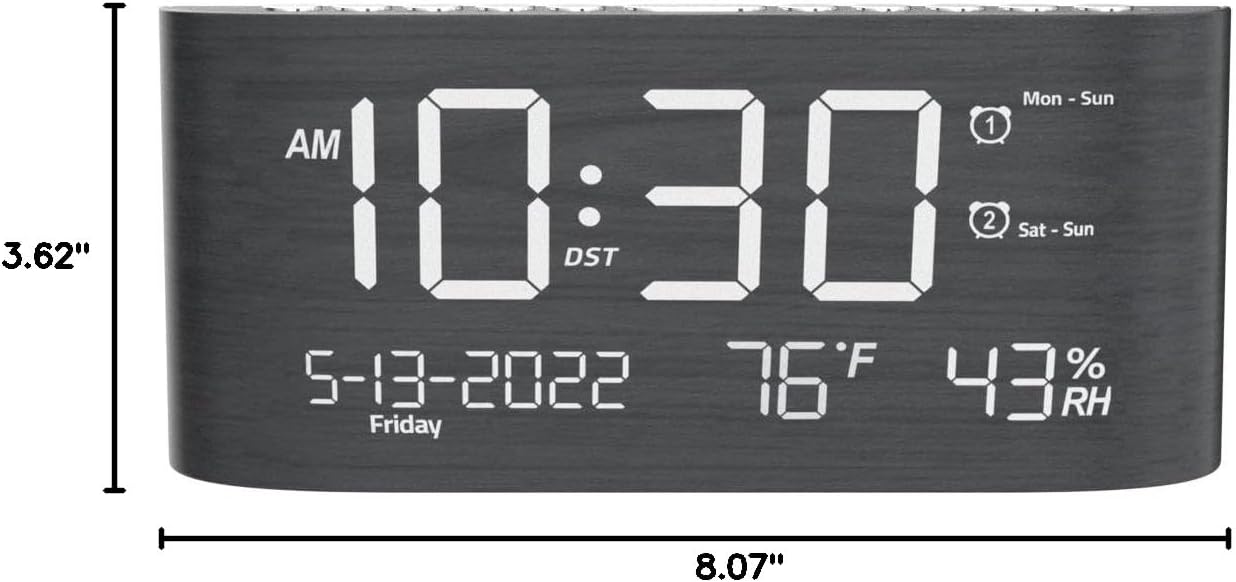
Figura 9: Dimensjonijiet tal-Prodott.
Garanzija u Appoġġ
This Mesqool product comes with a 2 Years Exchange Warranty. For any support inquiries, troubleshooting assistance, or warranty claims, please refer to the official Mesqool webis-sit jew ikkuntattja lis-servizz tal-klijenti tagħhom direttament.
An electronic version of this user manual is available for download: Niżżel il-Manwal tal-Utent (PDF)


