1. Informazzjoni dwar is-Sigurtà
Jekk jogħġbok aqra l-istruzzjonijiet kollha bir-reqqa qabel l-assemblaġġ u l-użu. Jekk ma ssegwix dawn l-istruzzjonijiet, jista' jkun hemm korriment jew ħsara lill-prodott.
- Żomm it-tfal u l-annimali domestiċi 'l bogħod mill-iskrivanija waqt l-operazzjoni.
- Ensure all cables connected to the desk have sufficient slack to accommodate height adjustments.
- Do not place objects taller than the maximum desk height underneath the desk.
- Toqgħodx bilqiegħda jew bilwieqfa fuq l-iskrivanija.
- Avoid placing liquids directly on the desk surface without using the cup holder.
- Iċċekkja regolarment il-viti u l-boltijiet kollha biex tiżgura li huma ssikkati.
- In case of malfunction, disconnect power and contact customer support.
2. Prodott Aktarview
The FLEXISPOT GT2 is a height-adjustable gaming desk designed for comfort and functionality. It features a robust steel frame, a durable tabletop, and integrated accessories to enhance your gaming or work setup.
Karatteristiċi ewlenin:
- Aġġustament Għoli: Electric motor for smooth transitions between sitting and standing positions (73-123 cm range, 25mm/s speed).
- Stabbiltà Mtejba: High-quality steel legs and a thick tabletop ensure a stable surface for gaming equipment.
- Aċċessorji Integrati: Includes a cup holder and headphone hook to keep your desktop tidy.
- Ġestjoni tal-Kejbil: Features cable routing holes for organized wiring.
- Sistema Kontra l-Ħabtiet: Automatically stops and retracts if an obstruction is detected during height adjustment.
- Dawl RGB: Customizable RGB lighting around the desk edges, controllable via remote, to create an immersive atmosphere.
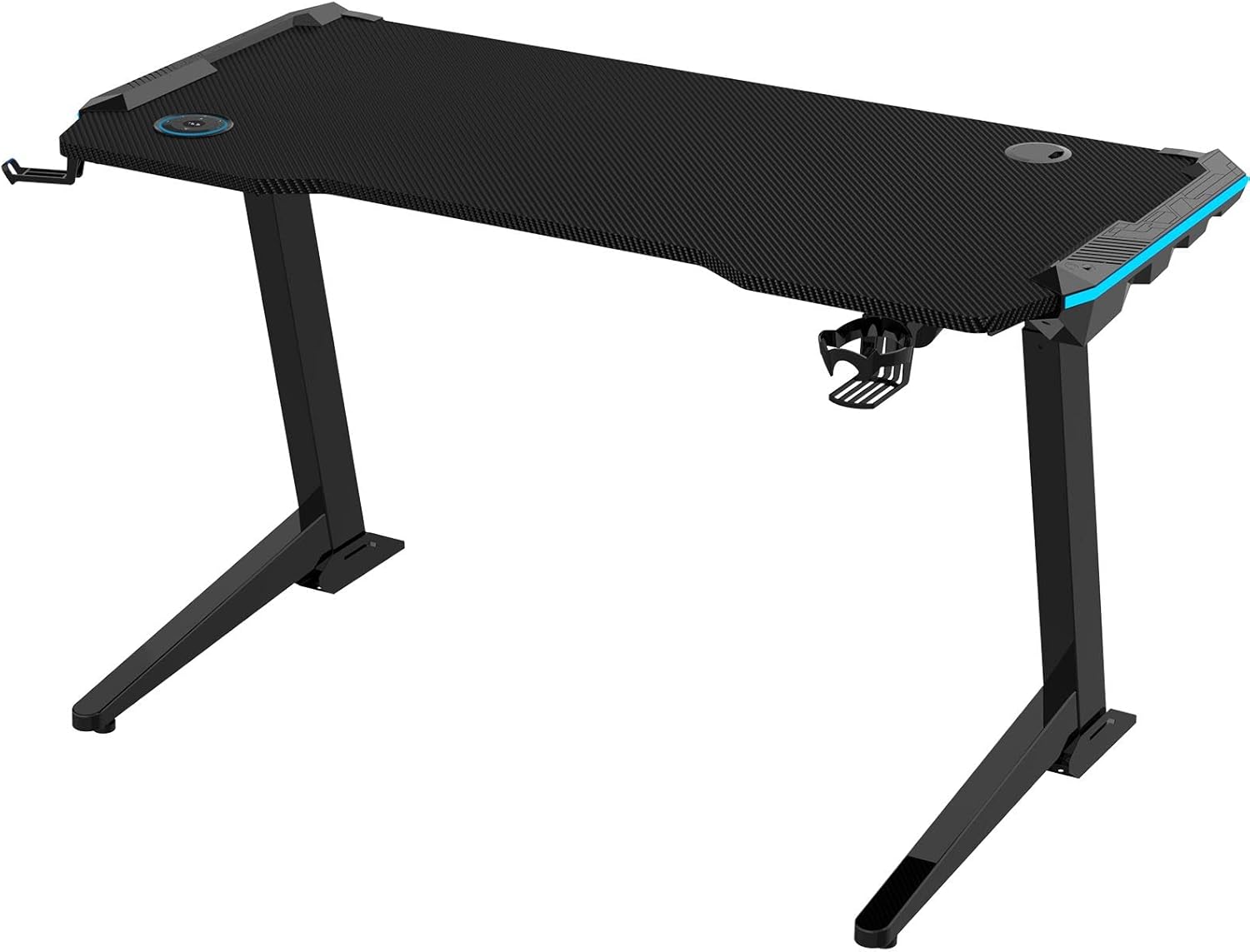
Image 2.1: The FLEXISPOT GT2 Height Adjustable Gaming Desk with its black carbon fiber texture tabletop and sturdy frame.

Image 2.2: The GT2 desk integrated into a gaming environment, showcasing its RGB lighting and spacious design.
3. Istruzzjonijiet tal-Assemblea
L-assemblaġġ tipikament jeħtieġ żewġ persuni. Segwi l-passi hawn taħt għal setup xieraq.
3.1 Żpakkjar u Kontroll tal-Komponenti
- Iftaħ il-komponenti kollha mill-pakkett bir-reqqa u poġġihom fuq wiċċ artab u nadif biex tevita l-grif.
- Verify all parts are present against the packing list.
3.2 It-twaħħil tar-riġlejn
- Attach the desk legs to the tabletop using the provided screws. Ensure they are securely fastened.
3.3 Installazzjoni ta 'Aċċessorji
- Mount the cup holder and headphone hook to the designated slots on the desk.
- Route any necessary cables through the cable management holes.

Image 3.1: Diagram showing the placement of the cup holder, headphone hook, and cable management holes on the GT2 desk.
3.4 Qawwa tal-Konnessjoni
- Connect the power cable to the desk's control box and then to a power outlet.
4. Istruzzjonijiet Operattivi
4.1 Aġġustament tal-Għoli
The desk features an electric height adjustment system with a control panel.
- Buttuni 'l fuq /' l isfel: Use the ▲ (Up) and ▼ (Down) buttons on the controller to adjust the desk height.
- Presets tal-memorja: The controller allows you to save preferred height settings. Press 'M' followed by a number (1, 2, 3, or 4) to save the current height. To recall a saved height, press the corresponding number button.
- Indikatur LED: The controller displays the current desk height in centimeters.

Image 4.1: The GT2 desk's control panel, showing up/down buttons, memory presets, and an LED height display.
4.2 Kontroll tad-Dawl RGB
The desk's RGB lighting can be customized to suit your preference.
- Use the dedicated remote control (if included) or touch buttons on the desk to change lighting colors and modes.
- Select from various colors and dynamic effects to create your desired ambiance.

Image 4.2: Close-up of the desk's edge highlighting the integrated RGB lighting feature.
4.3 Sistema Kontra l-Ħabtiet
The GT2 desk is equipped with an anti-collision feature to prevent damage.
- If the desk encounters an obstruction during height adjustment, it will automatically stop and retract slightly to prevent collision.

Image 4.3: Illustration demonstrating the anti-collision feature, where the desk stops movement upon detecting an obstacle.
5. Manutenzjoni
Regular maintenance ensures the longevity and optimal performance of your FLEXISPOT GT2 desk.
- Tindif: Imsaħ il-wiċċ tal-iskrivanija b'artab, damp drapp. Evita kimiċi ħarxa jew prodotti tat-tindif li joborxu.
- Kura tal-Mutur: Keep the motor and moving parts free from dust and debris. Do not lubricate the motor.
- Ġestjoni tal-Kejbil: Periodically check cables for wear or damage and ensure they are neatly organized to prevent interference with desk movement.
- Qafliet: Occasionally check all screws and bolts for tightness and re-tighten if necessary.
6 Issolvi l-problemi
If you encounter issues with your desk, refer to the following common problems and solutions.
- L-iskrivanija ma tiċċaqlaqx:
- Check if the power cable is securely connected to both the desk and the wall outlet.
- Ensure no obstructions are blocking the desk's movement.
- Moviment irregolari:
- Kun żgur li l-iskrivanija titqiegħed fuq wiċċ livell.
- Check that all leg components are properly assembled and tightened.
- Id-dawl RGB mhux qed jaħdem:
- Verify the lighting power connection.
- Check the remote control battery (if applicable).
If the problem persists, please contact FLEXISPOT customer support.
7. Speċifikazzjonijiet
| Karatteristika | Speċifikazzjoni |
|---|---|
| Brand | FLEXISPOT |
| Mudell | GT2 |
| Medda ta 'Aġġustament Għoli | 73-il ċm - 123 ċm |
| Veloċità ta 'rfigħ | 25 mm/s |
| Materjal tal-mejda | Thickened material (carbon fiber texture) |
| Materjal tal-qafas | Azzar |
| Kulur | Iswed |
| Dimensjonijiet tal-Prodott | 125 cm (Depth) x 60 cm (Width) x 72 cm (Height - minimum) |
| Dimensjonijiet tal-Pakkett | 135 x 70.5 x 19.6 ċm |
| Piż tal-Pakkett | 36 kg |
| Karatteristiċi | Height Adjustment, RGB Lighting, Anti-Collision, Cup Holder, Headphone Hook, Cable Management Holes |

Immaġni 7.1: Fuqview of the GT2 desk's key features and dimensions, including load capacity and height range.
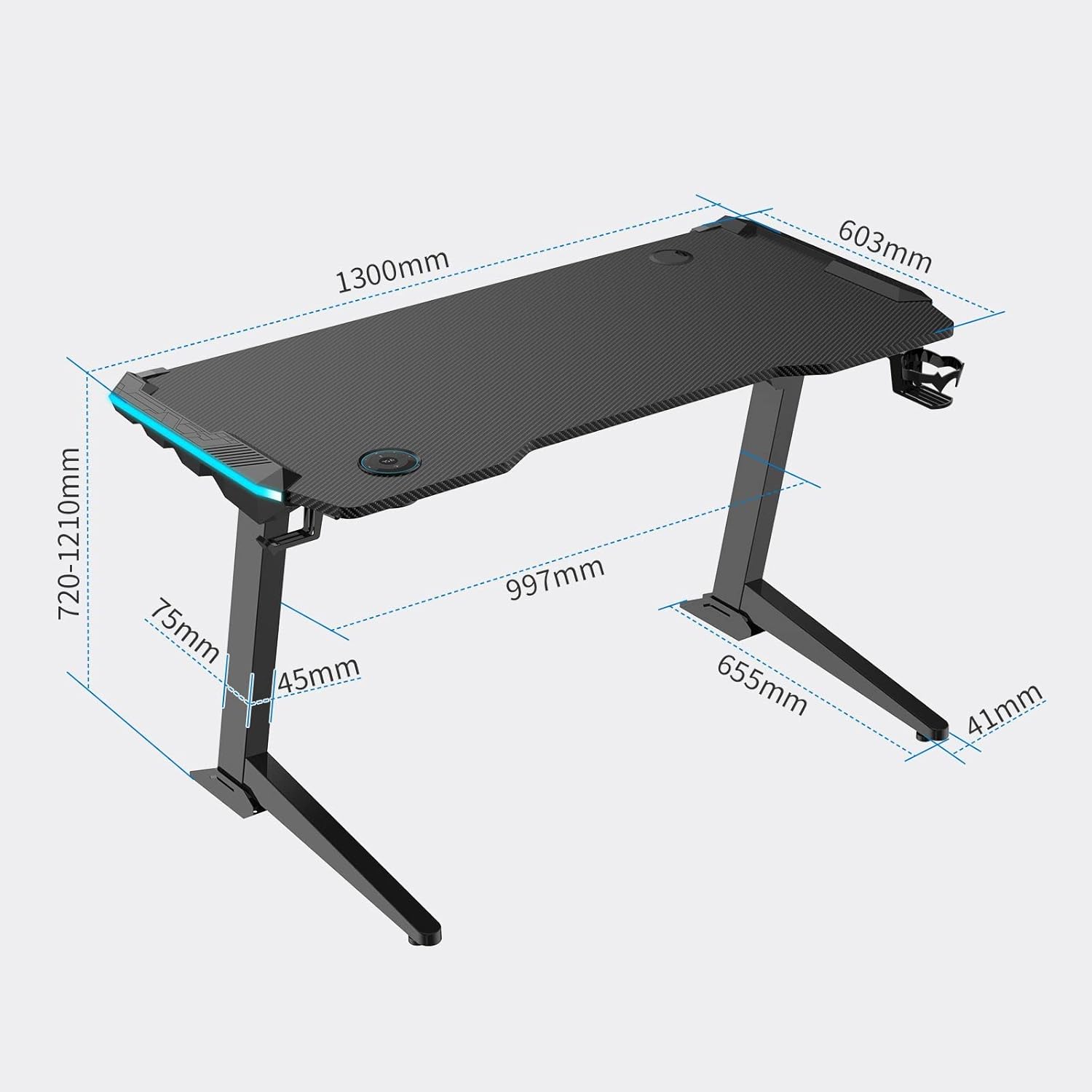
Image 7.2: Detailed dimensional drawing of the FLEXISPOT GT2 desk.
8. Garanzija u Appoġġ
FLEXISPOT provides comprehensive support for its products.
- Garanzija tal-Manifattur: The FLEXISPOT GT2 desk comes with a 5-year free long-term manufacturer's warranty. There is no limit to the number of support requests during the warranty period.
- Appoġġ għall-Klijent: FLEXISPOT has established a call center in Japan to provide excellent after-sales service. Support is available in Japanese, ensuring clear communication for any inquiries or issues.
For warranty claims or technical assistance, please contact FLEXISPOT customer service through their official channels.


