1. Introduzzjoni
Welcome to the user manual for your new FLITI Star Projector, Auroral Galaxy Night Light. This device is designed to transform any room into a mesmerizing cosmic experience with its dynamic nebula and galaxy projections. Featuring multiple color combinations, adjustable brightness, and sound-activated modes, it creates a relaxing or vibrant atmosphere. Please read this manual carefully to ensure proper setup, operation, and maintenance of your projector.

The FLITI Star Projector with its remote control, projecting a vibrant galaxy onto a ceiling.
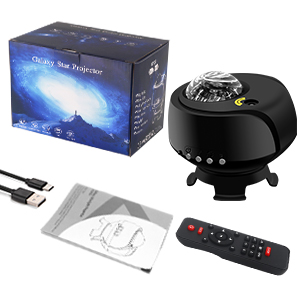
2. X'hemm fil-Kaxxa
Malli tiftaħ il-kaxxa, jekk jogħġbok ivverifika li l-komponenti kollha li ġejjin huma inklużi:
- FLITI Star Projector Unit
- Kontroll mill-bogħod
- Kejbil tal-Enerġija USB
- Manwal għall-Utent (dan id-dokument)

Image showing the FLITI Star Projector, remote control, USB cable, and user manual as included components.
3. Karatteristiċi ewlenin
- Upgraded Star Projection: Experience 29 unique combinations of star and galaxy light effects, creating an immersive cosmic environment.
- Kopertura Espansiva: Designed for a larger and brighter projection range compared to standard projectors, ensuring a more captivating display.
- Kontroll mill-bogħod u tajmer: Easily switch modes, adjust settings, and set automatic shut-off times (1 or 2 hours) using the included remote control.
- Sinkronizzazzjoni tal-Mużika: Built-in Bluetooth speaker and sound sensor allow the lights to dynamically respond to the beat of your music, enhancing the ambiance.
- Flexible Angle & Brightness: The unique base device supports 360° rotation, enabling precise adjustment of the projection angle. Brightness levels are also adjustable to suit your preference.

The projector's base allows for 360-degree rotation, enabling flexible projection angles.

The projector can synchronize its light effects with music, creating a dynamic visual experience.

The projector features Bluetooth connectivity for easy pairing with your devices to play music.
Fuqview of the projector's various features, including color options, music playback, and control settings.
A short video demonstrating the dynamic galaxy and star projection effects of the FLITI Star Projector.
Wirja tal-vidjoasing the extensive coverage area of the FLITI Galaxy Lights Projector, filling a large space with light.
4. Gwida ta' Setup
4.1 Tqegħid Inizjali
- Place the FLITI Star Projector on a stable, flat surface.
- Ensure there are no obstructions between the projector and the desired projection surface (ceiling or wall).
- Adjust the projector's angle using its unique base to achieve the desired projection area. The 360° rotation allows for versatile positioning.
4.2 Konnessjoni tal-Enerġija
- Connect the USB power cable to the projector's power input port.
- Plug the other end of the USB cable into a compatible USB power adapter (not included) or a USB port on a computer/power bank.
- Ensure the power source provides sufficient power for optimal operation.
5. Istruzzjonijiet Operattivi
5.1 Power On/Off
- Agħfas il-buttuna tal-qawwa fuq il-proġettazzjoni jew il-kontroll remot biex tixgħel jew titfi l-apparat.
5.2 Adjusting Projection Modes
- Use the mode selection buttons on the remote control to cycle through the 29 different projection combinations of nebula and star effects.
- Adjust the brightness using the dedicated brightness buttons on the remote.
5.3 Bluetooth Music Playback
- Kun żgur li l-proġekter huwa mixgħul.
- On your smartphone or audio device, enable Bluetooth and search for "AC6926".
- Select "AC6926" to pair with the projector. A confirmation sound will indicate successful pairing.
- Play your desired music. The projector's lights will synchronize with the music's beat in sound-activated mode.
5.4 Funzjoni Timer
- Use the timer buttons on the remote control to set the automatic shut-off time to 1 hour or 2 hours.

The projector is versatile for various occasions, from relaxing sleep to lively parties.
6. Manutenzjoni
To ensure the longevity and optimal performance of your FLITI Star Projector, follow these simple maintenance guidelines:
- Tindif: Use a soft, dry cloth to wipe the exterior of the projector. Do not use abrasive cleaners or solvents.
- Kura tal-Lenti: Gently clean the projection lens with a microfiber cloth to remove dust or smudges. Avoid touching the lens directly with your fingers.
- Ħażna: When not in use for extended periods, store the projector in a cool, dry place away from direct sunlight and extreme temperatures.
- Evita l-Ilma: The projector is not water-resistant. Keep it away from water or high-humidity environments to prevent damage.
7 Issolvi l-problemi
If you encounter any issues with your projector, please refer to the table below for common problems and solutions:
| Problema | Kawża Possibbli | Soluzzjoni |
|---|---|---|
| Il-proġettur ma jixgħelx. | L-ebda konnessjoni tal-enerġija jew kejbil difettuż. | Check if the power cable is securely connected. Try a different USB power adapter or USB port. |
| Il-kontroll mill-bogħod ma jaħdimx. | Batteries are dead or incorrectly inserted. Obstruction between remote and projector. | Replace remote control batteries. Ensure clear line of sight to the projector's IR receiver. |
| Lights are dim or unclear. | Brightness setting is low. Lens is dirty. Room is too bright. | Increase brightness using the remote. Clean the projection lens. Use in a darker environment for best results. |
| Kwistjonijiet ta 'konnessjoni Bluetooth. | Projector not in pairing mode. Device too far. Interference. | Ensure projector is on. Move your device closer to the projector. Restart both devices and try pairing again. |
8. Speċifikazzjonijiet
| Karatteristika | Dettall |
|---|---|
| Dimensjonijiet tal-Prodott | 3"D x 3"W x 4"H |
| Piż tal-oġġett | 0.47 Kilogrammi (1.04 libbra) |
| Lamp Tip | Dawl bil-lejl |
| Kulur dell | Multicolor |
| Tip ta' Swiċċ | Remote |
| Stil | Moderna |
| Brand | FLITI |
| Kulur | Black-E |
| Karatteristika Speċjali | Color Changing, Sound Activated, Remote Control Compatible |
| Tip ta' Sors tad-Dawl | LED |
| Materjal | Plastik |
| Tip ta' Kamra | Kamra tas-sodda |
| Forma | Round |
| Tip ta' Kontrollur | Kontroll mill-bogħod |
| Teknoloġija tal-Konnettività | Bluetooth |
| Tip ta 'Immuntar | Mejda |
| Metodu ta' Kontroll | Remot, Vuċi |
| Livell ta 'Reżistenza għall-Ilma | Mhux Reżistenti għall-Ilma |
| Pajjiż ta' Oriġini | Iċ-Ċina |
| Numru tal-Mudell | 1 |
9. Garanzija u Appoġġ
For warranty information or technical support, please refer to the contact details provided on the product packaging or the official FLITI websit. Żomm l-irċevuta tax-xiri tiegħek bħala prova tax-xiri għal kwalunkwe talba ta' garanzija.


