1. Introduzzjoni
Grazzi tax-xiriasing the ZEBRONICS Sound Bomb 7 True Wireless Stereo (TWS) Earbuds. This manual provides detailed instructions for setting up, operating, and maintaining your earbuds to ensure optimal performance and longevity. Please read this manual carefully before use.
2. Kontenut tal-Pakkett
Il-pakkett jinkludi l-oġġetti li ġejjin:
- Earbuds - 2 Units (Left and Right)
- Charging Case - 1 Unit
- Eartips - 4 Units (various sizes)
- Type-C Charging Cable - 1 Unit
- QR User Guide (digital access)
3. Prodott Aktarview
The ZEBRONICS Sound Bomb 7 earbuds are designed for a comfortable fit and high-quality audio experience. They feature touch controls, a portable charging case, and support for voice assistants.

Image: The ZEBRONICS Sound Bomb 7 TWS earbuds shown with their open charging case.

Image: A collage highlighting key features: Touch Control, 13mm Drivers, Splash Proof design, Portable Charging Case, Voice Assistant support, and Bluetooth v5.2 with Flash Connect.
4. Setup
4.1 Iċċarġjar inizjali
Before first use, ensure both the earbuds and the charging case are fully charged. Remove any protective stickers from the earbud charging contacts.
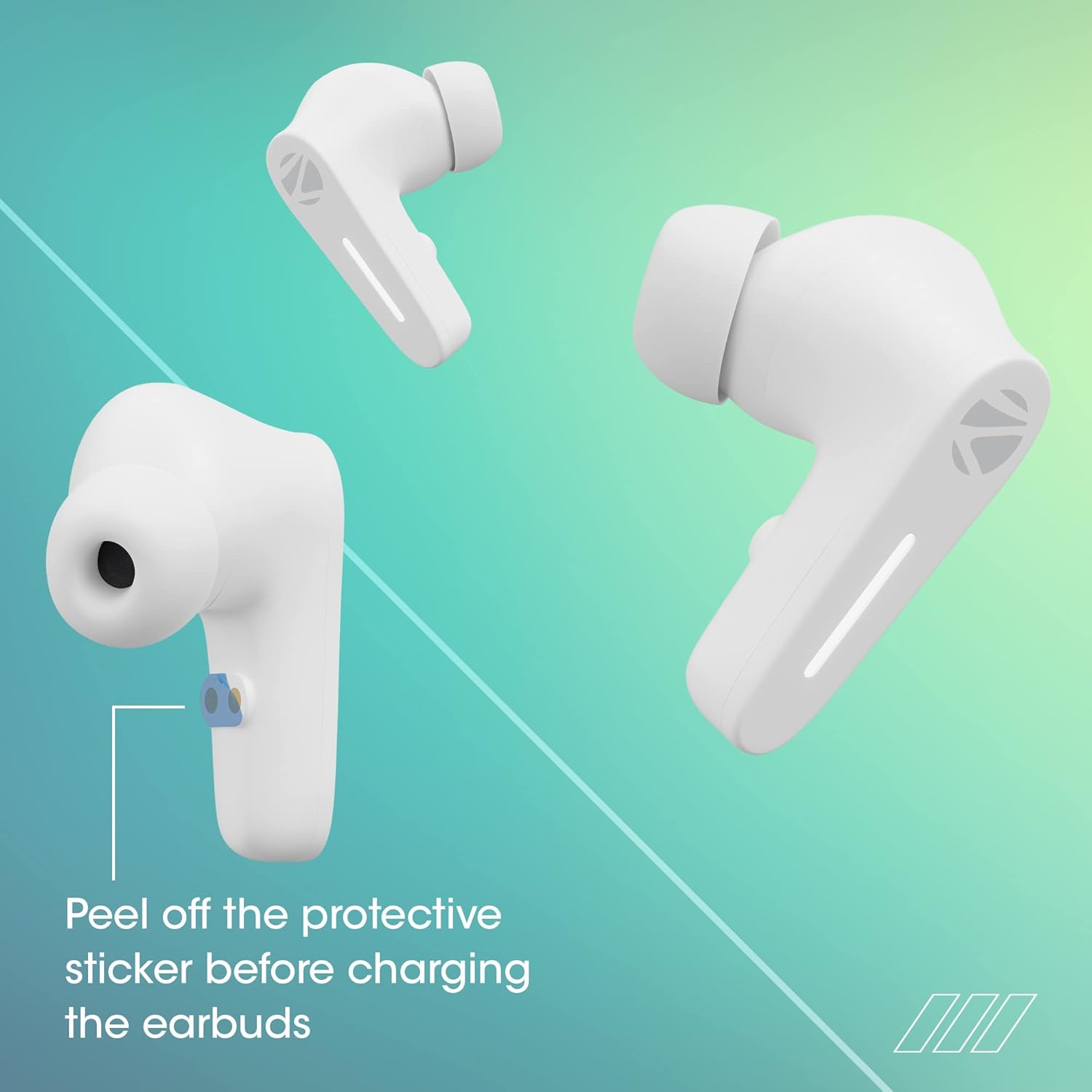
Image: Illustration showing the protective sticker on the earbud charging contacts that needs to be removed before charging.
- Poġġi ż-żewġ earbuds fil-kaxxa tal-iċċarġjar.
- Qabbad il-kejbil tal-iċċarġjar tat-Tip Ċ mal-port tal-iċċarġjar fuq il-kaxxa u ma' sors ta' enerġija USB.
- L-indikaturi LED fuq il-kaxxa juru l-istatus tal-iċċarġjar.
- A full charge typically takes approximately 1 hour for the case and earbuds.
The Sound Bomb 7 features Ħlas Rapidu, providing up to 180 minutes of playback with just 10 minutes of charging.

Image: A visual representation of the rapid charge feature and the Type-C charging port on the earbud case.
4.2 Tqabbil tal-Bluetooth
Qabbad il-earbuds tiegħek mat-tagħmir tiegħek għal awdjo mingħajr fili.
- Open the charging case. The earbuds will automatically power on and enter pairing mode (Flash Connect feature).
- Fuq l-ismartphone jew it-tagħmir li jaħdem bil-Bluetooth tiegħek, mur fis-settings tal-Bluetooth.
- Fittex għal available devices and select "ZEB-SOUND BOMB 7" from the list.
- Ladarba tkun konness, tisma' ton ta' konferma.
- Il-earbuds jerġgħu jikkonnettjaw awtomatikament mal-aħħar apparat imqabbad meta joħorġu mill-kaxxa, jekk il-Bluetooth ikun attivat fuq l-apparat.

Image: An illustration demonstrating the Flash Connect feature, where opening the case initiates quick pairing with a smartphone.
5. Istruzzjonijiet Operattivi
5.1 Kontrolli touch
Il-earbuds għandhom kontrolli touch intuwittivi għal diversi funzjonijiet:
- Tektek Uniku: Daqq/Ippawża l-mużika, Wieġeb/Temmen is-sejħiet.
- Tektek doppju (Earbud tax-Xellug): Track preċedenti.
- Tektek doppju (Earbud tal-lemin): Binarju li jmiss.
- Triple Tap (Left/Right Earbud): Attiva l-Assistent tal-Vuċi.
- Long Press (Left/Right Earbud for 2 seconds): Irrifjuta t-telefonata li tkun dieħla.
- Long Press (Left/Right Earbud for 3 seconds): Toggle Gaming Mode (Low Latency).
5.2 Modalità tal-Logħob (Latenza Baxxa)
Activate Gaming Mode for a low-latency audio experience, ideal for gaming. Long press either earbud for 3 seconds to toggle this mode on or off.

Image: A visual depicting the earbuds in Gaming Mode, emphasizing low latency and the 13mm audio drivers.
5.3 Assistent tal-Vuċi
Access your smartphone's voice assistant (Siri or Google Assistant) by triple-tapping either earbud. This allows for hands-free control of your device.

Image: Icons for "Hey Siri" and "Google Assistant" indicating support for voice assistant functionality.
5.4 Kanċellazzjoni tal-Istorbju Ambjentali (ENC)
The earbuds feature Environmental Noise Cancellation (ENC) for clearer call quality by reducing ambient noise during conversations.

Image: A graphic illustrating the Environmental Noise Cancellation feature, showing sound waves being reduced around an earbud.
6. Manutenzjoni
Proper care ensures the longevity of your earbuds.
- Tindif: Uża drapp artab u niexef biex tnaddaf il-earbuds u l-kaxxa tal-iċċarġjar. Tużax kimiċi ħarxa jew materjali li joborxu.
- Reżistenza għall-Ilma: The earbuds are splash-proof/sweat-proof. Avoid submerging them in water or exposing them to heavy rain.
- Ħażna: Meta ma tkunx qed tużahom, aħżen il-earbuds fil-kaxxa tal-iċċarġjar tagħhom biex tipproteġihom u żżommhom iċċarġjati.
- Temperatura: Evita li tesponi l-earbuds għal temperaturi estremi (sħana jew kesħa).

Image: An earbud being splashed with water, illustrating its splash-proof design.
7 Issolvi l-problemi
Jekk tiltaqa' ma' problemi, ipprova s-soluzzjonijiet li ġejjin:
| Problema | Soluzzjoni |
|---|---|
| Earbuds ma jingħaqdux |
|
| Earbud wieħed biss jaħdem |
|
| Volum baxx jew kwalità ħażina tal-ħoss |
|
| Każ tal-iċċarġjar mhux iċċarġjar |
|
8. Speċifikazzjonijiet
| Karatteristika | Dettall |
|---|---|
| Isem tal-Mudell | BOMBA TAL-ĦOSS ZEB 7 |
| Teknoloġija tal-Konnettività | Bluetooth 5.2 |
| Teknoloġija tal-Komunikazzjoni mingħajr Fili | Bluetooth |
| Tqegħid tal-widnejn | Fil-widnejn |
| Fattur tal-Formola | Fil-widnejn |
| Tip ta' Kontroll | Kontroll tal-Vuċi, Kontroll tal-Mess |
| Metodu ta' Kontroll | Mess |
| Kontroll tal-Ħoss | Kanċellazzjoni tal-Istorbju Ambjentali (ENC) |
| Daqs tas-Sewwieq | 13mm |
| Ħin tal-Iċċarġjar | Approx. 1 hour (earbuds & case) |
| Ħin tal-logħob | Up to 60 hours (with charging case, at 50% volume) |
| Ħlas Rapidu | 10 min charge for 180 min use |
| Modalità tal-Logħob | Latenza Baxxa ta' 50ms |
| Livell ta 'Reżistenza għall-Ilma | Water Resistant (Splash Proof/Sweat Proof) |
| Konnettur | USB Tip Ċ |
| Piż tal-oġġett | 47 Gramm |
| Dimensjonijiet tal-Prodott | 5.5 x 5.5 x 3.2 ċm |
| Apparati Kompatibbli | Laptops, Mobile Phones, Tablets, PC, Smart TVs, All Bluetooth Devices, iOS, Android |
9. Garanzija u Appoġġ
Your ZEBRONICS Sound Bomb 7 TWS Earbuds come with a 1-Sena Garanzija mid-data tax-xiri. Din il-garanzija tkopri difetti fil-manifattura taħt użu normali.
For warranty claims, technical support, or any product-related inquiries, please contact ZEBRONICS customer service. Keep your purchase receipt as proof of purchase.
You can find more information and support on the official ZEBRONICS websit: www.zebronics.com


