1. Introduzzjoni
This manual provides detailed instructions for the installation, operation, and maintenance of your ESSGOO Double Din Car Stereo. Please read this manual thoroughly before using the product to ensure proper function and safety. Keep this manual for future reference.
2. Informazzjoni dwar is-Sigurtà
- Kun żgur li tagħmel installazzjoni professjonali biex tevita li ssir ħsara lill-unità jew lill-vettura.
- Tħaddimx l-apparat b'mod li jtellifk l-attenzjoni mis-sewqan.
- Evita li tesponi l-unità għal temperaturi estremi, dawl tax-xemx dirett, jew umdità.
- Uża biss l-aċċessorji u l-partijiet speċifikati.
- Disconnect the car battery before installation or maintenance.
3. Kontenut tal-Pakkett
Ivverifika li l-oġġetti kollha huma preżenti fil-pakkett:
- ESSGOO Double Din Car Stereo Unit
- Kontroll mill-bogħod
- Backup Camera
- Mikrofonu
- Kejbil tal-Enerġija
- Kejbil tal-Ispeaker
- Kurdun tal-Enerġija tal-Kamera
- Viti tal-Immuntar
- Manwal għall-Utent (dan id-dokument)

Immaġni: Fuqview of the ESSGOO Double Din Car Stereo and its included accessories, such as the remote control, backup camera, microphone, and various connection cables.
4. Setup u Installazzjoni
4.1 Dijagramma tal-Wiring
Refer to the following diagram for proper wiring connections. Incorrect wiring can damage the unit or vehicle's electrical system.

Image: Detailed wiring diagram illustrating connections for power (ACC, BATT, GND), illumination, steering wheel control, reverse camera, parking brake, and speaker outputs. Also shows input/output ports on the back of the unit.
- Aħmar (ACC): Connect to ignition switch +12V.
- Iswed (GND): Connect to ground wire B-.
- Isfar (BATTERIJA): Connect to power supply +12V.
- Oranġjo (BREJK): Connect to parking brake cable.
- Kannella (ĊAVETTA): Connect to steering wheel control.
- Roża (BLA WARA): Connect to reversing camera signal.
- Blu (ANT): Qabbad mal-antenna tar-radju.
- Green (ILLUMINATION): Connect to illuminate.
- Wajers tal-Ispeaker: Ensure correct polarity for front and rear speakers (White/White-black, Gray/Gray-black, Green/Green-black, Purple/Purple-black).
Noti Importanti:
- When the yellow B+ line and the red ACC line have a 12V positive power at the same time, the unit can be turned on normally.
- The yellow B+ line keeps the power on and the machine has a memory function.
- 8 speaker cables: Each cable cannot be grounded, cannot be shared, and cannot touch other lines; otherwise, there will be no sound output, sound distortion, machine fever, and so on.
5. Istruzzjonijiet Operattivi
5.1 Operazzjoni Ġenerali

Image: The main screen of the ESSGOO car stereo displaying various application icons, including Phone, Music, Maps, Messages, Now Playing, Podcasts, News, and Audiobooks, indicating its multimedia capabilities.
- Buttuna tal-Qawwa: Agħfas biex tixgħel/itfi l-unità.
- Kontroll tal-Volum: Use VOL+ and VOL- buttons to adjust the volume level.
- Buttuna EQ: Access equalizer settings to customize audio output.
- Buttuna MUTE: Mute or unmute audio output.
- Buttuna MODE: Switch between different audio sources (FM, USB, AUX, Bluetooth).
- Buttuna SET: Aċċess għas-settings tas-sistema.
5.2 Mirror Link (Link tat-Telefon)
The Mirror Link function allows you to project your smartphone screen onto the car stereo display. Connect your phone via USB cable.

Image: The Mirror Link feature in action, demonstrating how a smartphone's display, showing a basketball game, is mirrored onto the car stereo's larger screen. Icons for Android and Apple indicate compatibility.
- Telefon Android: Supports two-way connection (control from phone and stereo).
- iPhone: Supports one-way projection (view only on stereo, control from phone).
- Use the data cable to connect the phone to the machine to achieve interconnection.
5.3 Bluetooth Handsfree Call
Qabbad l-ismartphone tiegħek permezz tal-Bluetooth għal sejħiet hands-free u streaming tal-awdjo.
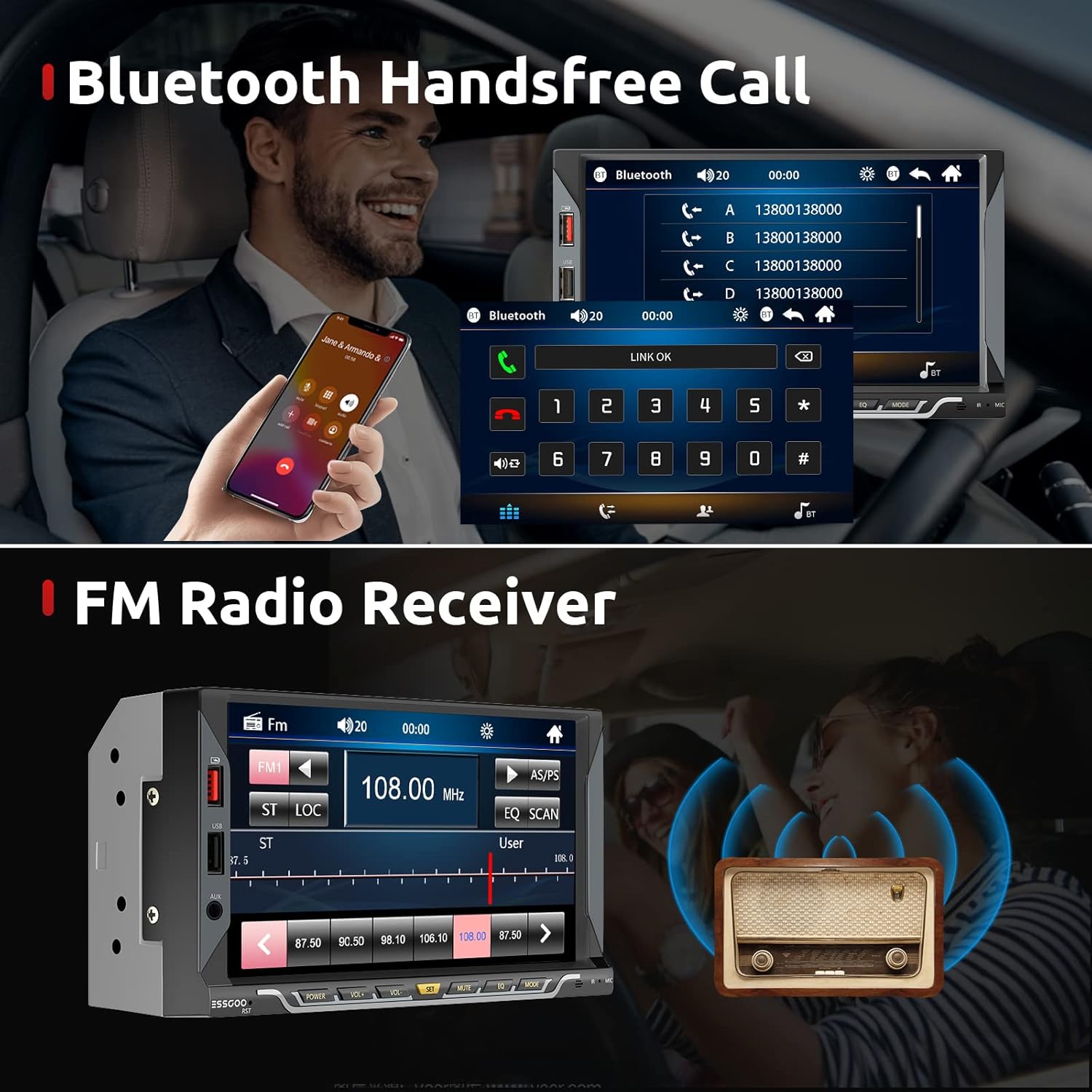
Image: Top half shows the Bluetooth hands-free calling interface on the car stereo, displaying a dial pad and call history. Bottom half shows the FM radio interface with frequency tuning and station presets.
- Pair your phone with the stereo via Bluetooth settings.
- Once paired, you can make and receive calls directly from the stereo's touchscreen.
- Audio from calls will play through your car's speakers.
5.4 Riċevitur tar-Radju FM
Tune into your favorite FM radio stations.
- Agħżel il-mod FM.
- Use the scan function to automatically search for and save stations, or manually tune to a frequency.
- Save preferred stations to presets for quick access.
5.5 USB/AUX Input
Play media from USB drives or external devices via the AUX input.

Image: A diagram illustrating the multi-functionality of the USB and AUX ports. It shows USB ports for playing music from flash drives, playing videos from flash drives, and charging mobile phones, as well as an AUX input for external audio devices.
- Insert a USB flash drive into the USB port to play audio or video files.
- Connect an external audio device (e.g., MP3 player) to the 3.5mm AUX input jack.
- The USB port also supports mobile device charging.
5.6 HD Rear View Kamera
When properly installed, the rear view il-kamera turi awtomatikament in-naħa ta' wara view meta l-vettura tkun fil-ger tar-rivers.

Image: The car stereo display showing the view from the HD rear view camera, with parking guidelines overlaid. Icons highlight key features: High Definition, Night Vision, 170° Viewing Angle, and Waterproof Protection.
- Features include High Definition, Night Vision, 170° Wide Viewing Angle, and Waterproof Protection.
- Ensure the camera is connected correctly to the "REVERSE" trigger wire.
5.7 Kontroll tar-rota tal-isteering
Control basic functions of the stereo directly from your vehicle's steering wheel buttons (if compatible and wired correctly).
- The unit supports steering wheel control. Refer to the wiring diagram for connection.
- Configuration may be required in the stereo's settings menu to map steering wheel buttons.
5.8 Kontroll mill-Bogħod
Use the included remote control for convenient operation of the stereo.

Image: A detailed diagram of the remote control for the car stereo, showing each button labeled with its corresponding function, such as Mute, Mode Switch, Power On/Off, Volume, Enter/Play/Pause, Next/Previous Track, Menu, and Number buttons.
- 1. Mute On/off
- 2. Swiċċ tal-Mod
- 3. Qawwa / mitfi
- 4. Volum +
- 5. Daħħal; Play / Pawża
- 6. Il-Binarju li Jmiss
- 7. Volume -
- 8. Tmiem is-Sejħa
- 9. Buttuna Numru
- 10. Menu
- 11. Track preċedenti
- 12. Wieġeb Sejħa
5.9 7 Color LED Backlight
Customize the button backlight color to match your vehicle's interior or personal preference.
- Access the backlight settings in the system menu.
- Choose from various colors including Red, Green, Blue, Yellow, Cyan, Purple, and White.
6. Manutenzjoni
- Tindif: Use a soft, dry cloth to clean the unit's surface. For stubborn dirt, dampen the cloth slightly with water. Do not use abrasive cleaners or solvents.
- Kura tal-Iskrin: The touchscreen is sensitive. Avoid pressing it with sharp objects. Clean with a microfiber cloth.
- Temperatura: Evita li tesponi l-unità għal temperaturi estremi.
7 Issolvi l-problemi
| Problema | Kawża Possibbli | Soluzzjoni |
|---|---|---|
| Ebda Qawwa | Wajers mhux korretti; Fjus maħruq; Konnessjoni maħlula. | Check power (ACC, BATT) and ground connections. Inspect vehicle's fuse box and unit's fuse. Ensure all wires are securely connected. |
| Ebda Ħoss | Speaker wires shorted or disconnected; Volume too low; Mute activated. | Check speaker wiring for shorts or disconnections. Increase volume. Deactivate mute function. |
| Bluetooth Mhux Konnessjoni | Phone's Bluetooth off; Stereo not in pairing mode; Interference. | Ensure phone's Bluetooth is on and discoverable. Put stereo in Bluetooth pairing mode. Move away from other Bluetooth devices. |
| Il-Link tal-Mirror Mhux Jaħdem | Incorrect USB cable; Phone settings; App compatibility. | Use a high-quality data USB cable. Check phone's USB debugging or mirroring settings. Ensure the phone's OS version is compatible. |
| Kamera ta' wara mhux qed turi | Camera not powered; Reverse trigger wire not connected; Faulty camera. | Check camera power supply. Ensure the "REVERSE" wire is correctly connected to the vehicle's reverse light signal. Test camera functionality. |
8. Speċifikazzjonijiet
| Karatteristika | Dettall |
|---|---|
| Dimensjonijiet tal-Prodott | 7.87 x 6.69 x 4.45 pulzieri |
| Piż tal-oġġett | 2.05 liri |
| Brand | ESSGOO |
| Teknoloġija tal-Konnettività | Awżiljarju, Bluetooth, USB |
| Tip ta' Kontrollur | Android, iOS (via Mirror Link) |
| Karatteristika Speċjali | Ekwalizzatur, Skrin tattili |
| Apparati Kompatibbli | Speaker |
| Tip ta' Konnettur | 3.5mm Jack, USB |
| Modalità tal-Ħruġ tal-Awdjo | Stereo |
| Numru ta 'Kanali | 4 |
| Output Wattage | 45 Watts |
| Servizzi tal-Internet Appoġġjati | Maps (via Mirror Link) |
9. Garanzija u Appoġġ
ESSGOO is committed to providing high-quality products and excellent customer service.
- Assigurazzjoni tal-Kwalità: The product comes with 1 Year Quality Assurance.
- Appoġġ għall-Klijent: If you have any questions or require technical guidance, please contact ESSGOO Support via Amazon Messages. Online replies are typically provided within 24 hours.


