Introduzzjoni
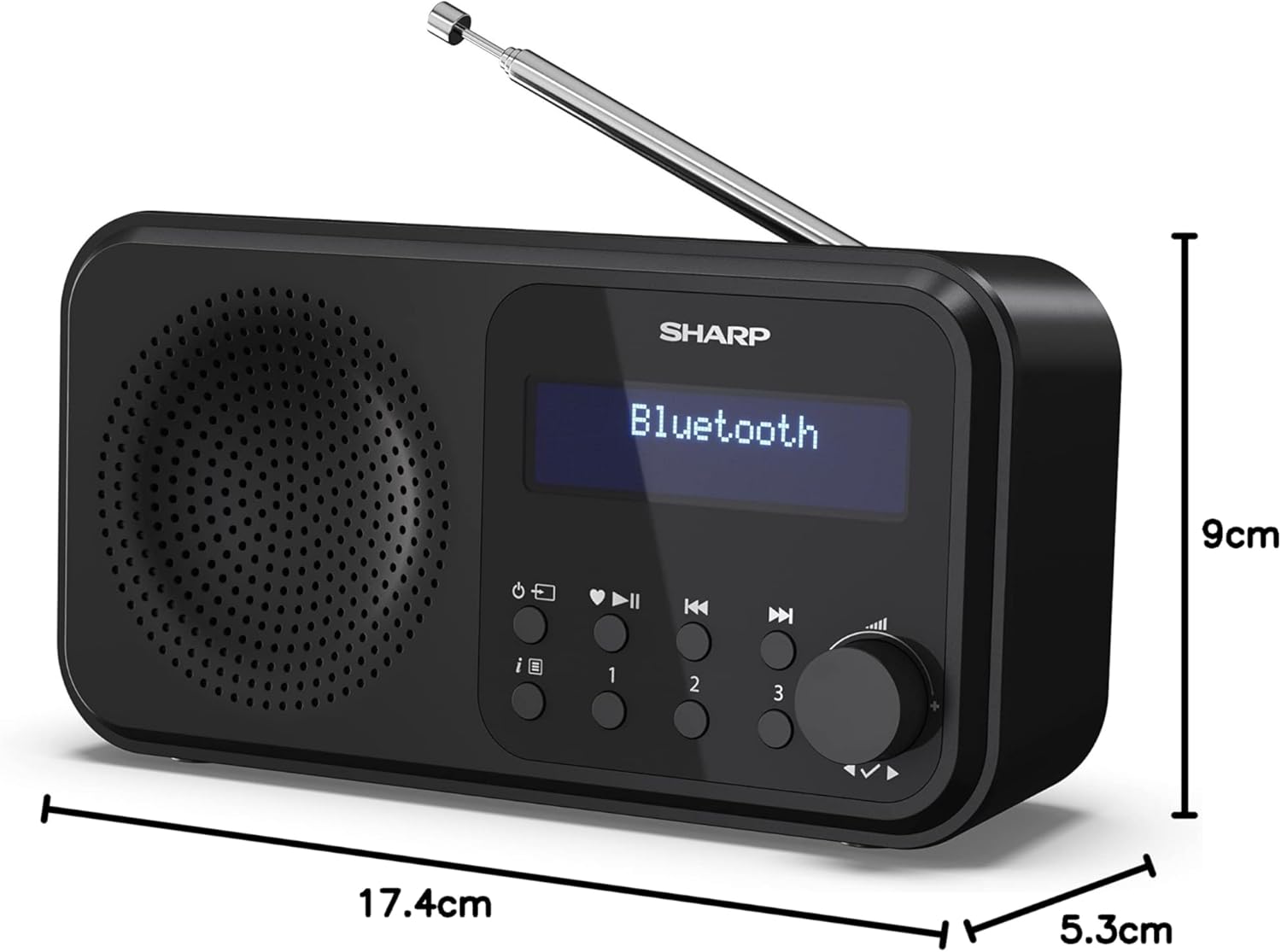
The SHARP DR-P420(BK) Tokyo Portable Digital Radio offers a versatile listening experience with its DAB+ and FM radio capabilities, alongside Bluetooth 5.0 for wireless streaming. Designed for portability, it can be powered via USB or batteries, making it suitable for various environments. This manual provides detailed instructions for setting up, operating, and maintaining your radio.
X'hemm fil-Kaxxa
- Main unit (SHARP DR-P420(BK) Radio)
- USB to Micro USB power cable
- Dokumentazzjoni tal-utent

Setup
It-Tħaddim tal-Apparat
The DR-P420(BK) radio offers flexible power options:
- Qawwa tal-USB: Connect the supplied USB to Micro USB cable to the radio's Micro USB port and plug the other end into a compatible USB power adapter (not supplied) or a powered USB port.
- Qawwa tal-batterija: For portable use, insert four AA batteries (not supplied) into the battery compartment located on the back of the unit. Ensure correct polarity.
Setup u Tuning Inizjali
Upon first power-on, the radio will typically perform an automatic scan for available DAB+ and FM stations. Ensure the telescopic antenna is fully extended for optimal reception.
- Estendi l-antenna teleskopika.
- Agħfas il-buttuna Power biex tixgħel ir-radju.
- The radio will automatically scan for DAB+ stations. Once complete, it will display the first available station.
- To switch between DAB+ and FM modes, press the 'Mode' button.
- For manual tuning or rescanning, refer to the 'Operating Instructions' section.

Istruzzjonijiet Operattivi
DAB+/FM Radio Operation
- Modi ta' Qlib: Press the 'Mode' button to toggle between DAB+ and FM radio.
- Għażla tal-istazzjon: In DAB+ mode, use the navigation buttons to browse available stations. In FM mode, use the tuning knob or seek function to find stations.
- Iffrankar ta' presets: The radio supports up to 40 presets. Tune to your desired station, then press and hold one of the preset number buttons (1, 2, 3) or follow the manual's instructions for saving to other memory slots.
Konnettività Bluetooth
The radio can connect wirelessly to your smartphone or tablet via Bluetooth 5.0.
- Press the 'Mode' button until 'Bluetooth' is displayed on the screen. The radio will enter pairing mode.
- On your device, enable Bluetooth and search for 'SHARP DR-P420(BK)'.
- Select the radio from the list to pair. Once connected, you can stream audio from your device.

Dual Alarm and Sleep Timer
- Issettjar ta' Allarmi: Access the alarm settings through the menu to set up to two independent alarms. You can choose to wake up to a buzzer or your preferred radio station.
- Timer ta 'l-Irqad: The sleep timer allows you to set a duration after which the radio will automatically turn off, perfect for falling asleep to music or talk radio.
Użu tal-headphones
For private listening, plug any standard 3.5mm headphones into the headphone jack located on the side of the radio. The built-in speaker will automatically mute when headphones are connected.
Manutenzjoni
- Tindif: Uża drapp artab u niexef biex tnaddaf il-barra tar-radju. Tużax prodotti tat-tindif jew solventi li joborxu.
- Ħażna: Meta ma tkunx qed tuża r-radju għal perjodi twal, neħħi l-batteriji biex tevita t-tnixxija u aħżen ir-radju f'post frisk u niexef.
- Kura tal-batterija: Ibdel il-batteriji meta jidher l-indikatur ta’ batterija baxxa. Armi l-batteriji użati b’mod responsabbli skont ir-regolamenti lokali.
Issolvi l-problemi
| Problema | Kawża Possibbli | Soluzzjoni |
|---|---|---|
| Ir-radju ma jixgħelx. | No power supply; batteries depleted or incorrectly inserted. | Check USB cable connection; replace batteries or ensure correct polarity. |
| Riċeviment ħażin tar-radju. | Antenna mhux estiża; żona tas-sinjal dgħajfa; interferenza. | Fully extend antenna; reposition radio; move away from other electronic devices. |
| L-apparat Bluetooth mhux qed jiġi mqabbla. | Radio not in pairing mode; device too far; Bluetooth already connected to another device. | Ensure radio is in Bluetooth pairing mode; bring devices closer; disconnect from other devices. |
| L-allarm ma jdoqqx. | Alarm not set correctly; volume too low. | Verify alarm settings (time, source, active); increase volume. |
Speċifikazzjonijiet
| Karatteristika | Dettall |
|---|---|
| Numru tal-Mudell | DR-P420(BK) |
| Dimensjonijiet tal-Prodott | 17.4L x 5.3W x 9H ċentimetri |
| Piż | 400 g |
| Teknoloġija tal-Konnettività | Bluetooth 5.0 |
| Teknoloġija Tuner | DAB+, FM |
| Sors tal-Enerġija | USB or Battery Powered (4x AA) |
| Karatteristiċi Speċjali | Portable, Lightweight, Dual Alarm, 40 Presets, 3.5mm Jack |
Garanzija u Appoġġ
This SHARP product is covered by a manufacturer's warranty. Please refer to the included user documentation for specific warranty terms and conditions applicable to your region. For technical support, troubleshooting assistance, or warranty claims, please contact Sharp Customer Service.
You can find more information and support resources on the official Sharp webis-sit jew billi żżur il- Ħanut Sharp fuq Amazon.


