1. Introduzzjoni
This manual provides detailed instructions for the setup, operation, and maintenance of your KECAG 10.1 Inch Digital Picture Frame. Please read this manual thoroughly before using the device to ensure proper functionality and to maximize your user experience. Keep this manual for future reference.
2. Prodott Aktarview
2.1 Karatteristiċi ewlenin
- 10.1 Inch 1080P HD IPS Screen: Features a 1920x1080 resolution with a 180° wide-angle IPS display for clear viewminn diversi angoli.
- Daqq Multimedjali: Supports photo slideshows, video playback, and music playback.
- Sensor tal-Moviment: Automatically turns the frame on/off based on detected movement to conserve energy.
- Timing On/Off Function: Allows scheduled power on and off times.
- Versatile Media Support: Compatible with SD cards and USB flash drives.
- Interface faċli għall-utent: Simple main menu for easy navigation.
- Kontroll mill-bogħod: Provides convenient operation from a distance.
- Funzjonijiet addizzjonali: Includes calendar and alarm features.
2.2 Kontenut tal-Pakkett
- KECAG 10.1 Inch Digital Picture Frame
- 32GB USB Flash Drive
- Kontroll mill-bogħod
- Adapter tal-Enerġija
- Manwal għall-Utent

Figura 2.2.1: The KECAG 10.1 Inch Digital Picture Frame displaying a family photo, accompanied by its remote control.
3. Setup
3.1 Konnessjoni tal-Enerġija
- Locate the power adapter included in the package.
- Connect the small end of the power adapter cable to the DC IN port on the back of the digital picture frame.
- Ipplaggja t-tarf l-ieħor tal-adapter tal-enerġija f'sokit elettriku standard.
- The frame will automatically power on or enter standby mode.
3.2 Inserting Media (USB Drive or SD Card)
The digital picture frame supports both USB flash drives and SD cards for media playback.
- Identify the USB port and SD card slot on the side or back of the frame.
- For a USB drive: Carefully insert the USB flash drive into the USB port.
- For an SD card: Insert the SD card into the SD card slot with the metal contacts facing down, until it clicks into place.
- Ensure the media is inserted correctly to avoid damage.

Figura 3.2.1: Illustrated steps for connecting media (USB/SD card) and power to the digital picture frame.
3.3 Initial Power On and Language Settings
- Once powered on, the frame may display a language selection screen.
- Use the remote control's navigation buttons (Up/Down/Left/Right) to select your preferred language.
- Agħfas il- DĦUL buttuna biex tikkonferma l-għażla tiegħek.
4. Istruzzjonijiet Operattivi
4.1 Funzjonijiet ta' Kontroll mill-bogħod
The remote control allows for convenient navigation and setting adjustments. Ensure the remote is aligned with the infrared sensor on the frame during use.
- MENU: Access the main menu or return to the previous menu.
- RITRAT: Directly enter photo playback mode.
- MUŻIKA: Directly enter music playback mode.
- FILMAT: Directly enter video playback mode.
- ĦRUĠ: Exit current function or menu.
- Daħħal: Confirm selection or play/pause media.
- SETUP: Aċċess għas-settings tas-sistema.
- Buttuni tan-Navigazzjoni ('il fuq/'l isfel/'il fuq/'il fuq/'il fuq): Innaviga permezz tal-menus u l-għażliet.
- VOL+/VOL-: Adjust volume during video or music playback.
4.2 Navigazzjoni tal-Menu Prinċipali
From the main menu, you can select different functions:
- Stampa: View photos in a slideshow.
- Mużika: Play awdjo files.
- Kalendarju: Display calendar and set alarms.
- Settings: Configure device preferences.

Figura 4.2.1: The digital picture frame's interface showing options for Calendar, Photo/Video, and Music playback.
4.3 Photo Playback
- Mill-menu prinċipali, agħżel Stampa jew agħfas il- RITRAT buttuna fuq il-remote.
- The frame will automatically start a slideshow of photos found on the inserted media.
- Ordni ta 'Daqq: In settings, you can choose between Shuffle, Sequential, or Repeat All.
- Effetti ta' Tranżizzjoni: Select from various effects like Up/Down, Mosaic, Left/Right, or Random.
- Immaġni Preview: Access a thumbnail view of your photos.
- Rotazzjoni tal-Immaġni: Adjust the orientation of images (vertical/horizontal).
- Luminożità tal-iskrin: Adjust the display brightness in the settings menu.
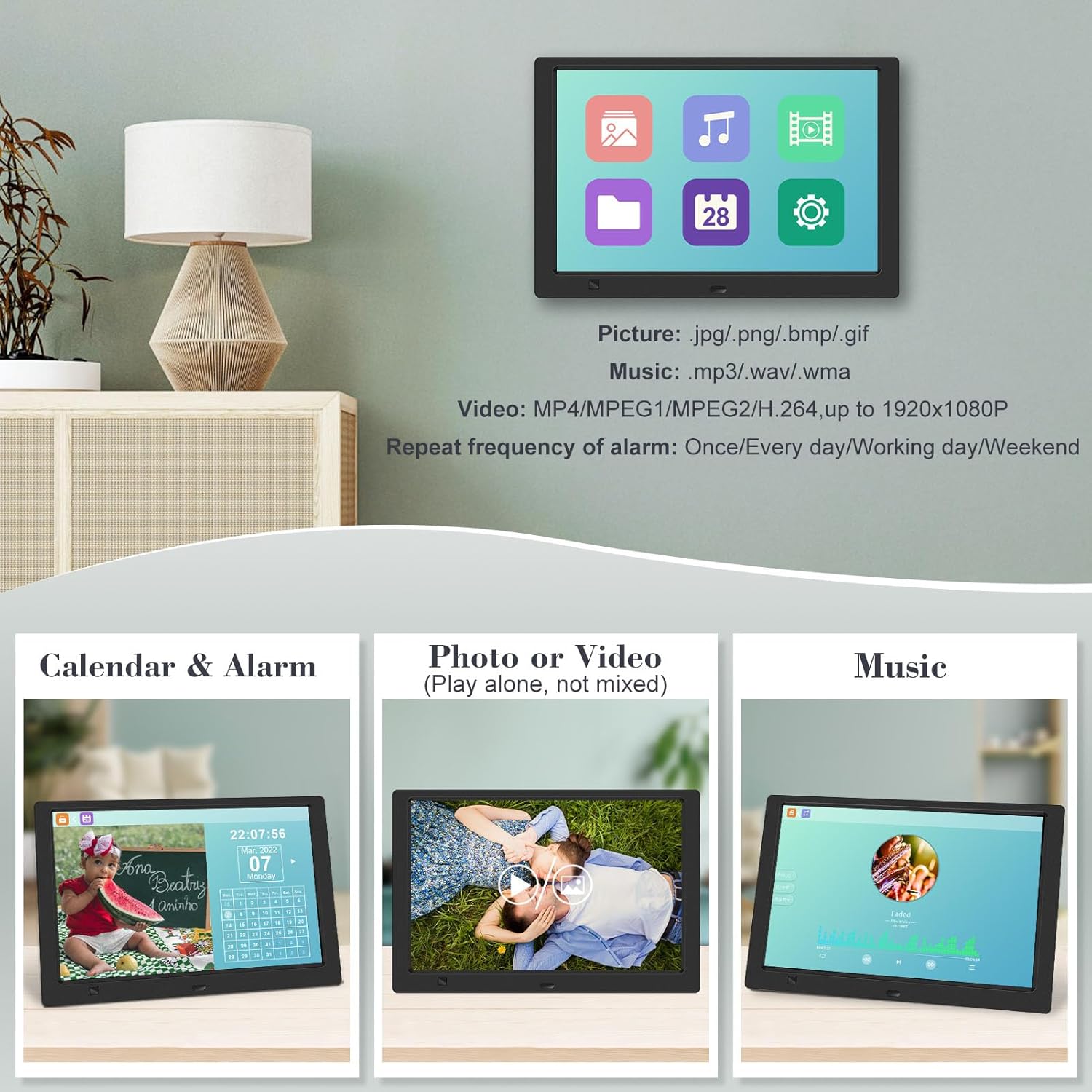
Figura 4.3.1: The digital picture frame displaying a photo slideshow with background music and various image transition options.

Figura 4.3.2: Visual representation of slideshow and image preview options, including settings for playback order, display scale, picture rotation, time window, and screen brightness adjustment.
4.4 Video and Music Playback
- Mill-menu prinċipali, agħżel Film or Mużika, or use the corresponding buttons on the remote.
- Mur fuq dak mixtieq file using the remote control and press DĦUL biex tilgħab.
- Supported video formats: MP4/MPEG1/MPEG2/H.264 up to 1920x1080.
- Supported music formats: MP3/WAV/WMA.
4.5 Motion Sensor Function
The motion sensor helps save energy by automatically turning the frame on or off.
- To enable/disable the motion sensor, go to the Settings menu.
- Select the motion sensor option and toggle it On or Off.
- When enabled, the frame will power on when movement is detected and turn off after a period of inactivity.
4.6 Timing On/Off Function
Set specific times for the frame to automatically power on and off.
- Aċċess għall- Settings menu.
- Locate the Timing On/Off function.
- Set your desired power-on time and power-off time. You can also configure this for specific days (e.g., weekdays, weekends, every day).

Figura 4.6.1: Demonstrates the smart motion sensor turning on the frame when movement is detected and the timing on/off function for scheduled operation.
5. Manutenzjoni
5.1 Tindif tal-Iskrin
Biex tnaddaf l-iskrin, imsaħ bil-mod b'ċarruta ratba, niexfa u mingħajr suf. Għal marki persistenti, imsaħ ftit.ampNaddaf id-drapp bl-ilma jew b'soluzzjoni tat-tindif li ma tagħmilx ħsara lill-iskrin. Evita li tuża kimiċi ħarxa jew materjali li joborxu.
5.2 Kura Ġenerali
- Keep the frame away from direct sunlight, heat sources, and excessive moisture.
- Evita li twaqqa 'l-apparat jew suġġett għal impatti qawwija.
- Do not attempt to disassemble the frame; this will void the warranty.
- Żgura ventilazzjoni xierqa madwar l-apparat.
6 Issolvi l-problemi
If you encounter issues with your digital picture frame, please refer to the following common problems and solutions:
| Problema | Kawża Possibbli | Soluzzjoni |
|---|---|---|
| Il-qafas ma jixgħelx. | L-adapter tal-enerġija mhux imqabbad jew is-sokit difettuż. | Kun żgur li l-adapter tal-enerġija huwa konness sew mal-qafas u ma' sokit elettriku li jaħdem. Ipprova sokit differenti. |
| No photos/videos/music displayed. | No media inserted, media not recognized, or unsupported file format. | Ensure a USB drive or SD card is properly inserted. Check if files are in supported formats (JPG/PNG/BMP/GIF for photos; MP4/MPEG1/MPEG2/H.264 for video; MP3/WAV/WMA for music). Try reformatting the media (backup data first). |
| Il-kontroll mill-bogħod ma jaħdimx. | Battery depleted, remote not aimed correctly, or sensor obstructed. | Replace the remote control battery. Ensure the remote is pointed directly at the frame's infrared sensor. Remove any obstructions between the remote and the frame. |
| L-iskrin huwa vojt jew iffriżat. | Problema temporanju tas-softwer. | Unplug the power adapter, wait 10 seconds, then plug it back in to restart the frame. |
7. Speċifikazzjonijiet
| Karatteristika | Speċifikazzjoni |
|---|---|
| Daqs tal-Iskrin | 10.1 Pulzier |
| Riżoluzzjoni | 1920 x 1080 (1080p HD IPS) |
| Proporzjon ta' l-aspett | 16:9 |
| ViewIng Angolu | 180° |
| Apparati Kompatibbli | SD Card, USB Drive |
| Formati tar-Ritratti Appoġġjati | JPG, PNG, BMP, GIF |
| Formati tal-Vidjo Appoġġjati | MP4, MPEG1, MPEG2, H.264 (up to 1920x1080) |
| Formati ta 'Mużika Appoġġjati | MP3, WAV, WMA |
| Sensor tal-Moviment | Iva |
| Numru tal-Mudell tal-Oġġett | KECAG-CA-001 |
| Dimensjonijiet tal-Prodott | 6.4 x 9.7 x 0.99 pulzieri |
| Piż tal-oġġett | 1.59 liri |
| Batteriji (Remoti) | 1 batterija tal-Lithium Metal (inkluża) |
| Manifattur | KECAG |
8. Garanzija u Appoġġ
For warranty information, please refer to the documentation included with your product packaging. KECAG provides 24-hour customer service to assist with any issues or questions you may have regarding your digital picture frame. Please contact customer support for assistance.


