Introduzzjoni
This manual provides detailed instructions for the installation, operation, maintenance, and troubleshooting of your OPT7 Aura Pro Underglow LED Lights. Please read this manual thoroughly before installation and use to ensure proper function and longevity of your product.

Image: OPT7 Aura Pro Underglow LED Lights kit components and a vehicle with the lights installed.
X'hemm fil-Kaxxa
Ivverifika li l-komponenti kollha elenkati hawn taħt huma preżenti fil-pakkett tiegħek:
- 1 x OPT7 Glow Control Box
- 1 x Remot li jinżamm fl-idejn
- 2 x 48" LED Light Bar + Extension Wires Attached
- 2 x 36" LED Light Bar + Extension Wire Attached
- 1 x Inline Fuse Power Harness
- Mounting brackets and zip ties (as indicated in product images)
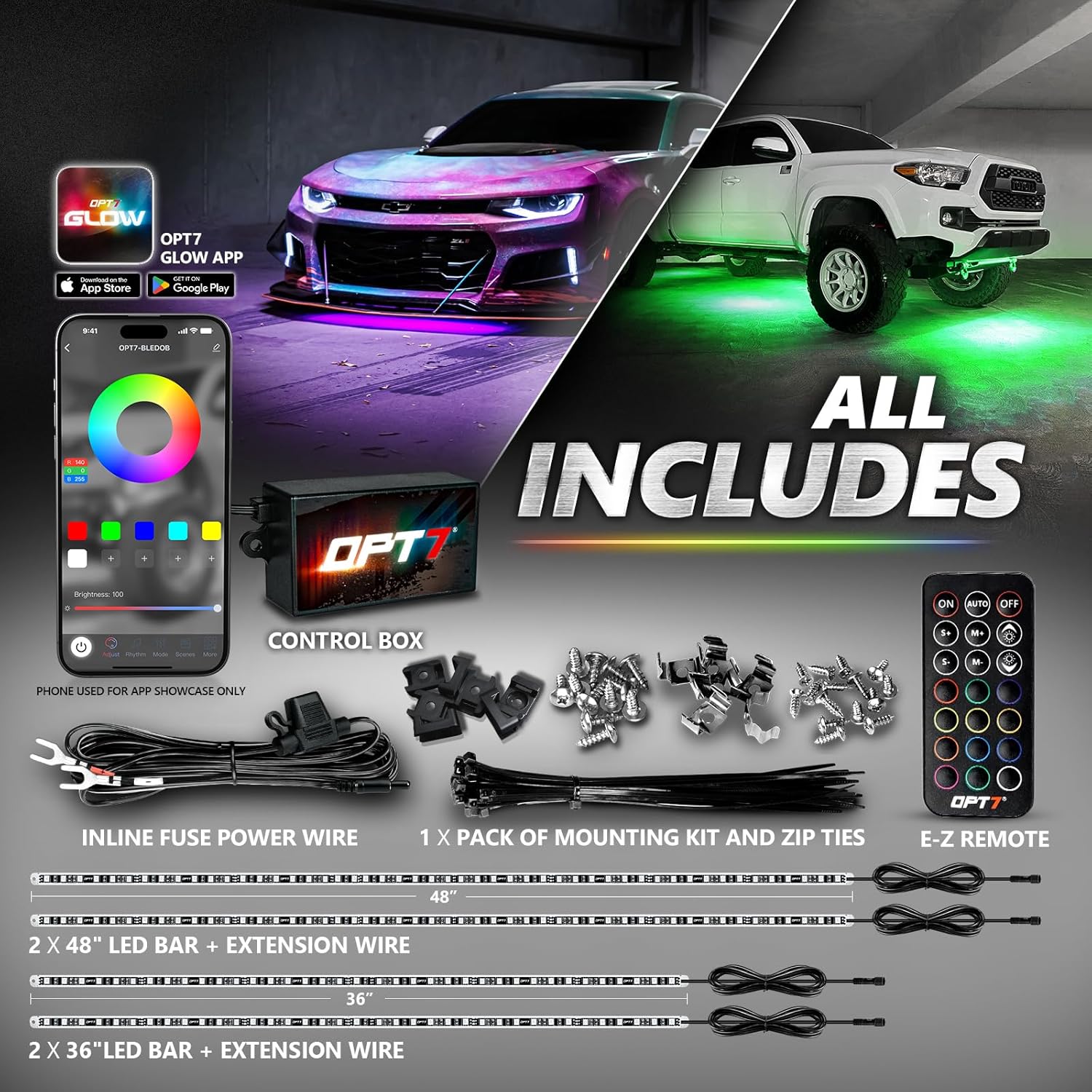
Image: All components included in the OPT7 Aura Pro Underglow LED Lights kit.
Setup u Installazzjoni
The OPT7 Aura Pro Underglow LED Lights are designed for straightforward installation. Follow these steps for optimal performance and safety.
1. Ippjanar u Tqegħid
Determine the ideal placement for the LED light bars under your vehicle. The kit includes two 48-inch and two 36-inch light bars. Consider the vehicle's undercarriage structure and potential obstructions.

Image: Recommended installation positions for the LED light bars.
2. Immuntar tal-Bars tad-Dawl
Secure the rigid aluminum light bars to the vehicle's undercarriage using the provided mounting brackets and zip ties. Ensure the bars are firmly attached and clear of moving parts or heat sources.
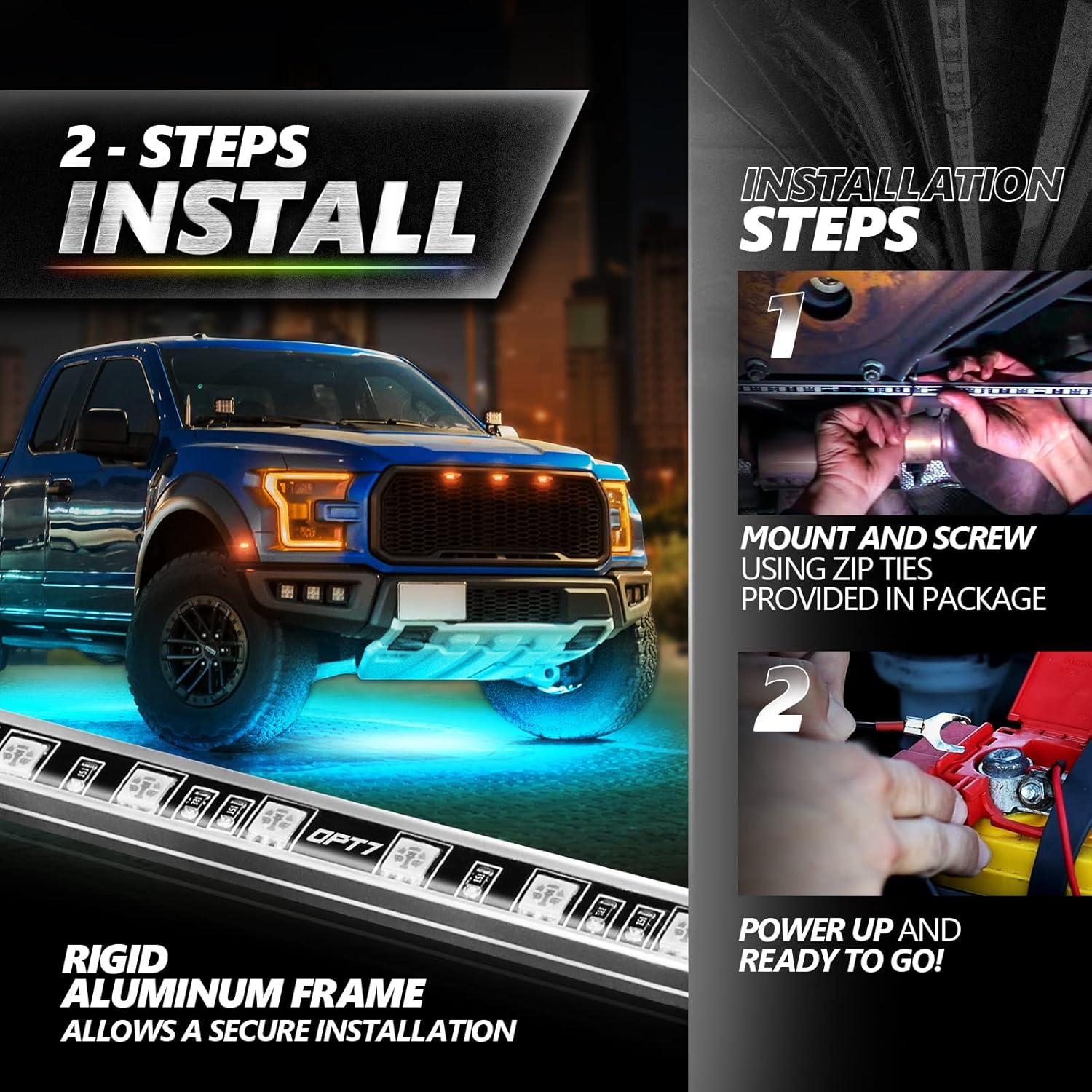
Image: Step-by-step visual guide for mounting and powering the lights.
3. Wiring u Konnessjoni tal-Enerġija
Connect the LED light bars to the OPT7 Glow Control Box. Pay attention to the connection arrows to ensure correct polarity and a secure, waterproof seal.

Image: Guide for proper waterproof connector alignment.
Connect the inline fuse 12V direct power battery harness to your vehicle's battery. This harness provides overdrawn protection. Ensure the control box is placed in a location protected from high temperatures and excessive moisture, such as the passenger compartment or a dry area under the hood, but not directly in the engine bay where heat and moisture are extreme.
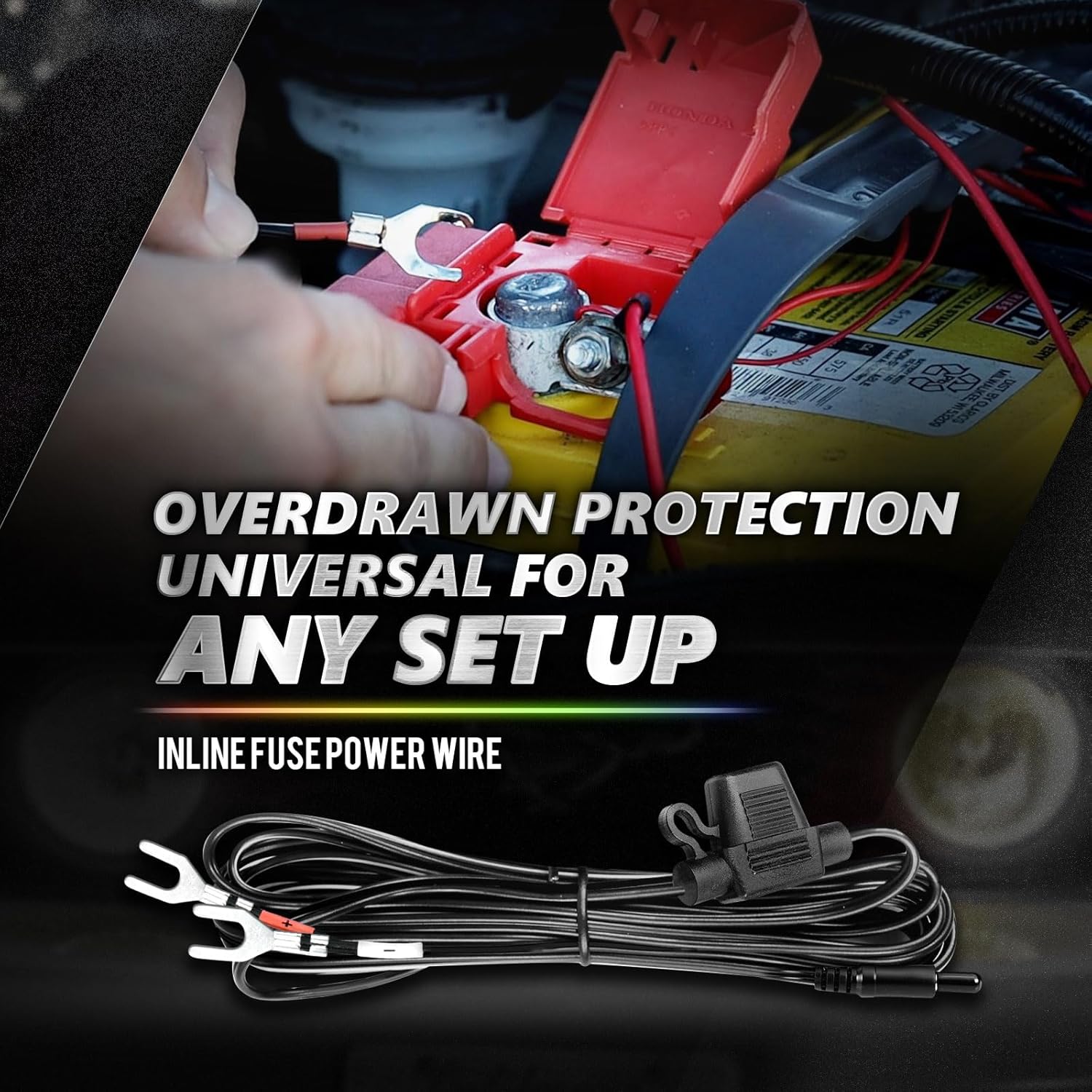
Image: Inline fuse power wire for battery connection.
4. Tqabbil mill-Bogħod
To pair the handheld remote with the control box:
- Ensure the control box is powered on.
- Reconnect the power to the control box.
- Aim the remote at the control box.
- Press and hold the "ON" button on the remote until the LED strips flash white. This indicates successful pairing.

Image: Instructions for pairing the remote control.
Istruzzjonijiet Operattivi
Your OPT7 Aura Pro Underglow LED Lights can be controlled via the OPT7 GLOW smartphone app or the included handheld remote.
Smartphone App Control (OPT7 GLOW)
Download the OPT7 GLOW app from the App Store (iOS 7+) or Google Play Store (Android 4.3+). The app provides comprehensive control over your lighting system.
- Għażla tal-Kulur: Choose from an extensive palette of colors to customize your vehicle's appearance.
- Aġġustament tal-luminożità: Aġġusta l-intensità tad-dwal.
- Effetti tad-Dawl Dinamiċi: Select from various animated patterns and effects.
- Modalità ta' Sinkronizzazzjoni tal-Mużika: Synchronize the lights with music played through your phone's microphone or music playlists.
- Modi Preset: Utilize pre-configured lighting modes for different moods or occasions.
- Multi-Kit Control: The app allows connection and control of up to four OPT7 GLOW kits simultaneously.

Immaġni: Fuqview of the OPT7 GLOW app features.

Image: App interface for color and style selection.

Image: App interface for animated light effects.

Image: App interface for music-activated lighting.

Image: App interface for preset lighting modes.

Image: App interface for connecting multiple OPT7 GLOW kits.
Kontroll mill-bogħod li jinżamm fl-idejn
The included E-Z Remote provides basic control over your lights:
- Qawwa mixgħul/mitfi
- Buttuni tal-għażla tal-kulur
- Aġġustament tal-luminożità
- Għażla tal-mod

Image: Control options via app and remote.
Manutenzjoni
The OPT7 Aura Pro Underglow LED Lights are designed for durability and minimal maintenance due to their robust construction.
- Kostruzzjoni Durabbli: The LED bars are crafted with premium-grade aluminum and dense silicone, offering resistance against corrosion and moisture damage. The control box and connectors are fully waterproof.
- Tindif: Periodically inspect and clean the LED bars and control box to remove dirt, debris, or road salt. Use a soft cloth and mild automotive cleaner. Avoid high-pressure washing directly on the components.
- Kontroll tal-Konnessjoni: Regularly check all wiring connections to ensure they remain secure and free from damage.

Image: Features contributing to product durability.

Image: Rigid aluminum frame and waterproof design.

Image: Fully waterproof connectors and product in wet conditions.
Issolvi l-problemi
If you encounter issues with your OPT7 Aura Pro Underglow LED Lights, refer to the following common solutions:
| Problema | Kawża Possibbli | Soluzzjoni |
|---|---|---|
| Id-dwal ma jixegħlux. | Bla enerġija, konnessjoni maħlula, fjus maħruq. | Check battery connection. Ensure all wires are securely connected. Inspect the inline fuse and replace if blown. |
| Il-kontroll mill-bogħod ma jaħdimx. | Remote not paired, dead battery in remote. | Re-pair the remote as per "Setup and Installation" section. Replace remote battery. |
| Bluetooth app connectivity issues. | Control box placement, interference, app not updated. | Ensure the control box is not in an area with extreme heat or moisture (e.g., deep in the engine bay) which can degrade Bluetooth signal. Move closer to the control box. Update the OPT7 GLOW app to the latest version. Restart your smartphone and the control box. |
| Id-dwal huma baxxi jew teptip. | Vol baxxtage, loose connection, damaged LED bar. | Iċċekkja l-batterija tal-vettura voltage. Verify all connections are tight. Inspect LED bars for physical damage. |
If problems persist, please contact OPT7 customer support for further assistance.
Speċifikazzjonijiet
| Karatteristika | Dettall |
|---|---|
| Mudell | AURAPRO-UNDERGLOW-UNIVERSAL-KIT |
| Brand | OPT7 |
| Kulur | RGB (Multi-Color) |
| Fattur tal-Formola | Bar |
| Użi Rakkomandati | Vehicle Exterior (Cars, SUVs, Vans, Trucks, RVs) |
| Pożizzjoni tal-Parti tal-Auto | Bottom (Underbody) |
| Komponenti Inklużi | 1 x Handheld Remote, 1 x Inline Fuse Power Harness, 1 x OPT7 Glow Control Box, 2 x 36" LED Light Bar + Extension Wire Attached, 2 x 48" LED Light Bar + Extension Wires Attached |
| Karatteristiċi Speċjali | 4pcs Rigid Aluminum Light Bar with 5050 LED, Memory, Multi-Color, Music Sync, Waterproof |
| Piż tal-oġġett | 4.3 Libbra (madwar 1.95 kg) |
| Materjal | Aluminju |
| Livell ta 'Reżistenza għall-Ilma | Water Resistant (Fully Waterproof components) |
| Numru ta' Biċċiet | 4 (LED Light Bars) |
| Tip ta 'Waħħal tal-Karozzi | Waħħal Universali |
| Dimensjonijiet tal-Prodott | 53 x 2.6 x 2.6 inches (overall package/kit dimensions) |
Garanzija u Appoġġ
OPT7 provides a garanzija ta 'sena for the Aura Pro Underglow LED Lights. For any assistance, technical support, or warranty claims, please contact OPT7's US-based customer service.
For more information or to explore other lighting options, visit the official OPT7 store: OPT7 Store on Amazon.


