1. Introduzzjoni
This manual provides detailed instructions for the installation, operation, and maintenance of the AXAGON PCEA-P1N PCIe-Adapter. This adapter is designed to add a single parallel port to your computer system via a PCI Express slot, utilizing the ASIX AX99100 chipset for reliable performance. Please read this manual thoroughly before installation and use to ensure proper functionality and to prevent damage to your system.

Image 1.1: The AXAGON PCEA-P1N PCIe-Adapter, showing the main board and the parallel port connector with a standard bracket.
2. Kontenut tal-Pakkett
Please verify that all items are present in your package. If any items are missing or damaged, contact your retailer immediately.
- 1x AXAGON PCEA-P1N PCIe-Adapter Card
- 1x Low-profile bracket (pre-installed or included separately)
- 1x Manwal tal-Utent (dan id-dokument)
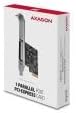
Immaġni 2.1: Eż.ample of the AXAGON PCEA-P1N product packaging.
3. Karatteristiċi
The AXAGON PCEA-P1N PCIe-Adapter offers the following key features:
- Interface: PCI Express x1 (compatible with x1, x4, x8, x16 slots)
- Port: 1x DB25 Parallel Port
- Chipset: ASIX AX99100
- Rata ta' Trasferiment tad-Dejta: Sa 1.5 Mbps
- Kompatibilità: Konformi mal-IEEE 1284
- Funzjonalità: Plug & Play support
- Parentesi: Includes standard and low-profile brackets for various PC cases

Immaġni 3.1: Dettaljata view of the parallel port connector and icons indicating PCI-Express, 1.5 Mbps speed, and 1x parallel port.

Image 3.2: Close-up showing the chipset area and icons highlighting IEEE 1284 compatibility and Plug & Play functionality.
4. Rekwiżiti tas-Sistema
- Available PCI Express x1 slot (or higher, e.g., x4, x8, x16)
- Compatible operating system (e.g., Windows, Linux)
- Computer case with an available expansion slot
5. Gwida għall-Installazzjoni
5.1. Installazzjoni Fiżika
- Itfi: Completely shut down your computer and disconnect the power cord from the wall outlet.
- Kawża Miftuħa: Open your computer case. Refer to your computer's manual for specific instructions on how to do this.
- Sib is-Slott tal-PCIe: Identify an available PCI Express x1 slot on your motherboard. These slots are typically shorter than graphics card slots.
- Neħħi l-Għatu tas-Slott: Neħħi l-għatu tal-islott tal-metall minn wara l-kaxxa tal-kompjuter tiegħek li jikkorrispondi mas-slott PCIe magħżul.
- Installa Low-Profile Parentesi (jekk meħtieġ): If your computer case requires a low-profile bracket, carefully remove the standard bracket from the adapter card and attach the low-profile bracket bl-użu tal-viti pprovduti.

Image 5.1: The AXAGON PCEA-P1N adapter card shown with a low-profile bracket, indicating its adaptability for smaller form factor cases.
- Daħħal l-Adapter: Carefully align the adapter card with the chosen PCIe slot and press it firmly and evenly until it is fully seated.
- Karta Sikura: Secure the adapter card to the computer case using the screw or latch mechanism that held the slot cover.
- Agħlaq il-Każ: Agħlaq il-kaxxa tal-kompjuter tiegħek u erġa' qabbad il-korda tal-enerġija.
- Qawwa Mixgħul: Ixgħel il-kompjuter tiegħek.
5.2. Installazzjoni tas-sewwieq
Most modern operating systems (e.g., Windows 10/11, recent Linux distributions) will automatically detect and install the necessary drivers for the ASIX AX99100 chipset upon startup. If the device is not recognized automatically, or if you experience issues, please follow these steps:
- Check Device Manager: In Windows, open Device Manager (search for "Device Manager" in the Start menu). Look for "Ports (COM & LPT)" or an "Other devices" section with an unrecognized device.
- Niżżel is-Sewwieqa: Visit the official AXAGON websit (www.axagon.eu) and navigate to the support section for the PCEA-P1N model. Download the latest drivers compatible with your operating system.
- Installa Sewwieqa: Follow the instructions provided with the downloaded driver package to install the drivers. This usually involves running an executable file.
- Ivverifika l-Installazzjoni: After installation, check Device Manager again to ensure the parallel port is listed correctly without any error symbols.
6. Operazzjoni
Once the AXAGON PCEA-P1N PCIe-Adapter is successfully installed and its drivers are loaded, the parallel port will be available for use by your operating system and compatible applications. The port typically appears as LPT1, LPT2, or LPT3, depending on your system configuration.
- Apparat li jgħaqqad: Connect your parallel port device (e.g., printer, scanner, industrial equipment) to the DB25 connector on the adapter card using a compatible parallel cable.
- Konfigurazzjoni tas-Softwer: Configure your application or operating system settings to use the newly installed parallel port. This may involve selecting the correct LPT port number within the software.
- Trasferiment tad-Data: The port supports data transfer rates up to 1.5 Mbps, suitable for legacy parallel devices.
7. Manutenzjoni
The AXAGON PCEA-P1N PCIe-Adapter is a low-maintenance device. To ensure its longevity and optimal performance:
- Żomm Nadif: Periodically clean the interior of your computer case to prevent dust buildup on the adapter card, which can affect cooling and performance. Use compressed air for this purpose.
- Evita l-istatika: When handling the card, always take precautions against electrostatic discharge (ESD) to prevent damage to electronic components.
- Firmware/Driver Updates: Regularly check the AXAGON website for updated drivers or firmware, which may offer improved compatibility or performance.
8 Issolvi l-problemi
If you encounter issues with your AXAGON PCEA-P1N PCIe-Adapter, refer to the following common troubleshooting steps:
- Karta Mhux Misjuba:
- Kun żgur li l-kard hija mdaħħla sew fl-islott tal-PCIe.
- Ipprova l-kard fi slott PCIe differenti jekk disponibbli.
- Check your motherboard's BIOS/UEFI settings to ensure PCIe slots are enabled.
- Drivers Not Installing/Working:
- Download the latest drivers directly from the AXAGON websit.
- Ensure you are installing the correct drivers for your operating system version (32-bit vs. 64-bit).
- Temporarily disable antivirus software during driver installation if issues persist.
- Connected Device Not Working:
- Verify the parallel cable is securely connected to both the adapter and the device.
- Ensure the device itself is powered on and functioning correctly.
- Check the software configuration to ensure it is pointing to the correct LPT port.
- Consult the manual for your parallel device for specific setup requirements.
9. Speċifikazzjonijiet
| Brand | AXAGON |
| Numru tal-Mudell | ZUUS-580 (PCEA-P1N) |
| Interface | PCI-Express x1 |
| Portijiet | 1x DB25 Parallel Port |
| Chipset | ASIX AX99100 |
| Max Data Rata | 1.5 Mbps |
| Kompatibilità | IEEE 1284 |
| Apparati Kompatibbli | Kompjuter Personali |
| Kulur | Iswed |
10. Garanzija u Appoġġ
Specific warranty information for the AXAGON PCEA-P1N PCIe-Adapter is not provided within this document. For details regarding warranty coverage, technical support, and returns, please refer to the official AXAGON webis-sit jew ikkuntattja l-punt tax-xiri tiegħek.
AXAGON Official Websit: www.axagon.eu


