1. Introduzzjoni
The ACT AC7049 Dual Monitor Docking Station transforms your laptop into a complete workstation. This versatile 11-in-1 docking station allows you to connect up to two Full HD displays (max. 2048 x 1152 resolution) to your laptop via HDMI, using a single USB-C/A cable. It expands your laptop's connectivity with a Gigabit LAN port, microphone and headphone jacks, and six additional USB ports. Featuring DisplayLink® technology, it ensures advanced screen display on both MacOS and Windows computers.
2. Karatteristiċi ewlenin
- Appoġġ għall-Monitor Doppju: Connect up to two external displays with HDMI ports, supporting resolutions up to 2048x1152@60Hz.
- Kompatibilità Universali: Works with laptops featuring a USB-C or USB-A 3.2 Gen1 (USB 3.0) port, compatible with MacOS and Windows thanks to DisplayLink technology.
- Konnettività estensiva: Includes 2x HDMI, 1x Gigabit Ethernet, 3x USB-A 3.2 Gen 1 (one with fast charging), 4x USB-A 2.0, and 3.5mm audio jacks for microphone and headphones.
- Pjazzament Flessibbli: Designed for both vertical and horizontal placement to optimize desk space and port accessibility.
- Port tal-Iċċarġjar tal-USB: Dedicated USB port for charging smartphones and tablets.
3. Kontenut tal-Pakkett
Jekk jogħġbok iċċekkja l-pakkett għall-oġġetti li ġejjin:
- ACT AC7049 Docking Station
- USB-C/A 3.2 Gen1 Connection Cable (USB-A to USB-C)
- Adapter tal-Enerġija
- Stand Vertikali
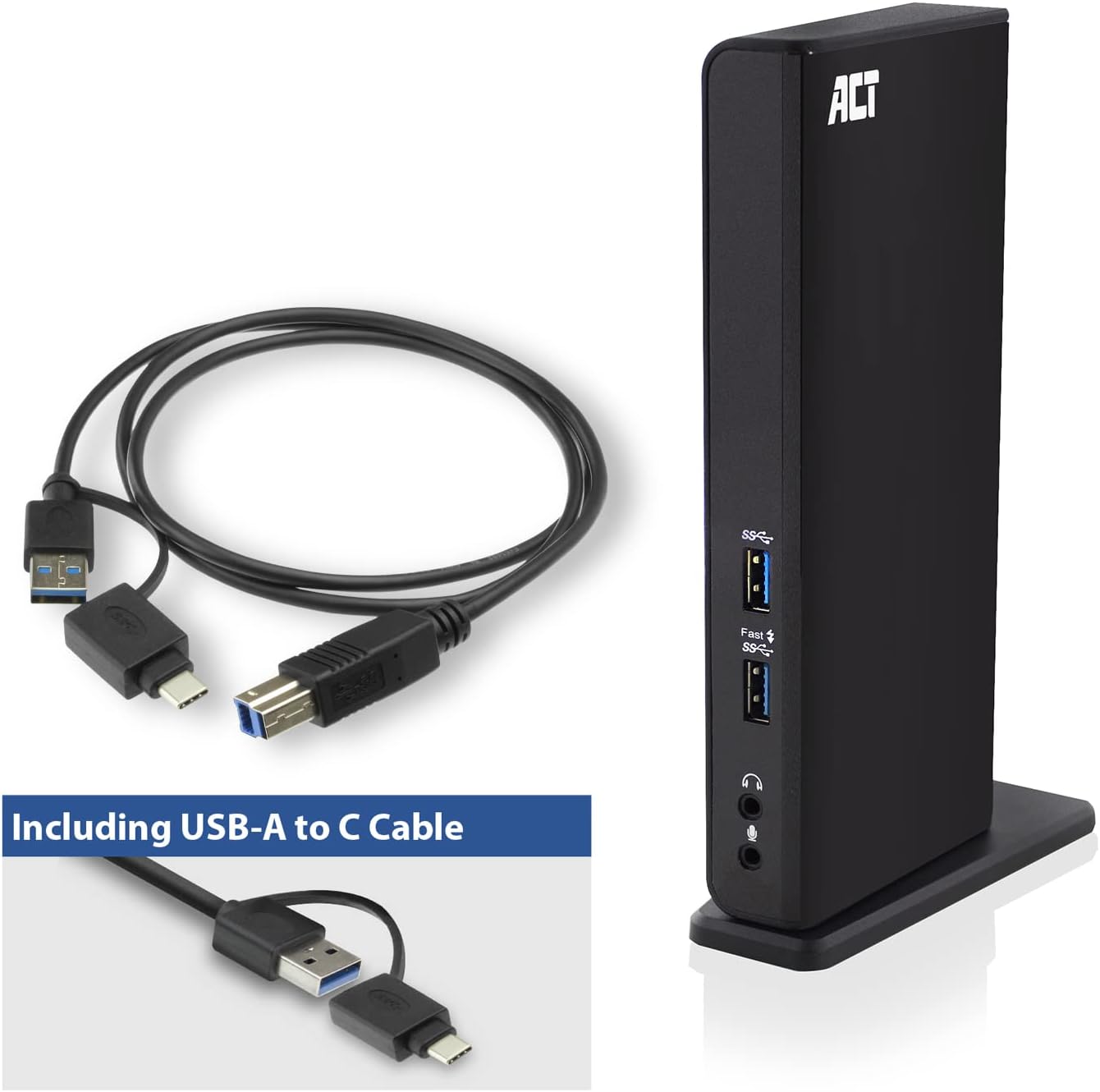
Image: The ACT AC7049 Docking Station shown with its included USB-A to USB-C connection cable and power adapter, highlighting the components provided in the package.
4. Gwida ta' Setup
4.1. Konnessjoni tal-Adapter tal-Enerġija
- Connect the power adapter to the DC 5V input port on the back of the AC7049 docking station.
- Plug the power adapter into a wall outlet. The docking station will power on.
4.2. Connecting to Your Laptop
- Use the provided USB-C/A 3.2 Gen1 connection cable. Connect the USB-B end to the corresponding port on the docking station.
- Connect the other end (USB-A or USB-C, depending on your laptop's port) to an available USB 3.2 Gen1 (USB 3.0) or USB-C port on your laptop.
4.3. Driver Installation (DisplayLink)
The AC7049 utilizes DisplayLink technology for extended monitor functionality. Drivers are typically installed automatically on most operating systems. If not, please follow these steps:
- Żur id-DisplayLink uffiċjali websit (www.displaylink.com/downloads) to download the latest drivers for your operating system (Windows or MacOS).
- Install the downloaded driver package and follow the on-screen instructions.
- Ibda mill-ġdid il-kompjuter tiegħek jekk tintalab.

Image: The official DisplayLink 'Plug and Display' logo, indicating the technology used for multi-monitor support.
5. Istruzzjonijiet Operattivi
5.1. Konnessjoni ta' Displays Esterni
- Connect your HDMI monitors to the two HDMI ports on the back of the docking station.
- Once connected, your operating system should detect the new displays. You can configure display settings (extend, mirror, primary display) through your computer's display settings.

Image: A visual representation of the docking station enabling both 'Mirror your content' and 'Extend your content' display modes across a laptop and two external monitors.
5.2. Konnessjoni ta' Periferali USB
- Portijiet USB ta 'quddiem: Two USB-A 3.2 Gen1 ports (one with fast charging capability) are located on the front for easy access to frequently used devices like USB drives, smartphones, or tablets.
- Rear USB Ports: Four USB-A 2.0 ports are located on the back for connecting peripherals such as keyboards, mice, printers, or other less frequently connected devices.
5.3. Konnessjoni tan-Netwerk
Connect an Ethernet cable from your router or network switch to the Gigabit Ethernet port on the docking station. Your laptop will automatically gain wired network access.
5.4. Konnessjonijiet tal-Awdjo
Connect your headphones and/or microphone to the dedicated 3.5mm audio jacks on the front of the docking station.

Image: An isometric diagram showcasing the comprehensive connectivity of the ACT AC7049, demonstrating how a laptop, two monitors, a keyboard, mouse, network cable, headphones, and a smartphone can all be connected simultaneously.
6. Għażliet ta' Tqegħid
The ACT AC7049 docking station offers flexible placement options to suit your workspace:
- Tqegħid Vertikali: Use the included stand to position the docking station vertically. This saves desk space and provides easy access to all ports.
- Poġġiment Orizzontali: The docking station can also be placed horizontally if preferred.

Image: The ACT AC7049 Docking Station positioned vertically on its stand, highlighting its compact design and accessible ports.
7. Manutenzjoni
To ensure optimal performance and longevity of your ACT AC7049 Docking Station, follow these maintenance guidelines:
- Tindif: Use a soft, dry cloth to clean the exterior of the docking station. Avoid using liquid cleaners or aerosols, as they may damage the device.
- Ventilazzjoni: Ensure the docking station is placed in a well-ventilated area to prevent overheating. Do not block any ventilation openings.
- Ħażna: Meta ma tkunx qed tużaha għal perjodi twal, aħżen l-istazzjon tad-docking f'post frisk u niexef 'il bogħod mix-xemx diretta u minn temperaturi estremi.
- Ġestjoni tal-Kejbil: Keep cables organized and free from kinks or excessive bending to prevent damage to the cables and ports.
8 Issolvi l-problemi
If you encounter issues with your ACT AC7049 Docking Station, please refer to the following common troubleshooting steps:
- L-ebda Output tal-Wiri:
- Ensure the docking station is powered on and correctly connected to your laptop.
- Ivverifika li l-kejbils tal-HDMI huma konnessi sew kemm mad-docking station kif ukoll mal-moniters.
- Check your laptop's display settings to ensure the external monitors are detected and configured correctly (e.g., extended or mirrored).
- Reinstall or update the DisplayLink drivers from www.displaylink.com/downloads.
- Ipprova qabbad monitor wieħed kull darba biex tiżola l-problema.
- Apparati USB Mhux Jaħdmu:
- Ensure the docking station is properly connected to your laptop and powered.
- Try connecting the USB device directly to your laptop to confirm it is functional.
- Connect the USB device to a different USB port on the docking station.
- Ibda mill-ġdid il-laptop tiegħek.
- L-ebda Konnessjoni man-Netwerk:
- Verify the Ethernet cable is securely connected to both the docking station and your router/switch.
- Check your laptop's network settings to ensure the wired connection is enabled.
- Ittestja l-kejbil Ethernet b'apparat ieħor jekk possibbli.
- L-Awdjo Mhux Jaħdem:
- Ensure headphones/microphone are fully plugged into the correct 3.5mm jacks.
- Check your laptop's sound settings to ensure the docking station's audio output/input is selected as the default device.
9. Speċifikazzjonijiet
| Karatteristika | Speċifikazzjoni |
|---|---|
| Numru tal-Mudell | AC7049 |
| Brand | ATT |
| Kulur | Iswed |
| Teknoloġija tal-Konnettività | USB-A, USB-C |
| Output tal-vidjo | 2 x HDMI (Max. 2048 x 1152 @ 60Hz) |
| Portijiet USB | 3 x USB-A 3.2 Gen 1 (5Gbps, 1x Fast Charging), 4 x USB-A 2.0 (480Mbps) |
| Port tan-Netwerk | 1 x Gigabit Ethernet (RJ45) |
| Portijiet Awdjo | 1 x 3.5mm Headphone Jack, 1 x 3.5mm Microphone Jack |
| Apparati Kompatibbli | Laptop, Computer (with USB 3.2 Gen1 / USB 3.0 or USB-C port) |
| Appoġġ tas-Sistema Operattiva | Windows, MacOS (via DisplayLink) |
| Dimensjonijiet (L x W x H) | 10.9 x 6 x 18.1 ċm (madwar) |
| Piż tal-oġġett | 317 Gramm |
10. Garanzija u Appoġġ
ACT products are designed for reliability and adhere to international standards and EU legislation. The ACT AC7049 Docking Station comes with a manufacturer's warranty, typically ranging from 2 to 5 years. For specific warranty details and support, please refer to the official ACT websit jew ikkuntattja lill-bejjiegħ bl-imnut tiegħek.
For technical support or further inquiries, please visit the official ACT connectivity websit: www.act-connectivity.com


