1. Introduzzjoni
The ROVE R3 is a sophisticated 3-channel dash camera designed to provide comprehensive video surveillance for your vehicle. It features a 3-inch IPS touch screen, front, cabin, and rear cameras, infrared night vision, dual-band Wi-Fi, and built-in GPS. This manual provides detailed instructions for the installation, operation, and maintenance of your ROVE R3 Dash Cam.

Image 1.1: The ROVE R3 Dash Cam, showcasing its main unit, rear camera, and connectivity with a smartphone application for live view and video management.
2. Kontenut tal-Pakkett
Iċċekkja li l-oġġetti kollha elenkati hawn taħt huma inklużi fil-pakkett tiegħek. Jekk xi oġġetti huma neqsin jew bil-ħsara, jekk jogħġbok ikkuntattja l-appoġġ għall-klijenti.
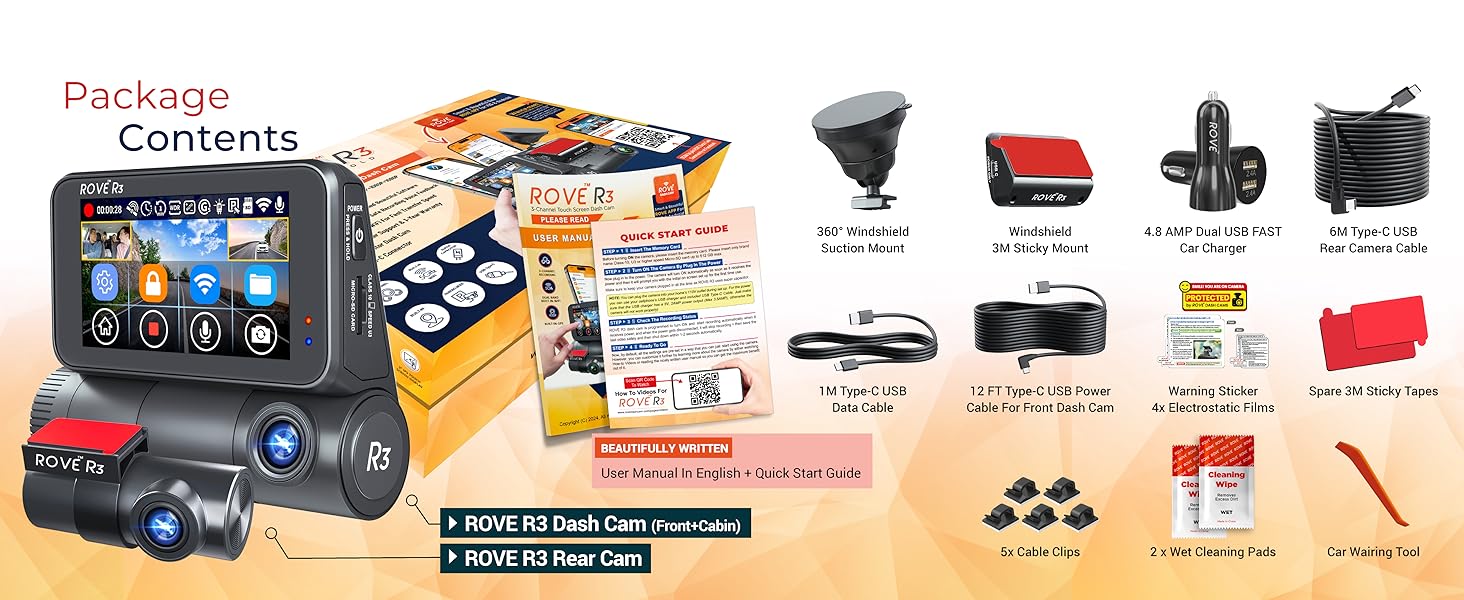
Image 2.1: A visual representation of all components included in the ROVE R3 Dash Cam package, including the main unit, rear camera, cables, mounts, and accessories.
- 1x ROVE R3 Dash Cam (Primary Unit with Front & Cabin Cameras)
- 1x Kamera ta 'wara
- 1x Dual USB Fast Car Charger
- 1x Windshield Suction Mount
- 1x Muntaġġ manjetiku
- 1x 12ft Power Cable (USB-C)
- 1x 1M USB-C Data Cable
- 1x 6M Rear Camera Extension Cable
- Clips tal-Kejbil 5x
- 1x Crowbar (for cable routing)
- 2x Sticky Tapes
- 4x Films Elettrostatiċi
- 2x Kuxxinetti tat-Tindif Imxarrbin
- 1x Dash Cam Window/Bumper Sticker
- 1x Manwal għall-Utent
- 1x Gwida tal-Bidu Mgħaġġel
- 1x Karta tal-Garanzija
Note: A memory card is required for operation and is NOT included in the package. Purchase separately (supports micro-SD, Class 10 U3 speed, up to 512GB max).
3. Setup
3.1 Tiddaħħal il-Memory Card
- Kun żgur li l-kamera tad-daxxbord tkun mitfija.
- Locate the microSD card slot on the side of the main unit.
- Insert a Class 10 U3 or higher microSD card (up to 512GB) into the slot until it clicks into place.
- Biex tneħħiha, imbotta l-karta bil-mod 'il ġewwa sakemm toħroġ 'il barra.
3.2 Immuntar tad-Dash Cam
The ROVE R3 offers both a suction mount and a magnetic mount for the primary unit, and sticky tape for the rear camera.
- Primary Unit (Front & Cabin):
- Naddaf iż-żona tal-windskrin fejn se titwaħħal il-kamera tad-dashboard.
- Attach the chosen mount (suction or magnetic) to the dash cam.
- Secure the mount to the windshield, ensuring it does not obstruct your view. Adjust the camera angle as needed.
- Kamera ta' wara:
- Clean the rear windshield area. Apply an electrostatic film first for easier removal later.
- Attach the rear camera to the electrostatic film or directly to the windshield using the provided sticky tape.
- Route the 6M rear camera extension cable discreetly along the vehicle's interior trim to connect to the main unit.

Image 3.1: The ROVE R3 Dash Cam securely mounted on a vehicle's windshield, demonstrating its placement and the accessibility of its touch screen interface.
3.3 Konnessjoni tal-Enerġija
- Connect the 12ft USB-C power cable to the main dash cam unit.
- Plug the other end of the power cable into the dual USB fast car charger.
- Daħħal il-ċarġer tal-karozza fis-sokit tal-enerġija ta' 12V tal-vettura tiegħek (sokit tal-lajter tas-sigaretti).
- Route the power cable neatly using the provided cable clips and crowbar.

Immaġni 3.2: Mill-qrib view of the USB Type-C port on the ROVE R3 Dash Cam, highlighting its modern connectivity for power and data transfer.
4. Istruzzjonijiet Operattivi
4.1 Tixgħel/Jitfi
- The dash cam will automatically power on and begin recording when your vehicle starts.
- To manually power off, press and hold the power button. The device will automatically power off when the vehicle's power is cut.
4.2 Navigazzjoni fuq Touch Screen
The 3-inch IPS touch screen allows for intuitive control and setting adjustments.

Image 4.1: A finger interacting with the responsive 3-inch IPS touch screen of the ROVE R3 Dash Cam, demonstrating its user-friendly interface for navigating settings.
- Tap icons to access menus and settings.
- Swipe to navigate through options or recorded footage.
4.3 Modi ta' Reġistrazzjoni
The R3 supports various recording configurations:

Image 4.2: Diagram illustrating the three camera components of the ROVE R3: Front Cam, Cabin Cam, and Rear Cam, highlighting their respective recording capabilities.
- Reġistrazzjoni bi 3 Kanali: Front (1440P) + Cabin (1080P) + Rear (1080P) @30fps.
- Reġistrazzjoni bi 2 Kanali: Front (2K 1440P) + Cabin (1080P) or Front (4K 2160P) + Rear (1080P).
- Single Channel Recording: Front (4K 2160P) @30fps.
4.4 Loop Recording
This feature allows the R3 to continuously record by overwriting the oldest unlocked video clips when the memory card is full. You can set the loop recording duration in the settings (1-min, 3-min (Default), 5-min, 10-min).

Image 4.3: Visual explanation of the loop recording function, showing how older, unlocked video clips are automatically deleted to make space for new recordings.
4.5 Monitor tal-Parkeġġ
The 24-hour parking monitor feature automatically triggers recording if a collision or impact is detected while the vehicle is parked. This requires the ROVE Ultimate USB Type-C Hardwire Kit (sold separately, ASIN: B0B7235VLX) for continuous power.

Image 4.4: Illustration of the 24-hour parking monitor feature, showing how the dash cam detects impacts and records incidents while the vehicle is unattended.
4.6 G-Sensor
The built-in three-axis impact G-sensor detects sudden movements or collisions. When activated, it automatically locks the current video footage to prevent it from being overwritten by loop recording. The sensitivity can be adjusted in the settings (Off, Low, Medium, High).
4.7 Gwida bil-Vuċi
The R3 provides proprietary fail-safe voice guidance to inform you of important statuses, such as recording issues or parking mode activation. This ensures you are aware of the camera's operational status without needing to look at the screen.

Image 4.5: Depiction of the voice guidance system, showing a pop-up message on the dash cam screen indicating 'Parking Mode got activated!' accompanied by a voice alert.
4.8 Viżjoni bil-lejl
Equipped with an F1.5 large aperture lens for the front camera and F1.8 for cabin & rear, along with four hidden IR LEDs for the cabin camera, the R3 captures clear images in low-light conditions and complete darkness inside the car cabin.

Image 4.6: Comparison of standard and night vision recording, highlighting the clarity provided by the ROVE R3's Super Night Vision, especially for the cabin camera with IR LEDs.
4.9 Firxa Dinamika Wiesgħa (WDR)
WDR technology ensures optimal exposure, capturing clear details in both bright and dark areas of the footage, anke f'kundizzjonijiet ta' dawl diffiċli.

Image 4.7: Visual demonstration of Wide Dynamic Range (WDR), comparing footage with and without WDR to show improved detail in both underexposed and overexposed areas.
4.10 Time-Lapse Video
The time-lapse video feature, often used in conjunction with parking mode, allows for recording long durations into condensed video files, saving storage space while capturing continuous events.

Immaġni 4.8: Eksample of time-lapse video recording, showing a car driving through a city at night, illustrating how long periods can be compressed into shorter videos.
4.11 Wi-Fi Connectivity & ROVE App
The R3 features dual-band 5.0 GHz and 2.4 GHz Wi-Fi for fast and stable connection to the ROVE App (available for iOS and Android). The app allows for live preview, video playback, download, sharing, and camera settings management.

Image 4.9: Diagram illustrating the 5GHz + 2.4GHz dual-band Wi-Fi connectivity of the ROVE R3, showing fast download speeds and seamless interaction with the smartphone app.
4.12 Funzjonalità tal-GPS
The built-in Quad-Mode GPS provides live speed, compass direction, and location stamps on your recordings. Use the free ROVE Dash Cam GPS Player on PC/Mac to view recordings with synchronized GPS logs and G-Sensor data.

Image 4.10: Screenshot of the ROVE Dash Cam GPS Player software on a computer, displaying video footage alongside a map with GPS tracking and G-Sensor data.
5. Manutenzjoni
5.1 Ġestjoni tal-Kard tal-Memorja
- Regularly format your microSD card (at least once a month) to ensure optimal performance and prevent data corruption. This can be done through the dash cam's settings menu.
- Use high-endurance microSD cards specifically designed for dash cams to prolong their lifespan.
5.2 Tindif
- Use a soft, dry cloth to clean the dash cam's exterior and lenses.
- Evita li tuża kimiċi ħarxa jew materjali li joborxu li jistgħu jagħmlu ħsara lill-apparat.
5.3 Aġġornamenti tal-Firmware
ROVE provides free firmware updates to improve performance and add new features. Updates can be performed wirelessly via the ROVE App.

Image 5.1: A sequence of smartphone screens demonstrating the over-the-air firmware update process for the ROVE R3 Dash Cam via the ROVE App.
6 Issolvi l-problemi
| Problema | Kawża Possibbli | Soluzzjoni |
|---|---|---|
| Id-dash cam ma tixgħelx. | No power supply; faulty cable/charger. | Check power connections. Ensure car charger is properly inserted and vehicle's 12V outlet is functional. Try a different USB-C cable or charger. |
| Waqfiet ta' reġistrazzjoni jew footage hija korrotta. | Memory card issue (full, slow, corrupted). | Format the microSD card. Use a Class 10 U3 high-endurance card. Replace the card if issues persist. |
| Wi-Fi connection unstable or slow. | Interference; distance from phone; outdated firmware. | Ensure phone is close to the dash cam. Update dash cam firmware via the ROVE App. Try connecting to both 2.4GHz and 5GHz bands. |
| Parking monitor not working. | No hardwire kit installed; G-Sensor sensitivity too low. | Install the ROVE Ultimate USB Type-C Hardwire Kit (sold separately). Adjust G-Sensor sensitivity in settings. |
| Il-GPS mhux qed jakkwista sinjal. | Poor satellite visibility; GPS module issue. | Kun żgur li l-kamera tad-daxxbord għandha viżibilità ċara view of the sky. Wait a few minutes for signal acquisition. Check for firmware updates. |
7. Speċifikazzjonijiet
| Karatteristika | Dettall |
|---|---|
| Isem tal-Mudell | R3 |
| Dimensjonijiet tal-Prodott | 1.57 x 3.86 x 3.07 pulzieri |
| Piż tal-oġġett | 6.4 uqija |
| Riżoluzzjoni tal-Qbid tal-Vidjo | Front: 4K (2160P), 2K (1440P); Cabin/Rear: 1080P |
| Kanali | 3 Channel (Front + Cabin + Rear) |
| Wiri | 3-pulzier IPS Touch Screen |
| Teknoloġija tal-Konnettività | USB, Wi-Fi (5.0 & 2.4GHz Dual Band) |
| GPS | Built-in Quad-Mode GPS Enabled |
| Sors tal-Enerġija | Supercapacitor (for safety and longer life) |
| Karatteristiċi Speċjali | IR Night Vision, G-Sensor, Loop Recording, Parking Monitor (requires hardwire kit), Voice Guidance, Time-Lapse Video, WDR, Digital Image Stabilization |
| Ħażna Massima | Supports up to 512GB MicroSD (Class 10 U3) |
| Qasam ta View | Front: 150 Degrees; Cabin/Rear: 140 Degrees |

Image 7.1: Diagram illustrating the built-in supercapacitor of the ROVE R3 Dash Cam, highlighting its benefits such as ultra durability, longer product life, and resistance to extreme temperatures.
8. Garanzija u Appoġġ
8.1 Garanzija tal-Prodott
The ROVE R3 Dash Cam is backed by a 1-year warranty from the date of purchase. This warranty covers manufacturing defects and ensures the product functions as intended under normal use. Please retain your proof of purchase for warranty claims.
8.2 Appoġġ għall-Klijent
For any questions, technical assistance, or warranty claims, please contact ROVE customer care. Our dedicated support team is based in Chicago, USA, and is available to provide quick and efficient assistance.
Contact information can be found on the ROVE webis-sit jew il-karta tal-garanzija tiegħek.


